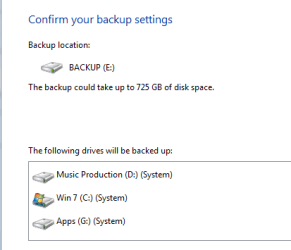
wanted to do an image of the C drive

mossy

New member
Local time
3:02 AM
Messages
13
hi, im having a similar problem

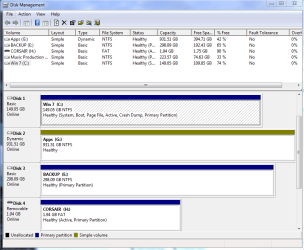
I want to just do an image of the C drive but it seems Windows thinks my other drives are system drives as well!

Ive attached the disk management and system image screenshots

Hope someone can help! thanks
 

Attachments
  • disk management.PNG
    disk management.PNG
    28.6 KB · Views: 40
  • system image.PNG
    system image.PNG
    5.2 KB · Views: 16

My Computer My Computer

At a glance

Windows 7 Home Premium 64biti7 8706gb Corsair DDR3Nvidia GTX 260 (216)
Computer Manufacturer/Model Number
Custom built
OS
Windows 7 Home Premium 64bit
CPU
i7 870
Motherboard
Gigabyte P55A-UD4
Memory
6gb Corsair DDR3
Graphics Card(s)
Nvidia GTX 260 (216)
anyone?? Id like to get my c drive backed up in case i get more problems! thanks :)
 

My Computer My Computer

At a glance

Windows 7 Home Premium 64biti7 8706gb Corsair DDR3Nvidia GTX 260 (216)
Computer Manufacturer/Model Number
Custom built
OS
Windows 7 Home Premium 64bit
CPU
i7 870
Motherboard
Gigabyte P55A-UD4
Memory
6gb Corsair DDR3
Graphics Card(s)
Nvidia GTX 260 (216)

My Computer My Computer

At a glance

Vista, Windows7, Mint Mate, Zorin, Windows 8from 1.6GHz Duo to i7
Computer Manufacturer/Model Number
HP, Dell, Gateway, Toshiba - 4 laptops and 2 desktops
OS
Vista, Windows7, Mint Mate, Zorin, Windows 8
CPU
from 1.6GHz Duo to i7
Monitor(s) Displays
2x HP w2207
Hard Drives
5x HDD, 7x SSD, 12x Externals
Keyboard
with trackball - no mices
Mouse
Trackball mice
Internet Speed
DSL 6000
Thanks - Does anyone know what system files might be on the other drives or is it just like looking for a needle in a haystack?
 

My Computer My Computer

At a glance

Windows 7 Home Premium 64biti7 8706gb Corsair DDR3Nvidia GTX 260 (216)
Computer Manufacturer/Model Number
Custom built
OS
Windows 7 Home Premium 64bit
CPU
i7 870
Motherboard
Gigabyte P55A-UD4
Memory
6gb Corsair DDR3
Graphics Card(s)
Nvidia GTX 260 (216)
What exactly is Corsair Drive H and why is it marked "active"??

Can you boot with ONLY the C drive connected?

How did G drive become "dynamic"?
 

My Computer My Computer

At a glance

Windows 7 Home Premium SP1, 64-bitIntel Skylake i5-6600K, not overclocked8 GB HyperX DDR4-2666 (2 x 4 GB)none; graphics are integrated on CPU
Computer type
PC/Desktop
Computer Manufacturer/Model Number
Ignatz Special; 4 speed manual gearbox; factory air conditioning; one of one
OS
Windows 7 Home Premium SP1, 64-bit
CPU
Intel Skylake i5-6600K, not overclocked
Motherboard
AsRock Z170M Extreme 4, micro ATX
Memory
8 GB HyperX DDR4-2666 (2 x 4 GB)
Graphics Card(s)
none; graphics are integrated on CPU
Sound Card
onboard: Realtek ALC1150; external: USB Behringer UF0-202
Monitor(s) Displays
Dell S2340M 23 inch IPS
Screen Resolution
1600 x 900
Hard Drives
System: Crucial MX100 series SSD, 128 GB;
Data: Samsung Spinpoint 103SJ, 1 TB;
Backup: WD Caviar Green WD30EZRX-00D8PB0, 3 TB
PSU
Rosewill SilentNight 500 watt fanless, semi-modular
Case
Antec Solo II
Cooling
Noctua NH-U12S; Noctua F12 intake, Noctua S12A exhaust
Keyboard
Microsoft 200 6JH-00001 USB
Mouse
Dell or Microsoft optical wired; USB
Antivirus
Microsoft Security Essentials and Malwarebytes Premium
Browser
Pale Moon
Other Info
All fans PWM; speeds at idle: CPU circa 500 rpm; intake circa 600 rpm; exhaust circa 600 rpm; CPU temps 27 idle and 47 C load in a warm room (27 C/81 F) when running Intel Extreme Tuning Utility stress test.
Hi
Corsair is just a memory stick
Not sure how G became dynamic!

I guess i could temporarily disconnect D and G and then do the image??
 

My Computer My Computer

At a glance

Windows 7 Home Premium 64biti7 8706gb Corsair DDR3Nvidia GTX 260 (216)
Computer Manufacturer/Model Number
Custom built
OS
Windows 7 Home Premium 64bit
CPU
i7 870
Motherboard
Gigabyte P55A-UD4
Memory
6gb Corsair DDR3
Graphics Card(s)
Nvidia GTX 260 (216)
If there are system files on other drives, diconnecting them will not work with Windows7 imaging. The image will not work.

The usual suspects of system files spread to other drives are the bootmgr, program files and the pagefile. The bootmgr could have been placed on another drive by the installer, but in your case it does not look like that. The other files (if any) must have been placed there by yourself.
 

My Computer My Computer

At a glance

Vista, Windows7, Mint Mate, Zorin, Windows 8from 1.6GHz Duo to i7
Computer Manufacturer/Model Number
HP, Dell, Gateway, Toshiba - 4 laptops and 2 desktops
OS
Vista, Windows7, Mint Mate, Zorin, Windows 8
CPU
from 1.6GHz Duo to i7
Monitor(s) Displays
2x HP w2207
Hard Drives
5x HDD, 7x SSD, 12x Externals
Keyboard
with trackball - no mices
Mouse
Trackball mice
Internet Speed
DSL 6000
I install most programs on either the D or G drive, not C drive - would this be causing the problem?
thanks
 

My Computer My Computer

At a glance

Windows 7 Home Premium 64biti7 8706gb Corsair DDR3Nvidia GTX 260 (216)
Computer Manufacturer/Model Number
Custom built
OS
Windows 7 Home Premium 64bit
CPU
i7 870
Motherboard
Gigabyte P55A-UD4
Memory
6gb Corsair DDR3
Graphics Card(s)
Nvidia GTX 260 (216)
I install most programs on either the D or G drive, not C drive - would this be causing the problem?
thanks
Absolutely - that's why Win7 imaging includes those partitions because else you would lose those programs when you restore.

Should you use e.g. Macrium, you would have to image those partitions too in order to be able to restore those program files when the restore day comes.

I think it is a bad practice to install programs in other partitions - other than C. Only in rare cases - e.g. when the OS is on a small SSD and you install large games - that approach is acceptable. But with a large C partition on hand, that makes no sense.

PS: It is still not clear why D does no show up in Disk Management and C does not show up in Computer. Also G being dynamic is very strange.
 

My Computer My Computer

At a glance

Vista, Windows7, Mint Mate, Zorin, Windows 8from 1.6GHz Duo to i7
Computer Manufacturer/Model Number
HP, Dell, Gateway, Toshiba - 4 laptops and 2 desktops
OS
Vista, Windows7, Mint Mate, Zorin, Windows 8
CPU
from 1.6GHz Duo to i7
Monitor(s) Displays
2x HP w2207
Hard Drives
5x HDD, 7x SSD, 12x Externals
Keyboard
with trackball - no mices
Mouse
Trackball mice
Internet Speed
DSL 6000
Ah, makes sense when I think about it, windows is smarter than me :geek:

The reason i wanted to use the image was because Windows tried to do a system restore last week after failing to get past a BSOD during bootup
I noticed one of the advanced options was to restore a "system image" - so i was thinking it would be nice to have an image rather than reinstalling Windows again

My thinking behind only restoring C drive was that i already back up stuff on the other drives, so they are safe - its just when you have to reinstall windows it kinda throws everything off
But as you say, i would have to reinstall my programs anyway - guess i need a bigger backup drive, i could confine my program installs to C and D which would keep the image size down

thanks!
 

My Computer My Computer

At a glance

Windows 7 Home Premium 64biti7 8706gb Corsair DDR3Nvidia GTX 260 (216)
Computer Manufacturer/Model Number
Custom built
OS
Windows 7 Home Premium 64bit
CPU
i7 870
Motherboard
Gigabyte P55A-UD4
Memory
6gb Corsair DDR3
Graphics Card(s)
Nvidia GTX 260 (216)
I don't know what programs you have installed. But with a C partition of nearly 150GB you should have no trouble to fit them all on C.

I have a lot of programs installed and my C is under 30GB used space.

As a first step I would uninstall all those 'ouboard' programs and reinstall them on C. Then your imaging task and the space needed on the external drive will be more controllable. Also the time it takes to make and image and to restore.

For image size figure that the image will only use appr. 60% of the space that is used on C - because of compression.
 

My Computer My Computer

At a glance

Vista, Windows7, Mint Mate, Zorin, Windows 8from 1.6GHz Duo to i7
Computer Manufacturer/Model Number
HP, Dell, Gateway, Toshiba - 4 laptops and 2 desktops
OS
Vista, Windows7, Mint Mate, Zorin, Windows 8
CPU
from 1.6GHz Duo to i7
Monitor(s) Displays
2x HP w2207
Hard Drives
5x HDD, 7x SSD, 12x Externals
Keyboard
with trackball - no mices
Mouse
Trackball mice
Internet Speed
DSL 6000
yes i think i may reinstall my programs to C drive to keep things easier, thanks.......
 

My Computer My Computer

At a glance

Windows 7 Home Premium 64biti7 8706gb Corsair DDR3Nvidia GTX 260 (216)
Computer Manufacturer/Model Number
Custom built
OS
Windows 7 Home Premium 64bit
CPU
i7 870
Motherboard
Gigabyte P55A-UD4
Memory
6gb Corsair DDR3
Graphics Card(s)
Nvidia GTX 260 (216)
Back
Top