Warcraft 3 and Windows 7 problem

In7ernal

New member
Local time
2:37 AM
Messages
11
I went to at least another 10-20 forums and wrote about my problem AND still no help received. So I will start with my specs :
OS : Windows 7 x64 Ultimate Edition
CPU : Intel Core2Duo E6300 1.86 GHz
GPU : GB Ge-Force 8600GT 512 MB
Motherboard : ASUS P5LD2-X/1333
RAM : DDR2 Kinston 2x2 GB
If you need more info I will write it down. So my Warcraft 3 can't start and I saw that it is in the runnable games list but still can't make it to work. Tried all of the compatibility options I tried running it in -opengl I tried updating my sound card drivers,video card drivers,chipset drivers , installing DirectX9.0c and almost anything I could found but still NO GO ! If I run it with -opengl in the shortcut instead of seeing my desktop with changed resolution(800x600) I see a black screen and the war3 in the taskbar. So my problem is :
1.Start Warcraft3 TFT (1.24c-newest patch isn't from that)
2.It goes into black screen as it should to the intro
3.But instead it gives me my desktop in low resolution and a Warcraft 3 Running but not working
If I try to close the process it tells me I need to have administrative privilages and i kill the process with cmd.
I really need your help guys I want to play really bad. I have CS1.6,Cod4,cod6,dirt 2 and plenty more games that run FINE but not this one . HELP ME !
 

My Computer

Computer Manufacturer/Model Number
ASUS
OS
Windows 7 Ultimate x64
CPU
Intel Core2Duo E6300 1.87 GHz
Motherboard
ASUS P5LD2-X/1333
Memory
DDR2 Kingston 2x2 GB
Graphics Card(s)
Gigabyte Ge-Force 8600GT
Sound Card
Built In
Monitor(s) Displays
LG
Screen Resolution
1680x1050
Hard Drives
1-80GB
2-320GB Seagates
Case
Colors
Cooling
Built-in
Keyboard
A4 Tech Gaming Keyboard
Mouse
A4 Tech x750MF
Internet Speed
Download : 30 mbps Upload : 12 MBPS
I went to at least another 10-20 forums and wrote about my problem AND still no help received. So I will start with my specs :
OS : Windows 7 x64 Ultimate Edition
CPU : Intel Core2Duo E6300 1.86 GHz
GPU : GB Ge-Force 8600GT 512 MB
Motherboard : ASUS P5LD2-X/1333
RAM : DDR2 Kinston 2x2 GB
If you need more info I will write it down. So my Warcraft 3 can't start and I saw that it is in the runnable games list but still can't make it to work. Tried all of the compatibility options I tried running it in -opengl I tried updating my sound card drivers,video card drivers,chipset drivers , installing DirectX9.0c and almost anything I could found but still NO GO ! If I run it with -opengl in the shortcut instead of seeing my desktop with changed resolution(800x600) I see a black screen and the war3 in the taskbar. So my problem is :
1.Start Warcraft3 TFT (1.24c-newest patch isn't from that)
2.It goes into black screen as it should to the intro
3.But instead it gives me my desktop in low resolution and a Warcraft 3 Running but not working
If I try to close the process it tells me I need to have administrative privilages and i kill the process with cmd.
I really need your help guys I want to play really bad. I have CS1.6,Cod4,cod6,dirt 2 and plenty more games that run FINE but not this one . HELP ME !

Hi and welcome

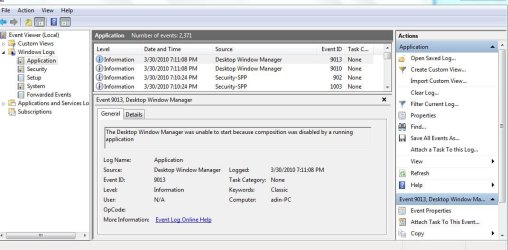
You should check event viewer. type eventvwr in search>goto windows log>application tab. Look for errors (the have red in the left column) that mention either app hang, app crash, or anything that mentions the game.

When you find them use the built in snipping tool (type snipping in search) to make a screen shot and upload it to us using the attachment icon (shaped like a paper clip) in the reply form see pics

Ken J++
 
Last edited:

My Computer

Computer Manufacturer/Model Number
HP Pavillion dv-7 1005 Tx
OS
Win 8 Release candidate 8400
CPU
[email protected]
Memory
4 gigs
Graphics Card(s)
Nvidia 9600M
Sound Card
HD built-in
Monitor(s) Displays
17" Wxga
Screen Resolution
1440x900
Cooling
none
Internet Speed
45Mb down 5Mb up
I didn't find anything in the eventviewer that has something to do with War3 or with my video drivers.
 

My Computer

Computer Manufacturer/Model Number
ASUS
OS
Windows 7 Ultimate x64
CPU
Intel Core2Duo E6300 1.87 GHz
Motherboard
ASUS P5LD2-X/1333
Memory
DDR2 Kingston 2x2 GB
Graphics Card(s)
Gigabyte Ge-Force 8600GT
Sound Card
Built In
Monitor(s) Displays
LG
Screen Resolution
1680x1050
Hard Drives
1-80GB
2-320GB Seagates
Case
Colors
Cooling
Built-in
Keyboard
A4 Tech Gaming Keyboard
Mouse
A4 Tech x750MF
Internet Speed
Download : 30 mbps Upload : 12 MBPS
it should be a 64bit driver problem... but sadly no idea how to fix it ... (good thing I'm still stuck to 32bit LOL)

warcraft III TFT 1.24c works fine for me...

@offtopic I'm sure you play wc3 because of dota :D, right XD?


my only suggestion is try to update to latest driver ver or try older driver version X_X;!
 

My Computer

OS
Windows 7 32bit RTM
I already have the newest driver ... I can try the old driver idea but there are so many ... How can I be sure what to use ? No still doesn't start... I guess I will never play dota again... At least not until someone can figure it out or I install a different Windows 7 but i doubt it happening soon...
 

My Computer

Computer Manufacturer/Model Number
ASUS
OS
Windows 7 Ultimate x64
CPU
Intel Core2Duo E6300 1.87 GHz
Motherboard
ASUS P5LD2-X/1333
Memory
DDR2 Kingston 2x2 GB
Graphics Card(s)
Gigabyte Ge-Force 8600GT
Sound Card
Built In
Monitor(s) Displays
LG
Screen Resolution
1680x1050
Hard Drives
1-80GB
2-320GB Seagates
Case
Colors
Cooling
Built-in
Keyboard
A4 Tech Gaming Keyboard
Mouse
A4 Tech x750MF
Internet Speed
Download : 30 mbps Upload : 12 MBPS
My suggestion is to go from dota to HON :)

However, I ran War3 on Win 7 64bit. But it wasn't 1.24c. hmm
 

My Computer

Computer type
PC/Desktop
Computer Manufacturer/Model Number
DELL VOSTRO 3650
OS
Windows 8.1 PRO
CPU
3rd Generation Intel Core i7‐3612QM CPU @ 2.10GHZ
Memory
8GB DDR3
Graphics Card(s)
NVIDIA GeForce GT 525M (128 bit), 1GB Grpahics
Screen Resolution
1920X1080
Hard Drives
750GB 5400RPM
But I like DotA>HON just I find it attractive and don't like HON because it's kind of dark and more complex... If someone has ideas I am here...
 

My Computer

Computer Manufacturer/Model Number
ASUS
OS
Windows 7 Ultimate x64
CPU
Intel Core2Duo E6300 1.87 GHz
Motherboard
ASUS P5LD2-X/1333
Memory
DDR2 Kingston 2x2 GB
Graphics Card(s)
Gigabyte Ge-Force 8600GT
Sound Card
Built In
Monitor(s) Displays
LG
Screen Resolution
1680x1050
Hard Drives
1-80GB
2-320GB Seagates
Case
Colors
Cooling
Built-in
Keyboard
A4 Tech Gaming Keyboard
Mouse
A4 Tech x750MF
Internet Speed
Download : 30 mbps Upload : 12 MBPS
did you run the installer, it seems the codec or whatever it needs to play the intro video is missing.
 

My Computer

Computer type
PC/Desktop
Computer Manufacturer/Model Number
home built
OS
windows 8.1 Pro x64
CPU
intel i5 4670k @ 4.3ghz
Motherboard
asus z87-plus
Memory
16 gig ram ddr3 @ 1600 corsair vengeance
Graphics Card(s)
evga 970 GTX 4 GIG FTW ACX 2.0
Sound Card
asus xonar D2X
Monitor(s) Displays
benq gw2765ht
Screen Resolution
2560x1440
Hard Drives
Samsung 850 pro SSD 512gig - boot device wooosh
WD black cavalier 640gig WD6401AALS
Seagate 500gig ST3500630AS
WD 2TB Green WDC20EARS
2 x WD Red 3TB WD30EFRX
Samsung 750gig HD753LG - on asmedia controller
PSU
coolermaster silent pro 600watt modular
Case
fractal define R4
Cooling
artic freezer i30, 3 case fans
Keyboard
microsoft business ps2 keyboard
Mouse
microsoft optical black mouse
Internet Speed
80/20 FTTC SkyBB
Antivirus
Nod32 AV v8, HitmanProAlert, SRP, System Hardening
Browser
Chrome x64
Other Info
Intel controller is in AHCI mode currently using IaSTOR 12.8.0.1016 drivers
Yes I have tried reinstalling it !
 

My Computer

Computer Manufacturer/Model Number
ASUS
OS
Windows 7 Ultimate x64
CPU
Intel Core2Duo E6300 1.87 GHz
Motherboard
ASUS P5LD2-X/1333
Memory
DDR2 Kingston 2x2 GB
Graphics Card(s)
Gigabyte Ge-Force 8600GT
Sound Card
Built In
Monitor(s) Displays
LG
Screen Resolution
1680x1050
Hard Drives
1-80GB
2-320GB Seagates
Case
Colors
Cooling
Built-in
Keyboard
A4 Tech Gaming Keyboard
Mouse
A4 Tech x750MF
Internet Speed
Download : 30 mbps Upload : 12 MBPS
Please help :(
 

My Computer

Computer Manufacturer/Model Number
ASUS
OS
Windows 7 Ultimate x64
CPU
Intel Core2Duo E6300 1.87 GHz
Motherboard
ASUS P5LD2-X/1333
Memory
DDR2 Kingston 2x2 GB
Graphics Card(s)
Gigabyte Ge-Force 8600GT
Sound Card
Built In
Monitor(s) Displays
LG
Screen Resolution
1680x1050
Hard Drives
1-80GB
2-320GB Seagates
Case
Colors
Cooling
Built-in
Keyboard
A4 Tech Gaming Keyboard
Mouse
A4 Tech x750MF
Internet Speed
Download : 30 mbps Upload : 12 MBPS
*bump* Will someone help ?
 

My Computer

Computer Manufacturer/Model Number
ASUS
OS
Windows 7 Ultimate x64
CPU
Intel Core2Duo E6300 1.87 GHz
Motherboard
ASUS P5LD2-X/1333
Memory
DDR2 Kingston 2x2 GB
Graphics Card(s)
Gigabyte Ge-Force 8600GT
Sound Card
Built In
Monitor(s) Displays
LG
Screen Resolution
1680x1050
Hard Drives
1-80GB
2-320GB Seagates
Case
Colors
Cooling
Built-in
Keyboard
A4 Tech Gaming Keyboard
Mouse
A4 Tech x750MF
Internet Speed
Download : 30 mbps Upload : 12 MBPS
Still no one helps ... :(
 

My Computer

Computer Manufacturer/Model Number
ASUS
OS
Windows 7 Ultimate x64
CPU
Intel Core2Duo E6300 1.87 GHz
Motherboard
ASUS P5LD2-X/1333
Memory
DDR2 Kingston 2x2 GB
Graphics Card(s)
Gigabyte Ge-Force 8600GT
Sound Card
Built In
Monitor(s) Displays
LG
Screen Resolution
1680x1050
Hard Drives
1-80GB
2-320GB Seagates
Case
Colors
Cooling
Built-in
Keyboard
A4 Tech Gaming Keyboard
Mouse
A4 Tech x750MF
Internet Speed
Download : 30 mbps Upload : 12 MBPS
hey dude... try this... we have THE SAME PROBLEM!!! \m/ we ROCK DUDE!!!
-install war3(ALL)
-send shortcut to desktop(frozen throne.exe)
-make your warcraft3 Frozen Throne WINDOW MODE ~ right click on shortcut, click properties, type "-window" or "-windows" at the last of the *Target:"
example: "E:\Games\Warcraft 3_DotA\Warcraft III\Frozen Throne.exe" -window
-click OK
-open war3 TFT
-go to options
-go to videos
-change your resolution to 800x600x32 <---- i know this ain't cool dude, but trust me. Y_Y
-confirm
-DELETE your shortuct icon in Warcraft3 Frozen Throne in your DESKTOP
-THEN PLAY!!! ENJOY! 100% WORKING... my DMC4,COD4etc. works fine on high resolution, but this war3 TFT really pissed me off.. x)
 

My Computer

Computer Manufacturer/Model Number
secret...
OS
Windows XP
CPU
AMD Athlon x2 2.1Ghz 4000+
Motherboard
MSI
Memory
1GB DDR2
Graphics Card(s)
Nvidia GeForce 8400GS 512MB
Sound Card
built in
Monitor(s) Displays
MAG innovisio
Hard Drives
SATA 160GB
hey dude... try this... we have THE SAME PROBLEM!!! \m/ we ROCK DUDE!!!
-install war3(ALL)
-send shortcut to desktop(frozen throne.exe)
-make your warcraft3 Frozen Throne WINDOW MODE ~ right click on shortcut, click properties, type "-window" or "-windows" at the last of the *Target:"
example: "E:\Games\Warcraft 3_DotA\Warcraft III\Frozen Throne.exe" -window
-click OK
-open war3 TFT
-go to options
-go to videos
-change your resolution to 800x600x32 <---- i know this ain't cool dude, but trust me. Y_Y
-confirm
-DELETE your shortuct icon in Warcraft3 Frozen Throne in your DESKTOP
-THEN PLAY!!! ENJOY! 100% WORKING... my DMC4,COD4etc. works fine on high resolution, but this war3 TFT really pissed me off.. x)
 

My Computer

Computer Manufacturer/Model Number
secret...
OS
Windows XP
CPU
AMD Athlon x2 2.1Ghz 4000+
Motherboard
MSI
Memory
1GB DDR2
Graphics Card(s)
Nvidia GeForce 8400GS 512MB
Sound Card
built in
Monitor(s) Displays
MAG innovisio
Hard Drives
SATA 160GB
i got same problems but my eventvwr tells me this so what do i do
 

Attachments

  • war 3.JPG
    war 3.JPG
    78.8 KB · Views: 323

My Computer

OS
windows 7
can u open reign of chaos instead of tft?


try deleting the registry of wc3.
search for regedit, go to hkey current user->software-> blizzard entertainment(delete it)
try running tft again, it should rewrite the registry
 

My Computer

Computer Manufacturer/Model Number
Asus F83VF Noteook
OS
Windows 7 Home Premium x64
CPU
Intel Core 2 Duo P8800
Motherboard
Intel PM45 Chipset
Memory
4 GB DDR3
Graphics Card(s)
NVIDIA GeForce GT 220M, 1 GB GDDR3 SDRAM
Sound Card
Realtek
Screen Resolution
1366x768
Hard Drives
Seagate 500 GB
PSU
-
Case
-
Cooling
-
Keyboard
-
Mouse
Razer Lachesis
Internet Speed
10 Mb/s
lol, like Merculiar said earlier, running on 32 bit 7 works fine for me.


I'm not sure if this even would make a difference, but compatibility mode?
 

My Computer

OS
2000 Pro, XP, Vista, 7
Im running windows 7 x86 and when i go on battle.net(warcraft 3 TFT)I'll be playing fine,And then i get disconnected from battle.net and it says "CD key in use by user sheldon(thats me)on warcraft 3 reign of chaos" Someone help me I'm at wits end.
 

My Computer

OS
Windows 7 x64
Back
Top