Warning -- Firefox users please read!

Status
Not open for further replies.

scaramonga

New member
Local time
10:27 PM
Messages
341
How to disable the Firefox .NET Framework Assistant installed by MS.

In a recent update of the .NET framework Microsoft silently installs an extension to your Firefox browser if it is found on your system. This extension enables websites you visit with Firefox to silently install software on your computer, thus injecting the most serious flaw of Internet Explorer into Firefox.

Microsoft installs this extension in such a way that it cannot be removed directly by the user -- it is listed in the Extensions list but Uninstall is disabled.

This is not a bug -- this is the intended functionality of the Firefox extension, probably to enable Microsoft to install software on your machine when you visit their websites with Firefox instead of IE. This extension introduces a serious security vulnerability to Firefox. It should be removed immediately, using the instructions below.


Links removed by dmex
-This is not a vulnerability or anything to be concerned about, The Author of that article does not know what ClickOnce really does, please see page 3 for a detailed explanation-
 
Last edited by a moderator:

My Computer

OS
XP
Thanks for the heads up with the info :)
 

My Computer

Computer Manufacturer/Model Number
Built
OS
Windows 7 RC build 7100x64 // 7260x32
CPU
Quad core 2.33GHz
Motherboard
Asus P5Q SE
Memory
4 gig DRR2
Graphics Card(s)
8400 GS gigabyte
Sound Card
built in with motherboard
Monitor(s) Displays
LG Flaton l1739s
Screen Resolution
1440x900 x2
Hard Drives
500 gig HDD // and a 500 gig out
PSU
500Watt
Case
ATX black case
Cooling
Cpu fan \ case fan
Keyboard
logitech
Mouse
logitech
Internet Speed
1500
I am running 7100rc x 64 bit and the extension uninstall is not grayed out and allowed me to remove it
 

My Computer

Computer type
PC/Desktop
Computer Manufacturer/Model Number
Self Built Custom Computer.
OS
Windows 10 Pro x64
CPU
i7-4770K
Motherboard
Asus Z87 Sabertooth
Memory
16Gig DDR3-2400
Graphics Card(s)
Gigabyte GT740
Sound Card
Onboard
Monitor(s) Displays
Benq 27" - Dell 23' - Benq 22"
Screen Resolution
1680x1050
Hard Drives
Samsung 840 Pro 128g SSD
1xWestern Digital Caviar Green 1tb
2xWestern Digital Caviar Green 2 tb
PSU
Seasonic 760 watt Platinum
Case
Coolermaster Haf - X
Cooling
Noctua NH-C12P CPU Cooler
Keyboard
Logitech illuminated keyboard
Mouse
Logitech Perfomance MX
Internet Speed
Cable = speeds to 20Mbps downsteam and 512kbps upsteam
Antivirus
Avast Internet Security
Browser
Firefox
I am running 7100rc x 64 bit and the extension uninstall is not grayed out and allowed me to remove it
kodi
First welcome to SF. Tons of resources and really nice ppl. See scaramonga's post (#1) and use the removal instructions link. Also we can help you more if you fill in your "my system specs" in control panel

Good luck

Ken
 
Last edited:

My Computer

Computer Manufacturer/Model Number
HP Pavillion dv-7 1005 Tx
OS
Win 8 Release candidate 8400
CPU
[email protected]
Memory
4 gigs
Graphics Card(s)
Nvidia 9600M
Sound Card
HD built-in
Monitor(s) Displays
17" Wxga
Screen Resolution
1440x900
Cooling
none
Internet Speed
45Mb down 5Mb up
I am running 7100rc x 64 bit and the extension uninstall is not grayed out and allowed me to remove it

Yes, but if you read the article:

Note that on Windows 7 and possibly some Versions of Vista the Uninstall button may actually be active for the .NET extension in the Firefox extensions list. However, using it does not appear to remove all the components of the extension. Since the vulnerability is so serious you should still manually check all the items on the Windows Annoyances check list to make sure they have all been removed.

:)
 

My Computer

OS
XP
On x86 7201, Firefox 3.5 Beta 4, it was not greyed out and it let me uninstall normally. I then went to the annoyances site and did what they said.

I did not have this following part because I'm guessing I deleted it when uninstalling.

  1. Type microsoftdotnet in the Filter field to quickly find the general.useragent.extra.microsoftdotnet setting.
  2. Right-click general.useragent.extra.microsoftdotnet and select Reset.
To delete the DotNetAssistantExtension folder, I had to take ownership and also have Firefox closed.

This is horrible practice by Microsoft. We specifically go out of our way to not use IE and they have to do this to us? Overall, M$ is making good progress but this is not acceptable at all.

Thank you Scaramonga. I'd +1 rep again if I could.
 

My Computer

Computer Manufacturer/Model Number
self built
OS
7600.20510 x86
CPU
P4 550 3.4 GHz HT running at 3.5 GHz
Motherboard
MSI PM8M3-V (MS-7211 v1.x) Micro-ATX mainboard
Memory
OCZ 2 GB(2x1GB) DDR400mHz running @ 414 mHz
Graphics Card(s)
HIS Radeon HD 3850 IceQ 3 Turbo HDMI Dual DL-DVI AGP
Sound Card
MOTU Traveler firewire studio interface 192 kHz 24 bit
Monitor(s) Displays
22" widescreen Acer X223W LCD, 17" Compaq P75 CRT
Screen Resolution
1680x1050 and 1280x1024
Hard Drives
SATA I x2 WD, 400 GB and 120 GB, SATA 2 WD Caviar Black 1 TB
PSU
350W generic
Case
Cybertronpc, it glows blue
Cooling
stock cpu fan, Ice-Q 3 gpu and system, many case fans
Keyboard
Logitch Classical Keyboard 200
Mouse
Logitech Mediaplay cordless
Internet Speed
1792/448 kbits/sec
Other Info
SATA II PCI fake RAID adapter, 1 GB Readyboost, original ATI Remote Wonder (even works with WMC perfectly), Logitech Rumblepad 2 game controller x2
Thanks for the heads up, and i to was able to uninstall the add-on with no issues as far as i can tell.
 

My Computer

Computer Manufacturer/Model Number
Custom Build
OS
Window's 7 Ultimate 64bit
CPU
E8400 Lapped
Motherboard
P5Q Pro Turbo Asus
Memory
Kingston 4 gig
Graphics Card(s)
2=ATI 5670Video Crossfire / HVR2250 TV Tuner Card
Sound Card
HDMI sound
Monitor(s) Displays
Sony 46"
Screen Resolution
1280x720
Hard Drives
1 WD 160gig YS, 1 Black Edition 320gig and one 250gig WD YS Model plus external Caviar Black 640gig Drives
PSU
Antec 550 Modular
Case
Antec Custom 180B
Cooling
X-1283 Lapped Artic Silver 5
Keyboard
Wave Combo Logitech
Mouse
Logitech LX-8
Internet Speed
5mb down 768 up
Other Info
Custom side fan in case, plus moved middle lower fan to the front of hard drives , also installed a second intake fan in lower two optical drive slots. Rear fans are controlled by Fan mate controllers. temps inside case are monitored by probe and temps coming out the top exhaust are also monitored, temps as of right now 20c inside and 22.7 out the exhaust. Front intake fans are controlled by Asu
On x86 7201, Firefox 3.5 Beta 4, it was not greyed out and it let me uninstall normally. I then went to the annoyances site and did what they said.

I did not have this following part because I'm guessing I deleted it when uninstalling.

  1. Type microsoftdotnet in the Filter field to quickly find the general.useragent.extra.microsoftdotnet setting.
  2. Right-click general.useragent.extra.microsoftdotnet and select Reset.
To delete the DotNetAssistantExtension folder, I had to take ownership and also have Firefox closed.

This is horrible practice by Microsoft. We specifically go out of our way to not use IE and they have to do this to us? Overall, M$ is making good progress but this is not acceptable at all.

Thank you Scaramonga. I'd +1 rep again if I could.

Yup my friend, exactly the same procedure I had as well, but got there in the end :)
 

My Computer

OS
XP
I was able to add to rep ... thanks again scaramonga :)
 

My Computer

Computer type
PC/Desktop
Computer Manufacturer/Model Number
Bruce ... somewhere in his 40's
OS
Windows 7 Ultimate 32bit SP1
CPU
Intel(R) Core(TM)2 Quad CPU @ 2.40GHz, 2400 MHz
Motherboard
INTEL/D975XBX2
Memory
4 GB
Graphics Card(s)
ATI Radeon HD 2600 Pro
Monitor(s) Displays
Samsung SyncMaster 914v
Screen Resolution
1280 x 1024
Hard Drives
2/500GB each ... ST3500630AS ATA Device.
One is not connected
PSU
Rocketfish 700 W
Case
G.Skill Gigabyte Chassis
Keyboard
Standard PS/2 Keyboard
Mouse
Microsoft PS/2 Mouse
Internet Speed
DSL
Antivirus
Avira Internet Security
Browser
IE 11
Other Info
ATI HDMI Audio
iam tring to delete %SYSTEMDRIVE%\Windows\Microsoft.NET\Framework\v3.5\Windows Presentation Foundation folder but i wont allow it. i tried giving my user full control but that did not help. how do i transfer ownership of the folder to my user ?
 

My Computer

Computer Manufacturer/Model Number
Orillion inc 2.0
OS
Windows 7 Build 7229
CPU
Intel Core 2 Duo E6600
Motherboard
Abit AW9D-Max
Memory
4x1 gb Kingston PC2-5300
Graphics Card(s)
BFG Geforce 7950 GT 512 mb ram
Sound Card
Abit AudioMAX HD 7.1 CH
Monitor(s) Displays
Acer AL1916W
Screen Resolution
1440x900
Hard Drives
2x200gb western digital ( sata )
1x80gb Maxtor ( sata )
PSU
Antec PSU 550W TruePower Trio TP3-550 EC
Case
Antec Nine Hundred
Cooling
big mutha fu.... Zalman
Keyboard
Logitech G15
Mouse
Logitech MX1000
Internet Speed
20/1 mbit
Also make sure that no instances of Firefox are running before you delete, else it will fail.

:)
 

My Computer

OS
XP
iam tring to delete %SYSTEMDRIVE%\Windows\Microsoft.NET\Framework\v3.5\Windows Presentation Foundation folder but i wont allow it. i tried giving my user full control but that did not help. how do i transfer ownership of the folder to my user ?


Hi Orillion,

If you delete the Windows Presentation Foundation folder then your computer will be unusable, Its a required system folder used by applications and deleting it will cause you great grief trying to run applications and use your computer in the future.

Steven
 
Thanks, removed.
 

My Computer

Computer Manufacturer/Model Number
self built
OS
Windows 7 Professional 64-bit
CPU
Intel E8400 3GHz
Motherboard
Intel DX48BT2
Memory
Kingston PC3-10700H 4Gb
Graphics Card(s)
XFX Radeon HD 5850 BlackEd.
Sound Card
Asus Xonar DG
Monitor(s) Displays
2x Samsung SM-T220HD 22"
Screen Resolution
1680x1050 on two monitors
Hard Drives
OCZ Vertex 2 120gb 3.5" (OS)
Seagate Momentus XT 500gb
Samsung F3 1Tb (games)
2x Samsung F1 1Tb
PSU
Thermaltake ToughPower 850w
Case
Thermaltake Armor
Cooling
Scythe Mugen II
Keyboard
Microsoft Comfort Curve USB
Mouse
Razer Diamondback 3G
Internet Speed
8128/443
Reset?

I have no idea why, but I cannot get past the "reset" part since I have no reset option... :sarc:

Is this wierd to more people, or is it just me?
 

My Computer

Computer Manufacturer/Model Number
ASUS M51Se
OS
Windows 7 RC build 7100
CPU
Intel Centrino T5750 2.00GHz
Memory
3 GB
Graphics Card(s)
ATI Radeon HD3470 512mb
Hard Drives
320GB WD 7200rpm 2,5"
I have no idea why, but I cannot get past the "reset" part since I have no reset option... :sarc:

Is this wierd to more people, or is it just me?

I never had steps 1. & 2. either....

  1. Type microsoftdotnet in the Filter field to quickly find the general.useragent.extra.microsoftdotnet setting.
  2. Right-click general.useragent.extra.microsoftdotnet and select Reset.
Just ignore if you don't have them and make sure to delete the DotNetAssistantExtension folder, and ONLY this folder!!
 

My Computer

OS
XP
I've just read that if the uninstall button is greyed out, your running an old 'un-updated' .Net framework. They claim it was fixed with an .Net update late last month.

Security Fix - Microsoft Update Quietly Installs Firefox Extension
(read the comments)


Is it everyone NOT running latest build 7201 with problems with it greyed out by any chance?
 

My Computer

Computer Manufacturer/Model Number
Self Built
OS
XP Pro SP3 x86/Vista SP2 x64/Win7 x64 Triple-boot
CPU
AMD64 X2 AM2 5000+
Motherboard
Asus MSN-X Plus
Memory
Corsair TWX 2Gb (2x1Gb) DDR2 800Mhz
Graphics Card(s)
PCI-X 2.0 Inno3D (NVidia) 9500GT 1Gb DDR2
Sound Card
Onboard Realtec ALC662-GR
Monitor(s) Displays
Relisys 17' CRT (model unknown)
Screen Resolution
1024x768
Hard Drives
750Gb Samsung 7200-3Gb/s 32Mb Cache SATA
PSU
500W
Cooling
Standard AMD CPU Fan, One side, front and rear case fan.
Keyboard
Microsoft Multimedia Keyboard
Mouse
Samsung Optical
Internet Speed
10M
I never had steps 1. & 2. either....

  1. Type microsoftdotnet in the Filter field to quickly find the general.useragent.extra.microsoftdotnet setting.
  2. Right-click general.useragent.extra.microsoftdotnet and select Reset.
Just ignore if you don't have them and make sure to delete the DotNetAssistantExtension folder, and ONLY this folder!!

Will do, thanks for quick help :)

[Edit: Just deleted the folder, had some trouble with that too. It said I didn't have permission to delete it, so I downloaded and installed Unlocker 1.8.7 and deleted it with that. Now its all clear :)]
 
Last edited:

My Computer

Computer Manufacturer/Model Number
ASUS M51Se
OS
Windows 7 RC build 7100
CPU
Intel Centrino T5750 2.00GHz
Memory
3 GB
Graphics Card(s)
ATI Radeon HD3470 512mb
Hard Drives
320GB WD 7200rpm 2,5"

  1. Type microsoftdotnet in the Filter field to quickly find the general.useragent.extra.microsoftdotnet setting.
  2. Right-click general.useragent.extra.microsoftdotnet and select Reset.
Just ignore if you don't have them and make sure to delete the DotNetAssistantExtension folder, and ONLY this folder!!

im using the beta firefox. it let me uninstall the extension. do i still have to do these steps? if so, where are these located, plz.

Microsoft, you sneaky snakes!
 

My Computer

Computer Manufacturer/Model Number
eMachines W3502
OS
Windows 7 Ultimate x32
CPU
Intel Celeron D 3.2 Ghz 533 fsb (LGA 775)
Motherboard
Intel D101GGC
Memory
1 GB (2x512MB) PC-3200 DDR @ 200Mhz
Graphics Card(s)
Nvidia GeForce 9400GT- 1GB
Sound Card
Sound Blaster X-Fi Xtreame Gamer
Monitor(s) Displays
19" LCD HDtv
Screen Resolution
1360x768 @ 60Htz
Hard Drives
SeaGate Barracuda 750GB
SeaGate Barracuda 100GB
Toshiba CD/DVDW/ TS-H552D [DVD+R, DL]
PSU
stock (idk)
Case
The busted remains of the stock case
Cooling
Dust cooled, waitwut?
Keyboard
Stock. Missing a few keys.
Mouse
Logitech LX8 5-btn mouse (wireless)
Internet Speed
TWC 10Mb
Other Info
Keeps going, and going, and going.......
Before anyone starts removing the plugin , they should try using a ClickOnce application to see just how Hyped this report has been...

I deploy applications via ClickOnce and there is no issue here with the way its been designed or deployed by Microsoft, they have worked on ClickOnce for the last 10 years and it has had zero security vulnerability's in its entire history, basically because the Source-Code for the .net Framework is viewable on every system using a program called Reflector (.NET Reflector, class browser, analyzer and decompiler for .NET).

Reflector is able to show you the Source Code to any .net framework based executable or dll file including the source to Microsoft's own .net Framework files, bugs and issues are found very early and if someone tried releasing a virus using ClickOnce, anyone can see the source code to their application.

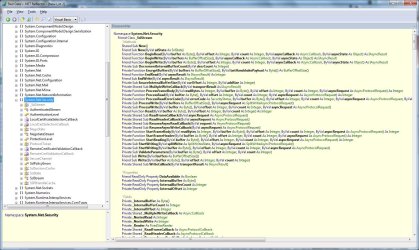
Heres a screenshot of the System.Net.Security.dll found in the C:\Windows\Microsoft.NET\framework\ folder:

System.Net.Security.JPG

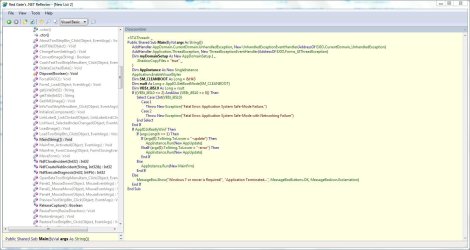
Heres a screenshot of an application Im developing for Sevenforums:

dmexApp.JPG


You can test your Firefox ClickOnce support Here: (by James Dobson)
ClickOnceTester

Testing Manual here: (by James Dobson)
FFClickOnce Testing Manual

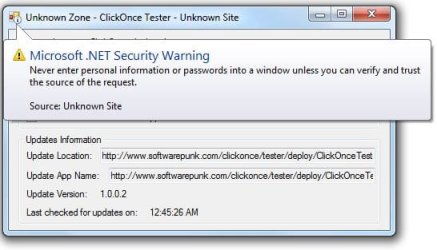
By design, You see this security warning when applications are deployed via ClickOnce and also when the .net framework runs the application with low-rights, in that mode applications can not prompt for Elevation, can not access your entire system or make dangerous system changes.

ClickOnce.JPG


ClickOnce applications have to request security permissions to do anything particularly nasty to your system. Yet this is not foolproof. A poor security configuration on your machine or a bug in the .NET Framework (none in the last 9 years) that could allow an application to do more than it should.

ClickOnce is blocked from being able to access system components, unless you have changed file ownership and reset file permissions to system files, then even restricted applications like ClickOnce will have full access to your system.

Seriously, ClickOnce is not a security issue unless you have changed the default security of system files :sarc:
 
Status
Not open for further replies.
Back
Top