Solved WARNING: Hardware noob! What does this odd thing actually do!

niemiro

Account closed
Local time
4:30 PM
Messages
890
Hello all!

I must tell you that I honestly have no clue about hardware! Absolutely no clue! And I have two questions! :sick: I can deal with software, but I needed help from one of the VF gurus to help me with plugging in my PCI-E card! That sort of noob! System Specs set up in my profile, just have a look.

I have a motherboard! Good start! On it is a CPU with a heatsink! Great! It is nice and cool to touch! Good! Next to it is a small heatsink, without a fan, and it is hot enough to put lines on your fingers if you touch it. It is just a small heat sink (about half the size of the CPU - linear, one quarter the size - area) right next to the CPU. Do you want a photo? Any ideas what it is? Do I need to worry about it being so hot? The system works fine, everything else is cool, so I would be tempted to just ignore it. I just became curious, and for someone with my absolute lack of skill, curiosity is dangerous!

I found this out while looking at my RAM. Although my Specs say 32bit, I am about to reinstall with Vista 64bit. Please think along the lines of 64bit OSs. I currently have 4GB of RAM. I use my computer very heavily. Firefox is currently using 523MB of RAM. I sometimes push it up to over a GB of RAM (Internet additct! lol) I use my system for a lot of heavy programming tasks. At the moment, it is early morning. I am currently using 73% available memory. At the middle of the day, that will be 95-100%.

Will I get a noticeable performance increase with 6GB of RAM? I do the occasional game. Low spec games. Old games. Very occasionally, they all run just fine. Or would Windows just continue to fill up my memory, but no noticeable increase in speed for me. I know the increase will never be massive, but I am just wondering whether it would be nothing?

If I do get more RAM, any particular brand? I have seen adverts for Crucial. They have a nice RAM tool. Are they the best?

I also know I need to look up speeds. Do I just look up my CPU and Motherboard speeds, and buy RAM for the lowest, or do I need to multiply things up. It all seems very complicated! What do I need to look up? I would be looking to put in a single matching pair. Would this be alright?

Could I then put my two old 1GB sticks into another computer? It is a fairly modern computer, so I don't think I need to worry about 0, 1, or 2 notch RAM, in a pair.

Are heatsink RAM sticks worth it? Looking at my system, I would say no.

Thank you so much for all your help, and patience with a noob!

Richard

P.S. I never overclock things!

P.P.S: Is there some other upgrade that really stands out. I can't really afford an expensive processor or anything like that, but maybe something stands out to your trained eyes!
 

My Computer My Computer

At a glance

Vista Home Premium x86 SP2Intel Core 2 Quad Q9300 2.50GHz4 gb (DDR2 800) 400MHzATI Radeon HD 3870 (512 MBytes)
Computer Manufacturer/Model Number
Dell XPS 420
OS
Vista Home Premium x86 SP2
CPU
Intel Core 2 Quad Q9300 2.50GHz
Motherboard
Stock Dell 0TP406
Memory
4 gb (DDR2 800) 400MHz
Graphics Card(s)
ATI Radeon HD 3870 (512 MBytes)
Monitor(s) Displays
1 x Dell 2007FP and 1 x (old) Sonic flat screen
Screen Resolution
1600 x 1200 and 1280 x 1204
Hard Drives
1 x 640Gb (SATA 300) Western Digital: WDC WD6400AAKS-75A7B0 1 x 1Tb (SATA 600) Western Digital: Caviar Black, SATA 6GB/S, 64Mb cache, 8ms Western Digital: WDC WD1002FAEX-00Z3A0 ATA Device
Case
Dell XPS 420
Cooling
Stock Fan
Keyboard
Dell Bluetooth
Mouse
Advent Optical ADE-WG01 (colour change light up)
Internet Speed
Varies from 10kb/s to 170kb/s. So unreliable it is not funny
Other Info
ASUS USB 3.0 5Gbps/SATA 6Gbps - PCI-Express Combo Controller Card (U3S6)
At a guess that would be the Northbridge chipset next to the cpu , as to the ram a 64bit system can make better use of ram over 4GB here is a link to an article about ramdefinitions which may help you understand the timings better Memory Timings Explained :)
 

My Computer My Computer

At a glance

win 7 ultimate32bit, Win8.1pro wmc 32bitamd phenom x4 9600corsair twinxs 2x2gb2x nvidia 1gb 8500gt
Computer type
PC/Desktop
Computer Manufacturer/Model Number
self build
OS
win 7 ultimate32bit, Win8.1pro wmc 32bit
CPU
amd phenom x4 9600
Motherboard
asus m2n32-sli deluxe
Memory
corsair twinxs 2x2gb
Graphics Card(s)
2x nvidia 1gb 8500gt
Sound Card
onboard
Monitor(s) Displays
23" PB Viseo 233d
Screen Resolution
1920x1080
Hard Drives
maxtor sata 500gb
maxtor sata 320gb
fujitsu sata200gb
PSU
oryxx tornado 750w
Case
thermaltake xaser lll
Cooling
artic freezer64 pro + 7 case fans
I'm not technical either Richard but putting more RAM into the machine is always going to make a difference but make sure you check what your motherboard can take with regards speed and make.

Also RAM is there to be used and Windows will always find a use for it otherwise it's just a waste.

Just my thoughts for you.;)
 

My Computer My Computer

At a glance

Windows 10 64bit/Windows 10 64bit/Windows 10 ...Intel Pentium J3710 @ 60GHz/Intel B820,1.7GHz...8.00GB DDR3 @ 1599MHz/8GB 2 x 4GB DDR3/8.00GB...Intel HD Graphics/Intel/512MB ATI AMD Radeon ...
Computer type
PC/Desktop
Computer Manufacturer/Model Number
Acer Aspire XC-704 x64 bit/ Asus K55A Notebook PC/HP Envy x360 Convertible 15-bq0xx
OS
Windows 10 64bit/Windows 10 64bit/Windows 10 64bit
CPU
Intel Pentium J3710 @ 60GHz/Intel B820,1.7GHz/AMD A9 Radeon
Motherboard
Acer Aspire XC-704 (SOCKET 0)/Asus/HP 8312 (Socket FP4)
Memory
8.00GB DDR3 @ 1599MHz/8GB 2 x 4GB DDR3/8.00GB Dual-Channel
Graphics Card(s)
Intel HD Graphics/Intel/512MB ATI AMD Radeon R5 Graphics (HP
Sound Card
Realtek High Definition Audio/Onboard/AMD High Definition Au
Monitor(s) Displays
Acer LCD K222HQL /Asus 15.6/Generic PnP Monitor (1920x1080@6
Screen Resolution
1920x1080@59Hz/1366 x 768/1920x1080@60Hz
Hard Drives
1863GBWesternn Digital WDC/Asus/119GB SanDisk SD8SN8U-128G-1006 (SSD)
931GB Hitachi HGST HTS721010A9E630 (SATA)
Keyboard
Microsoft Natural Ergonomic Keyboard 4000 (UK)/Inbuilt/Inbui
Mouse
Microsoft Optical Wheel Mouse/Same plus Touchpad/Same + Pad
Internet Speed
Infinity 2 up to 76 Mbps
Antivirus
MSE/MSE/MSE and all 3 have MalwareBytes Premium
Browser
Edge, Firefox/Edge, Firefox/Edge, Firefox, Chrome
Other Info
Seagate Expansion 500GB External Desktop Drive
Seagate Expansion Portable Drives 500GB and 1TB
Epson XP-332 Wireless Printer
Hello!

Thank you both so much for your answers! Sorry for the delay! I wanted time to think! Northbridge was not something I had actually heard of before, but I have now, and it certainly seems to be the right thing. It has probably been hot for years. I shall just ignore it, and you have quenched my curiosity! Thanks Pebbly! Topic one resolved!

Again, thanks Pebbly for the excellent link! I read it, and learned a lot! And thank you, Joan, for your excellent contributions!

I have got another question now! *worry all around* I ran the crutial memory scanner: Memory upgrades from Crucial.com - Determine My Memory Needs

It offers memory at 1.8V and 2.0V. This thread says very definitely that 1.8V on 2.0V is fine: will running 1.8V ram at 2.0 kill it? - Overclock.net - Overclocking.net

But I don't know what I have! I assume that 2.0V will not work on 1.8V. I looked in the Dell manual, but couldn't find anything about it. I assume that I am on 1.8V, but not for any particular reason.

If I need 1.8V, that gives me this: 4GB kit (2GBx2), 240-pin DIMM, DDR2 PC2-6400 upgrades for Dell XPS 420 Desktop/PC, CT1167040 from Crucial.com as I don't want to go for the slower speed. £10 for not losing memory speed is money well spent - it is only £10.

However, if I can use 2.0V, I have far more options, and even some faster memory like this one: 4GB kit (2GBx2), Ballistix 240-pin DIMM, DDR2 PC2-8500 upgrades for Dell XPS 420 Desktop/PC, CT1198084 from Crucial.com

I shall contact Crucial to see if their scanner actually accurately gauges speed properly, and I shall hunt around for a motherboard manual.

Thanks again!

Richard
 

My Computer My Computer

At a glance

Vista Home Premium x86 SP2Intel Core 2 Quad Q9300 2.50GHz4 gb (DDR2 800) 400MHzATI Radeon HD 3870 (512 MBytes)
Computer Manufacturer/Model Number
Dell XPS 420
OS
Vista Home Premium x86 SP2
CPU
Intel Core 2 Quad Q9300 2.50GHz
Motherboard
Stock Dell 0TP406
Memory
4 gb (DDR2 800) 400MHz
Graphics Card(s)
ATI Radeon HD 3870 (512 MBytes)
Monitor(s) Displays
1 x Dell 2007FP and 1 x (old) Sonic flat screen
Screen Resolution
1600 x 1200 and 1280 x 1204
Hard Drives
1 x 640Gb (SATA 300) Western Digital: WDC WD6400AAKS-75A7B0 1 x 1Tb (SATA 600) Western Digital: Caviar Black, SATA 6GB/S, 64Mb cache, 8ms Western Digital: WDC WD1002FAEX-00Z3A0 ATA Device
Case
Dell XPS 420
Cooling
Stock Fan
Keyboard
Dell Bluetooth
Mouse
Advent Optical ADE-WG01 (colour change light up)
Internet Speed
Varies from 10kb/s to 170kb/s. So unreliable it is not funny
Other Info
ASUS USB 3.0 5Gbps/SATA 6Gbps - PCI-Express Combo Controller Card (U3S6)
Rule one: DO NOT TOUCH INSIDE OF COMPUTER WHILE IT IS ON.
Rule two: earth yourself before touching system components.

Now for some advice.

All modern PCs have thermometers in them to prevent catastrophic failure and to regulate temperature.

They have cut off points which when hit causes an emergency shut down (like pulling the plug)

For most computers this is 100ºC.

This is to stop your PC from damaging itself.

If this hasn't happened to you you will be fine for the most part.

As for RAM. I made a little picture which isn't terribly useful or accurate but is quite fun.

RAM.jpg


Oli
 

My Computer My Computer

At a glance

Windows 7 Profesional x86, Mac OS X 10.6 Snow...Intel Core 2 Duo 2.4Ghz4GB DDR3Nvidia 9400m
Computer Manufacturer/Model Number
Apple MacBook 5,1
OS
Windows 7 Profesional x86, Mac OS X 10.6 Snow Leopard
CPU
Intel Core 2 Duo 2.4Ghz
Memory
4GB DDR3
Graphics Card(s)
Nvidia 9400m
Monitor(s) Displays
13.3" Internal + 22" DVI + 21.5" USB
Screen Resolution
1280x800 + 1920x1080 + 1920x1080
Hard Drives
Internal SATA 2.5" 500GB (395GB Mac HFS+, 105GB Windows NTFS)
2.48TB RAID consisting of 5 disks (HFS+)
Case
Aluminium Unibody
Keyboard
Apple Late 2009 Wireless Keyboard (US)
Mouse
Apple Magic Mouse
Internet Speed
6.33Mb/s up. 0.36Mb/s down.
Other Info
Harman Kardon Soundsticks II Speakers
Memory upgrades from Crucial.com - About Crucial:Media Toolbox

Did you happen to find this at Crucial?

It will scan to see what is installed and give you suggestions.
I realize you got options at Crucial just checking if you used the scanner or entered the Brand/Model option.

Scanner is more accurate and specific to actual installed.

Mike
 

My Computer My Computer

At a glance

Windows7 Pro 64bit SP-1; Windows XP Pro 32bitIntel Core i7-870 Lynnfield 2.93GHz LGA 1156 ...8GB@1400MHz Crucial Ballistix DDR3-1600 4x2GBASUS ENGTX460 DirectCU/2DI/1GD5 1GB 256-bit G...
Computer Manufacturer/Model Number
Hopalong/ Godzilla
OS
Windows7 Pro 64bit SP-1; Windows XP Pro 32bit
CPU
Intel Core i7-870 Lynnfield 2.93GHz LGA 1156 95W Quad-Core
Motherboard
ASUS P7P55D-E PRO
Memory
8GB@1400MHz Crucial Ballistix DDR3-1600 4x2GB
Graphics Card(s)
ASUS ENGTX460 DirectCU/2DI/1GD5 1GB 256-bit GDDR5
Sound Card
VIA Onboard
Monitor(s) Displays
Asus VS248H-P 24"; Samsung SyncMaster 941BW 19"ws
Screen Resolution
1920x1080; 1440x900
Hard Drives
Samsung 830 120GB SSD
Intel 320 120GB SSD
Western Digital Caviar Black WD7501AALS 750GB 7200 RPM SATA 3.0Gb/s
Western Digital Caviar Black WD6401AALS 640GB 7200 RPM SATA 3.0Gb/s
PSU
COOLER MASTER Silent Pro RS850-AMBAJ3-US 850W Modular
Case
COOLER MASTER HAF 932 RC-932-KKN5-GP Black
Cooling
Scythe "Mugen-2 Rev.B" (2 ScytheKaze-Jyuni PWM fans)
Keyboard
Logitech K-320
Mouse
Kensington
Antivirus
Avast Inernet Suite
Browser
IE 9 ; Chrome
Yes, I used the tool. That scan I showed you was the result of the tool. However, I cannot believe that this old system is is good for 2.0V and 8500 frequency. I shall probably try contacting Crucial, just to confirm that their tool cannot scan for this, rather than my computer is better than I thought, and I shall also try to find my motherboard manual, unless anybody has any knowledge?

Richard

P.S. Oli, your picture has single handedly resolved all questions relating to voltage, temperatures, frequencies, motherboards and everything else!
 

My Computer My Computer

At a glance

Vista Home Premium x86 SP2Intel Core 2 Quad Q9300 2.50GHz4 gb (DDR2 800) 400MHzATI Radeon HD 3870 (512 MBytes)
Computer Manufacturer/Model Number
Dell XPS 420
OS
Vista Home Premium x86 SP2
CPU
Intel Core 2 Quad Q9300 2.50GHz
Motherboard
Stock Dell 0TP406
Memory
4 gb (DDR2 800) 400MHz
Graphics Card(s)
ATI Radeon HD 3870 (512 MBytes)
Monitor(s) Displays
1 x Dell 2007FP and 1 x (old) Sonic flat screen
Screen Resolution
1600 x 1200 and 1280 x 1204
Hard Drives
1 x 640Gb (SATA 300) Western Digital: WDC WD6400AAKS-75A7B0 1 x 1Tb (SATA 600) Western Digital: Caviar Black, SATA 6GB/S, 64Mb cache, 8ms Western Digital: WDC WD1002FAEX-00Z3A0 ATA Device
Case
Dell XPS 420
Cooling
Stock Fan
Keyboard
Dell Bluetooth
Mouse
Advent Optical ADE-WG01 (colour change light up)
Internet Speed
Varies from 10kb/s to 170kb/s. So unreliable it is not funny
Other Info
ASUS USB 3.0 5Gbps/SATA 6Gbps - PCI-Express Combo Controller Card (U3S6)

My Computer My Computer

At a glance

Windows7 Pro 64bit SP-1; Windows XP Pro 32bitIntel Core i7-870 Lynnfield 2.93GHz LGA 1156 ...8GB@1400MHz Crucial Ballistix DDR3-1600 4x2GBASUS ENGTX460 DirectCU/2DI/1GD5 1GB 256-bit G...
Computer Manufacturer/Model Number
Hopalong/ Godzilla
OS
Windows7 Pro 64bit SP-1; Windows XP Pro 32bit
CPU
Intel Core i7-870 Lynnfield 2.93GHz LGA 1156 95W Quad-Core
Motherboard
ASUS P7P55D-E PRO
Memory
8GB@1400MHz Crucial Ballistix DDR3-1600 4x2GB
Graphics Card(s)
ASUS ENGTX460 DirectCU/2DI/1GD5 1GB 256-bit GDDR5
Sound Card
VIA Onboard
Monitor(s) Displays
Asus VS248H-P 24"; Samsung SyncMaster 941BW 19"ws
Screen Resolution
1920x1080; 1440x900
Hard Drives
Samsung 830 120GB SSD
Intel 320 120GB SSD
Western Digital Caviar Black WD7501AALS 750GB 7200 RPM SATA 3.0Gb/s
Western Digital Caviar Black WD6401AALS 640GB 7200 RPM SATA 3.0Gb/s
PSU
COOLER MASTER Silent Pro RS850-AMBAJ3-US 850W Modular
Case
COOLER MASTER HAF 932 RC-932-KKN5-GP Black
Cooling
Scythe "Mugen-2 Rev.B" (2 ScytheKaze-Jyuni PWM fans)
Keyboard
Logitech K-320
Mouse
Kensington
Antivirus
Avast Inernet Suite
Browser
IE 9 ; Chrome
But I don't know what I have! I assume that 2.0V will not work on 1.8V. I looked in the Dell manual, but couldn't find anything about it. I assume that I am on 1.8V, but not for any particular reason.

Hi Richard,

Note sure if this helps you, but...

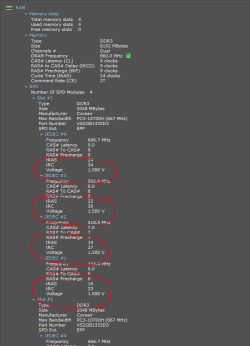
Speccy (if you don't have it) will allow you to find out the voltage of your current RAM for a starting point. Get it here Speccy - System Information - Free Download

This is a screenshot of mine from Speccy
 

Attachments

  • Capture1.PNG
    Capture1.PNG
    21.2 KB · Views: 14

My Computer My Computer

At a glance

Windows 10 Pro x64 ; Xubuntu x64Intel i7 860 @ 2.80 GHz O/C'ed to 4.0GHz16GB Corsair Vengance DDR3 @ 661 MHz Dual Cha...EVGA NVidia GTX 560 1024MB
Computer type
PC/Desktop
Computer Manufacturer/Model Number
Golden Mk. I.4
OS
Windows 10 Pro x64 ; Xubuntu x64
CPU
Intel i7 860 @ 2.80 GHz O/C'ed to 4.0GHz
Motherboard
Gigabyte P55A-UD3R Rev.1. Award BIOS F13
Memory
16GB Corsair Vengance DDR3 @ 661 MHz Dual Channel (9-9-9-24)
Graphics Card(s)
EVGA NVidia GTX 560 1024MB
Sound Card
Realtek Integrated
Monitor(s) Displays
Dual Samsung SyncMaster 2494HS
Screen Resolution
1920*1080 and 1920*1080
Hard Drives
1*Samsung 840 EVO 120GB SSD;
1*OCZ Vertex 2 60GB SSD;
2*Samsung F3 SpinPoint 1TB in RAID0;
1*Samsung F1 SpinPoint 1TB;
2*Western Digital 1TB External USB 3.0
1*Western Digital 500GB External USB 3.0
1*Seagate 500GB External USB 2.0
PSU
Thermaltake ToughPower QFan 750W
Case
Thermaltake Element S VK60001W2Z
Cooling
Corsair H60 Water Cooling, 2*230mm and 2*80mm case fans
Keyboard
Logitech G110
Mouse
Logitech MX518
Just for future reference, here is the Dell XPS 420 Owner's Manual

Documentation

A Guy
 

My Computer My Computer

At a glance

Windows 10 Home x64INTEL Core i5-750 Quad-Core 3.37GHzHyperX Fury Black Series 8GB (2 x 4GB) 1866MhzEVGA GeForce GTX 750 Superclocked 1GB 128-Bit...
Computer type
PC/Desktop
OS
Windows 10 Home x64
CPU
INTEL Core i5-750 Quad-Core 3.37GHz
Motherboard
ASUS P7P55D
Memory
HyperX Fury Black Series 8GB (2 x 4GB) 1866Mhz
Graphics Card(s)
EVGA GeForce GTX 750 Superclocked 1GB 128-Bit GDDR5
Monitor(s) Displays
LG 32MA68HY 32" IPS
Screen Resolution
1920 x 1080
Hard Drives
Samsung 840 Evo 120GB, SEAGATE 500GB Barracuda® 7200.12, SATA 3 Gb/s, 7200 RPM, 16MB cache
PSU
ANTEC TruePower New TP-550, 80 PLUS, 550W
Case
ANTEC Three Hundred Illusion
Cooling
COOLER MASTER Hyper 212 Plus, 4 x 120mm 1 x 140mm Noctua's
Internet Speed
85 + Mbps
Antivirus
Avast
Browser
Vivaldi
Hello!

Thank you both so much for your answers! Sorry for the delay! I wanted time to think! Northbridge was not something I had actually heard of before, but I have now, and it certainly seems to be the right thing. It has probably been hot for years. I shall just ignore it, and you have quenched my curiosity! Thanks Pebbly! Topic one resolved!

Again, thanks Pebbly for the excellent link! I read it, and learned a lot! And thank you, Joan, for your excellent contributions!

I have got another question now! *worry all around* I ran the crutial memory scanner: Memory upgrades from Crucial.com - Determine My Memory Needs

It offers memory at 1.8V and 2.0V. This thread says very definitely that 1.8V on 2.0V is fine: will running 1.8V ram at 2.0 kill it? - Overclock.net - Overclocking.net

But I don't know what I have! I assume that 2.0V will not work on 1.8V. I looked in the Dell manual, but couldn't find anything about it. I assume that I am on 1.8V, but not for any particular reason.

If I need 1.8V, that gives me this: 4GB kit (2GBx2), 240-pin DIMM, DDR2 PC2-6400 upgrades for Dell XPS 420 Desktop/PC, CT1167040 from Crucial.com as I don't want to go for the slower speed. £10 for not losing memory speed is money well spent - it is only £10.

However, if I can use 2.0V, I have far more options, and even some faster memory like this one: 4GB kit (2GBx2), Ballistix 240-pin DIMM, DDR2 PC2-8500 upgrades for Dell XPS 420 Desktop/PC, CT1198084 from Crucial.com

I shall contact Crucial to see if their scanner actually accurately gauges speed properly, and I shall hunt around for a motherboard manual.

Thanks again!

Richard

These are the RAM that Crucial recommends for your specific model (not determined by a scanner, although it may be the same list):

Computer memory upgrades for Dell XPS 420 Desktop/PC from Crucial.com

I imagine that if you wished to run memory faster than DDR2-800, you'd need to set a memory multiplier in the machine's BIOS. I doubt that Dell's BIOS settings are flexible enough to permit that. (Corrections will be cheerfully accepted.)

I believe that you'd get your best performance with the DDR2 800 with the lowest latencies (4-4-4-15), although the performance gain over less expensive RAM with longer latencies may be trivial. The more expensive stuff ("Ballistix") comes with pretty heat spreaders, which may not improve the performance of the RAM at all.
 

My Computer My Computer

At a glance

Windows 7 Pro X64 SP1Intel Core I7-3930k16 GB Gskill DDR3-2133eVGA GTX680
Computer Manufacturer/Model Number
homegrown
OS
Windows 7 Pro X64 SP1
CPU
Intel Core I7-3930k
Motherboard
Asus P9X79 Pro
Memory
16 GB Gskill DDR3-2133
Graphics Card(s)
eVGA GTX680
Sound Card
Creative X-Fi Titanium
Monitor(s) Displays
As PA246Q
Screen Resolution
1920 X 1200
Hard Drives
Corsair Force GT, 120 GB
WDC 1.5TB Caviar Black
PSU
PCP&C Silencer 750 Crossfire
Case
Silverstone FT02
Cooling
Noctua NH-D14
Keyboard
cheap Logitech USB
Mouse
Microsoft Intellimouse Explorer (old optical) USB
Internet Speed
6Mb cable
Other Info
Pioneer BDR-205
Samsung SH-203B
Monsoon 5.1 speakers
Thank you so much again, to all of you! Speccy showed me that I had 1.8V RAM. From my understanding from Google, I cannot run 2.0V RAM in this machine without overclocking, and that doesn't sound very safe to me! They also said that you might have to loosen off on the timing etc. etc. It all sounds very complicated!

Looking at the 1.8V RAM, there is one with a lower speed than my current, which I am not having, and one which is the same speed. This also means that I don't have to worry about the speeds so much. This would then be the choice: 4GB kit (2GBx2), 240-pin DIMM, DDR2 PC2-6400 upgrades for Dell XPS 420 Desktop/PC, CT1167040 from Crucial.com

It doesn't show its timing! I might actually have to ask Crucial about that, although I am sure it will be better than my current summary: 4.0GB Dual-Channel DDR2 @ 399MHz (6-6-6-18)

The crucial scanner does guarantee compatibility. However, from one of you knowledgeable folk, is 2.0V guaranteed for the gurus, and I will end up blowing it up, or can you just plug it in and the motherboard will deal with the voltage - I fear not!

Thank you so much for your patience!

Richard
 

My Computer My Computer

At a glance

Vista Home Premium x86 SP2Intel Core 2 Quad Q9300 2.50GHz4 gb (DDR2 800) 400MHzATI Radeon HD 3870 (512 MBytes)
Computer Manufacturer/Model Number
Dell XPS 420
OS
Vista Home Premium x86 SP2
CPU
Intel Core 2 Quad Q9300 2.50GHz
Motherboard
Stock Dell 0TP406
Memory
4 gb (DDR2 800) 400MHz
Graphics Card(s)
ATI Radeon HD 3870 (512 MBytes)
Monitor(s) Displays
1 x Dell 2007FP and 1 x (old) Sonic flat screen
Screen Resolution
1600 x 1200 and 1280 x 1204
Hard Drives
1 x 640Gb (SATA 300) Western Digital: WDC WD6400AAKS-75A7B0 1 x 1Tb (SATA 600) Western Digital: Caviar Black, SATA 6GB/S, 64Mb cache, 8ms Western Digital: WDC WD1002FAEX-00Z3A0 ATA Device
Case
Dell XPS 420
Cooling
Stock Fan
Keyboard
Dell Bluetooth
Mouse
Advent Optical ADE-WG01 (colour change light up)
Internet Speed
Varies from 10kb/s to 170kb/s. So unreliable it is not funny
Other Info
ASUS USB 3.0 5Gbps/SATA 6Gbps - PCI-Express Combo Controller Card (U3S6)

My Computer My Computer

At a glance

Vista Home Premium x86 SP2Intel Core 2 Quad Q9300 2.50GHz4 gb (DDR2 800) 400MHzATI Radeon HD 3870 (512 MBytes)
Computer Manufacturer/Model Number
Dell XPS 420
OS
Vista Home Premium x86 SP2
CPU
Intel Core 2 Quad Q9300 2.50GHz
Motherboard
Stock Dell 0TP406
Memory
4 gb (DDR2 800) 400MHz
Graphics Card(s)
ATI Radeon HD 3870 (512 MBytes)
Monitor(s) Displays
1 x Dell 2007FP and 1 x (old) Sonic flat screen
Screen Resolution
1600 x 1200 and 1280 x 1204
Hard Drives
1 x 640Gb (SATA 300) Western Digital: WDC WD6400AAKS-75A7B0 1 x 1Tb (SATA 600) Western Digital: Caviar Black, SATA 6GB/S, 64Mb cache, 8ms Western Digital: WDC WD1002FAEX-00Z3A0 ATA Device
Case
Dell XPS 420
Cooling
Stock Fan
Keyboard
Dell Bluetooth
Mouse
Advent Optical ADE-WG01 (colour change light up)
Internet Speed
Varies from 10kb/s to 170kb/s. So unreliable it is not funny
Other Info
ASUS USB 3.0 5Gbps/SATA 6Gbps - PCI-Express Combo Controller Card (U3S6)
It doesn't show its timing! I might actually have to ask Crucial about that, although I am sure it will be better than my current summary: 4.0GB Dual-Channel DDR2 @ 399MHz (6-6-6-18)
I marked the timing in RED below. They just report it different.
CL-6 would be marked 6-6-6 on Crucial DDR3.
It is set to match yours. Perfecto mundo!!:party:
Mike

Borrowed from: http://www.crucial.com/store/mpartspecs.aspx?mtbpoid=3C984BE5A5CA7304

4GB kit (2GBx2), 240-pin DIMM, DDR2 PC2-6400 memory module

CT1167040
  • Module Size: 4GB kit (2GBx2)
  • Package: 240-pin DIMM<LI class=" sfhover">Feature: DDR2 PC2-6400
  • Specs: DDR2 PC2-6400 • CL=6 • Unbuffered • NON-ECC • DDR2-800 • 1.8V • 256Meg x 64 •
 

My Computer My Computer

At a glance

Windows7 Pro 64bit SP-1; Windows XP Pro 32bitIntel Core i7-870 Lynnfield 2.93GHz LGA 1156 ...8GB@1400MHz Crucial Ballistix DDR3-1600 4x2GBASUS ENGTX460 DirectCU/2DI/1GD5 1GB 256-bit G...
Computer Manufacturer/Model Number
Hopalong/ Godzilla
OS
Windows7 Pro 64bit SP-1; Windows XP Pro 32bit
CPU
Intel Core i7-870 Lynnfield 2.93GHz LGA 1156 95W Quad-Core
Motherboard
ASUS P7P55D-E PRO
Memory
8GB@1400MHz Crucial Ballistix DDR3-1600 4x2GB
Graphics Card(s)
ASUS ENGTX460 DirectCU/2DI/1GD5 1GB 256-bit GDDR5
Sound Card
VIA Onboard
Monitor(s) Displays
Asus VS248H-P 24"; Samsung SyncMaster 941BW 19"ws
Screen Resolution
1920x1080; 1440x900
Hard Drives
Samsung 830 120GB SSD
Intel 320 120GB SSD
Western Digital Caviar Black WD7501AALS 750GB 7200 RPM SATA 3.0Gb/s
Western Digital Caviar Black WD6401AALS 640GB 7200 RPM SATA 3.0Gb/s
PSU
COOLER MASTER Silent Pro RS850-AMBAJ3-US 850W Modular
Case
COOLER MASTER HAF 932 RC-932-KKN5-GP Black
Cooling
Scythe "Mugen-2 Rev.B" (2 ScytheKaze-Jyuni PWM fans)
Keyboard
Logitech K-320
Mouse
Kensington
Antivirus
Avast Inernet Suite
Browser
IE 9 ; Chrome
It doesn't show its timing! I might actually have to ask Crucial about that, although I am sure it will be better than my current summary: 4.0GB Dual-Channel DDR2 @ 399MHz (6-6-6-18)
I marked the timing in RED below. They just report it different.
CL-6 would be marked 6-6-6 on Crucial DDR3.
It is set to match yours. Perfecto mundo!!:party:
Mike

Borrowed from: 4GB kit (2GBx2), 240-pin DIMM, DDR2 PC2-6400 upgrades for Dell XPS 420 Desktop/PC, CT1167040 from Crucial.com

4GB kit (2GBx2), 240-pin DIMM, DDR2 PC2-6400 memory module

CT1167040
  • Module Size: 4GB kit (2GBx2)
  • Package: 240-pin DIMM<LI class=" sfhover">Feature: DDR2 PC2-6400
  • Specs: DDR2 PC2-6400 • CL=6 • Unbuffered • NON-ECC • DDR2-800 • 1.8V • 256Meg x 64 •

Ah! That is very interesting! And this is why we need to experts! I just ignored the CL=6! Had no clue what it meant, so assumed it didn't mean anything :sarc: Sort of.

It appears that if I get 2.0V, I can get faster memory, with lower latencies. Maybe I should consider getting 2.0V. I just don't know what the consequences will be! Surely having memory with a higher clockspeed, and lower latencies by 2 (nano)(micro)seconds then that would be far better.

Thanks!
 

My Computer My Computer

At a glance

Vista Home Premium x86 SP2Intel Core 2 Quad Q9300 2.50GHz4 gb (DDR2 800) 400MHzATI Radeon HD 3870 (512 MBytes)
Computer Manufacturer/Model Number
Dell XPS 420
OS
Vista Home Premium x86 SP2
CPU
Intel Core 2 Quad Q9300 2.50GHz
Motherboard
Stock Dell 0TP406
Memory
4 gb (DDR2 800) 400MHz
Graphics Card(s)
ATI Radeon HD 3870 (512 MBytes)
Monitor(s) Displays
1 x Dell 2007FP and 1 x (old) Sonic flat screen
Screen Resolution
1600 x 1200 and 1280 x 1204
Hard Drives
1 x 640Gb (SATA 300) Western Digital: WDC WD6400AAKS-75A7B0 1 x 1Tb (SATA 600) Western Digital: Caviar Black, SATA 6GB/S, 64Mb cache, 8ms Western Digital: WDC WD1002FAEX-00Z3A0 ATA Device
Case
Dell XPS 420
Cooling
Stock Fan
Keyboard
Dell Bluetooth
Mouse
Advent Optical ADE-WG01 (colour change light up)
Internet Speed
Varies from 10kb/s to 170kb/s. So unreliable it is not funny
Other Info
ASUS USB 3.0 5Gbps/SATA 6Gbps - PCI-Express Combo Controller Card (U3S6)

If there is only 1.8v going to the 2v RAM it will run at default 1.8v anyway.

Match it and be done.
You cannot increase the voltage to the new RAM without increasing voltage to the old RAM.
OC'ing/ overvolting is not good on the old RAM.
 

My Computer My Computer

At a glance

Windows7 Pro 64bit SP-1; Windows XP Pro 32bitIntel Core i7-870 Lynnfield 2.93GHz LGA 1156 ...8GB@1400MHz Crucial Ballistix DDR3-1600 4x2GBASUS ENGTX460 DirectCU/2DI/1GD5 1GB 256-bit G...
Computer Manufacturer/Model Number
Hopalong/ Godzilla
OS
Windows7 Pro 64bit SP-1; Windows XP Pro 32bit
CPU
Intel Core i7-870 Lynnfield 2.93GHz LGA 1156 95W Quad-Core
Motherboard
ASUS P7P55D-E PRO
Memory
8GB@1400MHz Crucial Ballistix DDR3-1600 4x2GB
Graphics Card(s)
ASUS ENGTX460 DirectCU/2DI/1GD5 1GB 256-bit GDDR5
Sound Card
VIA Onboard
Monitor(s) Displays
Asus VS248H-P 24"; Samsung SyncMaster 941BW 19"ws
Screen Resolution
1920x1080; 1440x900
Hard Drives
Samsung 830 120GB SSD
Intel 320 120GB SSD
Western Digital Caviar Black WD7501AALS 750GB 7200 RPM SATA 3.0Gb/s
Western Digital Caviar Black WD6401AALS 640GB 7200 RPM SATA 3.0Gb/s
PSU
COOLER MASTER Silent Pro RS850-AMBAJ3-US 850W Modular
Case
COOLER MASTER HAF 932 RC-932-KKN5-GP Black
Cooling
Scythe "Mugen-2 Rev.B" (2 ScytheKaze-Jyuni PWM fans)
Keyboard
Logitech K-320
Mouse
Kensington
Antivirus
Avast Inernet Suite
Browser
IE 9 ; Chrome
Oh yeah! Forgot about the old sticks! I guess the best thing to do would be to buy the fastest 2.0V RAM, and underclock it to 1.8V. I am just about to have a look in my BIOS to see how much flexibility there actually is with these voltages - synchronous, asynchronous, and flexibility. Thanks again, everybody!
 

My Computer My Computer

At a glance

Vista Home Premium x86 SP2Intel Core 2 Quad Q9300 2.50GHz4 gb (DDR2 800) 400MHzATI Radeon HD 3870 (512 MBytes)
Computer Manufacturer/Model Number
Dell XPS 420
OS
Vista Home Premium x86 SP2
CPU
Intel Core 2 Quad Q9300 2.50GHz
Motherboard
Stock Dell 0TP406
Memory
4 gb (DDR2 800) 400MHz
Graphics Card(s)
ATI Radeon HD 3870 (512 MBytes)
Monitor(s) Displays
1 x Dell 2007FP and 1 x (old) Sonic flat screen
Screen Resolution
1600 x 1200 and 1280 x 1204
Hard Drives
1 x 640Gb (SATA 300) Western Digital: WDC WD6400AAKS-75A7B0 1 x 1Tb (SATA 600) Western Digital: Caviar Black, SATA 6GB/S, 64Mb cache, 8ms Western Digital: WDC WD1002FAEX-00Z3A0 ATA Device
Case
Dell XPS 420
Cooling
Stock Fan
Keyboard
Dell Bluetooth
Mouse
Advent Optical ADE-WG01 (colour change light up)
Internet Speed
Varies from 10kb/s to 170kb/s. So unreliable it is not funny
Other Info
ASUS USB 3.0 5Gbps/SATA 6Gbps - PCI-Express Combo Controller Card (U3S6)
Bother! No control at all! Too cheap a stock motherboard! I guess I need to run at 1.8V!
 

My Computer My Computer

At a glance

Vista Home Premium x86 SP2Intel Core 2 Quad Q9300 2.50GHz4 gb (DDR2 800) 400MHzATI Radeon HD 3870 (512 MBytes)
Computer Manufacturer/Model Number
Dell XPS 420
OS
Vista Home Premium x86 SP2
CPU
Intel Core 2 Quad Q9300 2.50GHz
Motherboard
Stock Dell 0TP406
Memory
4 gb (DDR2 800) 400MHz
Graphics Card(s)
ATI Radeon HD 3870 (512 MBytes)
Monitor(s) Displays
1 x Dell 2007FP and 1 x (old) Sonic flat screen
Screen Resolution
1600 x 1200 and 1280 x 1204
Hard Drives
1 x 640Gb (SATA 300) Western Digital: WDC WD6400AAKS-75A7B0 1 x 1Tb (SATA 600) Western Digital: Caviar Black, SATA 6GB/S, 64Mb cache, 8ms Western Digital: WDC WD1002FAEX-00Z3A0 ATA Device
Case
Dell XPS 420
Cooling
Stock Fan
Keyboard
Dell Bluetooth
Mouse
Advent Optical ADE-WG01 (colour change light up)
Internet Speed
Varies from 10kb/s to 170kb/s. So unreliable it is not funny
Other Info
ASUS USB 3.0 5Gbps/SATA 6Gbps - PCI-Express Combo Controller Card (U3S6)
If Crucial said the ram will work in the XPS 420 it will, Crucial guarranty it. It will also downclock on it's own, just put it in the bios will do the rest. I have a Dell XPS and buy from Crucial many times never a bad stick.
 

My Computer My Computer

At a glance

Windows 7 Home Premium 64 bitIntel Core 2 quad Extreme Q9770 @ 3.2 GHz4x2 GB Muskin 1600 MHz ramNVidia GTX 250
Computer Manufacturer/Model Number
Dell XPS 730
OS
Windows 7 Home Premium 64 bit
CPU
Intel Core 2 quad Extreme Q9770 @ 3.2 GHz
Memory
4x2 GB Muskin 1600 MHz ram
Graphics Card(s)
NVidia GTX 250
Sound Card
Soundblaster X-Fi Fatality Champion
Monitor(s) Displays
2 Dell 2007WFP Ultrascans
Screen Resolution
3360 x 1050
Hard Drives
WD Black 1TB sata, 2-WD Black 500 sata, 2-Seagate 500 Go external
PSU
1000 Watt
Cooling
air
Keyboard
MS Natrual Keyboard Pro
Mouse
Logitech Wireless Trackball
Internet Speed
DSL Elite
Unless you are a dedicated and experienced overclocker, RAM is the last thing you want to get cute with. It can be very cranky. The compatibility between a given motherboard and RAM can be very touchy. That's why motherboard manufacturers often have a certified RAM compatibility list.

I gather you have no intention of overclocking your RAM.

In that case, get the lowest priced 1.8 volt package in the size you need on the Crucial confirmed compatibility list and be done with it. That configurator is highly reliable and Crucial is a high quality brand. No need for you to get into the Ballistix product line.

The chances of you noticing any difference if you were to get RAM with faster timings is about zero.
 

My Computer My Computer

At a glance

Windows 7 Home Premium SP1, 64-bitIntel Skylake i5-6600K, not overclocked8 GB HyperX DDR4-2666 (2 x 4 GB)none; graphics are integrated on CPU
Computer type
PC/Desktop
Computer Manufacturer/Model Number
Ignatz Special; 4 speed manual gearbox; factory air conditioning; one of one
OS
Windows 7 Home Premium SP1, 64-bit
CPU
Intel Skylake i5-6600K, not overclocked
Motherboard
AsRock Z170M Extreme 4, micro ATX
Memory
8 GB HyperX DDR4-2666 (2 x 4 GB)
Graphics Card(s)
none; graphics are integrated on CPU
Sound Card
onboard: Realtek ALC1150; external: USB Behringer UF0-202
Monitor(s) Displays
Dell S2340M 23 inch IPS
Screen Resolution
1600 x 900
Hard Drives
System: Crucial MX100 series SSD, 128 GB;
Data: Samsung Spinpoint 103SJ, 1 TB;
Backup: WD Caviar Green WD30EZRX-00D8PB0, 3 TB
PSU
Rosewill SilentNight 500 watt fanless, semi-modular
Case
Antec Solo II
Cooling
Noctua NH-U12S; Noctua F12 intake, Noctua S12A exhaust
Keyboard
Microsoft 200 6JH-00001 USB
Mouse
Dell or Microsoft optical wired; USB
Antivirus
Microsoft Security Essentials and Malwarebytes Premium
Browser
Pale Moon
Other Info
All fans PWM; speeds at idle: CPU circa 500 rpm; intake circa 600 rpm; exhaust circa 600 rpm; CPU temps 27 idle and 47 C load in a warm room (27 C/81 F) when running Intel Extreme Tuning Utility stress test.
Back
Top