
Warning when changing file extension

kenny91

New member
Local time
5:47 PM
Messages
2
Location
Missouri
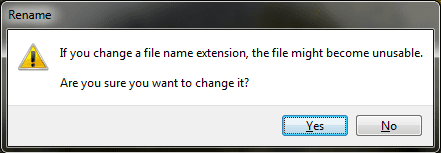
Every time I change the file extension of something I get an annoying pop up warning me that it might render the file unusable. I know this. If I change the extension and it becomes unusable I'll just change it back, big deal. Is it possible to stop this warning from displaying every time I change the extension of a file? I am guessing there is probably a registry value I need to change, I just don't know what it is.
 

Attachments
  • fileextension.png
    fileextension.png
    6.7 KB · Views: 8

My Computer

Computer Manufacturer/Model Number
Toshiba Satellite L305-S5919
OS
Windows 7 Home Premium 64 bit/ Ubuntu 9.10 32 bit
CPU
Intel® Celeron® Processor 585 2.16 GHz
Memory
2GB PC6400 DDR2 800MHz SDRAM
Monitor(s) Displays
WXGA with TruBrite® Technology, 15.4" widescreen
Screen Resolution
Supports 720p content, 1280x800
Hard Drives
160GB HDD (5400rpm) WD
PSU
AC power: 75W (19V 3.95A) Auto-sensing, 100-240V / 50-6
Keyboard
86 key US keyboard
Mouse
TouchPad™ pointing device and Logitech USB mouse
Internet Speed
Satellite internet, 125kb/s

My Computer

Computer Manufacturer/Model Number
HP Pavilion dm3 (netbook) *** 27" iMac (Dual-Boot)
OS
Windows 7 Home Premium (64-bit) *** Windows XP SP3 (32-bit), OSX 10.6
CPU
AMD Athlon Neo X2 1.6GHz *** Intel Core i7 Quad Core 2.8GHz
Memory
4.00 GB *** 4.00 GB
Graphics Card(s)
ATI Radeon HD 3200, 384MB *** ATI Radeon HD 4850, 1GB
Sound Card
ATI High Definition Audio *** ATI High Definition Audio
Monitor(s) Displays
LG Flatron W2053TX
Screen Resolution
1600 x 900 (monitor), 1266 x 768 (laptop) *** 2560 x 1440
Hard Drives
300 GB SATA (internal), 500 GB HP SimpleSave (external) *** 1 TB SATA (internal), 160 GB LaCie (external)
Mouse
Logitech Cordless Optical Mouse for Notebooks
Internet Speed
Broadband
Thanks for the quick response! That wasn't the elegant solution I was looking for but it will work. It's a shame that window can't just be disabled all together :(.
 

My Computer

Computer Manufacturer/Model Number
Toshiba Satellite L305-S5919
OS
Windows 7 Home Premium 64 bit/ Ubuntu 9.10 32 bit
CPU
Intel® Celeron® Processor 585 2.16 GHz
Memory
2GB PC6400 DDR2 800MHz SDRAM
Monitor(s) Displays
WXGA with TruBrite® Technology, 15.4" widescreen
Screen Resolution
Supports 720p content, 1280x800
Hard Drives
160GB HDD (5400rpm) WD
PSU
AC power: 75W (19V 3.95A) Auto-sensing, 100-240V / 50-6
Keyboard
86 key US keyboard
Mouse
TouchPad™ pointing device and Logitech USB mouse
Internet Speed
Satellite internet, 125kb/s
Yeah it is a shame, but on the other hand I can see why they don't make it easy. If you forget what the extension used to be and need to change it back, there's no way to get there other than a System Restore... or scouring the internets for a solution :) Glad to help though!

Walker
Windows Outreach Team
 

My Computer

Computer Manufacturer/Model Number
HP Pavilion dm3 (netbook) *** 27" iMac (Dual-Boot)
OS
Windows 7 Home Premium (64-bit) *** Windows XP SP3 (32-bit), OSX 10.6
CPU
AMD Athlon Neo X2 1.6GHz *** Intel Core i7 Quad Core 2.8GHz
Memory
4.00 GB *** 4.00 GB
Graphics Card(s)
ATI Radeon HD 3200, 384MB *** ATI Radeon HD 4850, 1GB
Sound Card
ATI High Definition Audio *** ATI High Definition Audio
Monitor(s) Displays
LG Flatron W2053TX
Screen Resolution
1600 x 900 (monitor), 1266 x 768 (laptop) *** 2560 x 1440
Hard Drives
300 GB SATA (internal), 500 GB HP SimpleSave (external) *** 1 TB SATA (internal), 160 GB LaCie (external)
Mouse
Logitech Cordless Optical Mouse for Notebooks
Internet Speed
Broadband
Back
Top