Solved Waterfox / Outlook 2003 - clicking a mailto link opens up many IE

ChrisPbass

New member
Member
VIP
Local time
9:53 AM
Messages
317
Location
Fairfax, VA
When I click a mailto link, instead of Outlook 2003 opening up an email w/the address already on it I get a 2nd instance of outlook and I'm the default mail client is not installed properly then IE 11 opens up new windows until I manage to shut them down.

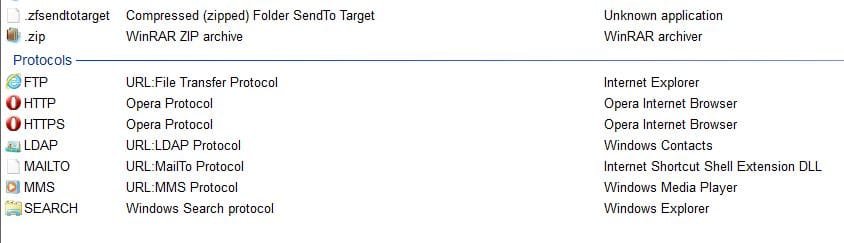
Default mail program is Outlook 2003 in control panel?

Ideas?

I rarely use IE. WAterfox is the default.
 

My Computer My Computer

At a glance

7 Ultimate 64 bit2x4Gb DDR3-SDRAMt750
Computer type
PC/Desktop
Computer Manufacturer/Model Number
need to update!
OS
7 Ultimate 64 bit
Memory
2x4Gb DDR3-SDRAM
Graphics Card(s)
t750
Monitor(s) Displays
AOC 24" yee haw and Dell 19"
Screen Resolution
1680 x 1050 @60hz
Hard Drives
Samsung 840EVO
Internet Speed
100/20
Antivirus
MSE
Browser
Firefox
Hi,
Is water... you default browser ?
 

My Computer My Computer

At a glance

Win-7-Pro64bit 7-H-Prem-64biti7-5930K 2nd i9-9940x both water blocked VRM'...Trident-z 3200C14 2nd Trident-z 3600C16EVGA 1080ti ftw3 2nd Titan Xp both water blocked
Computer type
PC/Desktop
Computer Manufacturer/Model Number
Custom assembled by me :}
OS
Win-7-Pro64bit 7-H-Prem-64bit
CPU
i7-5930K 2nd i9-9940x both water blocked VRM's too
Motherboard
ASUS SABERTOOTH X99 2nd ASUS x299 Apex
Memory
Trident-z 3200C14 2nd Trident-z 3600C16
Graphics Card(s)
EVGA 1080ti ftw3 2nd Titan Xp both water blocked
Sound Card
Built-in Realtek
Monitor(s) Displays
1-AOC G2460PG 24"G-Sync 144Hz/ 2nd 1-ASUS VG248QE 24" 144Hz
Screen Resolution
1920 x 1080 144Hz
Hard Drives
2-Samsung M.2 Evo & Evo Plus
2-Samsung 850 EVO 500GB SSD's/ 3-2.5 W.D. Black 1tb-&3-1tb/3-3.5 WD Black 1tb hdd's
PSU
EVGA SuperNOVA 1000-P2 2nd 1200-P2
Case
2-Corsair Obsidian Series 450D Black ATX Mid Tower
Cooling
Custom water loops
Keyboard
Logitech G710+/ 2nd Logitech G910
Mouse
2-RedDragon M901 Perdition 16400 dpi Gaming mouse = wired
Internet Speed
Comcast Ping 19ms 89.31mbps download speed 6.12mbps upload
Antivirus
Malwarebytes Pro/ Superantispyware Pro
Browser
FireFox & Pale moon
Other Info
2nd ASUS X299 Apex/Intel i9-9940x with Custom water loop/7H-Prem-x64/Corsair 450D case/Ram Trident-z 3600C16 4x8gb / Samsung970Evo plus 500gb SSD/Dual ssd EZ swap evo/PSU EVGA SuperNova 1200w-P2 80+Platinum/GPU Titan Xp /8-ML-140 on push-pull on 2-280GTX rads
Yes, Wfox is default.
 

My Computer My Computer

At a glance

7 Ultimate 64 bit2x4Gb DDR3-SDRAMt750
Computer type
PC/Desktop
Computer Manufacturer/Model Number
need to update!
OS
7 Ultimate 64 bit
Memory
2x4Gb DDR3-SDRAM
Graphics Card(s)
t750
Monitor(s) Displays
AOC 24" yee haw and Dell 19"
Screen Resolution
1680 x 1050 @60hz
Hard Drives
Samsung 840EVO
Internet Speed
100/20
Antivirus
MSE
Browser
Firefox

My Computer My Computer

At a glance

Win-7-Pro64bit 7-H-Prem-64biti7-5930K 2nd i9-9940x both water blocked VRM'...Trident-z 3200C14 2nd Trident-z 3600C16EVGA 1080ti ftw3 2nd Titan Xp both water blocked
Computer type
PC/Desktop
Computer Manufacturer/Model Number
Custom assembled by me :}
OS
Win-7-Pro64bit 7-H-Prem-64bit
CPU
i7-5930K 2nd i9-9940x both water blocked VRM's too
Motherboard
ASUS SABERTOOTH X99 2nd ASUS x299 Apex
Memory
Trident-z 3200C14 2nd Trident-z 3600C16
Graphics Card(s)
EVGA 1080ti ftw3 2nd Titan Xp both water blocked
Sound Card
Built-in Realtek
Monitor(s) Displays
1-AOC G2460PG 24"G-Sync 144Hz/ 2nd 1-ASUS VG248QE 24" 144Hz
Screen Resolution
1920 x 1080 144Hz
Hard Drives
2-Samsung M.2 Evo & Evo Plus
2-Samsung 850 EVO 500GB SSD's/ 3-2.5 W.D. Black 1tb-&3-1tb/3-3.5 WD Black 1tb hdd's
PSU
EVGA SuperNOVA 1000-P2 2nd 1200-P2
Case
2-Corsair Obsidian Series 450D Black ATX Mid Tower
Cooling
Custom water loops
Keyboard
Logitech G710+/ 2nd Logitech G910
Mouse
2-RedDragon M901 Perdition 16400 dpi Gaming mouse = wired
Internet Speed
Comcast Ping 19ms 89.31mbps download speed 6.12mbps upload
Antivirus
Malwarebytes Pro/ Superantispyware Pro
Browser
FireFox & Pale moon
Other Info
2nd ASUS X299 Apex/Intel i9-9940x with Custom water loop/7H-Prem-x64/Corsair 450D case/Ram Trident-z 3600C16 4x8gb / Samsung970Evo plus 500gb SSD/Dual ssd EZ swap evo/PSU EVGA SuperNova 1200w-P2 80+Platinum/GPU Titan Xp /8-ML-140 on push-pull on 2-280GTX rads
The behavior w/IE is slightly different.

I don't get another instance of outlook.exe. I don't get the 'default mail client' message and IE closes and opens a new IE at the home page.

I have done the default program thing but I will look through that link again to see if I missed something.

thanks for your help!

edit: program associates all seem to be set correctly. My limited knowledge of registry says that outlook is supposed to open....however I'm not expert.

There are a couple tutorials but my registry entries don't seem to match.
 
Last edited:

My Computer My Computer

At a glance

7 Ultimate 64 bit2x4Gb DDR3-SDRAMt750
Computer type
PC/Desktop
Computer Manufacturer/Model Number
need to update!
OS
7 Ultimate 64 bit
Memory
2x4Gb DDR3-SDRAM
Graphics Card(s)
t750
Monitor(s) Displays
AOC 24" yee haw and Dell 19"
Screen Resolution
1680 x 1050 @60hz
Hard Drives
Samsung 840EVO
Internet Speed
100/20
Antivirus
MSE
Browser
Firefox
Hi,
Thanks for the update,
Did waterfox ever work properly ?
Have you tried to re-install waterfox to see if a default install will improve the issue ?
Have you make any other changes/ new software/ waterfox browser add-ons ....?
You might try to disable ie's browser add-ons
Open ie,
Use Gear symbol on the top right and Manage add-ons,
Go to the Accelerators section and disable all listed there,
Close and boot your machine and test or re-install waterfox at that point,
Cheers.
 

My Computer My Computer

At a glance

Win-7-Pro64bit 7-H-Prem-64biti7-5930K 2nd i9-9940x both water blocked VRM'...Trident-z 3200C14 2nd Trident-z 3600C16EVGA 1080ti ftw3 2nd Titan Xp both water blocked
Computer type
PC/Desktop
Computer Manufacturer/Model Number
Custom assembled by me :}
OS
Win-7-Pro64bit 7-H-Prem-64bit
CPU
i7-5930K 2nd i9-9940x both water blocked VRM's too
Motherboard
ASUS SABERTOOTH X99 2nd ASUS x299 Apex
Memory
Trident-z 3200C14 2nd Trident-z 3600C16
Graphics Card(s)
EVGA 1080ti ftw3 2nd Titan Xp both water blocked
Sound Card
Built-in Realtek
Monitor(s) Displays
1-AOC G2460PG 24"G-Sync 144Hz/ 2nd 1-ASUS VG248QE 24" 144Hz
Screen Resolution
1920 x 1080 144Hz
Hard Drives
2-Samsung M.2 Evo & Evo Plus
2-Samsung 850 EVO 500GB SSD's/ 3-2.5 W.D. Black 1tb-&3-1tb/3-3.5 WD Black 1tb hdd's
PSU
EVGA SuperNOVA 1000-P2 2nd 1200-P2
Case
2-Corsair Obsidian Series 450D Black ATX Mid Tower
Cooling
Custom water loops
Keyboard
Logitech G710+/ 2nd Logitech G910
Mouse
2-RedDragon M901 Perdition 16400 dpi Gaming mouse = wired
Internet Speed
Comcast Ping 19ms 89.31mbps download speed 6.12mbps upload
Antivirus
Malwarebytes Pro/ Superantispyware Pro
Browser
FireFox & Pale moon
Other Info
2nd ASUS X299 Apex/Intel i9-9940x with Custom water loop/7H-Prem-x64/Corsair 450D case/Ram Trident-z 3600C16 4x8gb / Samsung970Evo plus 500gb SSD/Dual ssd EZ swap evo/PSU EVGA SuperNova 1200w-P2 80+Platinum/GPU Titan Xp /8-ML-140 on push-pull on 2-280GTX rads

My Computer My Computer

At a glance

Windows 10 Home x64INTEL Core i5-750 Quad-Core 3.37GHzHyperX Fury Black Series 8GB (2 x 4GB) 1866MhzEVGA GeForce GTX 750 Superclocked 1GB 128-Bit...
Computer type
PC/Desktop
OS
Windows 10 Home x64
CPU
INTEL Core i5-750 Quad-Core 3.37GHz
Motherboard
ASUS P7P55D
Memory
HyperX Fury Black Series 8GB (2 x 4GB) 1866Mhz
Graphics Card(s)
EVGA GeForce GTX 750 Superclocked 1GB 128-Bit GDDR5
Monitor(s) Displays
LG 32MA68HY 32" IPS
Screen Resolution
1920 x 1080
Hard Drives
Samsung 840 Evo 120GB, SEAGATE 500GB Barracuda® 7200.12, SATA 3 Gb/s, 7200 RPM, 16MB cache
PSU
ANTEC TruePower New TP-550, 80 PLUS, 550W
Case
ANTEC Three Hundred Illusion
Cooling
COOLER MASTER Hyper 212 Plus, 4 x 120mm 1 x 140mm Noctua's
Internet Speed
85 + Mbps
Antivirus
Avast
Browser
Vivaldi
Hi,
Thanks for the update,
Did waterfox ever work properly ?
Have you tried to re-install waterfox to see if a default install will improve the issue ?
Have you make any other changes/ new software/ waterfox browser add-ons ....?
You might try to disable ie's browser add-ons
Open ie,
Use Gear symbol on the top right and Manage add-ons,
Go to the Accelerators section and disable all listed there,
Close and boot your machine and test or re-install waterfox at that point,
Cheers.

I've never had a problem w/Waterfox. If you mean a problem regarding the mailto links then yes...it's been going on for as long as I can remember.

FTR, disabling everything in IE creates the same behavior IN IE as well.
 

My Computer My Computer

At a glance

7 Ultimate 64 bit2x4Gb DDR3-SDRAMt750
Computer type
PC/Desktop
Computer Manufacturer/Model Number
need to update!
OS
7 Ultimate 64 bit
Memory
2x4Gb DDR3-SDRAM
Graphics Card(s)
t750
Monitor(s) Displays
AOC 24" yee haw and Dell 19"
Screen Resolution
1680 x 1050 @60hz
Hard Drives
Samsung 840EVO
Internet Speed
100/20
Antivirus
MSE
Browser
Firefox
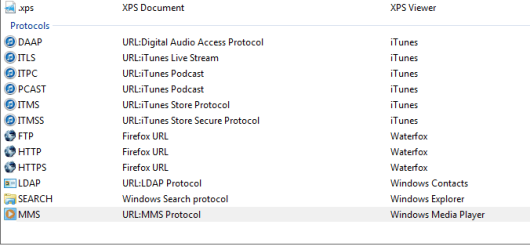
See what the association for the MAILTO protocol is:

http://www.sevenforums.com/tutorials/9154-default-programs-associate-file-type-protocol.html

Scroll down to the very bottom until you see the MAILTO protocol

View attachment 329496

Select MAILTO> Click on Change program button> Select Outlook 2003 from the list> Check Always use the selected program to handle this protocol> OK your way out

A Guy

I love dog nose pix!

Well...I don't appear to have a MAILTO under protocols or under regular file associations!
Coulda sworn I saw that somewhere but....

EDIT: the place I saw it was in WFox where it says to use MOutlook for Mailto links.
Options/Applications/Mailto 'use MS outlook'
 

Attachments

  • mailto.PNG
    mailto.PNG
    6.8 KB · Views: 9

My Computer My Computer

At a glance

7 Ultimate 64 bit2x4Gb DDR3-SDRAMt750
Computer type
PC/Desktop
Computer Manufacturer/Model Number
need to update!
OS
7 Ultimate 64 bit
Memory
2x4Gb DDR3-SDRAM
Graphics Card(s)
t750
Monitor(s) Displays
AOC 24" yee haw and Dell 19"
Screen Resolution
1680 x 1050 @60hz
Hard Drives
Samsung 840EVO
Internet Speed
100/20
Antivirus
MSE
Browser
Firefox
Let's see if you have the correct registry key

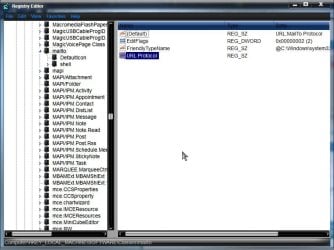
Start> In search box type regedit> Enter> Navigate to HKEY_LOCAL_MACHINE\Software\Classes\mailto> Confirm you have a key named URL Protocol on the right pane

URL Protocol.jpg

If it does not exist, and you are comfortable editing the registry, you can add it. Suggest making a backup just in case.

http://www.sevenforums.com/tutorials/4230-registry-backup-restore.html

HKEY_LOCAL_MACHINE\Software\Classes\mailto

Edit menu (Top left)> New> String Value> Type URL Protocol as the name of the new String Value> Exit the Registry Editor

See if the protocol is now listed.

A Guy
 

My Computer My Computer

At a glance

Windows 10 Home x64INTEL Core i5-750 Quad-Core 3.37GHzHyperX Fury Black Series 8GB (2 x 4GB) 1866MhzEVGA GeForce GTX 750 Superclocked 1GB 128-Bit...
Computer type
PC/Desktop
OS
Windows 10 Home x64
CPU
INTEL Core i5-750 Quad-Core 3.37GHz
Motherboard
ASUS P7P55D
Memory
HyperX Fury Black Series 8GB (2 x 4GB) 1866Mhz
Graphics Card(s)
EVGA GeForce GTX 750 Superclocked 1GB 128-Bit GDDR5
Monitor(s) Displays
LG 32MA68HY 32" IPS
Screen Resolution
1920 x 1080
Hard Drives
Samsung 840 Evo 120GB, SEAGATE 500GB Barracuda® 7200.12, SATA 3 Gb/s, 7200 RPM, 16MB cache
PSU
ANTEC TruePower New TP-550, 80 PLUS, 550W
Case
ANTEC Three Hundred Illusion
Cooling
COOLER MASTER Hyper 212 Plus, 4 x 120mm 1 x 140mm Noctua's
Internet Speed
85 + Mbps
Antivirus
Avast
Browser
Vivaldi
EDIT: I do not have a mailto key....if anything that needs to be created before the URL protocol is added.


re-edit. I added the new key Mailto and then added the string Url Protocol in the Mailto key.
 
Last edited:

My Computer My Computer

At a glance

7 Ultimate 64 bit2x4Gb DDR3-SDRAMt750
Computer type
PC/Desktop
Computer Manufacturer/Model Number
need to update!
OS
7 Ultimate 64 bit
Memory
2x4Gb DDR3-SDRAM
Graphics Card(s)
t750
Monitor(s) Displays
AOC 24" yee haw and Dell 19"
Screen Resolution
1680 x 1050 @60hz
Hard Drives
Samsung 840EVO
Internet Speed
100/20
Antivirus
MSE
Browser
Firefox
Being impatient....
I went to this thread and downloaded a registry edit
http://www.sevenforums.com/browsers-mail/214845-mailto-protocol-missing.html
I backed up and did the merge.
The mailto is NOW in the associate a file app in control panel.

and it works! woo hoo.

Thank you for your help. I had a feeling that it had something to do w/the registry but could not find it. You posts helped me.
 

My Computer My Computer

At a glance

7 Ultimate 64 bit2x4Gb DDR3-SDRAMt750
Computer type
PC/Desktop
Computer Manufacturer/Model Number
need to update!
OS
7 Ultimate 64 bit
Memory
2x4Gb DDR3-SDRAM
Graphics Card(s)
t750
Monitor(s) Displays
AOC 24" yee haw and Dell 19"
Screen Resolution
1680 x 1050 @60hz
Hard Drives
Samsung 840EVO
Internet Speed
100/20
Antivirus
MSE
Browser
Firefox
Ahhh, yes, Shawn can do anything ;) Glad you got it sorted :thumbsup:

A Guy
 

My Computer My Computer

At a glance

Windows 10 Home x64INTEL Core i5-750 Quad-Core 3.37GHzHyperX Fury Black Series 8GB (2 x 4GB) 1866MhzEVGA GeForce GTX 750 Superclocked 1GB 128-Bit...
Computer type
PC/Desktop
OS
Windows 10 Home x64
CPU
INTEL Core i5-750 Quad-Core 3.37GHz
Motherboard
ASUS P7P55D
Memory
HyperX Fury Black Series 8GB (2 x 4GB) 1866Mhz
Graphics Card(s)
EVGA GeForce GTX 750 Superclocked 1GB 128-Bit GDDR5
Monitor(s) Displays
LG 32MA68HY 32" IPS
Screen Resolution
1920 x 1080
Hard Drives
Samsung 840 Evo 120GB, SEAGATE 500GB Barracuda® 7200.12, SATA 3 Gb/s, 7200 RPM, 16MB cache
PSU
ANTEC TruePower New TP-550, 80 PLUS, 550W
Case
ANTEC Three Hundred Illusion
Cooling
COOLER MASTER Hyper 212 Plus, 4 x 120mm 1 x 140mm Noctua's
Internet Speed
85 + Mbps
Antivirus
Avast
Browser
Vivaldi
Back
Top