WD 1TB Ext HDD will not initialize - Incorrect Function

Murd3rd

New member
Power User
Local time
3:44 PM
Messages
95
I recently acquired a WD 1 TB hard drive P/N WD1000H1U-00 from a friend because he can no longer get it to work, and bought a new one, he says if i can fix it i can have it...

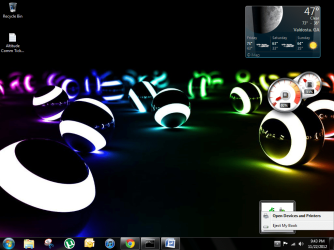
the drive shows a USB icon in the lower right hand corner with only the option to eject(last attached pic)...drive does not show up under my computer, other drives do...(internal drive and another USB mass storage device.)

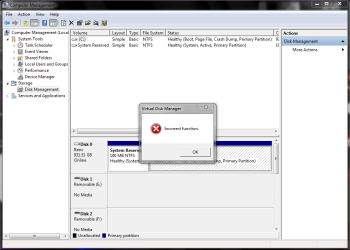
However, the drive does show up under the device management (first attached pic)

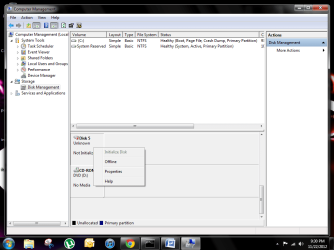
Under the disk management screen it pops up telling me i need to initialize the drive (second attached pic)

I then click ok on the correct option (for under 2TB drive) and i get this error/failure (third attached pic)

after that closes i can right click the drive in the same screen and the initialize is now grayed out and i cant click on it (fourth attached pic)

So here's what i have done...

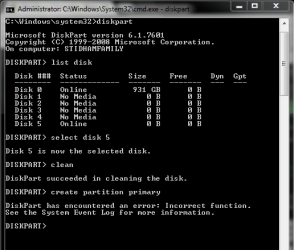
Tried reformatting it in command prompt...(fifth attached pic)...cant create partition primary...im assuming because the drive is not initialized

what is my next step? data being lost is no biggie, BUT if it can be saved easily, my friend says there are a few pics he would like to get off of it, but if not, he is not worried about it.
 

Attachments
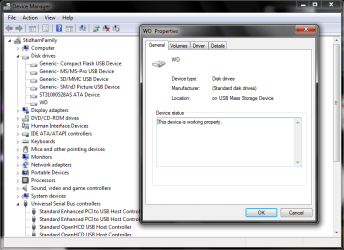
  • Device manager Snip.PNG
    Device manager Snip.PNG
    33 KB · Views: 28
  • option to initialize.PNG
    option to initialize.PNG
    37.3 KB · Views: 35
  • incorrect function.PNG
    incorrect function.PNG
    32.4 KB · Views: 46
  • greyed out.png
    greyed out.png
    41.6 KB · Views: 35
  • create partition.PNG
    create partition.PNG
    11.8 KB · Views: 69
  • USB icon.png
    USB icon.png
    165.9 KB · Views: 23

My Computer

Computer type
PC/Desktop
Computer Manufacturer/Model Number
Asus Essentio Desktop PC CM1630
OS
Windows 7 Ultimate x64
CPU
AMD Athlon II X2 220 Regor 45nm Technology
Motherboard
ASUSTeK Computer INC. CM1630 (AM3)
Memory
4.00 GB Dual-Channel DDR3 @ 669MHz (9-9-9-24)
Graphics Card(s)
Generic Non-PnP Monitor (1024x768@60Hz) ATI Radeon 3000 Grap
Hard Drives
977GB Seagate ST31000528AS ATA Device (SATA)
Case
Asus
Cooling
Asus
Keyboard
Asus (came w/tower)
Mouse
Asus (came w/tower)
Other Info
Also have a Toshiba Satellite laptop running W7 Ult x64
Try to reinitialise the WD external HDD to the factory condition.

Download the Windows executable (requires no installation) version HDDGURU: HDD LLF Low Level Format Tool , run it with your ext. hard drive plugged in, select it and do the low level format. This may take a few hours. ( I see that you have not tried diskpart - clean all. This software does the samething - writing zeroes to each and every sector and reinitialising the hard disk drive. One advantage here when compared to diskpart-clean all is that you get a visual representation of the progress and you will not get impatient.)

If it enconters errors, that will appear in the dialog box. In that case you have to fall back upon the drive manufacturer's test/diagnose/repair utility and check the drive.

If it successfully completes the LLF, you have to carry out a regular format.
 

My Computer

OS
Windows 7 Home Premium 32 bit
Try to reinitialise the WD external HDD to the factory condition.

Download the Windows executable (requires no installation) version HDDGURU: HDD LLF Low Level Format Tool , run it with your ext. hard drive plugged in, select it and do the low level format. This may take a few hours. ( I see that you have not tried diskpart - clean all. This software does the samething - writing zeroes to each and every sector and reinitialising the hard disk drive. One advantage here when compared to diskpart-clean all is that you get a visual representation of the progress and you will not get impatient.)

If it enconters errors, that will appear in the dialog box. In that case you have to fall back upon the drive manufacturer's test/diagnose/repair utility and check the drive.

If it successfully completes the LLF, you have to carry out a regular format.


I downloaded the .exe file and ran it and the only drive that it can see is my internal drive.

The External drive is still showing up in disk management and device manager as well.


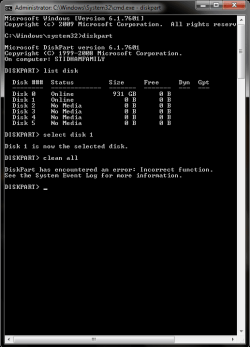
Edit: I went into command prompt and tried:

DISKPART> list disk
DISKPART> select disk 1
DISKPART> clean all

and this is what happens...
 

Attachments

  • clean all.PNG
    clean all.PNG
    12.5 KB · Views: 60

My Computer

Computer type
PC/Desktop
Computer Manufacturer/Model Number
Asus Essentio Desktop PC CM1630
OS
Windows 7 Ultimate x64
CPU
AMD Athlon II X2 220 Regor 45nm Technology
Motherboard
ASUSTeK Computer INC. CM1630 (AM3)
Memory
4.00 GB Dual-Channel DDR3 @ 669MHz (9-9-9-24)
Graphics Card(s)
Generic Non-PnP Monitor (1024x768@60Hz) ATI Radeon 3000 Grap
Hard Drives
977GB Seagate ST31000528AS ATA Device (SATA)
Case
Asus
Cooling
Asus
Keyboard
Asus (came w/tower)
Mouse
Asus (came w/tower)
Other Info
Also have a Toshiba Satellite laptop running W7 Ult x64
I would say that this disk has a hardware problem which you can probably not solve with software solutions.
 

My Computer

Computer Manufacturer/Model Number
HP, Dell, Gateway, Toshiba - 4 laptops and 2 desktops
OS
Vista, Windows7, Mint Mate, Zorin, Windows 8
CPU
from 1.6GHz Duo to i7
Monitor(s) Displays
2x HP w2207
Hard Drives
5x HDD, 7x SSD, 12x Externals
Keyboard
with trackball - no mices
Mouse
Trackball mice
Internet Speed
DSL 6000
I would say that this disk has a hardware problem which you can probably not solve with software solutions.

yes i am thinking that you are right...sadly

i was just hoping that there was some way to rescue it...afterall it would have been free if i could fix it...and who couldnt use a free TB?!?! :geek:


Edit: But i am open to try anything to fix this thing...all i have is time and the ability to learn...
 

My Computer

Computer type
PC/Desktop
Computer Manufacturer/Model Number
Asus Essentio Desktop PC CM1630
OS
Windows 7 Ultimate x64
CPU
AMD Athlon II X2 220 Regor 45nm Technology
Motherboard
ASUSTeK Computer INC. CM1630 (AM3)
Memory
4.00 GB Dual-Channel DDR3 @ 669MHz (9-9-9-24)
Graphics Card(s)
Generic Non-PnP Monitor (1024x768@60Hz) ATI Radeon 3000 Grap
Hard Drives
977GB Seagate ST31000528AS ATA Device (SATA)
Case
Asus
Cooling
Asus
Keyboard
Asus (came w/tower)
Mouse
Asus (came w/tower)
Other Info
Also have a Toshiba Satellite laptop running W7 Ult x64
Is it a bare bone disk or an enclosed disk that attaches via USB ??
 

My Computer

Computer Manufacturer/Model Number
HP, Dell, Gateway, Toshiba - 4 laptops and 2 desktops
OS
Vista, Windows7, Mint Mate, Zorin, Windows 8
CPU
from 1.6GHz Duo to i7
Monitor(s) Displays
2x HP w2207
Hard Drives
5x HDD, 7x SSD, 12x Externals
Keyboard
with trackball - no mices
Mouse
Trackball mice
Internet Speed
DSL 6000
Is it a bare bone disk or an enclosed disk that attaches via USB ??

it is a WD 1 TB external hard drive that connects via USB

but in my attempts at troubleshooting i have disassembled it and it is a sata drive, i even disconnected my internal hard drive of my desktop and put this hard drive in and booted into a windows install disc, to see if the wizard could format the drive, but it didnt even come up in the drive options
 

My Computer

Computer type
PC/Desktop
Computer Manufacturer/Model Number
Asus Essentio Desktop PC CM1630
OS
Windows 7 Ultimate x64
CPU
AMD Athlon II X2 220 Regor 45nm Technology
Motherboard
ASUSTeK Computer INC. CM1630 (AM3)
Memory
4.00 GB Dual-Channel DDR3 @ 669MHz (9-9-9-24)
Graphics Card(s)
Generic Non-PnP Monitor (1024x768@60Hz) ATI Radeon 3000 Grap
Hard Drives
977GB Seagate ST31000528AS ATA Device (SATA)
Case
Asus
Cooling
Asus
Keyboard
Asus (came w/tower)
Mouse
Asus (came w/tower)
Other Info
Also have a Toshiba Satellite laptop running W7 Ult x64
Understand. That would have been my suggestion too. I guess you have come to the end of the line.
 

My Computer

Computer Manufacturer/Model Number
HP, Dell, Gateway, Toshiba - 4 laptops and 2 desktops
OS
Vista, Windows7, Mint Mate, Zorin, Windows 8
CPU
from 1.6GHz Duo to i7
Monitor(s) Displays
2x HP w2207
Hard Drives
5x HDD, 7x SSD, 12x Externals
Keyboard
with trackball - no mices
Mouse
Trackball mice
Internet Speed
DSL 6000
Understand. That would have been my suggestion too. I guess you have come to the end of the line.


Well i suppose you are right...:cry:
 

My Computer

Computer type
PC/Desktop
Computer Manufacturer/Model Number
Asus Essentio Desktop PC CM1630
OS
Windows 7 Ultimate x64
CPU
AMD Athlon II X2 220 Regor 45nm Technology
Motherboard
ASUSTeK Computer INC. CM1630 (AM3)
Memory
4.00 GB Dual-Channel DDR3 @ 669MHz (9-9-9-24)
Graphics Card(s)
Generic Non-PnP Monitor (1024x768@60Hz) ATI Radeon 3000 Grap
Hard Drives
977GB Seagate ST31000528AS ATA Device (SATA)
Case
Asus
Cooling
Asus
Keyboard
Asus (came w/tower)
Mouse
Asus (came w/tower)
Other Info
Also have a Toshiba Satellite laptop running W7 Ult x64
Back
Top