
WD- 2TB Caviar Green won't initialize

sjmdnightstalke

New member
Local time
2:42 PM
Messages
8
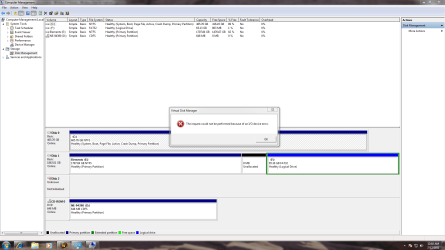
Ok so first time posting here but i'm very hopeful for assistance in this. I have a 2tbWD Caviar Green hard drive SATA connection in a brand new system new install of windows etc. Also have a 500g WD hard drive with windows on it that works perfectly. So the problem is the bios sees the 2TB HD device manager has it listed as fine and it shows up in Disk Management however, when i try to initialize it i get "The request could not be performed because of an I/O device error." I have tried multiple ports and multiple cables ensuring that they are connected tight. I have ensured that my motherboard drivers are fully updated etc. I have tried running the diagnostic tools from WD and it passes everything only because the program reads it as 0.00 size due to the fact its not initialized. It also makes an intersting kind of beeping sound when i turn the system on bare with me but it goes (don dooon doon) for a bit and stops hard to describe it but whatever. I find it hard to believe that the drive is bad considering its read by windows and bios as fine just cannot initialize it. Any assistance is greatly appreciated due to the fact that it is driving me insane.

Thank you
 

My Computer

Computer Manufacturer/Model Number
EVGA custom
OS
Windows 7 home premium 64 bit
CPU
Itel Core I7 2600
Motherboard
EVGA P67
Memory
16ghz DDR3
Graphics Card(s)
GF 550TI
Sound Card
onboard
Monitor(s) Displays
1
Hard Drives
500 WD works great
2TB WDC- Caviar Green - problem child
Stalke,
Post the output of Disk Management please. I expect the solution to be simple but need info first.


HOW TO POST A SNAPSHOT OF DISK MANAGEMENT DISPLAY

Run disk management:
WIN | type DISKMGMT.MSC | ENTER
WIN is the key with the wavy flag.

Maximize the output of Disk Management:
ALT-Spacebar key combo (this pops up a menu) |
X key (selects Maximize) |
Drag the field separators (such as between Status and Capacity) to show entire field. This is very important, otherwise, needed info is not visible.

Make a snapshot:
WIN | type SNIPPING | ENTER
Click the New button.
Drag the cursor around the area you want to snip.
File | Save as | select save location and name | Save button

Post the snapshot:
· Click on the paperclip icon in that row of icons at the top of the message box.
· Click on a BROWSE button. There are 5 of them.
· Navigate to the folder containing the snapshot.
· Click on the snapshot.
· Click on the OPEN button.
· Click on the UPLOAD button adjacent to the 5th BROWSE button.
· Close the MANAGE ATTACHMENTS window.
· Position the cursor at the spot in the message where you want the
snapshot to appear.
· Click on the PaperClip again.
· Click on the file which you want to insert
· Attach code will be inserted into your message.
 

My Computer

Computer Manufacturer/Model Number
Toshiba Satellite S875D-S7239 laptop
OS
MS Windows 7 Ultimate SP1 64-bit
CPU
AMD A10-4600M
Motherboard
AMD Pumori (Socket FT1)
Memory
6.00 GB Dual-Channel DDR3 @ 798MHz (11-11-12-28)
Graphics Card(s)
AMD Radeon HD 7660G
Sound Card
High Definition Audio Device
Monitor(s) Displays
Generic PnP Monitor (1600x900@60Hz)
Screen Resolution
1600x900@60Hz
Hard Drives
SSD 119GB Corsair CSSD-V128GB2 ATA Device
Keyboard
Standard PS/2 Keyboard
Mouse
HP Wireless Optical Mobile Mouse Model FHA-3410
Internet Speed
What the local pub, local coffee shop offers.
Other Info
Optical Drive:MATSHITA BD-CMB UJ160B ATA Device


Also have an Asus ha1002xp netbook with Win 7 Ultimate installed.
Ok I have uploaded the requested information if you need anything else please let me know i'll be up all night working on this anyways.

Thank you,
 

Attachments

  • devicemngr.PNG
    devicemngr.PNG
    56.6 KB · Views: 238
  • dskmng.PNG
    dskmng.PNG
    66.2 KB · Views: 326
  • error.PNG
    error.PNG
    68.1 KB · Views: 421

My Computer

Computer Manufacturer/Model Number
EVGA custom
OS
Windows 7 home premium 64 bit
CPU
Itel Core I7 2600
Motherboard
EVGA P67
Memory
16ghz DDR3
Graphics Card(s)
GF 550TI
Sound Card
onboard
Monitor(s) Displays
1
Hard Drives
500 WD works great
2TB WDC- Caviar Green - problem child
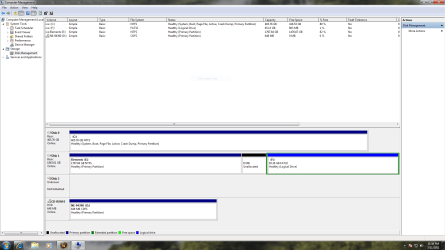
The 2 TB drive--do you have any data there that you want to save?
 

My Computer

Computer Manufacturer/Model Number
Toshiba Satellite S875D-S7239 laptop
OS
MS Windows 7 Ultimate SP1 64-bit
CPU
AMD A10-4600M
Motherboard
AMD Pumori (Socket FT1)
Memory
6.00 GB Dual-Channel DDR3 @ 798MHz (11-11-12-28)
Graphics Card(s)
AMD Radeon HD 7660G
Sound Card
High Definition Audio Device
Monitor(s) Displays
Generic PnP Monitor (1600x900@60Hz)
Screen Resolution
1600x900@60Hz
Hard Drives
SSD 119GB Corsair CSSD-V128GB2 ATA Device
Keyboard
Standard PS/2 Keyboard
Mouse
HP Wireless Optical Mobile Mouse Model FHA-3410
Internet Speed
What the local pub, local coffee shop offers.
Other Info
Optical Drive:MATSHITA BD-CMB UJ160B ATA Device


Also have an Asus ha1002xp netbook with Win 7 Ultimate installed.
not at all its a brand new drive lol. Its the drive that says "not initialized" the other one with 1.7tb free is an external drive.
 

My Computer

Computer Manufacturer/Model Number
EVGA custom
OS
Windows 7 home premium 64 bit
CPU
Itel Core I7 2600
Motherboard
EVGA P67
Memory
16ghz DDR3
Graphics Card(s)
GF 550TI
Sound Card
onboard
Monitor(s) Displays
1
Hard Drives
500 WD works great
2TB WDC- Caviar Green - problem child
does your bios see the drive? Yes or no.
 

My Computer

Computer Manufacturer/Model Number
Toshiba Satellite S875D-S7239 laptop
OS
MS Windows 7 Ultimate SP1 64-bit
CPU
AMD A10-4600M
Motherboard
AMD Pumori (Socket FT1)
Memory
6.00 GB Dual-Channel DDR3 @ 798MHz (11-11-12-28)
Graphics Card(s)
AMD Radeon HD 7660G
Sound Card
High Definition Audio Device
Monitor(s) Displays
Generic PnP Monitor (1600x900@60Hz)
Screen Resolution
1600x900@60Hz
Hard Drives
SSD 119GB Corsair CSSD-V128GB2 ATA Device
Keyboard
Standard PS/2 Keyboard
Mouse
HP Wireless Optical Mobile Mouse Model FHA-3410
Internet Speed
What the local pub, local coffee shop offers.
Other Info
Optical Drive:MATSHITA BD-CMB UJ160B ATA Device


Also have an Asus ha1002xp netbook with Win 7 Ultimate installed.
Yes bios see's the drive as does windows device mnger, Well let me elaborate on that i can see it in CMOSS but if i try to get to it using cmd. i am unable to because it does not have a drive letter.
 

My Computer

Computer Manufacturer/Model Number
EVGA custom
OS
Windows 7 home premium 64 bit
CPU
Itel Core I7 2600
Motherboard
EVGA P67
Memory
16ghz DDR3
Graphics Card(s)
GF 550TI
Sound Card
onboard
Monitor(s) Displays
1
Hard Drives
500 WD works great
2TB WDC- Caviar Green - problem child
Try an XP or VISTA disk if you have one, preferably XP, to partition the drive.
Go through the install process until you get to the partition screen.
Partition the drive as one partition, then exit.
Restart Windows 7.

I doubt that you won't be able to restart 7, but if you cannot, insert your Windows 7 disk and use startup repair.
http://www.sevenforums.com/tutorials/681-startup-repair.html
 

My Computer

Computer type
PC/Desktop
Computer Manufacturer/Model Number
Custom Build
OS
Windows 7 Home Premium 64 bit
CPU
Intel Core i7-4790
Motherboard
GA-Z87X-D3H
Memory
G.SKILL 8GB (2 x 4GB) DDR3 F3-10666CL9D-8GBNT
Graphics Card(s)
AMD Radeon R7 250
Sound Card
Realtek ALC892
Monitor(s) Displays
Samsung UN32EH5000, Dell 1703FPT
Screen Resolution
1920 x 1080, 1280 x 1024
Hard Drives
WD5003AZEX
WD10EZEX
Samsung HD103SJ
Samsung 128 GB 840 PRO
PSU
SeaSonic M12II SS-500GM
Case
Fractal Design Define R4
Cooling
Zalman CNPS9900ALED
Keyboard
Logitech K800
Mouse
Logitech M705
Internet Speed
16 Mbps
Antivirus
Avast
Browser
Firefox
Other Info
Bose Companion 2 Multimedia Speakers
the problem with that is the installation does not recognize the drive for some unknown reason lol.
 

My Computer

Computer Manufacturer/Model Number
EVGA custom
OS
Windows 7 home premium 64 bit
CPU
Itel Core I7 2600
Motherboard
EVGA P67
Memory
16ghz DDR3
Graphics Card(s)
GF 550TI
Sound Card
onboard
Monitor(s) Displays
1
Hard Drives
500 WD works great
2TB WDC- Caviar Green - problem child
I honestly am starting to think that I just had bad luck on the draw and got a bum drive but the fact that it shows up in device manager and disk management leads me to believe otherwise.
 

My Computer

Computer Manufacturer/Model Number
EVGA custom
OS
Windows 7 home premium 64 bit
CPU
Itel Core I7 2600
Motherboard
EVGA P67
Memory
16ghz DDR3
Graphics Card(s)
GF 550TI
Sound Card
onboard
Monitor(s) Displays
1
Hard Drives
500 WD works great
2TB WDC- Caviar Green - problem child
stalker,
That's ok.

Let's use DiskPart.

DiskPart should find your drive and allow you to set it up.

With diskpart, you will
list disk to get a list of the disks found.

Select the number of the disk that is troublesome.

use the Detail Disk command to make 100% sure you have the correct disk.

Then use Create Partition Primary which will create one 2 TB partition.

Now that is much too much for practical purposes, but later using Disk Management, you will shrink the partition anc create more PRIMARY prartions there. To avoid many problems, I recommend never using logical partitions unless such is an absolute necessity.

You will also declare the partition as Active, just in case later you want to use the drive for other purposes.

You can use the ASSIGN command to give a drive letter to the partition you created. This isn't needed but can be convenient.

Now let's see what canned write-ups I have for you.


VIEW DRIVE LETTERS USING DISKPART
Type these commands and follow each by hitting the ENTER key.

DISKPART starts the DiskPart program
LIST VOLUME shows drive letter assignment
EXIT exit the DiskPart program


[FONT=&quot]WIPE A DISK CLEAN[/FONT]

· type DiskPart, Enter key
· type List disk, Enter key
note the numeral of the disk you want to clean
for example purposes, I’ll be using the numeral 2
· type Select disk 2, Enter key
· type Detail disk, Enter key
this info will let you know if you selected correctly
· type Clean ALL, Enter key
your entire disk is being overwritten with zeros.
This can take a considerable amount of time
· type EXIT, Enter key (only after Clean is finished)
· type EXIT, Enter key (this gets you back where you were)


&&&&&&&&&&&&&&&&&&&&&&&&&&&&&&&&&&&&&&&&&&&&
In your case, I don't recommend Clean All, simply use Clean.

Clean All will take forever on a 2tb drive.

**************************************************

Ok. I didn't find the file I wanted. so here goes.


Command Prompt - Elevated command prompt


Elevated command prompt = Run CMD.EXE as administrator
WIN | type CMD.EXE (do not hit Enter key) |
In the Programs list, Right-Click on CMD.EXE |
Click on Run as administrator | YES button

OR for keyboard fans:
WIN | type CMD.EXE (do not hit Enter key) |
CTRL + SHIFT + ENTER
key combo | ALT + y

WIN is the key with the Microsoft flag on top.


Now that you know how to run cmd as an adminisrator,

run cmd as admin
type DISkpart which runs the diskpart program
LIST DISK to list disks.
SELECT DISK to select your 2 tb disk
DETAIL DISK to make sure you have the 2tb sisk
CLEAN to put zeros in boot area
CREATE PARTITION PRIMARY to create you monster partition
FORMAT FS=NTFS QUICK to format partition
ACTIVE so that could some day support a boot loader
ASSIGN Z you put the drive letter you want
EXIT to exit from diskpart
EXIT to exit the command shell


Now you go to disk management, shrink the partition, create more partitions.

You will have less problems if you keep partitions at or preferrably under I GB.
 

My Computer

Computer Manufacturer/Model Number
Toshiba Satellite S875D-S7239 laptop
OS
MS Windows 7 Ultimate SP1 64-bit
CPU
AMD A10-4600M
Motherboard
AMD Pumori (Socket FT1)
Memory
6.00 GB Dual-Channel DDR3 @ 798MHz (11-11-12-28)
Graphics Card(s)
AMD Radeon HD 7660G
Sound Card
High Definition Audio Device
Monitor(s) Displays
Generic PnP Monitor (1600x900@60Hz)
Screen Resolution
1600x900@60Hz
Hard Drives
SSD 119GB Corsair CSSD-V128GB2 ATA Device
Keyboard
Standard PS/2 Keyboard
Mouse
HP Wireless Optical Mobile Mouse Model FHA-3410
Internet Speed
What the local pub, local coffee shop offers.
Other Info
Optical Drive:MATSHITA BD-CMB UJ160B ATA Device


Also have an Asus ha1002xp netbook with Win 7 Ultimate installed.
Try an XP or VISTA disk if you have one, preferably XP, to partition the drive.
Go through the install process until you get to the partition screen.
Partition the drive as one partition, then exit.
Restart Windows 7.

I doubt that you won't be able to restart 7, but if you cannot, insert your Windows 7 disk and use startup repair.
http://www.sevenforums.com/tutorials/681-startup-repair.html

The preferrable approach is using DiskPart. Simpler, and a part of the operating system. Requires no additional dvds.

Diskpart /? will demonstrate the power of DiskPart.
 

My Computer

Computer Manufacturer/Model Number
Toshiba Satellite S875D-S7239 laptop
OS
MS Windows 7 Ultimate SP1 64-bit
CPU
AMD A10-4600M
Motherboard
AMD Pumori (Socket FT1)
Memory
6.00 GB Dual-Channel DDR3 @ 798MHz (11-11-12-28)
Graphics Card(s)
AMD Radeon HD 7660G
Sound Card
High Definition Audio Device
Monitor(s) Displays
Generic PnP Monitor (1600x900@60Hz)
Screen Resolution
1600x900@60Hz
Hard Drives
SSD 119GB Corsair CSSD-V128GB2 ATA Device
Keyboard
Standard PS/2 Keyboard
Mouse
HP Wireless Optical Mobile Mouse Model FHA-3410
Internet Speed
What the local pub, local coffee shop offers.
Other Info
Optical Drive:MATSHITA BD-CMB UJ160B ATA Device


Also have an Asus ha1002xp netbook with Win 7 Ultimate installed.
Saddly diskpart did not find the drive T.T
 

My Computer

Computer Manufacturer/Model Number
EVGA custom
OS
Windows 7 home premium 64 bit
CPU
Itel Core I7 2600
Motherboard
EVGA P67
Memory
16ghz DDR3
Graphics Card(s)
GF 550TI
Sound Card
onboard
Monitor(s) Displays
1
Hard Drives
500 WD works great
2TB WDC- Caviar Green - problem child
Stalker,
Then you have a physical configuration problem.

I will bow out and let those who have personally encountered this problem help out. All I can advise is to review the manual for your motherboard and for the drive.
 

My Computer

Computer Manufacturer/Model Number
Toshiba Satellite S875D-S7239 laptop
OS
MS Windows 7 Ultimate SP1 64-bit
CPU
AMD A10-4600M
Motherboard
AMD Pumori (Socket FT1)
Memory
6.00 GB Dual-Channel DDR3 @ 798MHz (11-11-12-28)
Graphics Card(s)
AMD Radeon HD 7660G
Sound Card
High Definition Audio Device
Monitor(s) Displays
Generic PnP Monitor (1600x900@60Hz)
Screen Resolution
1600x900@60Hz
Hard Drives
SSD 119GB Corsair CSSD-V128GB2 ATA Device
Keyboard
Standard PS/2 Keyboard
Mouse
HP Wireless Optical Mobile Mouse Model FHA-3410
Internet Speed
What the local pub, local coffee shop offers.
Other Info
Optical Drive:MATSHITA BD-CMB UJ160B ATA Device


Also have an Asus ha1002xp netbook with Win 7 Ultimate installed.
well karl the issues is this is the 2nd system i've tried the drive in with the same exact problem I am accepting the fact that this time I drew the unlucky number and got a bad HD and maybe play the lottery tomorrow. I really appreciate you attempting to help me but i guess this drive is just screwy for some reason.
 

My Computer

Computer Manufacturer/Model Number
EVGA custom
OS
Windows 7 home premium 64 bit
CPU
Itel Core I7 2600
Motherboard
EVGA P67
Memory
16ghz DDR3
Graphics Card(s)
GF 550TI
Sound Card
onboard
Monitor(s) Displays
1
Hard Drives
500 WD works great
2TB WDC- Caviar Green - problem child
Stalker,
I reflected on your problem and decided that a defective disk was also a possibility.

Let's see what for links I have:
DISK - HARD DRIVE DIAGNOSTICS AND UTILITIES

Hard drive diagnostics and utilities Hard Drive Diagnostics Tools and Utilities (Storage) - TACKtech Corp.
latest diagnostic software and utilities from the manufacturer of your hard drive(s).


Western Digital Hard Drive Diagnostics Tools and Utilities (Storage) - TACKtech Corp.


Western Digital Support
WD Support / Downloads / Select Product


Hitachi Drive Fitness Test
http://www.hitachigst.com/hdd/support/downloads/dft32_v416_b00.iso
tests SCSI, IDE and SATA drives without overwriting data

that one is good for testing nearly any drive.


http://www.tacktech.com/display.cfm?ttid=287#wdc
 

My Computer

Computer Manufacturer/Model Number
Toshiba Satellite S875D-S7239 laptop
OS
MS Windows 7 Ultimate SP1 64-bit
CPU
AMD A10-4600M
Motherboard
AMD Pumori (Socket FT1)
Memory
6.00 GB Dual-Channel DDR3 @ 798MHz (11-11-12-28)
Graphics Card(s)
AMD Radeon HD 7660G
Sound Card
High Definition Audio Device
Monitor(s) Displays
Generic PnP Monitor (1600x900@60Hz)
Screen Resolution
1600x900@60Hz
Hard Drives
SSD 119GB Corsair CSSD-V128GB2 ATA Device
Keyboard
Standard PS/2 Keyboard
Mouse
HP Wireless Optical Mobile Mouse Model FHA-3410
Internet Speed
What the local pub, local coffee shop offers.
Other Info
Optical Drive:MATSHITA BD-CMB UJ160B ATA Device


Also have an Asus ha1002xp netbook with Win 7 Ultimate installed.
Back
Top