wd elements 1023 1tb formatting

yuganz

New member
Local time
1:18 AM
Messages
14
hai, my friend ask me to format his external hdd, then i do a full format, while work in progress the pc was suddenly shutdown by itself. then i turn it on again, then i try to format it again but after two hours there is no progress. how can i fix it? is the shutdown ruined the hdd?
 

My Computer

Computer Manufacturer/Model Number
Acer Aspire V3-471G
OS
windows 7 HP 64bit
CPU
i7-3610qm
Memory
4 GB
Graphics Card(s)
Nvidia GT640M
Monitor(s) Displays
14'
Screen Resolution
1366 x 768
A screen shot of the disk management would help and just how were you formatting it.

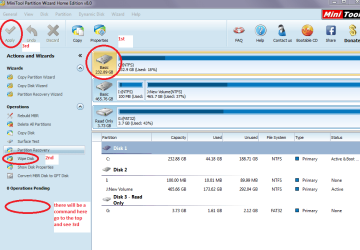
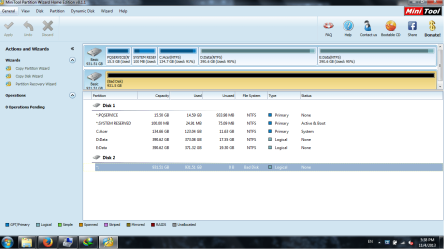
Personally I would wipe the drive with clean all or the Partition Wizard and the format it but it will take some time to do that
http://www.sevenforums.com/tutorials/52129-disk-clean-clean-all-diskpart-command.html or
Best Free Partition Manager Freeware and free partition magic for Windows 7, Windows 8, Windows Vista and Windows XP 32 bit & 64 bit. MiniTool Free Partition Manager Software Home Edition. - see pic

PS That drive I marked is my C: drive and only an example make sure you pick the right drive
 

Attachments

  • WIPE.PNG
    WIPE.PNG
    39.6 KB · Views: 0

My Computer

Computer type
PC/Desktop
Computer Manufacturer/Model Number
Own build (new) Desk1 / Asus ROG Win 7 / Desk2 1st build
OS
Desk1 7 Home Prem / Desk2 10 Pro / Main lap Asus ROG 10 Pro 2 laptop Toshiba 7 Pro Asus P2520 7 & 10
CPU
Desk1 i5 3750K / Laptop i7 GTX 860M / Desk2 i5 2500
Motherboard
Desk1 Asus P877-V / Desk2 Gigabyte H67 UD3H / Laptop ?
Memory
Desk1 8GB (1866) / Desk2 16GB (1333) / Laptop 8Gb DDR3
Graphics Card(s)
Desk 1& 2NVidia GTX 650 & Laptops on board Intel
Sound Card
Desk 1 & 2 -XONAR DG Realtek High Def audio Laptop
Monitor(s) Displays
Desk 1 Benq HD 2450 / Desk2 Philips 24" / Laptop 17.5"
Screen Resolution
1920x1080 D1 & D2 & Laptop 1
Hard Drives
Desk1 Samsung 120GB 830 SSD
Asus ROG 256GB 850 Pro SSD
Desk2 Samsung 840 256 SSD
Toshiba 120GB EVO
PSU
Desk 1 Corsair HX 1050/ Laptop ? / Desk 2 Corsair HX 650
Case
Desk 1 Cooler HAF XM ? Toshiba laptop / Desk2 Coolermaster
Cooling
Fans on all Desk1 -2 Desk2 - all Coolermasters 5 Laptop ?
Keyboard
Desk 1 MS Sidewinder X6 Desk 2 MS Sidewinder X 4
Mouse
Desk 1&2 - Gigabyte MS 900 gamer - laptop - Logitec wireless
Internet Speed
ADSL2+
Other Info
One other Desktop (tester) and spare Toshba laptop both with SSD's
Running Kaspersky 2016 ISS on all machines config'd identically
Logitec audio stereo systems on each machine (x3)
Canon MG5250MFC
Router/modem TP-Link running WPA2SK
thanks for the reply.
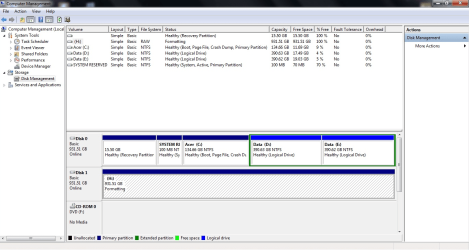
i just do full format from disk management.
here is the screen shot

Untitled.png
 

My Computer

Computer Manufacturer/Model Number
Acer Aspire V3-471G
OS
windows 7 HP 64bit
CPU
i7-3610qm
Memory
4 GB
Graphics Card(s)
Nvidia GT640M
Monitor(s) Displays
14'
Screen Resolution
1366 x 768
No probs mate if it doesn't go ok just do the clean or the wipe that way it positively gets rid of anything including that rotten software they always seem to bundle in.
 

My Computer

Computer type
PC/Desktop
Computer Manufacturer/Model Number
Own build (new) Desk1 / Asus ROG Win 7 / Desk2 1st build
OS
Desk1 7 Home Prem / Desk2 10 Pro / Main lap Asus ROG 10 Pro 2 laptop Toshiba 7 Pro Asus P2520 7 & 10
CPU
Desk1 i5 3750K / Laptop i7 GTX 860M / Desk2 i5 2500
Motherboard
Desk1 Asus P877-V / Desk2 Gigabyte H67 UD3H / Laptop ?
Memory
Desk1 8GB (1866) / Desk2 16GB (1333) / Laptop 8Gb DDR3
Graphics Card(s)
Desk 1& 2NVidia GTX 650 & Laptops on board Intel
Sound Card
Desk 1 & 2 -XONAR DG Realtek High Def audio Laptop
Monitor(s) Displays
Desk 1 Benq HD 2450 / Desk2 Philips 24" / Laptop 17.5"
Screen Resolution
1920x1080 D1 & D2 & Laptop 1
Hard Drives
Desk1 Samsung 120GB 830 SSD
Asus ROG 256GB 850 Pro SSD
Desk2 Samsung 840 256 SSD
Toshiba 120GB EVO
PSU
Desk 1 Corsair HX 1050/ Laptop ? / Desk 2 Corsair HX 650
Case
Desk 1 Cooler HAF XM ? Toshiba laptop / Desk2 Coolermaster
Cooling
Fans on all Desk1 -2 Desk2 - all Coolermasters 5 Laptop ?
Keyboard
Desk 1 MS Sidewinder X6 Desk 2 MS Sidewinder X 4
Mouse
Desk 1&2 - Gigabyte MS 900 gamer - laptop - Logitec wireless
Internet Speed
ADSL2+
Other Info
One other Desktop (tester) and spare Toshba laptop both with SSD's
Running Kaspersky 2016 ISS on all machines config'd identically
Logitec audio stereo systems on each machine (x3)
Canon MG5250MFC
Router/modem TP-Link running WPA2SK
ok, thanks i will try to wipe the hdd. but now i have a problem, i can't cancel the on going formatting. is it safe to force stop the formatting with unplug the hdd?.
 
Last edited:

My Computer

Computer Manufacturer/Model Number
Acer Aspire V3-471G
OS
windows 7 HP 64bit
CPU
i7-3610qm
Memory
4 GB
Graphics Card(s)
Nvidia GT640M
Monitor(s) Displays
14'
Screen Resolution
1366 x 768
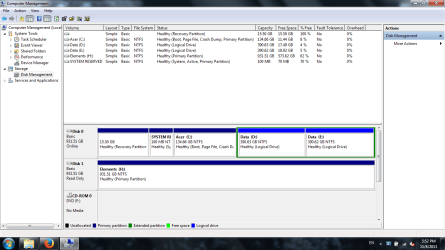
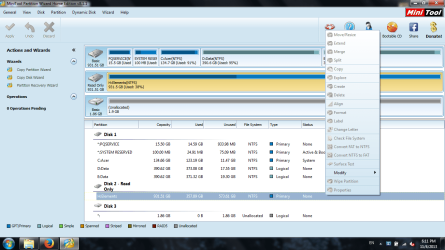
i don't know what happen, but now the disk become read only and the data still there.
is there a way to make it normal (not read only).
here is the screenshot.
22.png
23.png

note : i can't safely remove the disk.
 
Last edited:

My Computer

Computer Manufacturer/Model Number
Acer Aspire V3-471G
OS
windows 7 HP 64bit
CPU
i7-3610qm
Memory
4 GB
Graphics Card(s)
Nvidia GT640M
Monitor(s) Displays
14'
Screen Resolution
1366 x 768
Which wipe did you use yuganz? Whatever it was try the other method the clean all with DISKPART will work as long as you are sure you have no data on that drive you want.
http://www.sevenforums.com/tutorials/52129-disk-clean-clean-all-diskpart-command.html

then format it http://www.sevenforums.com/tutorials/2674-partition-volume-create-new.html I sue the whole disk for formatting so I just leave the total amount when that wizard comes up.

TIP this will take a long time to do as it is such a large drive personally I prefer two 500GB drives to one 1TB drive because a) if it goes south so does a lot of data and b) you have this problem of waiting so long to get the disk back to normal.

Its late now so I ma heading of but will check in tomorrow to see how things went :)

John
 

My Computer

Computer type
PC/Desktop
Computer Manufacturer/Model Number
Own build (new) Desk1 / Asus ROG Win 7 / Desk2 1st build
OS
Desk1 7 Home Prem / Desk2 10 Pro / Main lap Asus ROG 10 Pro 2 laptop Toshiba 7 Pro Asus P2520 7 & 10
CPU
Desk1 i5 3750K / Laptop i7 GTX 860M / Desk2 i5 2500
Motherboard
Desk1 Asus P877-V / Desk2 Gigabyte H67 UD3H / Laptop ?
Memory
Desk1 8GB (1866) / Desk2 16GB (1333) / Laptop 8Gb DDR3
Graphics Card(s)
Desk 1& 2NVidia GTX 650 & Laptops on board Intel
Sound Card
Desk 1 & 2 -XONAR DG Realtek High Def audio Laptop
Monitor(s) Displays
Desk 1 Benq HD 2450 / Desk2 Philips 24" / Laptop 17.5"
Screen Resolution
1920x1080 D1 & D2 & Laptop 1
Hard Drives
Desk1 Samsung 120GB 830 SSD
Asus ROG 256GB 850 Pro SSD
Desk2 Samsung 840 256 SSD
Toshiba 120GB EVO
PSU
Desk 1 Corsair HX 1050/ Laptop ? / Desk 2 Corsair HX 650
Case
Desk 1 Cooler HAF XM ? Toshiba laptop / Desk2 Coolermaster
Cooling
Fans on all Desk1 -2 Desk2 - all Coolermasters 5 Laptop ?
Keyboard
Desk 1 MS Sidewinder X6 Desk 2 MS Sidewinder X 4
Mouse
Desk 1&2 - Gigabyte MS 900 gamer - laptop - Logitec wireless
Internet Speed
ADSL2+
Other Info
One other Desktop (tester) and spare Toshba laptop both with SSD's
Running Kaspersky 2016 ISS on all machines config'd identically
Logitec audio stereo systems on each machine (x3)
Canon MG5250MFC
Router/modem TP-Link running WPA2SK
i can't do clean with diskpart,
11.png
cd.png
is there any other way to fix it?
 

My Computer

Computer Manufacturer/Model Number
Acer Aspire V3-471G
OS
windows 7 HP 64bit
CPU
i7-3610qm
Memory
4 GB
Graphics Card(s)
Nvidia GT640M
Monitor(s) Displays
14'
Screen Resolution
1366 x 768
Try formatting it with HP USB Disk Storage Format Tool 2.2.3 HP USB Disk Storage Format Tool Free Download

Right click on the exe file and Run as administrator.

Let us see what happens. ( Please remove all other external drives/pen drives so that you do not accidentally format the wrong drive.)
 

My Computer

OS
Windows 7 Home Premium 32 bit
Back
Top