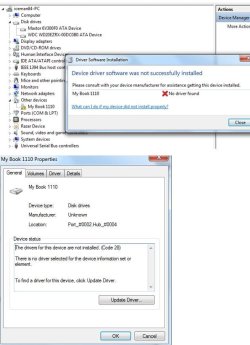
Solved WD Ext Hard Disk getting Error Code 28

iceman2509

New member
Local time
9:04 AM
Messages
8
Hi,

Wonder is anyone had encountered this, my Ext HDD 3.5" stop working.
It just refuse to auto detect the drivers.
I had search the Internet attempting to reinstall the driver but does not work.

Refer to Word document for screenshots & I have attached my PC Specs from CPU-Z


I cannot do a system restore as I do not have a point before an this issue occurred.

I also have a Dell 1133 laser printer after install drivers from either the internet/CD is showing me Error code 28.
It was while troubleshooting the printer then I noticed my Ext HDD cannot be accessed.
I had installed a new Win 7 64Bit on a different partition & plugged my HDD there is it working.
I used a Lenovo laptop, also with Win7 64Bit, both printer & HDD install perfectly fine.

Troubleshooting steps:
1) Uninstall all Universal Serial Bus Controllers then reboot then allow the machine to auto detect.
2) Checked the Internet for WD My Book 1110 drivers installed
3) Removed all printer drivers reboot & reinstall from both Internet / CD still does not work.
 

Attachments

My Computer

Computer type
PC/Desktop
Computer Manufacturer/Model Number
Custom Build
OS
Win 7 Ultimate 64 bit
CPU
Intel(R) Core(TM)2 Quad CPU Q8200 @ 2.33GHz
Motherboard
Intel P45/P43/G45/G43 rev. A3, Socket 775 LGA (0x4)
Memory
4 Gb
Graphics Card(s)
NVIDIA GeForce 9800 GTX/9800 GTX+
Sound Card
Onboard
Monitor(s) Displays
Winbond W83667HG
Screen Resolution
1920 x 1080
Hard Drives
1 X Maxtor 6V300F0 ATA
1 X WDC WD20EZRX-00DC0B0 ATA
Case
DIY
Cooling
Fans
Keyboard
Micosoft
Mouse
Razer Death adder
Internet Speed
100 Mbps
Antivirus
AVG Free Anti Virus
Browser
Firefox, Chrome, Internet Explorer
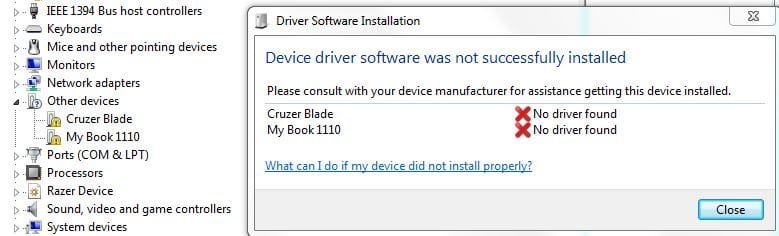
Hi,

Wonder is anyone had encountered this, my Ext HDD 3.5" stop working.
It just refuse to auto detect the drivers.
I had search the Internet attempting to reinstall the driver but does not work.

Refer to Word document for screenshots & I have attached my PC Specs from CPU-Z


I cannot do a system restore as I do not have a point before an this issue occurred.

I also have a Dell 1133 laser printer after install drivers from either the internet/CD is showing me Error code 28.
It was while troubleshooting the printer then I noticed my Ext HDD cannot be accessed.
I had installed a new Win 7 64Bit on a different partition & plugged my HDD there is it working.
I used a Lenovo laptop, also with Win7 64Bit, both printer & HDD install perfectly fine.

Troubleshooting steps:
1) Uninstall all Universal Serial Bus Controllers then reboot then allow the machine to auto detect.
2) Checked the Internet for WD My Book 1110 drivers installed
3) Removed all printer drivers reboot & reinstall from both Internet / CD still does not work.

Hi iceman2509,

Welcome to Seven forums.

Please let us know the system model you are using. As you might need to update the chipset driver for your system.

Also, post a screenshot for your device manager for your system:

http://www.sevenforums.com/tutorials/9733-screenshots-files-upload-post-seven-forums.html

Kindly update your system specs here by following this.

Keep us posted with the results so we can advise you further.
 

My Computer

Computer type
PC/Desktop
OS
Winndows 7 32 bit
Chipset driver currently using is latest,
9.1.1.1019


Here is how to find what version chipset driver you have (once and for all)...

Run Registry Editor (Start -> Run -> regedit -> enter)

Once in the Registry Editor expand "HKEY_LOCAL_MACHINE"
Next Expand "SOFTWARE"
Next Expand "INTEL"
Click on "Infinst"

On the right hand side there will be two things to look for.
First is to make sure the line that says "Install" has the word "success" next too it (to the right, under "data"). This indicates the driver was installed correctly.
Next find the line that says "Version", and that will be your version number that was installed.
 

Attachments

  • WD02.JPG
    WD02.JPG
    60.6 KB · Views: 1

My Computer

Computer type
PC/Desktop
Computer Manufacturer/Model Number
Custom Build
OS
Win 7 Ultimate 64 bit
CPU
Intel(R) Core(TM)2 Quad CPU Q8200 @ 2.33GHz
Motherboard
Intel P45/P43/G45/G43 rev. A3, Socket 775 LGA (0x4)
Memory
4 Gb
Graphics Card(s)
NVIDIA GeForce 9800 GTX/9800 GTX+
Sound Card
Onboard
Monitor(s) Displays
Winbond W83667HG
Screen Resolution
1920 x 1080
Hard Drives
1 X Maxtor 6V300F0 ATA
1 X WDC WD20EZRX-00DC0B0 ATA
Case
DIY
Cooling
Fans
Keyboard
Micosoft
Mouse
Razer Death adder
Internet Speed
100 Mbps
Antivirus
AVG Free Anti Virus
Browser
Firefox, Chrome, Internet Explorer
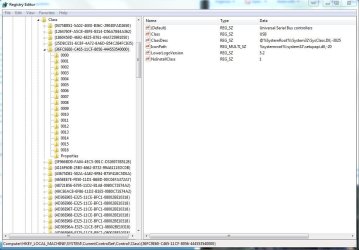
Chipset driver currently using is latest,
9.1.1.1019


Here is how to find what version chipset driver you have (once and for all)...

Run Registry Editor (Start -> Run -> regedit -> enter)

Once in the Registry Editor expand "HKEY_LOCAL_MACHINE"
Next Expand "SOFTWARE"
Next Expand "INTEL"
Click on "Infinst"

On the right hand side there will be two things to look for.
First is to make sure the line that says "Install" has the word "success" next too it (to the right, under "data"). This indicates the driver was installed correctly.
Next find the line that says "Version", and that will be your version number that was installed.

Hi iceman2509,

Thanks for providing us this information. Kindly run the fixit from the link below:

Tips for solving problems with USB devices

Also, check this tutorial which should be helpful in resolving this issue:

http://www.sevenforums.com/tutorials/165554-usb-driver-general-fix-problems.html

Keep us posted with the results so we can advise you further.
 

My Computer

Computer type
PC/Desktop
OS
Winndows 7 32 bit
Hi,
Pls forgive me but I am very anxious to fix this issue now as after following your guide:

USB Driver - General Fix for Problems

3 times, now I cannot access any thumbdrives or external HDD..the issue just got alot worst.
I already have the variable & deleted the INFCACHE.1 file. 3 times, still the same

Tips for solving problems with USB devices
This had no solutions but a log file was generated.
Log file attached.

Pls advise how to I fix this issue urgently I cannot access any USB media now...
 

Attachments

My Computer

Computer type
PC/Desktop
Computer Manufacturer/Model Number
Custom Build
OS
Win 7 Ultimate 64 bit
CPU
Intel(R) Core(TM)2 Quad CPU Q8200 @ 2.33GHz
Motherboard
Intel P45/P43/G45/G43 rev. A3, Socket 775 LGA (0x4)
Memory
4 Gb
Graphics Card(s)
NVIDIA GeForce 9800 GTX/9800 GTX+
Sound Card
Onboard
Monitor(s) Displays
Winbond W83667HG
Screen Resolution
1920 x 1080
Hard Drives
1 X Maxtor 6V300F0 ATA
1 X WDC WD20EZRX-00DC0B0 ATA
Case
DIY
Cooling
Fans
Keyboard
Micosoft
Mouse
Razer Death adder
Internet Speed
100 Mbps
Antivirus
AVG Free Anti Virus
Browser
Firefox, Chrome, Internet Explorer
Hi,
Pls forgive me but I am very anxious to fix this issue now as after following your guide:

USB Driver - General Fix for Problems

3 times, now I cannot access any thumbdrives or external HDD..the issue just got alot worst.
I already have the variable & deleted the INFCACHE.1 file. 3 times, still the same

Tips for solving problems with USB devices
This had no solutions but a log file was generated.
Log file attached.

Pls advise how to I fix this issue urgently I cannot access any USB media now...

Hi iceman2509,

It seems that windows has been turned off to install the drivers automatically. Please check this link below and make sure that this options is selected" Install driver/software from Windows Update if it is not found on my computer"

http://www.sevenforums.com/tutorials/82137-drivers-turn-off-automatic-driver-installation.html

Also, if this fails then create a new username and check the drive in that username:

http://www.sevenforums.com/tutorials/181024-user-account-create.html

Keep us posted with the results so we can advise you further.
 

My Computer

Computer type
PC/Desktop
OS
Winndows 7 32 bit
Hi,

Check pls see my settings as attached. In my current or new user account both have the same issue USB thumb drive not able to detect,

Both accounts show the same error msg so I shall only unload 1 of it
 

Attachments

  • 04.JPG
    04.JPG
    35.6 KB · Views: 1
  • 06.JPG
    06.JPG
    35.8 KB · Views: 29

My Computer

Computer type
PC/Desktop
Computer Manufacturer/Model Number
Custom Build
OS
Win 7 Ultimate 64 bit
CPU
Intel(R) Core(TM)2 Quad CPU Q8200 @ 2.33GHz
Motherboard
Intel P45/P43/G45/G43 rev. A3, Socket 775 LGA (0x4)
Memory
4 Gb
Graphics Card(s)
NVIDIA GeForce 9800 GTX/9800 GTX+
Sound Card
Onboard
Monitor(s) Displays
Winbond W83667HG
Screen Resolution
1920 x 1080
Hard Drives
1 X Maxtor 6V300F0 ATA
1 X WDC WD20EZRX-00DC0B0 ATA
Case
DIY
Cooling
Fans
Keyboard
Micosoft
Mouse
Razer Death adder
Internet Speed
100 Mbps
Antivirus
AVG Free Anti Virus
Browser
Firefox, Chrome, Internet Explorer
Hi,

Check pls see my settings as attached. In my current or new user account both have the same issue USB thumb drive not able to detect,

Both accounts show the same error msg so I shall only unload 1 of it

Hi iceman2509,

I appreciate the time and effort that you took to troubleshoot the issue. It seems generic driveare in the windows are not loading properly.

Kindly SFC scan to ensure all files are intact:

http://www.sevenforums.com/tutorials/1538-sfc-scannow-command-system-file-checker.html

Make sure that your windows is update automatically:

Microsoft Windows Update

Also, ensure below update is installed on the system:

Binary files in some USB drivers are not updated after you install Windows 7 SP1 or Windows Server 2008 R2 SP1

Keep us posted with the results so we can advise you further.
 

My Computer

Computer type
PC/Desktop
OS
Winndows 7 32 bit
Kindly SFC scan to ensure all files are intact:

1) SFC /SCANNOW Command - System File Checker
Ran 3 times, CBS.log attached

2) Make sure that your windows is update automatically:

Microsoft Windows Update
I used the option "Let me decide what to install"
I had install all latest Windows update, leaving out the optional ones.

3) Also, ensure below update is installed on the system:

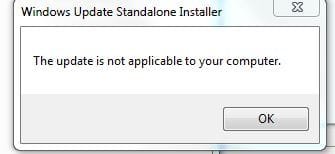
Binary files in some USB drivers are not updated after you install Windows 7 SP1 or Windows Server 2008 R2 SP1
Still have not tried this yet. Anywhere I can get a offline installer?
 

My Computer

Computer type
PC/Desktop
Computer Manufacturer/Model Number
Custom Build
OS
Win 7 Ultimate 64 bit
CPU
Intel(R) Core(TM)2 Quad CPU Q8200 @ 2.33GHz
Motherboard
Intel P45/P43/G45/G43 rev. A3, Socket 775 LGA (0x4)
Memory
4 Gb
Graphics Card(s)
NVIDIA GeForce 9800 GTX/9800 GTX+
Sound Card
Onboard
Monitor(s) Displays
Winbond W83667HG
Screen Resolution
1920 x 1080
Hard Drives
1 X Maxtor 6V300F0 ATA
1 X WDC WD20EZRX-00DC0B0 ATA
Case
DIY
Cooling
Fans
Keyboard
Micosoft
Mouse
Razer Death adder
Internet Speed
100 Mbps
Antivirus
AVG Free Anti Virus
Browser
Firefox, Chrome, Internet Explorer
Just completed option 3,
Binary files in some USB drivers are not updated after you install Windows 7 SP1 or Windows Server 2008 R2 SP1
 

Attachments

  • 07.JPG
    07.JPG
    14 KB · Views: 17

My Computer

Computer type
PC/Desktop
Computer Manufacturer/Model Number
Custom Build
OS
Win 7 Ultimate 64 bit
CPU
Intel(R) Core(TM)2 Quad CPU Q8200 @ 2.33GHz
Motherboard
Intel P45/P43/G45/G43 rev. A3, Socket 775 LGA (0x4)
Memory
4 Gb
Graphics Card(s)
NVIDIA GeForce 9800 GTX/9800 GTX+
Sound Card
Onboard
Monitor(s) Displays
Winbond W83667HG
Screen Resolution
1920 x 1080
Hard Drives
1 X Maxtor 6V300F0 ATA
1 X WDC WD20EZRX-00DC0B0 ATA
Case
DIY
Cooling
Fans
Keyboard
Micosoft
Mouse
Razer Death adder
Internet Speed
100 Mbps
Antivirus
AVG Free Anti Virus
Browser
Firefox, Chrome, Internet Explorer
Kindly SFC scan to ensure all files are intact:

1) SFC /SCANNOW Command - System File Checker
Ran 3 times, CBS.log attached

2) Make sure that your windows is update automatically:

Microsoft Windows Update
I used the option "Let me decide what to install"
I had install all latest Windows update, leaving out the optional ones.

3) Also, ensure below update is installed on the system:

Binary files in some USB drivers are not updated after you install Windows 7 SP1 or Windows Server 2008 R2 SP1
Still have not tried this yet. Anywhere I can get a offline installer?

Hi iceman2509,

Thanks for providing us this information. Kindly make sure that Windows update is set to automatic so it can install any drivers needed from windows update.

Also, perform a clean startup to ensure no background programs are limiting the drivers to not load properly:

Clean Boot

Also, remove filters if available in registry:

1. Click Start, and then click All Programs.
2. Click Accessories, and then click Run.
3. Type regedit, and then click OK. If you are prompted for an administrator password or for a confirmation, type the password, or click Allow.
4. In the navigation pane, locate and then click the following registry subkey:
HKLM\System\currentcontrolset\control\class\{36FC9E60-C465-11CF-8056-444553540000}
5. In the right pane, click UpperFilters.

Note: You may also see an UpperFilters.bak registry entry. You do not have to remove that entry. Click UpperFilters only. If you do not see the UpperFilters registry entry, you still might have to remove the LowerFilters registry entry. To do this, go to step 8.
6. On the Edit menu, click Delete.
7. When you are prompted to confirm the deletion, click Yes.
8. In the right pane, click LowerFilters.

Perform a backup of registry before attempting these steps:

http://www.sevenforums.com/tutorials/4230-registry-backup-restore.html

Keep us posted with the results so we can advise you further.
 

My Computer

Computer type
PC/Desktop
OS
Winndows 7 32 bit
Hi,

1) Clean Boot - with everything disable except Microsoft stuff. HDD & USB thumb drives not detected.
2) Registry entry do not exists - may have already deleted it previously.
 

Attachments

  • 08.JPG
    08.JPG
    98.6 KB · Views: 0

My Computer

Computer type
PC/Desktop
Computer Manufacturer/Model Number
Custom Build
OS
Win 7 Ultimate 64 bit
CPU
Intel(R) Core(TM)2 Quad CPU Q8200 @ 2.33GHz
Motherboard
Intel P45/P43/G45/G43 rev. A3, Socket 775 LGA (0x4)
Memory
4 Gb
Graphics Card(s)
NVIDIA GeForce 9800 GTX/9800 GTX+
Sound Card
Onboard
Monitor(s) Displays
Winbond W83667HG
Screen Resolution
1920 x 1080
Hard Drives
1 X Maxtor 6V300F0 ATA
1 X WDC WD20EZRX-00DC0B0 ATA
Case
DIY
Cooling
Fans
Keyboard
Micosoft
Mouse
Razer Death adder
Internet Speed
100 Mbps
Antivirus
AVG Free Anti Virus
Browser
Firefox, Chrome, Internet Explorer
Hi,

1) Clean Boot - with everything disable except Microsoft stuff. HDD & USB thumb drives not detected.
2) Registry entry do not exists - may have already deleted it previously.

Hi iceman2509,

Thanks for providing us this information. I appreciate the time and effort that you took to troubleshoot the issue.

I believe now it would be better if you take a backup of the system and perform a clean install of windows:

http://www.sevenforums.com/tutorials/1649-clean-install-windows-7-a.html

If you have alot of data that can't be backed up right now you can attempt a repair re-install as well:

http://www.sevenforums.com/tutorials/3413-repair-install.html?ltr=R

Keep us posted with the results so we can advise you further.
 

My Computer

Computer type
PC/Desktop
OS
Winndows 7 32 bit
Back
Top