Solved WD Ext HDD 1021 2TB Hard drive stopped working

blindaussie

New member
Local time
12:24 AM
Messages
21
I plugged it in and the software was installed successfully but it doesn't show up in the explorer with a drive letter. Now when I go to the device manager it does show up but I am not able to format it or give it a letter etc. It doesn't have a fat32 or NTFS File System. It shows as Disk 1 unknown 1863.01 GB not initialized.I tried to right click to initialize and it say the media is write protected can someone please help me with this i have been trying to fix this for last week with no success.
 

My Computer My Computer

At a glance

Windows 7 Home Premium 64bit.
Computer type
Laptop
Computer Manufacturer/Model Number
Dell
OS
Windows 7 Home Premium 64bit.
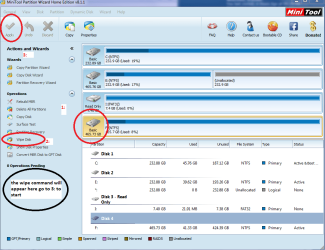
Hello and welcome blindaussie mate you can fix this drive with Partition Wizard or through a command prompt .
http://www.sevenforums.com/tutorials/52129-disk-clean-clean-all-diskpart-command.html

Best Free Partition Manager Freeware and free partition magic for Windows 7, Windows 8, Windows Vista and Windows XP 32 bit & 64 bit. MiniTool Free Partition Manager Software Home Edition.

personally I get rid of any software these drives come with as they are more trouble than they are worth IMHO anyway.

Either way takes a fair while to do and you need to make sure the drive is formatted afterwards.
 

Attachments

  • MINI TOOL 5.PNG
    MINI TOOL 5.PNG
    48 KB · Views: 0

My Computer My Computer

At a glance

Desk1 7 Home Prem / Desk2 10 Pro / Main lap A...Desk1 i5 3750K / Laptop i7 GTX 860M / Desk2 i...Desk1 8GB (1866) / Desk2 16GB (1333) / Laptop...Desk 1& 2NVidia GTX 650 & Laptops on board Intel
Computer type
PC/Desktop
Computer Manufacturer/Model Number
Own build (new) Desk1 / Asus ROG Win 7 / Desk2 1st build
OS
Desk1 7 Home Prem / Desk2 10 Pro / Main lap Asus ROG 10 Pro 2 laptop Toshiba 7 Pro Asus P2520 7 & 10
CPU
Desk1 i5 3750K / Laptop i7 GTX 860M / Desk2 i5 2500
Motherboard
Desk1 Asus P877-V / Desk2 Gigabyte H67 UD3H / Laptop ?
Memory
Desk1 8GB (1866) / Desk2 16GB (1333) / Laptop 8Gb DDR3
Graphics Card(s)
Desk 1& 2NVidia GTX 650 & Laptops on board Intel
Sound Card
Desk 1 & 2 -XONAR DG Realtek High Def audio Laptop
Monitor(s) Displays
Desk 1 Benq HD 2450 / Desk2 Philips 24" / Laptop 17.5"
Screen Resolution
1920x1080 D1 & D2 & Laptop 1
Hard Drives
Desk1 Samsung 120GB 830 SSD
Asus ROG 256GB 850 Pro SSD
Desk2 Samsung 840 256 SSD
Toshiba 120GB EVO
PSU
Desk 1 Corsair HX 1050/ Laptop ? / Desk 2 Corsair HX 650
Case
Desk 1 Cooler HAF XM ? Toshiba laptop / Desk2 Coolermaster
Cooling
Fans on all Desk1 -2 Desk2 - all Coolermasters 5 Laptop ?
Keyboard
Desk 1 MS Sidewinder X6 Desk 2 MS Sidewinder X 4
Mouse
Desk 1&2 - Gigabyte MS 900 gamer - laptop - Logitec wireless
Internet Speed
ADSL2+
Other Info
One other Desktop (tester) and spare Toshba laptop both with SSD's
Running Kaspersky 2016 ISS on all machines config'd identically
Logitec audio stereo systems on each machine (x3)
Canon MG5250MFC
Router/modem TP-Link running WPA2SK
Hi blindaussie,

Try what ICit2lol has suggested.( I do not know whether it will work or not.:))

In case it does not work, Start > All Programs > Accessories > Command Prompt. Right click on it and Run as administrator.

In the Administrator: Command Prompt box against the command prompt type
each of these commands one at a time in this order (of course after each command press ENTER)
diskpart
list volume
select volume n (where n = the problem volume)
attributes disk clear readonly
attributes volume clear readonly

after each of the last two you should get the response that it was successful.

( Neither do I know that this will work. Why lol only? lol.)
 

My Computer My Computer

At a glance

Windows 7 Home Premium 32 bit
OS
Windows 7 Home Premium 32 bit
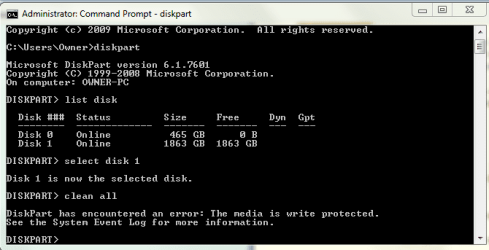
thank you ICit2lol and jumanji but these solutions didn't fix my problem. I went to disk management as suggested I can see the hard drive it doesn't have a letter it just says Disk 1 unknown 1863.01 GB not initialized then in the box to the right it a black header and inside it has 1863.01 GB unallocated when i right click to initialize it tells me the disk is write protected .The same thing happens when i go to diskpart in clean all i t says diskpart has encountered an error:The media is write protected . See the system event log for more information. I hope this information will help find a solution for me I greatly appreciate your help
 

My Computer My Computer

At a glance

Windows 7 Home Premium 64bit.
Computer type
Laptop
Computer Manufacturer/Model Number
Dell
OS
Windows 7 Home Premium 64bit.
You didn't say what happens when you go through diskpart, list volume, select volume n blah blah. Can you please elaborate?
 

My Computer My Computer

At a glance

Windows 7 Home Premium 32 bit
OS
Windows 7 Home Premium 32 bit
I went into command prompts as administrator went to diskpart,list disks the disk showed up as disk 1 i went to select disk 1 then went clean all and the reply was error this disk is write protected
 

My Computer My Computer

At a glance

Windows 7 Home Premium 64bit.
Computer type
Laptop
Computer Manufacturer/Model Number
Dell
OS
Windows 7 Home Premium 64bit.
My instructions was not for clean all but for clearing attributes.

select volume n (where n = the problem volume)
attributes disk clear readonly
attributes volume clear readonly

Naturally I am interested in knowing what happened on attributes clear readonly, and attributes volume clear readonly commands.
 

My Computer My Computer

At a glance

Windows 7 Home Premium 32 bit
OS
Windows 7 Home Premium 32 bit
I went to diskpart entered list volume but it doesn't show any volume for the drive that I can't access. The list shows all the other volumes eg:volume 4 C NTFS 455 GB Healthy Boot,there are 3 drives other but not the one need to fix.
 

My Computer My Computer

At a glance

Windows 7 Home Premium 64bit.
Computer type
Laptop
Computer Manufacturer/Model Number
Dell
OS
Windows 7 Home Premium 64bit.
You said "disk showed up as disk 1 i went to select disk 1 then went clean all and the reply was error this disk is write protected "

Now you are saying no volume is shown. :confused: Did you run diskpart with administrator privileges?
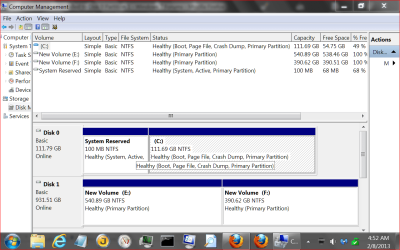
Please post a screenshot. A picture is worth more than a thousand words.:)
 

My Computer My Computer

At a glance

Windows 7 Home Premium 32 bit
OS
Windows 7 Home Premium 32 bit
I have attached a screen shot as you con see when I list volume the disk isn't there when i list disks you can see the disk
 

Attachments

My Computer My Computer

At a glance

Windows 7 Home Premium 64bit.
Computer type
Laptop
Computer Manufacturer/Model Number
Dell
OS
Windows 7 Home Premium 64bit.

My Computer My Computer

At a glance

Windows 10 Pro. 64/ version 1709 Windows 7 Pr...Intel i7-6800K @ 4.3Corsair Platinum 16 gig @2400EVGA GTX 1070 OC
Computer type
PC/Desktop
Computer Manufacturer/Model Number
Home made Desktop
OS
Windows 10 Pro. 64/ version 1709 Windows 7 Pro/64
CPU
Intel i7-6800K @ 4.3
Motherboard
ASUS X-99 Deluxe II
Memory
Corsair Platinum 16 gig @2400
Graphics Card(s)
EVGA GTX 1070 OC
Monitor(s) Displays
Asus 27" LED LCD/VE278Q
Screen Resolution
1920-1080 or 1280-720 HDMI
Hard Drives
INTEL SSD 730-240 Gb Sata 3.0/
PSU
EVGA Platium 1200W
Case
Phanteks Luxe Tempered Glass 8 fans/ one radiator
Cooling
XSPC/ Water Cooled CPU
Keyboard
Das 4 Professional
Mouse
Logitech M705/MX Anywhere 2-S
Internet Speed
100 mbits
Antivirus
Microsoft Security Essentials/ Malwarebytes Premium 3.0/ SAS
Browser
I.E. 11 default/Firefox/ ISP Time Warner Cable/Spectrum
Other Info
LG BluRay Burner/
Sound system-KLipsch-THX/
Icy Dock ssd Hot Swap bays.
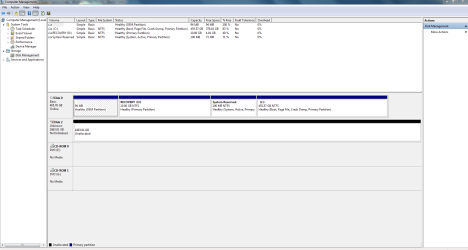
Yep,blindaussie, now you know how to snip and post a screenshot. And let us start from the beginning.

Please remove all other external drives from your PC. Connect only your problem drive. Post a screenshot of how it looks like in Windows Disk Management. ( If it appears in Windows Disk Management, then it should also be listed by Diskpart. In one post you said diskpart listed the disk but responded that it was write protected to the clean all command. Next you say Disk part did not list the disk. So you could not carry out the clear attribute command. So there is a little confusion here. Let us see whether your problem disk has totally disappeared from the scene.:))
 

My Computer My Computer

At a glance

Windows 7 Home Premium 32 bit
OS
Windows 7 Home Premium 32 bit
I have attached the screen shot of disk managment
 

Attachments

My Computer My Computer

At a glance

Windows 7 Home Premium 64bit.
Computer type
Laptop
Computer Manufacturer/Model Number
Dell
OS
Windows 7 Home Premium 64bit.
We like to use the Forums methods. It is a safe way for other members. We do not have to off site to see things.

Disk Management.PNG
 

My Computer My Computer

At a glance

Windows 10 Pro. 64/ version 1709 Windows 7 Pr...Intel i7-6800K @ 4.3Corsair Platinum 16 gig @2400EVGA GTX 1070 OC
Computer type
PC/Desktop
Computer Manufacturer/Model Number
Home made Desktop
OS
Windows 10 Pro. 64/ version 1709 Windows 7 Pro/64
CPU
Intel i7-6800K @ 4.3
Motherboard
ASUS X-99 Deluxe II
Memory
Corsair Platinum 16 gig @2400
Graphics Card(s)
EVGA GTX 1070 OC
Monitor(s) Displays
Asus 27" LED LCD/VE278Q
Screen Resolution
1920-1080 or 1280-720 HDMI
Hard Drives
INTEL SSD 730-240 Gb Sata 3.0/
PSU
EVGA Platium 1200W
Case
Phanteks Luxe Tempered Glass 8 fans/ one radiator
Cooling
XSPC/ Water Cooled CPU
Keyboard
Das 4 Professional
Mouse
Logitech M705/MX Anywhere 2-S
Internet Speed
100 mbits
Antivirus
Microsoft Security Essentials/ Malwarebytes Premium 3.0/ SAS
Browser
I.E. 11 default/Firefox/ ISP Time Warner Cable/Spectrum
Other Info
LG BluRay Burner/
Sound system-KLipsch-THX/
Icy Dock ssd Hot Swap bays.
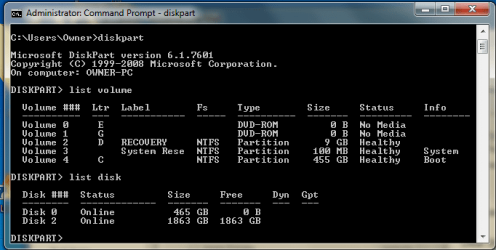
Sorry I'm new to this just trying to find a solution to my hard drive problem
disk management.png
 

My Computer My Computer

At a glance

Windows 7 Home Premium 64bit.
Computer type
Laptop
Computer Manufacturer/Model Number
Dell
OS
Windows 7 Home Premium 64bit.
i have just added the command prompt also
command prompt.PNG
 

My Computer My Computer

At a glance

Windows 7 Home Premium 64bit.
Computer type
Laptop
Computer Manufacturer/Model Number
Dell
OS
Windows 7 Home Premium 64bit.
That is good and easy on us.:)

Your problem disk is shown as Disk 2 "Unknown Not initialised Unallocated". Not a good sign. Though Windows Disk Manager does not show it online, Diskpart shows it online. ( I do not know why it is not being shown as Disk 1. Anyone can enlighten me on this.)

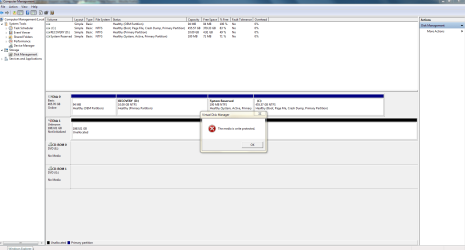
Right click on the Disk 2 ( the left Pane) and see whether you can bring it online. If the menu items are greyed out, start diskpart with admin privileges. Then

select Disk 2

clean all

Be aware that if clean all goes through you will lose all data on the drive. If you get an error message, then against diskpart type

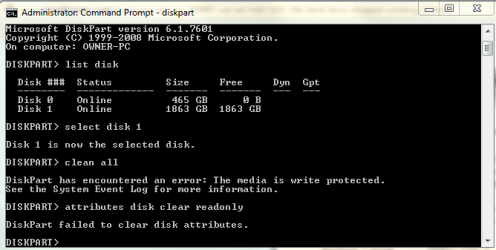
attributes disk clear readonly

Let us see what happens.
 

My Computer My Computer

At a glance

Windows 7 Home Premium 32 bit
OS
Windows 7 Home Premium 32 bit
I Have added the screen shots to show u the results thanks again for all your help I hope You can help me get the hard drive back
result of right clicking left panel trying to bring it online.PNG

diskpart clean all results.PNG
 

My Computer My Computer

At a glance

Windows 7 Home Premium 64bit.
Computer type
Laptop
Computer Manufacturer/Model Number
Dell
OS
Windows 7 Home Premium 64bit.
sorry i missed a step did it on this one
clear attributes.PNG
 

My Computer My Computer

At a glance

Windows 7 Home Premium 64bit.
Computer type
Laptop
Computer Manufacturer/Model Number
Dell
OS
Windows 7 Home Premium 64bit.
Back
Top