Solved WD Ext HDD 1021 2TB Hard drive stopped working

You have done well so far.
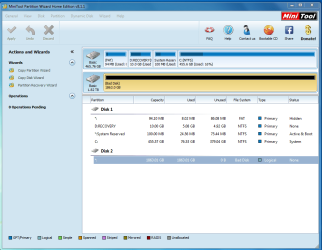
Now download Minitools Partition Wizard Home Edition referenced by ICit2lol in post #2. Install and run it. Post a screenshot. If your problem drive shows up a bad disk, the prognosis is indeed bad.

You may also answer the following queries.

1. How long have you been using that external HDD?

2. Is it still under warranty? Can you RMA it and get a replacement?

3. Since you were ready to format it, I presume you have no data to be recovered. Confirm.

( Right now I am slightly indisposed and so may not respond immediately.)
 

My Computer My Computer

At a glance

Windows 7 Home Premium 32 bit
OS
Windows 7 Home Premium 32 bit
I've Had the drive for 18 months no warranty. I do have stuff i would like to keep but if i have to format it it doesn't worry me to much.
mini tool partition wizard.PNG
 

My Computer My Computer

At a glance

Windows 7 Home Premium 64bit.
Computer type
Laptop
Computer Manufacturer/Model Number
Dell
OS
Windows 7 Home Premium 64bit.
As I feared, PW is showing your HDD as Bad Disk.

Now one last ditch attempt. Try to format it with HP USB Disk Storage Format Tool v1.2.2 HP USB Disk Storage Format Tool Free Download

( Right click on the exe file and Run as administrator to format.)

If it does not help, download Western Digital Lifeguard diagnostics for Windows WD Support / Downloads / SATA & SAS / WD RE2

Run the Quick Test. If it fails Extended Test. If the extended Test also fails, try Write Zeros and see whether you can initialise the Disk.( All this assuming that the software can see your external drive)

If everything fails, try Easus Partition Master 9.2.2 Free partition manager software to resize partitions - EaseUS Partition Master Free and try to format ( based on a miracle experience by another user here http://www.sevenforums.com/hardware...zed-pc-but-can-t-formatted-5.html#post2490715 )

If all these fail, you have to take the HDD out of the case and try it as a second internal drive in a desk top. (If it is only the interface electronics inside the enclosure that has failed your HDD may - note the word may - still be good. The above user referenced, used an IDE/SATA to USB connector)

If still your HDD does not work, the worst has happened. The HDD is dead as a dodo. ( Reason: If all the reserved sectors in the HDD are already mapped by the bad sectors and there is no more of it to accommodate further bad sectors created in the HDD, the drive controller will make it write protected, so that you can't write any more data that will only get corrupted. End of life for HDD.)

Now I have given you a full load of what to do so that I can relax for a week.:) ( I will only peeping in as an observer and not an involver, till I recover my health)
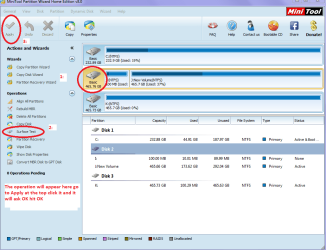
You can still report any problems in executing this plan, and I am sure others will help you to carry out the task. Good luck.
 

My Computer My Computer

At a glance

Windows 7 Home Premium 32 bit
OS
Windows 7 Home Premium 32 bit
Well my two cents again what about a surface test with Partition Wizard?? At leasst it might eliminate any physical damage.
 

Attachments

  • TEST.PNG
    TEST.PNG
    42.5 KB · Views: 0

My Computer My Computer

At a glance

Desk1 7 Home Prem / Desk2 10 Pro / Main lap A...Desk1 i5 3750K / Laptop i7 GTX 860M / Desk2 i...Desk1 8GB (1866) / Desk2 16GB (1333) / Laptop...Desk 1& 2NVidia GTX 650 & Laptops on board Intel
Computer type
PC/Desktop
Computer Manufacturer/Model Number
Own build (new) Desk1 / Asus ROG Win 7 / Desk2 1st build
OS
Desk1 7 Home Prem / Desk2 10 Pro / Main lap Asus ROG 10 Pro 2 laptop Toshiba 7 Pro Asus P2520 7 & 10
CPU
Desk1 i5 3750K / Laptop i7 GTX 860M / Desk2 i5 2500
Motherboard
Desk1 Asus P877-V / Desk2 Gigabyte H67 UD3H / Laptop ?
Memory
Desk1 8GB (1866) / Desk2 16GB (1333) / Laptop 8Gb DDR3
Graphics Card(s)
Desk 1& 2NVidia GTX 650 & Laptops on board Intel
Sound Card
Desk 1 & 2 -XONAR DG Realtek High Def audio Laptop
Monitor(s) Displays
Desk 1 Benq HD 2450 / Desk2 Philips 24" / Laptop 17.5"
Screen Resolution
1920x1080 D1 & D2 & Laptop 1
Hard Drives
Desk1 Samsung 120GB 830 SSD
Asus ROG 256GB 850 Pro SSD
Desk2 Samsung 840 256 SSD
Toshiba 120GB EVO
PSU
Desk 1 Corsair HX 1050/ Laptop ? / Desk 2 Corsair HX 650
Case
Desk 1 Cooler HAF XM ? Toshiba laptop / Desk2 Coolermaster
Cooling
Fans on all Desk1 -2 Desk2 - all Coolermasters 5 Laptop ?
Keyboard
Desk 1 MS Sidewinder X6 Desk 2 MS Sidewinder X 4
Mouse
Desk 1&2 - Gigabyte MS 900 gamer - laptop - Logitec wireless
Internet Speed
ADSL2+
Other Info
One other Desktop (tester) and spare Toshba laptop both with SSD's
Running Kaspersky 2016 ISS on all machines config'd identically
Logitec audio stereo systems on each machine (x3)
Canon MG5250MFC
Router/modem TP-Link running WPA2SK
It says disk is error: write protected I think i will just go get a new drive and throw this on in the bin thanks everyone for your help it been greatly appreciated jumunji i hope your help gets better thanks again for your help
 

My Computer My Computer

At a glance

Windows 7 Home Premium 64bit.
Computer type
Laptop
Computer Manufacturer/Model Number
Dell
OS
Windows 7 Home Premium 64bit.
yes sorry
 

My Computer My Computer

At a glance

Windows 7 Home Premium 64bit.
Computer type
Laptop
Computer Manufacturer/Model Number
Dell
OS
Windows 7 Home Premium 64bit.
not genuine windows 7

I bought my laptop off eBay about 6 weeks ago I have just found that the windows 7 is not genuine i went to dell and found out that i should have windows vista installed .I want to know if I buy the windows 7 upgrade and install it with the the original windows vista installed will it upgrade ok
 

My Computer My Computer

At a glance

Windows 7 Home Premium 64bit.
Computer type
Laptop
Computer Manufacturer/Model Number
Dell
OS
Windows 7 Home Premium 64bit.
Back
Top