WD external disk problems, error detected

Ninchie

New member
Member
Local time
1:00 AM
Messages
39
Location
SLOVENIA
Hi.

Well, I have a problem with my WD external disk P/N WDBAAUA0010HBK-01 (1TB)

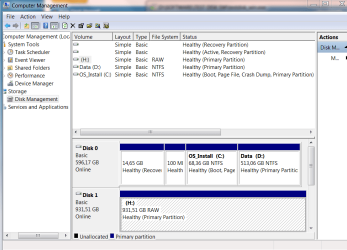
The drive is detected as H Drive, but it said "H drive not accessible. The Parameter is incorrect."
I checked on MyComputer>Manage and I formatted disk as I read on other forums as a solution.
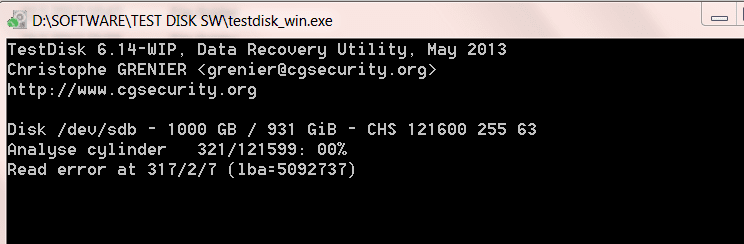
After formatting I didn't recognize any aprovements. As recommended I did a CHECKDISK, which I used TESTDISK.exe file from downloaded Zip File and here is what is says... Please check the attachment.

If you might help with any suggestions, PLEASE do.

The drive is still uder the test...it goes very slow...:confused:

Thank you in advance :)
 

Attachments

  • wd error1.PNG
    wd error1.PNG
    9.3 KB · Views: 3
  • Computer Management pic.PNG
    Computer Management pic.PNG
    32.4 KB · Views: 2
Last edited:

My Computer

Computer Manufacturer/Model Number
MSI all in one PC Wind Top AE2220
OS
Windows 7, home edition 64bit
Graphics Card(s)
Nvidia
Screen Resolution
Full HD (1920 X 1080)
Internet Speed
8/1
Antivirus
Avast
Browser
Google
I added Computer Management opened file to see what it shows.
 

My Computer

Computer Manufacturer/Model Number
MSI all in one PC Wind Top AE2220
OS
Windows 7, home edition 64bit
Graphics Card(s)
Nvidia
Screen Resolution
Full HD (1920 X 1080)
Internet Speed
8/1
Antivirus
Avast
Browser
Google
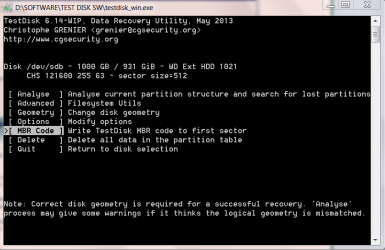
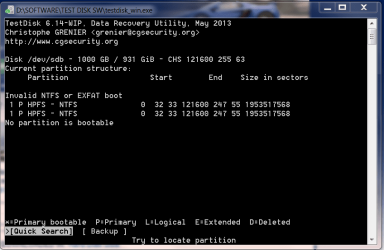
After checking...
 

Attachments

  • after checking.PNG
    after checking.PNG
    19.8 KB · Views: 2
  • analyze.PNG
    analyze.PNG
    22.1 KB · Views: 1

My Computer

Computer Manufacturer/Model Number
MSI all in one PC Wind Top AE2220
OS
Windows 7, home edition 64bit
Graphics Card(s)
Nvidia
Screen Resolution
Full HD (1920 X 1080)
Internet Speed
8/1
Antivirus
Avast
Browser
Google
Is there data on this hard drive? (or is it blank / empty / new)
 

My Computer

Computer type
PC/Desktop
Computer Manufacturer/Model Number
Home Built - Jan 2013
OS
Windows 7 64 Bit Home Premium SP1
CPU
i7-3820
Motherboard
Asus P9X79-PRO - Bios 4608
Memory
GSkill F3-14900CL9Q - 16GB
Graphics Card(s)
EVGA GeForce GTX660 - Driver 352.86
Sound Card
On board Realtek ALC898
Monitor(s) Displays
Acer S271HL
Screen Resolution
1920 x 1080
Hard Drives
#1- Samsung 840 Pro Series
#2- Western Digital WD1002FAEX Sata3 Black
#3- Western Digital WD1002FAEX Sata3 Black
PSU
Corsair CMPSU-850TX-V2 - 850 watt (by Seasonic)
Case
Corsair Obsidian 550D
Cooling
Standard 3 120mm case fans, Cooler Master Hyper 212 EVO
Keyboard
MS KC-0405
Mouse
Intellimouse 5-button
Internet Speed
56 Mbits/Sec (on a good day)
Antivirus
Avast & Malwarebytes
Browser
Firefox
Other Info
Asus DVD - DRW-24B1ST 24X
Nothing. No data. Disc is completely empty so I can do whatever is needed if it's possible. Or do u think that's it's just trash. I don't know. I even tryed what some other posted on thread, but I believe it didn't work in this case.
I tried this:

http://www.sevenforums.com/hardware-devices/292589-seagate-freeagent-1tb-now-raw-files-ystem.html

When I wanted to restart the whole system, windows reported the system error. :shock: It's ikay now, cause it got repaired. So when I tried to lounch H drive again, it said that H drive has to be formatted before using it. :confused:
 

My Computer

Computer Manufacturer/Model Number
MSI all in one PC Wind Top AE2220
OS
Windows 7, home edition 64bit
Graphics Card(s)
Nvidia
Screen Resolution
Full HD (1920 X 1080)
Internet Speed
8/1
Antivirus
Avast
Browser
Google
So have you tried formatting drive H?

Here is what I would do: clean the disk using Windows Diskpart utility. This will zero out the file table section of the disk. Use the CLEAN option - it's faster, and it will not be necessary to CLEAN ALL if there was never any data written to the drive.

http://www.sevenforums.com/tutorials/52129-disk-clean-clean-all-diskpart-command.html

Then when you access the hard drive for the first time Windows will tell you you need to initialize the disk in order to use it - just like a brand new drive.

Say Yes to initialize the disk, then format it NTFS with default settings.
You will need to give it the H drive letter again if you don't like the default drive letter Windows assigns (probably E: in your case)
 

My Computer

Computer type
PC/Desktop
Computer Manufacturer/Model Number
Home Built - Jan 2013
OS
Windows 7 64 Bit Home Premium SP1
CPU
i7-3820
Motherboard
Asus P9X79-PRO - Bios 4608
Memory
GSkill F3-14900CL9Q - 16GB
Graphics Card(s)
EVGA GeForce GTX660 - Driver 352.86
Sound Card
On board Realtek ALC898
Monitor(s) Displays
Acer S271HL
Screen Resolution
1920 x 1080
Hard Drives
#1- Samsung 840 Pro Series
#2- Western Digital WD1002FAEX Sata3 Black
#3- Western Digital WD1002FAEX Sata3 Black
PSU
Corsair CMPSU-850TX-V2 - 850 watt (by Seasonic)
Case
Corsair Obsidian 550D
Cooling
Standard 3 120mm case fans, Cooler Master Hyper 212 EVO
Keyboard
MS KC-0405
Mouse
Intellimouse 5-button
Internet Speed
56 Mbits/Sec (on a good day)
Antivirus
Avast & Malwarebytes
Browser
Firefox
Other Info
Asus DVD - DRW-24B1ST 24X
So have you tried formatting drive H?

Here is what I would do: clean the disk using Windows Diskpart utility. This will zero out the file table section of the disk. Use the CLEAN option - it's faster, and it will not be necessary to CLEAN ALL if there was never any data written to the drive.

http://www.sevenforums.com/tutorials/52129-disk-clean-clean-all-diskpart-command.html

Then when you access the hard drive for the first time Windows will tell you you need to initialize the disk in order to use it - just like a brand new drive.

Say Yes to initialize the disk, then format it NTFS with default settings.
You will need to give it the H drive letter again if you don't like the default drive letter Windows assigns (probably E: in your case)

Thanx a lot for the tip. I'm gonna try it and I'll let you know if I succeed. Keep your fingers crossed :)
 

My Computer

Computer Manufacturer/Model Number
MSI all in one PC Wind Top AE2220
OS
Windows 7, home edition 64bit
Graphics Card(s)
Nvidia
Screen Resolution
Full HD (1920 X 1080)
Internet Speed
8/1
Antivirus
Avast
Browser
Google
Back
Top