wd hdd not recognised

SignorSilvestro

New member
Local time
3:28 PM
Messages
19
hello world, from sunny London.
I am trying to recover the data on my WD Elements SE external drive.
It stopped working a few months after buying it (around 10 years ago).
customer service at WD were very useless and therefore I have decided to ask here.
my pc doesn't read the device, (light is on and very quite)
in Disk Management I can see it as Disk1 but it is Unknown, Not initialized, Unallocated.
From other sources I have learned how to overwrite The “the media is write protect” message I receive when i try to Initialize it.
I have followed the command to select Disk one and “clear readonly” but only to Fail.
Unfortunately I could not complete this as there seem a problem.
here is a transcript of my last command in CMD mode

DISKPART> attribute disk
Current Read-only State : No
Read-only : No
Boot disk : No
Pagefile Disk : No
Hibernation File Disk : No
Crashdump Disk : No
Clustered Disk :No

I dont want format the drive as I have important pics and files.

PLEASE HELP!
SignorSilvestro
 

My Computer My Computer

At a glance

win Vista, Window7
Computer type
PC/Desktop
OS
win Vista, Window7
Welcome to the forum. There is a chance the drive is ok but the interface is the problem take it out and connect direct to the pc some WD encrypted the pc if its one of those it wont work
 

My Computer My Computer

At a glance

win 8 32 bit
Computer type
PC/Desktop
OS
win 8 32 bit
Hello and thanks for your prompt reply.
I have tried to open this drive from several PC and Laptops but have the same issue.
SignorSilvestro
 

My Computer My Computer

At a glance

win Vista, Window7
Computer type
PC/Desktop
OS
win Vista, Window7
If its not seen in BIOS it's dead you could download from wd site their test software to confirm
 

My Computer My Computer

At a glance

win 8 32 bit
Computer type
PC/Desktop
OS
win 8 32 bit
I can see it in DiskManagement and Diskpart but cannot initialize it as is write protected (but is not). Thanks, i'll try to download the file you suggested from WD
 

My Computer My Computer

At a glance

win Vista, Window7
Computer type
PC/Desktop
OS
win Vista, Window7
Is it possible that you misunderstood the samuria? I think he meant that you should disassemble and remove the hard drive that is inside the external hard drive chassis and then direct connect sata cables from the drive directly to the motherboard on a desktop computer or try it in a new external case
 

My Computer My Computer

At a glance

Linux:Debian, Kali.. 2xWin8.1,2x,1x7Pro, Retr...cpu's intel 8088 up to intel i7 gen9.. dual x...oldest 1024KB newest 64GBmostly internals i don't game
Computer type
PC/Desktop
Computer Manufacturer/Model Number
AsusX53, Aspire E1-572. AsusUX32A, HP Pro3130mt+3010mt, HP Proliant ML150G3, 3xCustom, i3, i5, i7
OS
Linux:Debian, Kali.. 2xWin8.1,2x,1x7Pro, Retro:1x2003server.1xXPpro, 1xW2k,1x98SE,1x95,1x3.11
CPU
cpu's intel 8088 up to intel i7 gen9.. dual xenon on server
Motherboard
a lot of them :-)
Memory
oldest 1024KB newest 64GB
Graphics Card(s)
mostly internals i don't game
Sound Card
old retro=soundblaster.. newer ones internal
Monitor(s) Displays
smalest 12" largest 26"
Internet Speed
100/100
Antivirus
NortonInternetSecurity, MS, Avast, (not on the same computer
Browser
IE8, IE9. IE11, Firefox
Other Info
I can't fit all info on all my computers in these fields :-D
Ah ok, i see.
I just need to find a video or some instructions on how to do that. Thanks
SignorSilvestro
 

My Computer My Computer

At a glance

win Vista, Window7
Computer type
PC/Desktop
OS
win Vista, Window7

My Computers My Computers

  • At a glance

    7 X64i5 84002x8gb 3200mhz
    Computer type
    PC/Desktop
    OS
    7 X64
    CPU
    i5 8400
    Motherboard
    gigabyte b365m ds3h
    Memory
    2x8gb 3200mhz
    Hard Drives
    various
    PSU
    pure power 11 400w cm
    Case
    Coolermaster
    Cooling
    cryorig m9i
  • At a glance

    7x64g54008gb ddr4 2400
    Computer type
    PC/Desktop
    OS
    7x64
    CPU
    g5400
    Motherboard
    ga b365m ds3h
    Memory
    8gb ddr4 2400
    PSU
    xfx pro 450w
After detaching the logic board the disk should have the usual power and sata connectors.
 

My Computers My Computers

  • At a glance

    7 X64i5 84002x8gb 3200mhz
    Computer type
    PC/Desktop
    OS
    7 X64
    CPU
    i5 8400
    Motherboard
    gigabyte b365m ds3h
    Memory
    2x8gb 3200mhz
    Hard Drives
    various
    PSU
    pure power 11 400w cm
    Case
    Coolermaster
    Cooling
    cryorig m9i
  • At a glance

    7x64g54008gb ddr4 2400
    Computer type
    PC/Desktop
    OS
    7x64
    CPU
    g5400
    Motherboard
    ga b365m ds3h
    Memory
    8gb ddr4 2400
    PSU
    xfx pro 450w
Ok. It seems quite straight forward.
 

My Computer My Computer

At a glance

win Vista, Window7
Computer type
PC/Desktop
OS
win Vista, Window7

My Computers My Computers

  • At a glance

    7 X64i5 84002x8gb 3200mhz
    Computer type
    PC/Desktop
    OS
    7 X64
    CPU
    i5 8400
    Motherboard
    gigabyte b365m ds3h
    Memory
    2x8gb 3200mhz
    Hard Drives
    various
    PSU
    pure power 11 400w cm
    Case
    Coolermaster
    Cooling
    cryorig m9i
  • At a glance

    7x64g54008gb ddr4 2400
    Computer type
    PC/Desktop
    OS
    7x64
    CPU
    g5400
    Motherboard
    ga b365m ds3h
    Memory
    8gb ddr4 2400
    PSU
    xfx pro 450w
Ok, actually this is easier than I thought, thank you.
My problem is that I have only 2 SATA cables, p9 and p10 both compatible. Unfortunately when I connect P9 power (and the data) cable to WD I hear a noise coming from inside the pc (not the WD HDD) it feels like something tightens up. I can see 2 extra Sata plugs on the Mobo but not sure where to get power from. (Power supply only has 2 and plenty of "molex" plug).
Thanks
SignorSilvestro
 

My Computer My Computer

At a glance

win Vista, Window7
Computer type
PC/Desktop
OS
win Vista, Window7
Connecting to my previous post, i bought a molex to Sata adapter and a spare Sata cable.
Until i receive them..
Thank you.
 

My Computer My Computer

At a glance

win Vista, Window7
Computer type
PC/Desktop
OS
win Vista, Window7
Hello, I have just received the parts mentioned above.
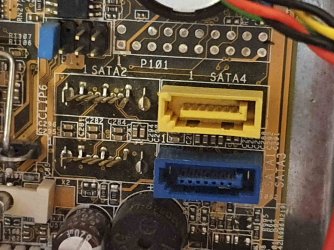
Unfortunately my SATA port on the Mobo has 2 connectors missing. (see img). I have 4 SATA ports but cannot connect to 2 of them. Shall i buy an adaptor (whats the name?) or it should work if I plug into any of the 2 already in use?
Thanks a lot
SignorSilvestro
 

Attachments

  • 20201127_163528.jpg
    20201127_163528.jpg
    392.1 KB · Views: 0

My Computer My Computer

At a glance

win Vista, Window7
Computer type
PC/Desktop
OS
win Vista, Window7

My Computer My Computer

At a glance

Win 7 Ultimate, Win 8.1 Pro, Linux Mint 19 Ci...Intel i5 4690KCorsair Vengeance LP 32GB DDR3MSI GTX 1060 GAMING X 6GB
Computer type
PC/Desktop
Computer Manufacturer/Model Number
Custom Build
OS
Win 7 Ultimate, Win 8.1 Pro, Linux Mint 19 Cinnamon (All 64-Bit)
CPU
Intel i5 4690K
Motherboard
Gigabyte Z97X-UD3H
Memory
Corsair Vengeance LP 32GB DDR3
Graphics Card(s)
MSI GTX 1060 GAMING X 6GB
Sound Card
Onboard
Hard Drives
Samsung 850 EVO 250GB SSD (x2)
Samsung 860 EVO 1TB SSD (x2)
Crucial MX300 525GB SSD
WD Blue 2TB 5400rpm Intellipark Disabled (x2)
PSU
Corsair HX750i
Case
Phanteks Enthoo Pro
Cooling
CM Hyper 212 EVO on CPU, Noctua Redux NF-P14S 1500rpm (x6)
Keyboard
Corsair K70 RGB LUX
Mouse
Corsair Sabre RGB
Antivirus
Avast Free, MalwareBytes, SAS & CryptoPrevent
Browser
Chrome
Other Info
StarTech PEXESAT322I 2 Port PCI-E SATA Card
ASUS PCE-AC56 Dual-band AC1300 Wireless Card
Akasa FC.Six Manual Fan Controller
And a Partridge in a Pear Tree!
Ok, I was thinking of sourcing one of these things in blue or yellow (as on the mobo)
Next week ill be receiving a new pc, hopefully i can connect it there.
Thanks
SignorSilvestro
 

My Computer My Computer

At a glance

win Vista, Window7
Computer type
PC/Desktop
OS
win Vista, Window7
Ok, I was thinking of sourcing one of these in blue or yellow.
Next week ill be receiving a new pc, hopefully i can connect it there.
Thanks
SignorSilvestro

Hopefully you're able to get your data back. I've had a couple of 2.5" External HDD's just refuse to work after a while, but it's not actually the drive, it's just the crappy connectors they use that seem to break. :rolleyes:
 

My Computer My Computer

At a glance

Win 7 Ultimate, Win 8.1 Pro, Linux Mint 19 Ci...Intel i5 4690KCorsair Vengeance LP 32GB DDR3MSI GTX 1060 GAMING X 6GB
Computer type
PC/Desktop
Computer Manufacturer/Model Number
Custom Build
OS
Win 7 Ultimate, Win 8.1 Pro, Linux Mint 19 Cinnamon (All 64-Bit)
CPU
Intel i5 4690K
Motherboard
Gigabyte Z97X-UD3H
Memory
Corsair Vengeance LP 32GB DDR3
Graphics Card(s)
MSI GTX 1060 GAMING X 6GB
Sound Card
Onboard
Hard Drives
Samsung 850 EVO 250GB SSD (x2)
Samsung 860 EVO 1TB SSD (x2)
Crucial MX300 525GB SSD
WD Blue 2TB 5400rpm Intellipark Disabled (x2)
PSU
Corsair HX750i
Case
Phanteks Enthoo Pro
Cooling
CM Hyper 212 EVO on CPU, Noctua Redux NF-P14S 1500rpm (x6)
Keyboard
Corsair K70 RGB LUX
Mouse
Corsair Sabre RGB
Antivirus
Avast Free, MalwareBytes, SAS & CryptoPrevent
Browser
Chrome
Other Info
StarTech PEXESAT322I 2 Port PCI-E SATA Card
ASUS PCE-AC56 Dual-band AC1300 Wireless Card
Akasa FC.Six Manual Fan Controller
And a Partridge in a Pear Tree!
Thanks, finger crossed.
 

My Computer My Computer

At a glance

win Vista, Window7
Computer type
PC/Desktop
OS
win Vista, Window7
Bad news,
After installing a new pc (gamer) i connected one of the SATA cable and power connection but nothing comes up.
I hear it running but it doesnt appear.
I took a step back and reassembled it with USB, it reads it but as previously cant initialize it and cant clear readonly.
Any suggestions?
Thanks
 

My Computer My Computer

At a glance

win Vista, Window7
Computer type
PC/Desktop
OS
win Vista, Window7
Back
Top