WD Passport Ultra 1Tb, not initialised, no show in MT Partition Wizard

Bongolia

New member
Local time
12:22 PM
Messages
15
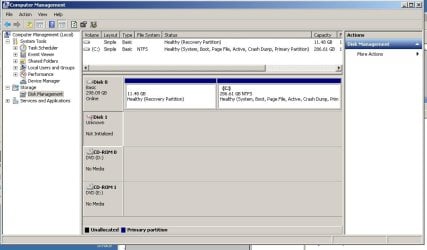
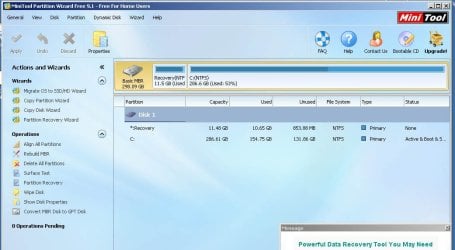
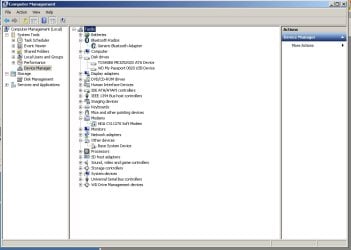
Hi, My WD Pasport Ultra has gone awry with valuable data on it. I've looked at lots of very useful threads here and I'm slowly getting closer to committing a restore process but I haven't got the guts to do it without an indication that I won't kill my data! I've tried a new USB 3 lead, running Mini Tool Partition Wizard, Recuva and Mini Tool Data Recovery. Partition Wizard and Recuva can't see the drive and Data Recover crashes when I search for it. I can see the drive in Device Manager and Disc Management and I've included images of these below. TestDisk can see it and I can navigate the whole process outlined by Jumanji until "Write partition table" in the ninth window, at which point I'm unsure what I'm writing to and whether I'll overwrite any valuable data. Any help would be ridiculously appreciated and supported by grovelling gratitude.
 

Attachments
  • device manage.jpg
    device manage.jpg
    64.6 KB · Views: 13
  • disc management.jpg
    disc management.jpg
    71.7 KB · Views: 14
  • choose disc screen.jpg
    choose disc screen.jpg
    79.3 KB · Views: 13
  • recover screen.jpg
    recover screen.jpg
    51.5 KB · Views: 15
Last edited:

My Computer My Computer

At a glance

Windows 7 Ultimate x64Intel Core 2 Duo P8400 @ 2.26Ghz4Gb RAMATI Mobility Radeon HD 3400
Computer type
Laptop
Computer Manufacturer/Model Number
Sony Vaio VGN-FW21E
OS
Windows 7 Ultimate x64
CPU
Intel Core 2 Duo P8400 @ 2.26Ghz
Memory
4Gb RAM
Graphics Card(s)
ATI Mobility Radeon HD 3400
Hard Drives
Toshiba MK3252GSX ATA 300Gb
Browser
Chrome
Welcome onboard.

Disk unknown not initialised does not show the capacity

None of the partition recovery, data recovery software sees the drive.

Not a very encouraging picture.

But I am surprised TestDisk could see it. So let us hang on to it and see what it shows.

TestDisk:

With your WD passport Ultra 1TB plugged in, run Testdisk.

First Screen: With up/Down arrow keys, highlight/select No Log Press Enter

Second screen: You should see all your connected disks and drives. Post a screenshot. Highlight the Disk ( not Drive) you want to recover Disk ( sda /dev /* ) You should be able to identify the drives with the capacity.
[Proceed] Enter

Third Screen:Highlight [Intel] if not highlighted already. Enter

Fourth Screen: [Analyse] Enter

Fifth Screen: Current Partition Structure will be shown. Post a screenshot. [Quick Search] should be highlighted. Enter

Sixth Screen: Let the analysis complete. You can see the progress. When complete it may show a number of partitions. Post a screenshot.

At this point click on X at top right corner to quit TestDisk.( You may also press q repeatedly till it takes you out)

Let me see the above three screenshots and decide on the next step. You can run TestDisk again.

Note: If you have any doubts on dealing with any screen post a screenshot and quit TestDisk.

Do not go to any step, choose any command on your own. Especially do not give a [Write]
command unless instructed. ( I am happy you didn't do it.)

Post the above screenshots. I shall see it tomorrow morning ( My time now 2243hrs.).
 

My Computer My Computer

At a glance

Windows 7 Home Premium 32 bit
OS
Windows 7 Home Premium 32 bit
Don't those drives use DriveUnlock[er]? If such was activated earlier, it might be an uphill struggle getting past DriiveUnlock[er].
 

My Computer My Computer

At a glance

Windows 7 Professional 64-bitDesktop i5; Acers i5 & i7desktop 16GB; 1 Acer 8GB & 1 Acer 16GB
Computer type
PC/Desktop
Computer Manufacturer/Model Number
Antec desktop; Acer Aspire laptops
OS
Windows 7 Professional 64-bit
CPU
Desktop i5; Acers i5 & i7
Memory
desktop 16GB; 1 Acer 8GB & 1 Acer 16GB
Hard Drives
1TB split into 2 equal partitions [OS and data] usable by RJS
Internet Speed
AT&T DSL
Browser
FF, GChrome, msIE
Other Info
Windows 7 Firewall, Emsisoft AM/AV, MSE [scan-only], SpywareBlaster, Ruiware/BillP combine
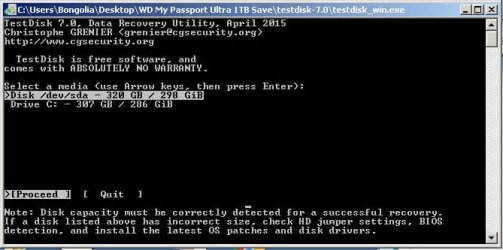
Thanks for getting back Jumanji. I'm now thinking that I wasn't seeing the drive in TestDisk. I think I mistook Disk /dev/sda - 320GB / 298GB for it. This is not the correct size. Screenshot below:
 

Attachments

  • TestDisk screen 2.jpg
    TestDisk screen 2.jpg
    44.5 KB · Views: 23
Last edited:

My Computer My Computer

At a glance

Windows 7 Ultimate x64Intel Core 2 Duo P8400 @ 2.26Ghz4Gb RAMATI Mobility Radeon HD 3400
Computer type
Laptop
Computer Manufacturer/Model Number
Sony Vaio VGN-FW21E
OS
Windows 7 Ultimate x64
CPU
Intel Core 2 Duo P8400 @ 2.26Ghz
Memory
4Gb RAM
Graphics Card(s)
ATI Mobility Radeon HD 3400
Hard Drives
Toshiba MK3252GSX ATA 300Gb
Browser
Chrome
Hello Bongolia!

I'm sorry you're having this issue! :/

The “Disk # is Unknown not initialized” could very often happen with a damaged external drive, so this could be the case.

Did you try changing the USB cable? I see your main goal is the data on the drive, so I would suggest you to try and boot to a Linux-based Live CD, connect the drive and see if it is being recognized.

You could use this tutorial from Golden:
http://www.sevenforums.com/tutorials/256518-peppermint-live-cd-dvd-usb-create-emergency-backup.html

If this doesn't work and the data is truly important you could also look into professional data recovery help, WD has partners in the field.

Best of luck!

CK_WD
 

My Computer My Computer

At a glance

Windows 7 Home Premium x64
Computer type
PC/Desktop
OS
Windows 7 Home Premium x64
Thanks for getting back Jumanji. I'm now thinking that I wasn't seeing the drive in TestDisk. I think I mistook Disk /dev/sda - 320GB / 298GB for it. This is not the correct size. Screenshot below:

Yes, TestDisk does not show your external disk. It shows only your system drive.I was surprised when you wrote Test Disk sees the disk.

You can try a Live Linux as CKWD has indicated as a last resort.

If no results then only Professional Data Recovery.

In your case I feel that the SATA to USB bridge inside the enclosure has failed. Since your drive is hardware-encrypted and most likely the SATA to USB bridge is integrated into the drive making the two entities inseperable, no DIY recovery is possible even if the HDD by itself is OK.
 

My Computer My Computer

At a glance

Windows 7 Home Premium 32 bit
OS
Windows 7 Home Premium 32 bit
Small external HDDs are convenient but if you want more reliable data backup in future I recommend a plain sata HDD (like you would install internally to a PC) inserted into a USB 3 docking station. What you get is:
1) A solid USB 3 connector and not the error prone micro USB 3 connector.
2) No silly enforced hardware encryption that WD seem to insist on.

You can connect this HDD to another docking station or internally for data recovery.
 

My Computer My Computer

At a glance

Windows 7x64 Home Premium SP1Intel i7 2600kG.Skill Ripjaws (DDR3-1600) 2x4GBNvidia GeForce GTS 450; Intel HD Graphics 300...
Computer type
PC/Desktop
Computer Manufacturer/Model Number
Own build
OS
Windows 7x64 Home Premium SP1
CPU
Intel i7 2600k
Motherboard
ASUS P8Z68 Deluxe
Memory
G.Skill Ripjaws (DDR3-1600) 2x4GB
Graphics Card(s)
Nvidia GeForce GTS 450; Intel HD Graphics 3000(GT2+)
Monitor(s) Displays
Dell Ultrasharp IPS panel U2311H, Samsung SyncMaster P2350
Screen Resolution
1920x1080
Hard Drives
Samsung 850 Pro SSD 256GB, Samsung SSD 840 120GB, Seagates 1TB Barracuda ST31000528AS x2
PSU
Seasonic M12II 520W
Case
Lian Li Lancool PC-K60
Cooling
Case: 1x120mm, 3x140mm CPU: Hyper 212+
Keyboard
Logitech MK520 (wireless)
Mouse
Logitech MK520
Internet Speed
6-7 Mbps
Antivirus
Norton Security Premium, Malwarebytes on 2 (MSE on 3rd PC)
Browser
FireFox
Other Info
Audio: Logitech Z523 2.1
Thanks for all the great suggestions everyone. I'll try the Linux route. I usually back up to a large separately powered disc drive but, once I got this 1TB which fits in my pocket, I got a bit lazy! I've casually saved everything to it for about 10 months now. I know exactly how silly that is but...

Here goes!
 

My Computer My Computer

At a glance

Windows 7 Ultimate x64Intel Core 2 Duo P8400 @ 2.26Ghz4Gb RAMATI Mobility Radeon HD 3400
Computer type
Laptop
Computer Manufacturer/Model Number
Sony Vaio VGN-FW21E
OS
Windows 7 Ultimate x64
CPU
Intel Core 2 Duo P8400 @ 2.26Ghz
Memory
4Gb RAM
Graphics Card(s)
ATI Mobility Radeon HD 3400
Hard Drives
Toshiba MK3252GSX ATA 300Gb
Browser
Chrome

My Computer My Computer

At a glance

Win 7 Ultimate, Win 8.1 Pro, Linux Mint 19 Ci...Intel i5 4690KCorsair Vengeance LP 32GB DDR3MSI GTX 1060 GAMING X 6GB
Computer type
PC/Desktop
Computer Manufacturer/Model Number
Custom Build
OS
Win 7 Ultimate, Win 8.1 Pro, Linux Mint 19 Cinnamon (All 64-Bit)
CPU
Intel i5 4690K
Motherboard
Gigabyte Z97X-UD3H
Memory
Corsair Vengeance LP 32GB DDR3
Graphics Card(s)
MSI GTX 1060 GAMING X 6GB
Sound Card
Onboard
Hard Drives
Samsung 850 EVO 250GB SSD (x2)
Samsung 860 EVO 1TB SSD (x2)
Crucial MX300 525GB SSD
WD Blue 2TB 5400rpm Intellipark Disabled (x2)
PSU
Corsair HX750i
Case
Phanteks Enthoo Pro
Cooling
CM Hyper 212 EVO on CPU, Noctua Redux NF-P14S 1500rpm (x6)
Keyboard
Corsair K70 RGB LUX
Mouse
Corsair Sabre RGB
Antivirus
Avast Free, MalwareBytes, SAS & CryptoPrevent
Browser
Chrome
Other Info
StarTech PEXESAT322I 2 Port PCI-E SATA Card
ASUS PCE-AC56 Dual-band AC1300 Wireless Card
Akasa FC.Six Manual Fan Controller
And a Partridge in a Pear Tree!
Back
Top