
Wddm 1.1

garysgold

MIA
Guru
Gold Member
VIP
Local time
11:24 PM
Messages
3,141
Location
Maine, USA
Just had a wierd thing happen. Happens with both Photo Viewer and Live Photo Gallery which makes me think it is a driver issue.

When I open a pic and enlarge it significantly for a few seconds and then close the program I have tons of artifacts from the pic on my desktop. If I right click and select the next background (I have several rotating), it clears. It doesn't happen every time, but almost.
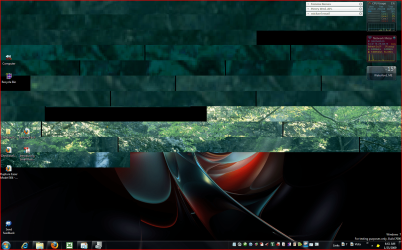
artifacts.PNG

Headed to work so don't have time to try a different driver, but was wondering if anyone else has seen this.

Gary
 

My Computer

Computer Manufacturer/Model Number
Dell XPS420
OS
Vista Ult 64 bit Seven Ult RTM x64
CPU
Intel Core2 Quad Q6600 2.40 gigahertz
Memory
Crucial Ballistix 4x2GB PC2 6400
Graphics Card(s)
NVIDIA GeForce 8600 GTS 256 MB
Sound Card
Creative SB X-Fi audio
Monitor(s) Displays
HP w2207 + HPvs15
Screen Resolution
1680x1050 + 1024x768
Hard Drives
2-WD5000AAKS-500 GB
WD5000AAV-500 GB external
Keyboard
Microsoft Comfort Curve
Mouse
MX Revolution
Other Info
Wacom Intuos 2 Graphics Tablet
Experience Index=5.5
Sorry Gary haven't seen that yet but that background looks familiar lol.
 

My Computer

Computer Manufacturer/Model Number
Home Brew
OS
Windows 7 Ultimate Vista Ultimate x64
CPU
Core 2 Duo E8500 3.16Ghz @ 3.8Ghz
Motherboard
eVGA 750i FTW
Memory
2x2Gigs Patriot PC2-6400 LL
Graphics Card(s)
Inno3D GeForce GTX260 216 SP
Monitor(s) Displays
ASUS VW222U 22" 2ms Response time
Screen Resolution
1680x1050
Hard Drives
SATA 150GB
SATA II 250GB
USB IDE 750GB Ext.
PSU
HYTEC 600W & Thermaltake 650W Toughpower Power Exp
Case
Thermaltake Armor LCS (Liquid Cooling System)
Cooling
Liquid Cooling System
Keyboard
Logitech G15 Gaming Keyboard
Mouse
Logitech G9 Gaming Mouse
Just had a wierd thing happen. Happens with both Photo Viewer and Live Photo Gallery which makes me think it is a driver issue.

When I open a pic and enlarge it significantly for a few seconds and then close the program I have tons of artifacts from the pic on my desktop. If I right click and select the next background (I have several rotating), it clears. It doesn't happen every time, but almost.

View attachment 3574

Headed to work so don't have time to try a different driver, but was wondering if anyone else has seen this.

Gary


That looks like some superb artwork there Gary :p

Its a driver issue, Are you using the WindowsUpdate WDDM1.1 drivers or the usual released drivers from NVidia? (The beta nvidia drivers have WDDM1.1 support btw ;))
 
Yeah, I thought it probably was since it was happening with both programs. Downloaded 181.22 from Nvidia. Problem solved. I was using the WDDM1.1 from windows update. When I searched all drivers for the 8600gts, it didn't show me any beta drivers. When I searched beta drivers, it showed me an older 181. Thanks Steven.

Gary
 

My Computer

Computer Manufacturer/Model Number
Dell XPS420
OS
Vista Ult 64 bit Seven Ult RTM x64
CPU
Intel Core2 Quad Q6600 2.40 gigahertz
Memory
Crucial Ballistix 4x2GB PC2 6400
Graphics Card(s)
NVIDIA GeForce 8600 GTS 256 MB
Sound Card
Creative SB X-Fi audio
Monitor(s) Displays
HP w2207 + HPvs15
Screen Resolution
1680x1050 + 1024x768
Hard Drives
2-WD5000AAKS-500 GB
WD5000AAV-500 GB external
Keyboard
Microsoft Comfort Curve
Mouse
MX Revolution
Other Info
Wacom Intuos 2 Graphics Tablet
Experience Index=5.5
Back
Top