We can't tell if your PC has enough space to continue installing ...

Crewey

New member
Member
Local time
11:45 AM
Messages
45
Hi guys, after finally getting my cloned SSD to boot up (with lots of help from this forum and SIW2), I am now trying to upgrade it to Windows 10. As ever, nothing is straightforward! I have the Windows 10 installation on a USB, but each time I try to install it I get " we can't tell if your PC has enough space to continue installing". There is 80GB available. Any advice or work arounds would be greatly appreciated. Thanks in advance.[h=1][/h]
 

My Computers My Computers

  • At a glance

    Windows 7 Proi512Gig
    Computer type
    PC/Desktop
    Computer Manufacturer/Model Number
    Viglen
    OS
    Windows 7 Pro
    CPU
    i5
    Memory
    12Gig
  • Computer type
    PC/Desktop
Before downgrading to win10:

Presumably you are keeping one of your disks with a win7 installation and dowgrading the win 7 os on the other disk ?
 

My Computers My Computers

  • At a glance

    7 X64i5 84002x8gb 3200mhz
    Computer type
    PC/Desktop
    OS
    7 X64
    CPU
    i5 8400
    Motherboard
    gigabyte b365m ds3h
    Memory
    2x8gb 3200mhz
    Hard Drives
    various
    PSU
    pure power 11 400w cm
    Case
    Coolermaster
    Cooling
    cryorig m9i
  • At a glance

    7x64g54008gb ddr4 2400
    Computer type
    PC/Desktop
    OS
    7x64
    CPU
    g5400
    Motherboard
    ga b365m ds3h
    Memory
    8gb ddr4 2400
    PSU
    xfx pro 450w
Hi mate, yes I am upgrading to Windows 10 on the cloned drive to put it in another machine. :-). I will continue running my "old" PC on Windows 7.

 

My Computers My Computers

  • At a glance

    Windows 7 Proi512Gig
    Computer type
    PC/Desktop
    Computer Manufacturer/Model Number
    Viglen
    OS
    Windows 7 Pro
    CPU
    i5
    Memory
    12Gig
  • Computer type
    PC/Desktop
Have you tried detaching all disks except the one you are downgrading to win10.
 

My Computers My Computers

  • At a glance

    7 X64i5 84002x8gb 3200mhz
    Computer type
    PC/Desktop
    OS
    7 X64
    CPU
    i5 8400
    Motherboard
    gigabyte b365m ds3h
    Memory
    2x8gb 3200mhz
    Hard Drives
    various
    PSU
    pure power 11 400w cm
    Case
    Coolermaster
    Cooling
    cryorig m9i
  • At a glance

    7x64g54008gb ddr4 2400
    Computer type
    PC/Desktop
    OS
    7x64
    CPU
    g5400
    Motherboard
    ga b365m ds3h
    Memory
    8gb ddr4 2400
    PSU
    xfx pro 450w
Yes, disconnected all other drives and disconnected from the internet. Disbabled anti virus.
 

My Computers My Computers

  • At a glance

    Windows 7 Proi512Gig
    Computer type
    PC/Desktop
    Computer Manufacturer/Model Number
    Viglen
    OS
    Windows 7 Pro
    CPU
    i5
    Memory
    12Gig
  • Computer type
    PC/Desktop
If it is an mbr disk with a 100mb active partition, it might be that win10 wants a larger active partition.
 

My Computers My Computers

  • At a glance

    7 X64i5 84002x8gb 3200mhz
    Computer type
    PC/Desktop
    OS
    7 X64
    CPU
    i5 8400
    Motherboard
    gigabyte b365m ds3h
    Memory
    2x8gb 3200mhz
    Hard Drives
    various
    PSU
    pure power 11 400w cm
    Case
    Coolermaster
    Cooling
    cryorig m9i
  • At a glance

    7x64g54008gb ddr4 2400
    Computer type
    PC/Desktop
    OS
    7x64
    CPU
    g5400
    Motherboard
    ga b365m ds3h
    Memory
    8gb ddr4 2400
    PSU
    xfx pro 450w
It's not MBR, we established it was GPT. How can I increase the size of the 100 mb partition? Thanks
 

My Computers My Computers

  • At a glance

    Windows 7 Proi512Gig
    Computer type
    PC/Desktop
    Computer Manufacturer/Model Number
    Viglen
    OS
    Windows 7 Pro
    CPU
    i5
    Memory
    12Gig
  • Computer type
    PC/Desktop
Post diskgenius screenshot and we wil have a look. The win10 installer also likes to create a "recovery" partition, usually after the end of the os partition, in which it likes to deposit winre.wim

this is the default layout

gpt-recommended.jpg
 

My Computers My Computers

  • At a glance

    7 X64i5 84002x8gb 3200mhz
    Computer type
    PC/Desktop
    OS
    7 X64
    CPU
    i5 8400
    Motherboard
    gigabyte b365m ds3h
    Memory
    2x8gb 3200mhz
    Hard Drives
    various
    PSU
    pure power 11 400w cm
    Case
    Coolermaster
    Cooling
    cryorig m9i
  • At a glance

    7x64g54008gb ddr4 2400
    Computer type
    PC/Desktop
    OS
    7x64
    CPU
    g5400
    Motherboard
    ga b365m ds3h
    Memory
    8gb ddr4 2400
    PSU
    xfx pro 450w
Diskgenius.PNG
 

My Computers My Computers

  • At a glance

    Windows 7 Proi512Gig
    Computer type
    PC/Desktop
    Computer Manufacturer/Model Number
    Viglen
    OS
    Windows 7 Pro
    CPU
    i5
    Memory
    12Gig
  • Computer type
    PC/Desktop
partition (2) looks like it might have been created by win10.

I would make 300mb esp , create a 16mb minimum msr just behind it, and delete that partition (2)
 

My Computers My Computers

  • At a glance

    7 X64i5 84002x8gb 3200mhz
    Computer type
    PC/Desktop
    OS
    7 X64
    CPU
    i5 8400
    Motherboard
    gigabyte b365m ds3h
    Memory
    2x8gb 3200mhz
    Hard Drives
    various
    PSU
    pure power 11 400w cm
    Case
    Coolermaster
    Cooling
    cryorig m9i
  • At a glance

    7x64g54008gb ddr4 2400
    Computer type
    PC/Desktop
    OS
    7x64
    CPU
    g5400
    Motherboard
    ga b365m ds3h
    Memory
    8gb ddr4 2400
    PSU
    xfx pro 450w
Not sure how to do that, sorry

- - - Updated - - -

Sorry, I have no idea how to do that?
 

My Computers My Computers

  • At a glance

    Windows 7 Proi512Gig
    Computer type
    PC/Desktop
    Computer Manufacturer/Model Number
    Viglen
    OS
    Windows 7 Pro
    CPU
    i5
    Memory
    12Gig
  • Computer type
    PC/Desktop
I would shrink the windows partition from the left about 400 mb.
Then extend the 100 mb to 300mb and create a small 16 mb ( minimum) msr partition.
You cant do this while you are in windows, it needs to be done from within another os , any 3rd party partition manager will boot into some kind of winpe or pre-os mode to do it.

delete the partition(2) which looks like a previous attempt by win10 to create a recovery partition
 

My Computers My Computers

  • At a glance

    7 X64i5 84002x8gb 3200mhz
    Computer type
    PC/Desktop
    OS
    7 X64
    CPU
    i5 8400
    Motherboard
    gigabyte b365m ds3h
    Memory
    2x8gb 3200mhz
    Hard Drives
    various
    PSU
    pure power 11 400w cm
    Case
    Coolermaster
    Cooling
    cryorig m9i
  • At a glance

    7x64g54008gb ddr4 2400
    Computer type
    PC/Desktop
    OS
    7x64
    CPU
    g5400
    Motherboard
    ga b365m ds3h
    Memory
    8gb ddr4 2400
    PSU
    xfx pro 450w
Cheers mate, that did the trick...but when I try to install Windows 10 it starts installing, then says "working on updates" then it freezes on 85%. Tried it twice, same thing...85%..any suggestions? Eventually I will get this machine working...with your help and expertise of course!

- - - Updated - - -

So I restarted my computer and it reverted back to Windows 7 with the following message:
0xC1900101 - 0x4000D. The installation failed in the second bootphase with an error during MIGRATE_DATA operation? Any idea what this means? Thanks
 

My Computers My Computers

  • At a glance

    Windows 7 Proi512Gig
    Computer type
    PC/Desktop
    Computer Manufacturer/Model Number
    Viglen
    OS
    Windows 7 Pro
    CPU
    i5
    Memory
    12Gig
  • Computer type
    PC/Desktop
If you disconnec from the net it wont be able to get updates during the upgrade. Are you using old win10 installation media ?
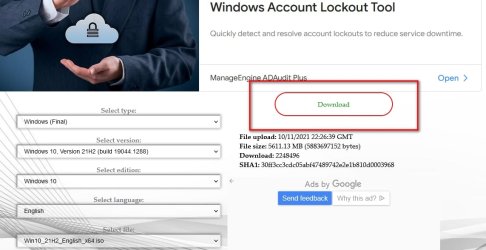
recent version 21H2 available here.

Unless you want to go straight to win11 and skip win10 ( check if your machine officially suports win11 first. which effectively means intel 8th gen cpu or newer or amd equivalent )

we dont know your machine specs - viglen doesnt tell us much.


TechBench by WZT (v4.1.1)
 

My Computers My Computers

  • At a glance

    7 X64i5 84002x8gb 3200mhz
    Computer type
    PC/Desktop
    OS
    7 X64
    CPU
    i5 8400
    Motherboard
    gigabyte b365m ds3h
    Memory
    2x8gb 3200mhz
    Hard Drives
    various
    PSU
    pure power 11 400w cm
    Case
    Coolermaster
    Cooling
    cryorig m9i
  • At a glance

    7x64g54008gb ddr4 2400
    Computer type
    PC/Desktop
    OS
    7x64
    CPU
    g5400
    Motherboard
    ga b365m ds3h
    Memory
    8gb ddr4 2400
    PSU
    xfx pro 450w
Thanks, I'll give it a try. I tried that link for latest Windows 10, but after filling in the details I can't find the download link? There are a number of buttons, but they are to download other stuff (Restoro, Driver Support,Nelegal)!
 

My Computers My Computers

  • At a glance

    Windows 7 Proi512Gig
    Computer type
    PC/Desktop
    Computer Manufacturer/Model Number
    Viglen
    OS
    Windows 7 Pro
    CPU
    i5
    Memory
    12Gig
  • Computer type
    PC/Desktop

My Computers My Computers

  • At a glance

    7 X64i5 84002x8gb 3200mhz
    Computer type
    PC/Desktop
    OS
    7 X64
    CPU
    i5 8400
    Motherboard
    gigabyte b365m ds3h
    Memory
    2x8gb 3200mhz
    Hard Drives
    various
    PSU
    pure power 11 400w cm
    Case
    Coolermaster
    Cooling
    cryorig m9i
  • At a glance

    7x64g54008gb ddr4 2400
    Computer type
    PC/Desktop
    OS
    7x64
    CPU
    g5400
    Motherboard
    ga b365m ds3h
    Memory
    8gb ddr4 2400
    PSU
    xfx pro 450w
So, I downloaded the ISO and wrote it to a USB. It won't run as it says the autorun.dll is missing or corrupt? i'm rewriting it to the usb and will try again.

- - - Updated - - -

Aaaagh...now it says,"WDSUTIL.DLL is missing? Why is nothing ever straightforawrd with computers!
 

My Computers My Computers

  • At a glance

    Windows 7 Proi512Gig
    Computer type
    PC/Desktop
    Computer Manufacturer/Model Number
    Viglen
    OS
    Windows 7 Pro
    CPU
    i5
    Memory
    12Gig
  • Computer type
    PC/Desktop
check the iso sha1 hash, it should match what is the pic in my previous post.

SHA1: 30ff3cc3cdc05abf47489742e2e1b810d0003968

If it matches, then there could be something wrong with your extraction method or the usb stick.

7-zip can get the hash.

https://7-zip.org/a/7z2200-x64.exe

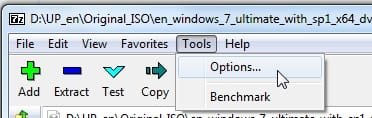
select Tools>options
7-zip-hash1.jpg

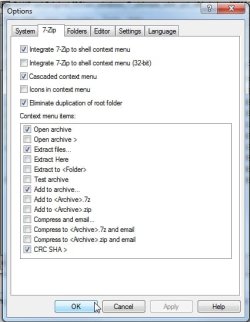
then select the 7-zip tab and tick like this, then click apply >ok
7-zip-hash2.jpg

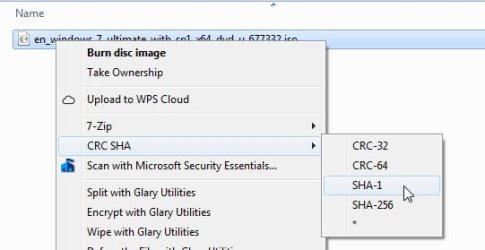
then when you rt click an iso you have a choice of hash - select sha1 and it will calculate it
7-zip-hash.jpg

- - - Updated - - -

The usb might be a bit messy, so you might want to give it a quick format - it needs to be ntfs if the install.wim is over 4gb obviously.

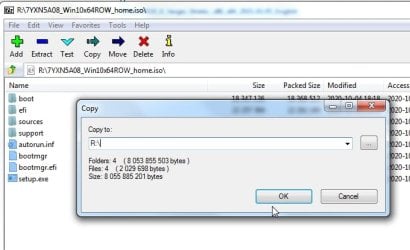
You could then extract the iso contents onto the usb stick with 7-zip

highlight the contents in blue then copy them to the usb stick, which is R:\ in the picture below, your usb stick letter will probably be different

7-zip-copy-iso-contents.jpg
 
Last edited:

My Computers My Computers

  • At a glance

    7 X64i5 84002x8gb 3200mhz
    Computer type
    PC/Desktop
    OS
    7 X64
    CPU
    i5 8400
    Motherboard
    gigabyte b365m ds3h
    Memory
    2x8gb 3200mhz
    Hard Drives
    various
    PSU
    pure power 11 400w cm
    Case
    Coolermaster
    Cooling
    cryorig m9i
  • At a glance

    7x64g54008gb ddr4 2400
    Computer type
    PC/Desktop
    OS
    7x64
    CPU
    g5400
    Motherboard
    ga b365m ds3h
    Memory
    8gb ddr4 2400
    PSU
    xfx pro 450w
Put in the latest version on my NTSC formatted USB stick as instructed. Got to 85% and froze again! Not connected to internet? This is a nightmare!
 

My Computers My Computers

  • At a glance

    Windows 7 Proi512Gig
    Computer type
    PC/Desktop
    Computer Manufacturer/Model Number
    Viglen
    OS
    Windows 7 Pro
    CPU
    i5
    Memory
    12Gig
  • Computer type
    PC/Desktop
Froze?

any messages?

Have a look at the log file to see if it tells you the problem.
Windows setup log file locations - Windows Client | Microsoft Docs

It is probably going to be easier to install win 10 onto another partition rather than doing the downgrade.

If you want to try that:

1. copy gatherosstate.exe from the win10 sources folder onto your win 7 desktop.

run gatherosstate.exe and in a few seconds it will create afile called genuineticket.xml on your win 7 desktop.

You will use that later.

2. create another partition after your win7 partition.

3. use winntsetup to apply the image from the usbstick\sources\install.wim file onto that new partition.

Dont forget to select the win 10 edition that you want to install in the dropdown

WinntsetupV524 will apply the win10 image(edition) you selected and take care of creating the necessary boot files as well

https://mega.nz/folder/ObATya7C#oR2t79bT-4MGjKxOAYwkbQ

- - - Updated - - -

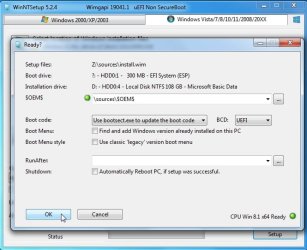
The efi partition should be automatically selected if there is only one on the machine.

brwse to the install.wim

browse to the partition you want to install onto

select the edition in the dropdown

click Setup

winntsetup-select1.jpg


default settings are ok, click Ok.

winntsetup-select2.jpg
 
Last edited:

My Computers My Computers

  • At a glance

    7 X64i5 84002x8gb 3200mhz
    Computer type
    PC/Desktop
    OS
    7 X64
    CPU
    i5 8400
    Motherboard
    gigabyte b365m ds3h
    Memory
    2x8gb 3200mhz
    Hard Drives
    various
    PSU
    pure power 11 400w cm
    Case
    Coolermaster
    Cooling
    cryorig m9i
  • At a glance

    7x64g54008gb ddr4 2400
    Computer type
    PC/Desktop
    OS
    7x64
    CPU
    g5400
    Motherboard
    ga b365m ds3h
    Memory
    8gb ddr4 2400
    PSU
    xfx pro 450w
Back
Top