

I have a couple of web sites. One is used for family matters and includes genealogy pages. I have always checked compatibility with both Firefox and Internet Explorer. My brother, who is a Mac user, will usually tell me if there is a problem with Safari. I suppose I really ought to download all the popular browsers to test for myself.
In the early days I found that Firefox rendered the pages exactly as I designed them whereas IE (4.0) was cr@p. As newer versions of IE appeared I found that it improved and eventually there was little difference between the two.
I have just installed Windows 7 (64 bit) which comes with IE 8 (64 bit). I don't know whether the 64 bit version is different to the 32 bit version but I'm impressed with the Developer Tools (F12) that are included. However, the rendering has reverted back to the sort of problems i found in version 4.0.
I wonder if you could take a look at this page on my family site.
It should look like this
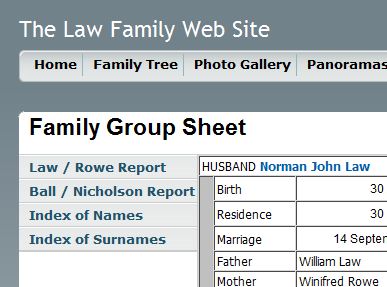
but in IE 8.0 it looks like this
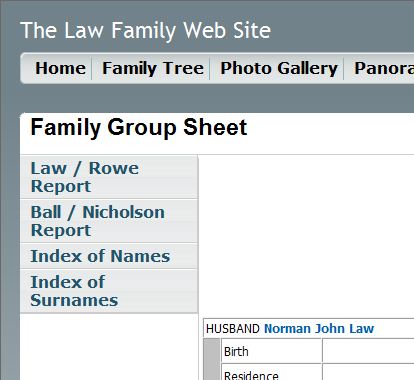
Even the font styles and sizes have changed. If anyone else is seeing it like this I would be interested to hear what browser and version you're using.
Anyone know how correct the problem?
In the early days I found that Firefox rendered the pages exactly as I designed them whereas IE (4.0) was cr@p. As newer versions of IE appeared I found that it improved and eventually there was little difference between the two.
I have just installed Windows 7 (64 bit) which comes with IE 8 (64 bit). I don't know whether the 64 bit version is different to the 32 bit version but I'm impressed with the Developer Tools (F12) that are included. However, the rendering has reverted back to the sort of problems i found in version 4.0.
I wonder if you could take a look at this page on my family site.
It should look like this
but in IE 8.0 it looks like this
Even the font styles and sizes have changed. If anyone else is seeing it like this I would be interested to hear what browser and version you're using.
Anyone know how correct the problem?
My Computer
- Computer Manufacturer/Model Number
- Dell XPS720
- OS
- Windows 7 Ultimate (64 bit)
- CPU
- Core 2 Quad Q6600 @ 2.4 ghz
- Motherboard
- Dell
- Memory
- 8 gb
- Graphics Card(s)
- NVIDIA GeForce 8800 GTX
- Sound Card
- Creative SB X-Fi
- Monitor(s) Displays
- Dell 2707 WFP
- Screen Resolution
- 1920 X 1200
- Hard Drives
- 4 Sata disks in 2 RAID 0 arrays
c: = 921 gb
d: = 745 gb
NVIDIA raid controller on MB
- PSU
- Dell XPS 720 Std.
- Case
- Dell XPS 720 Std.
- Cooling
- Dell XPS 720 Std.
- Keyboard
- Dell
- Mouse
- Dell
- Internet Speed
- Download Speed: 80713 kbps (10089.1 KB/sec ) Upload Speed:

