Websites aren't displaying/loading properly

Akatsuki

New member
Local time
8:23 AM
Messages
4
The last few days when I've been viewing websites on any browser (IE, FF, Chrome, Opera), they haven't been loading or displaying properly. Sometimes they're fine but frequently, pages aren't loading entirely, displaying html code. Images are distorted, blurred or looks wrong. Sometimes refreshing the page loads everything and sometimes it doesn't help. Here are some examples.


Same problem on my second computer and on my smart phone. I'm not too sure but I think it might be a connection problem? Anyone have an idea on what the central issue is? I don't think it's a virus since it's happening on multiple platforms. I've already contacted my ISP and they said the connection on their end is fine.
 

My Computer

OS
Windows 7 Home Premium 64bit
Saw this on Vistax64. Either a video issue or a connectivity issue.

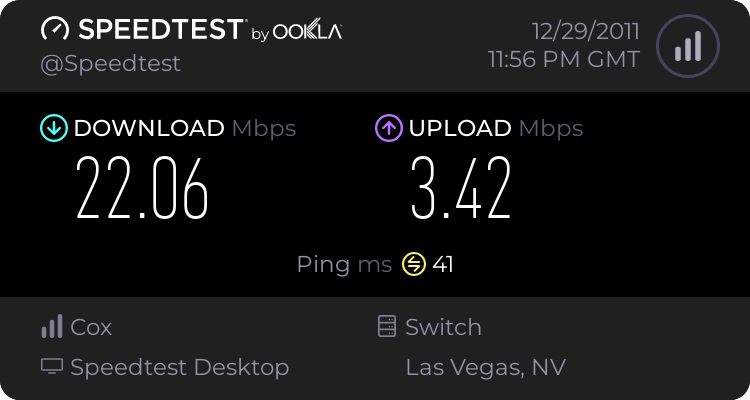
Can you go to speedtest and check your speeds (speedtest.net)

Can you also give us your system specs so we know what hardware we are dealing with?


By the way Welcome to SevnForums
 

My Computer

Computer Manufacturer/Model Number
HP Pavillion dv-7 1005 Tx
OS
Win 8 Release candidate 8400
CPU
[email protected]
Memory
4 gigs
Graphics Card(s)
Nvidia 9600M
Sound Card
HD built-in
Monitor(s) Displays
17" Wxga
Screen Resolution
1440x900
Cooling
none
Internet Speed
45Mb down 5Mb up
Hello there,


Same problem on my second computer and on my smart phone.

I've already contacted my ISP and they said the connection on their end is fine.


Of course they would. ;)

Experience tells me they always take the defensive position & never admit to difficulties.
The fact you are experiencing this problem across a few areas { computers & smart phone} leads me to believe they may be being less than forthright with you.

FYI

Error loading web sites | Troubleshooting | Firefox Help

Why are some webpages blank or incorrectly displayed in Internet Explorer 9?

Search results - Google Chrome Help
 

My Computer

Computer Manufacturer/Model Number
LAPTOP. HP Pavilion dv7-4010TX .
OS
Win 7 Ultimate 64-bit. SP1.
CPU
Intel i7 -720QM.[1.6GHz Turbo Boost 2.8GHz. 6MB Cache.]
Memory
8 DDR 3 RAM. 1066MHZ
Graphics Card(s)
ATI 1024 MB. DDR3. Radeon HD5650
Monitor(s) Displays
17.3" High Definition Brightview LCD. LED Backlit.
Screen Resolution
1600 x 900.
Hard Drives
640GB
Case
Laptop / notebook.
Mouse
Logitech Anywhere mouse. MX.
Internet Speed
ADSL [ but too slow ]
Saw this on Vistax64. Either a video issue or a connectivity issue.

Can you go to speedtest and check your speeds (speedtest.net)

Can you also give us your system specs so we know what hardware we are dealing with?


By the way Welcome to SevnForums
Could it possibly be that my router or modem needs to be replaced? Pretty much anything that is connected to my network, experiences some kind of problem, displaying images and videos (Computer, Phone, X-Box 360).

1676143796.png


----------------------------------------------------------
System Information
------------------
Operating System: Windows 7 Home Premium 64-bit (6.1, Build 7600) (7600.win7_gdr.110622-1503)
Language: English (Regional Setting: English)
System Manufacturer: Hewlett-Packard
System Model: s5550z
BIOS: BIOS Date: 09/07/10 09:17:09 Ver: 6.10
Processor: AMD Athlon(tm) II X4 635 Processor (4 CPUs), ~2.9GHz
Memory: 6144MB RAM
Available OS Memory: 5888MB RAM
Page File: 2063MB used, 9709MB available
Windows Dir: C:\Windows
DirectX Version: DirectX 11
DX Setup Parameters: Not found
User DPI Setting: 96 DPI (100 percent)
System DPI Setting: 96 DPI (100 percent)
DWM DPI Scaling: Disabled
DxDiag Version: 6.01.7600.16385 32bit Unicode
Display Devices
---------------
Card name: ATI Radeon 3000 Graphics
Manufacturer: ATI Technologies Inc.
Chip type: ATI display adapter (0x9616)
DAC type: Internal DAC(400MHz)
Device Key: Enum\PCI\VEN_1002&DEV_9616&SUBSYS_2AA9103C&REV_00
Display Memory: 2940 MB
Dedicated Memory: 252 MB
Shared Memory: 2687 MB
Current Mode: 1280 x 800 (32 bit) (60Hz)
Monitor Name: Generic PnP Monitor
Monitor Model: E182H
Monitor Id: EMA00B3
Native Mode: 1366 x 768(p) (59.790Hz)
Output Type: HD15
 

My Computer

OS
Windows 7 Home Premium 64bit
Do you reboot your router every so often?
How old is the router & what brand? {Tell us more about it.}
 

My Computer

Computer Manufacturer/Model Number
LAPTOP. HP Pavilion dv7-4010TX .
OS
Win 7 Ultimate 64-bit. SP1.
CPU
Intel i7 -720QM.[1.6GHz Turbo Boost 2.8GHz. 6MB Cache.]
Memory
8 DDR 3 RAM. 1066MHZ
Graphics Card(s)
ATI 1024 MB. DDR3. Radeon HD5650
Monitor(s) Displays
17.3" High Definition Brightview LCD. LED Backlit.
Screen Resolution
1600 x 900.
Hard Drives
640GB
Case
Laptop / notebook.
Mouse
Logitech Anywhere mouse. MX.
Internet Speed
ADSL [ but too slow ]
Do you reboot your router every so often?
How old is the router & what brand? {Tell us more about it.}
No, I dont. Should I've?

About 6 years and I have a Netgear WGT624v3.
 

My Computer

OS
Windows 7 Home Premium 64bit
Lets put it this way.
I reboot ours here every few weeks.
 

My Computer

Computer Manufacturer/Model Number
LAPTOP. HP Pavilion dv7-4010TX .
OS
Win 7 Ultimate 64-bit. SP1.
CPU
Intel i7 -720QM.[1.6GHz Turbo Boost 2.8GHz. 6MB Cache.]
Memory
8 DDR 3 RAM. 1066MHZ
Graphics Card(s)
ATI 1024 MB. DDR3. Radeon HD5650
Monitor(s) Displays
17.3" High Definition Brightview LCD. LED Backlit.
Screen Resolution
1600 x 900.
Hard Drives
640GB
Case
Laptop / notebook.
Mouse
Logitech Anywhere mouse. MX.
Internet Speed
ADSL [ but too slow ]
Do you think if I reset the router would it make it better??
 

My Computer

OS
Windows 7 Home Premium 64bit
Do you think if I reset the router would it make it better??

You may be lucky, however that's a fairly aged piece of kit... :zip:
 

My Computer

Computer Manufacturer/Model Number
Custom built machine
OS
W7 x64
CPU
Intel Q9300 2.5Ghz Quad LGA775 (Would like Q9650)
Motherboard
Gigabyte GA-EP45T-UD3R (F6 Bios)
Memory
4Gb OCZ Gold 1,333Mhz
Graphics Card(s)
Palit HD4850 O/C Sonic 512Mb DDR3, Dual DViD's
Sound Card
Azalia to twin Samson 50w Studio Monitors
Monitor(s) Displays
Twin Dell (E-IPS) U2311H 23.6" Screens
Screen Resolution
1920 x 1080 @ 60Hz
Hard Drives
Crucial M4 SSD, archives on twin Western Digital Caviar Black WD2002FAEX, 2TB, 7200rpm HDD's, Samsung Ritemaster CD/DVD Burner...
PSU
OCZ 600w
Case
Lian-Li PC8 acoustifoamed' aluminium tower
Cooling
Scythe 140mm Zipang
Keyboard
Cherry PS/2 custom model
Mouse
Lenovo USB laser "Thinkpad" Mouse
Internet Speed
ADSL2+ @14Mbps downstream & Cat6 Gigabit Ethernet
Antivirus
NOD32
Browser
Opera
Other Info
Silicon Dust HD Homerun Dual FTA (Ethernet) TV Tuners, Dray Tek Vigor 2850Vn router and 8x HP Gigabit Switch. Lian-Li CR26 Card Reader, Canon MF4430 iSensys laser printer/scanner.
One way to find out.
Be daring try it.
Turn it off for a few minutes.

If it works fine. Then do it at regular intervals.
 

My Computer

Computer Manufacturer/Model Number
LAPTOP. HP Pavilion dv7-4010TX .
OS
Win 7 Ultimate 64-bit. SP1.
CPU
Intel i7 -720QM.[1.6GHz Turbo Boost 2.8GHz. 6MB Cache.]
Memory
8 DDR 3 RAM. 1066MHZ
Graphics Card(s)
ATI 1024 MB. DDR3. Radeon HD5650
Monitor(s) Displays
17.3" High Definition Brightview LCD. LED Backlit.
Screen Resolution
1600 x 900.
Hard Drives
640GB
Case
Laptop / notebook.
Mouse
Logitech Anywhere mouse. MX.
Internet Speed
ADSL [ but too slow ]
Back
Top