Solved Websites Not Appearing Normal

WyattWhiteEagle

Member
Member
VIP
Local time
5:29 PM
Messages
166
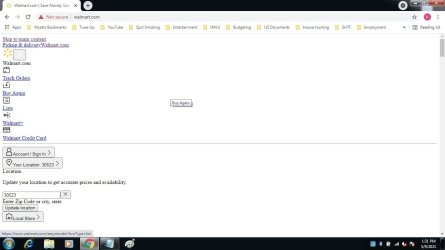
I'm currently using Google Chrome 90.0.4430.93 with Windows 7 Home Premium.

Not sure how many sites are appearing this way as this is the first encounter.

I tried adjusting Chrome browser settings but it didn't bring the "normal" look.

Any Ideas?
 

Attachments

  • Walmart.jpg
    Walmart.jpg
    115.8 KB · Views: 5

My Computer

Computer type
Laptop
Computer Manufacturer/Model Number
Acer Aspire E1-532
OS
Microsoft Windows 7 Home Premium 64-bit 7601 Multiprocessor Free Service Pack 1
CPU
Intel(R) Celeron(R) 2957U @ 1.40GHz
Motherboard
Acer EA50_HW
Memory
8.00 GB
Graphics Card(s)
Intel(R) HD Graphics
Sound Card
High Definition Audio Device
Screen Resolution
1366 x 768 x 32 bits (4294967296 colors) @ 59 Hz
Hard Drives
TOSHIBA MQ01ABD100 ATA Device
I have that happen to me now and then, I will listen in and learn from the experiences of others for solutions.
 

My Computer

Computer type
PC/Desktop
Computer Manufacturer/Model Number
Antec desktop; Acer Aspire laptops
OS
Windows 7 Professional 64-bit
CPU
Desktop i5; Acers i5 & i7
Memory
desktop 16GB; 1 Acer 8GB & 1 Acer 16GB
Hard Drives
1TB split into 2 equal partitions [OS and data] usable by RJS
Internet Speed
AT&T DSL
Browser
FF, GChrome, msIE
Other Info
Windows 7 Firewall, Emsisoft AM/AV, MSE [scan-only], SpywareBlaster, Ruiware/BillP combine

My Computer

Computer type
PC/Desktop
Computer Manufacturer/Model Number
medionl/Aspire 6930G/acer x55a
OS
W7 home premium 32bit/W7HP 64bit/w10 tp insider ring
CPU
E5300 dual core
Motherboard
medion MS7366
Memory
3gb
Graphics Card(s)
Nvidia Geforce 7100 Nforce 630i
Monitor(s) Displays
avixc
Internet Speed
n (isp resticted to 72)
Antivirus
mse/pands
Browser
palemoon
Other Info
Belkin Fd7050 n USB using Railink RT2870 drivers, more upto date
I recently had to clean install Windows 7 but I hadn't yet installed updates.

I ran Simplix and now...

Problem Solved!!!
 

My Computer

Computer type
Laptop
Computer Manufacturer/Model Number
Acer Aspire E1-532
OS
Microsoft Windows 7 Home Premium 64-bit 7601 Multiprocessor Free Service Pack 1
CPU
Intel(R) Celeron(R) 2957U @ 1.40GHz
Motherboard
Acer EA50_HW
Memory
8.00 GB
Graphics Card(s)
Intel(R) HD Graphics
Sound Card
High Definition Audio Device
Screen Resolution
1366 x 768 x 32 bits (4294967296 colors) @ 59 Hz
Hard Drives
TOSHIBA MQ01ABD100 ATA Device
This is the result from my shortcut to Walmart. (I'm not signed in yet.)

Verify your identity

This is the result of just typing walmart.com into the address bar:

Verify your identity

As the others, I have experienced websites showing up improperly like that, but it has been so long that I can't remember the solution. I do think it is something relatively simple though.

I am using Firefox.
 
Last edited:

My Computer

Computer type
Laptop
Computer Manufacturer/Model Number
HP
OS
Windows 7 Home Premium 64bit
This is the result from my shortcut to Walmart. (I'm not signed in yet.)

Verify your identity

This is the result of just typing walmart.com into the address bar:

Verify your identity

As the others, I have experienced websites showing up improperly like that, but it has been so long that I can't remember the solution. I do think it is something relatively simple though.

I am using Firefox.

When I open both of those links, I see a normal display.
That doesn't mean you are seeing a normal display.

Can you please attach a screenshot of what you are seeing?
It will help in finding a solution.
 

My Computer

Computer type
Laptop
Computer Manufacturer/Model Number
Acer Aspire E1-532
OS
Microsoft Windows 7 Home Premium 64-bit 7601 Multiprocessor Free Service Pack 1
CPU
Intel(R) Celeron(R) 2957U @ 1.40GHz
Motherboard
Acer EA50_HW
Memory
8.00 GB
Graphics Card(s)
Intel(R) HD Graphics
Sound Card
High Definition Audio Device
Screen Resolution
1366 x 768 x 32 bits (4294967296 colors) @ 59 Hz
Hard Drives
TOSHIBA MQ01ABD100 ATA Device
When I open both of those links, I see a normal display.
That doesn't mean you are seeing a normal display.

Can you please attach a screenshot of what you are seeing?
It will help in finding a solution.

Things got a little confusing in this thread. I think your comment that Simplix fixed it for you got in while I was still typing a response to torchwood's comment:

i am somewhat concerned thats a NOT legit site. Notice the NOT secure icon

Cant believe that Walmart is not secure

I was posting simply to show torchwood that my links to Walmart are secure in Firefox.

I apologize for the confusion I caused. I probably should not have put the links in the url forum format since that actually hid the https classification. And I should have quoted him from the get-go.

https://www.walmart dot com/?action=SignIn&rm=true (altered to keep the forum from changing it.)
 

My Computer

Computer type
Laptop
Computer Manufacturer/Model Number
HP
OS
Windows 7 Home Premium 64bit
...As the others, I have experienced websites showing up improperly like that, but it has been so long that I can't remember the solution. I do think it is something relatively simple though.

I am using Firefox.

Most times it is indeed something simple.

Torchwood's suggestion is a good one, however I viewed the suggestion as somewhat of a "last resort".

When I posted the image where Torchwood noticed the "Not secure" icon, I was seeing SevenForums normally.

It let me know that it was something very simple such as Google privacy settings, Windows Updates, Simplix, DISM, etc.

For me, though I adjusted some of Google's Privacy and Security settings, the solution was as simple as an Important Update from Windows Update.

Simplix runs only the most important Windows Updates.

I'm not surprised that Simplix was the solution for me.
 

My Computer

Computer type
Laptop
Computer Manufacturer/Model Number
Acer Aspire E1-532
OS
Microsoft Windows 7 Home Premium 64-bit 7601 Multiprocessor Free Service Pack 1
CPU
Intel(R) Celeron(R) 2957U @ 1.40GHz
Motherboard
Acer EA50_HW
Memory
8.00 GB
Graphics Card(s)
Intel(R) HD Graphics
Sound Card
High Definition Audio Device
Screen Resolution
1366 x 768 x 32 bits (4294967296 colors) @ 59 Hz
Hard Drives
TOSHIBA MQ01ABD100 ATA Device
The issue seems to be due to the fact you're loading the none HTTPS website by virtue of simply entering the base domain of walmart.com.

As you can see here, Chrome's built-in HSTS pre-load list doesn't auto direct to the HTTPS version of everybody's favorite Walmart website.

How do you solve this? Just enter the full domain as https://walmart.com.

Search for it in Google or your favorite search engine.

Install the HTTPS Everywhere extension to auto upgrade your domain name to a "secure" version of the site if one exists. HTTPS Everywhere - Chrome Web Store

Tell Walmart to view my post and have them submit their domain to Chrome's HSTS pre-load list to be incorporated into future versions of Chrome and Firefox et al.

If you give me a HAR file I'll tell you in a New York millisecond if you have a bad website full of Guy Fawkes mask wearing critters. How To Collect A Har File Using Chrome - Carbon Black Community
 

My Computer

Computer type
PC/Desktop
OS
Windows 7 Ultimate x64
Back
Top