
WEI can't get past running test "Direct3D 10 Batch Assessment"
Hello. Hope everybody is doing fine.
So, after installing another 4GB stick of RAM and my trusted SSD, it was time for a refresh on the WEI. But before I get to that, let me take you back a few days ago, when I got myself a new laptop party, a Lenovo Z710 (i3-4000M, GT 745M, 4GB DDR3L RAM@1600 mHZ, 1TB Seagate SSHD with a 8GB SSD for caching) and since I couldn't accept its performance, I got down to business (note to self: MUST also update my system specs
  ).
).
Step 1: I installed another 4GB of RAM DDR3 from my previous laptop (you can get it on my system specs as they are now) running at 1.5v, with no problems whatsoever. Before doing this, I had checked via the trusted HWiNFO64 that the pre-installed stick was a module of dual nominal voltage so I wouldn't fry the poor DDR3L. Ran WEI, got a 7,4 score on memory (in fact I was kinda disappointed but anyways), had no BSODs, no freezes, no nothing. But the SSHD was just low (the 8 GB of caching were literally nowhere) and that was the time I decided to go to
Step 2: and get myself a new clean install of Windows 7 Ultimate x64 on a Samsung 840 EVO SSD, with EVERYTHING in order (I had a few troubles finding the right driver for my wireless adapter though but I managed ) and decided to rerun the assessment.
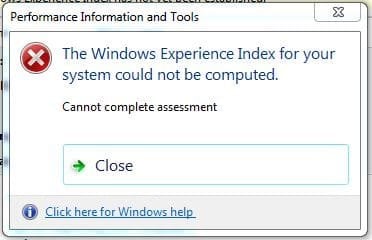
To my great surprise, the test can't get past the "Direct3D 10 Batch Assessment", gets stuck there for about 5 minutes, maybe more and then I got the dialog box below. I am able to play MMO's and MMORPG games without any kind of problem whatsover and without a single hint of increased temperature.
I have already tried running sfc /scannow on an elevated command prompt (3 times) without any "integrity violations", I have already followed the instructions given here http://www.sevenforums.com/tutorials/79177-windows-experience-index-reset.html and I don't know what else to do.
Any kind of help or advice from the community would be much appreciated.
Thanks and my apologies for the tl;dr post of mine
Hello. Hope everybody is doing fine.
So, after installing another 4GB stick of RAM and my trusted SSD, it was time for a refresh on the WEI. But before I get to that, let me take you back a few days ago, when I got myself a new laptop
party, a Lenovo Z710 (i3-4000M, GT 745M, 4GB DDR3L RAM@1600 mHZ, 1TB Seagate SSHD with a 8GB SSD for caching) and since I couldn't accept its performance, I got down to business (note to self: MUST also update my system specs ).Step 1: I installed another 4GB of RAM DDR3 from my previous laptop (you can get it on my system specs as they are now) running at 1.5v, with no problems whatsoever. Before doing this, I had checked via the trusted HWiNFO64 that the pre-installed stick was a module of dual nominal voltage so I wouldn't fry the poor DDR3L. Ran WEI, got a 7,4 score on memory (in fact I was kinda disappointed but anyways), had no BSODs, no freezes, no nothing. But the SSHD was just low (the 8 GB of caching were literally nowhere) and that was the time I decided to go to
Step 2: and get myself a new clean install of Windows 7 Ultimate x64 on a Samsung 840 EVO SSD, with EVERYTHING in order (I had a few troubles finding the right driver for my wireless adapter though but I managed
) and decided to rerun the assessment.To my great surprise, the test can't get past the "Direct3D 10 Batch Assessment", gets stuck there for about 5 minutes, maybe more and then I got the dialog box below. I am able to play MMO's and MMORPG games without any kind of problem whatsover and without a single hint of increased temperature.
I have already tried running sfc /scannow on an elevated command prompt (3 times) without any "integrity violations", I have already followed the instructions given here http://www.sevenforums.com/tutorials/79177-windows-experience-index-reset.html and I don't know what else to do.
Any kind of help or advice from the community would be much appreciated.
Thanks and my apologies for the tl;dr post of mine
Attachments
My Computer
At a glance
Windows 7 Ultimate x64Intel Core i5-4200M @ 2.50GHz8,00 GB Dual Channel DDR3 @ 800MHzNvidia GeForce GT 745M
- Computer type
- Laptop
- Computer Manufacturer/Model Number
- Lenovo IDEAPAD Z710 59407652 17.3''
- OS
- Windows 7 Ultimate x64
- CPU
- Intel Core i5-4200M @ 2.50GHz
- Motherboard
- Intel HM86 (Lynx Point)
- Memory
- 8,00 GB Dual Channel DDR3 @ 800MHz
- Graphics Card(s)
- Nvidia GeForce GT 745M
- Screen Resolution
- 1600 x 900
- Hard Drives
- Samsung SSD 850 EVO 250GB
- Cooling
- Cooler Master Notepal Ergostand
- Mouse
- Roccat Kova[+]
- Antivirus
- Avast! Free Antivirus
- Browser
- Google Chrome

