

Weird AppCrash issue: Logitech SetPoint crashes when Outlook launched
These two, Logitech SetPoint 6.15 and Outlook 2010, should logically thinking have nothing in common. Short problem description:
Using Logitech bluetooth mouse, keyboard & mediapad combo, software and drivers SetPoint version 6.15. Working surprisingly good, using laptop's internal bluetooth radio instead of Logitech's Bluetooth dongle.
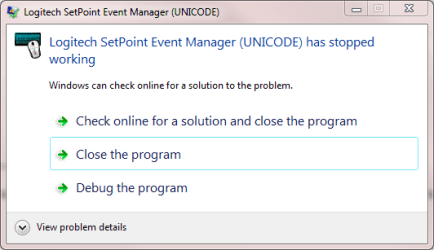
Each and every time I launch Outlook 2010, SetPoint crashes. In my case it means quite often, Outlook being my default email client. I have to manually relaunch SetPoint, and it works flawless, Outlook still running, until Outlook is closed and launched again. At this point, SetPoint crashes again and has to be relaunched.
After SetPoint crashes, I can still use my keyboard and mouse normally, only the special buttons and functions are disabled. For basic functions I don't need SetPoint. But because I have these devices precisely because of these extra features, it is not a desirable option to me. I'd rather solve this issue.
Weird, I have absolutely no idea why this happens. Any suggestions welcome.
Kari
These two, Logitech SetPoint 6.15 and Outlook 2010, should logically thinking have nothing in common. Short problem description:
Using Logitech bluetooth mouse, keyboard & mediapad combo, software and drivers SetPoint version 6.15. Working surprisingly good, using laptop's internal bluetooth radio instead of Logitech's Bluetooth dongle.
Each and every time I launch Outlook 2010, SetPoint crashes. In my case it means quite often, Outlook being my default email client. I have to manually relaunch SetPoint, and it works flawless, Outlook still running, until Outlook is closed and launched again. At this point, SetPoint crashes again and has to be relaunched.
After SetPoint crashes, I can still use my keyboard and mouse normally, only the special buttons and functions are disabled. For basic functions I don't need SetPoint. But because I have these devices precisely because of these extra features, it is not a desirable option to me. I'd rather solve this issue.
Weird, I have absolutely no idea why this happens. Any suggestions welcome.
Kari
Code:
Fault bucket , type 0
Event Name: APPCRASH
Response: Not available
Cab Id: 0

Problem signature:
P1: SetPoint.exe
P2: 6.15.6.0
P3: 4c253e05
P4: mfc90u.dll
P5: 9.0.30729.4148
P6: 4a5967eb
P7: c0000005
P8: 000000000009105c
P9:
P10:

Attached files:

These files may be available here:
d:\Users\Kari\AppData\Local\Microsoft\Windows\WER\ReportArchive\AppCrash_SetPoint.exe_7ca78fd91b5f444cd75fd6ef1814db43f1695_0aba33ad

Analysis symbol:
Rechecking for solution: 0
Report Id: bb51800e-038c-11e0-9d8e-001eecafca7e
My Computer
At a glance
Windows 10 Pro x64 EN-GB1.6 GHz Intel Core i7-720QM Processor6 GBATI Mobility Radeon HD 5850 Graphics
- Computer type
- Laptop
- Computer Manufacturer/Model Number
- HP ENVY 17-1150eg
- OS
- Windows 10 Pro x64 EN-GB
- CPU
- 1.6 GHz Intel Core i7-720QM Processor
- Memory
- 6 GB
- Graphics Card(s)
- ATI Mobility Radeon HD 5850 Graphics
- Sound Card
- Beats sound system with integrated subwoofer
- Monitor(s) Displays
- 17" laptop display, 22" LED and 32" Full HD TV through HDMI
- Screen Resolution
- 1600*900 (1), 1920*1080 (2&3)
- Hard Drives
- Internal: 2 x 500 GB SATA Hard Disk Drive 7200 rpm
External: 2TB for backups, 3TB USB3 network drive for media
- Cooling
- As Envy runs a bit warm, I have it on a Cooler Master pad
- Keyboard
- Logitech diNovo Media Desktop Laser (bluetooth)
- Mouse
- Logitech Performance Mouse MX
- Internet Speed
- 50/10 Mbps VDSL
- Antivirus
- Windows Defender 4.3.9431.0
- Browser
- Maxthon 3.5.2., IE11


 (this has been happening a couple of months now)