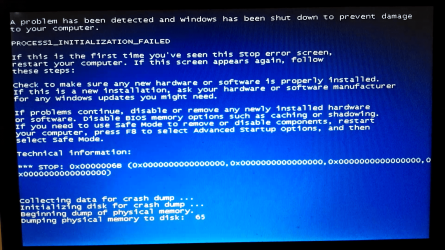
Earlier today my laptop was a little bit slow so I decided to restart it. I saw that the Windows Update icon in the notifications area said my updates were about 70% complete and wondered if restarting would have a negative affect. I decided to restart it anyway and before my laptop could shut down, I saw the "Installing Updates" screen. Once all 117 updates had been installed, the "Configuring Updates" screen appeared but it was stuck on 15% for almost an hour. So I held down the power button til my pc shut down. When I booted up again the blue screen from the attachment appeared after the Windows logo. I tried booting up in Safe Mode but the same screen popped up. System Repair suggested I System Restore but that failed because apparently the restore point that was created just before I started the updates was either corrupted or deleted. And that was the only restore point I had. Image Recovery wont work either since I've never made a system image before. So now I have no way of even accessing my laptop to find out whats wrong
Attachments
Screenshot_2020-12-20-13-43-33.png
760.1 KB
· Views: 0
My Computer
At a glance
Windows 7 Ultimate x64Intel Celeron CPU B800 @ 1.5GHz 1.5GHz4 GB DDR3Intel HD Graphics
For the 4 months that we've had WiFi here at my house, my laptop has had a problem with installing updates. When the "Configuring updates" screen would show, it would stay on a specific percentage for literally hours. One night I plugged in my laptop and started the updates. But when I looked again the next morning there wasn't a single percent of progress since the night before. From then on I decided that installing updates was gonna be a waste of time if this was what was gonna happen every single time. So I guess that's why the available updates just started piling up.
My Computer
At a glance
Windows 7 Ultimate x64Intel Celeron CPU B800 @ 1.5GHz 1.5GHz4 GB DDR3Intel HD Graphics
If you wait a long time between updates (noted: 117 updates were installed) it can take a very long time to complete the process. That is why Windows makes the point to "not turn off the computer" during this time (to avoid this kind of problem). I would have let the thing run for many many hours (as long as it needs). Since you have access to "System Repair" why not do a restore using the restore point prior to the last update that you interrupted (and apparently corrupted)? You may lose a lot of your software history but at least you can see if this will be better than reinstalling the O.S. -- because outside of finding a restore point that helps you get a successful boot-up and absent a system image you may have no other recourse than to re-install Windows.
Computer type Laptop
System Manufacturer/Model Number Packard Bell EasyNote TE11HC
OS Windows 7 Ultimate x64
CPU Intel Celeron CPU B820 @ 1.70GHz 1.70GHz
Memory 2 GB DDR3
Graphics Card Intel HD Graphics



 :\ /cleanup-image /revertpendingactions