Weird Control Panel Error

Davib

New member
Local time
12:24 AM
Messages
11
Hi All,


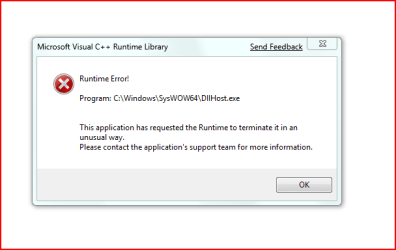
I am having a problem with the Control Panel....I cannot get to it. Each time I try to open it i get a Visual C++ Runtime Error (see attached). It was working a few days ago but have installed a few things since then.

Any Ideas?
 

Attachments

  • 7error.PNG
    7error.PNG
    8.3 KB · Views: 313

My Computer

OS
Windows 7
Check to see if the 'Software Licensing Service' in 'services' is not disabled, if so, enable it.

ATI drivers are known to cause this problem also.

System Restore would be another option to try, if you have it enabled.
 

My Computer

OS
XP
Ok..forgive my ignorance but how do I get to that "services" area if I cannot open Control Panel so I can check that?
 

My Computer

OS
Windows 7
Ok I have no "Software Licencing Service" Only software protection service.

A restart of this made no difference. I have no ATI drivers so Im guessing system restore is my last option.

Thanks for your time
 

My Computer

OS
Windows 7
Its definitely got to do with Adobe CS3 (Acrobat)

System restore had a hell of a time, it wouldn't restart then it attempted another repair.

I can now get to Control Panel but Adobe Acrobat wont work. I'm trying a reinstall of this to see if it happens again
 

My Computer

OS
Windows 7
Well now at least you know whats causing the problem. I had a friend who had problems with Acrobat on Win7, cant say I've had any problem with Acrobat, are you installing version 9? as that seems to work just great.
 

My Computer

OS
XP
Just so you know. You don't have to bother with the Run command box. That little search box at the bottom of the start menu can do most anything the run box can do and a lot more. Hit windows key/ type: services.msc. (no need to click in the white box it will enter automatically)/ hit Enter.
 

My Computer

Computer Manufacturer/Model Number
Dell XPS420
OS
Vista Ult 64 bit Seven Ult RTM x64
CPU
Intel Core2 Quad Q6600 2.40 gigahertz
Memory
Crucial Ballistix 4x2GB PC2 6400
Graphics Card(s)
NVIDIA GeForce 8600 GTS 256 MB
Sound Card
Creative SB X-Fi audio
Monitor(s) Displays
HP w2207 + HPvs15
Screen Resolution
1680x1050 + 1024x768
Hard Drives
2-WD5000AAKS-500 GB
WD5000AAV-500 GB external
Keyboard
Microsoft Comfort Curve
Mouse
MX Revolution
Other Info
Wacom Intuos 2 Graphics Tablet
Experience Index=5.5
Well now at least you know whats causing the problem. I had a friend who had problems with Acrobat on Win7, cant say I've had any problem with Acrobat, are you installing version 9? as that seems to work just great.

Yeah I have 9 now installed but the original was Acrobat 8 which comes with CS3
 

My Computer

OS
Windows 7
Just so you know. You don't have to bother with the Run command box. That little search box at the bottom of the start menu can do most anything the run box can do and a lot more. Hit windows key/ type: services.msc. (no need to click in the white box it will enter automatically)/ hit Enter.

Got that now ..thanks...never done it that way

cheers
 

My Computer

OS
Windows 7
Your welcome, Davib.

Gary
 

My Computer

Computer Manufacturer/Model Number
Dell XPS420
OS
Vista Ult 64 bit Seven Ult RTM x64
CPU
Intel Core2 Quad Q6600 2.40 gigahertz
Memory
Crucial Ballistix 4x2GB PC2 6400
Graphics Card(s)
NVIDIA GeForce 8600 GTS 256 MB
Sound Card
Creative SB X-Fi audio
Monitor(s) Displays
HP w2207 + HPvs15
Screen Resolution
1680x1050 + 1024x768
Hard Drives
2-WD5000AAKS-500 GB
WD5000AAV-500 GB external
Keyboard
Microsoft Comfort Curve
Mouse
MX Revolution
Other Info
Wacom Intuos 2 Graphics Tablet
Experience Index=5.5
Back
Top
