
You are using an out of date browser. It may not display this or other websites correctly.
You should upgrade or use an alternative browser.
You should upgrade or use an alternative browser.
Weird Desktop glitch
- Thread starter Kenny112
- Start date
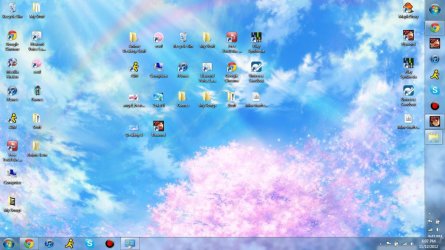

??? What is the problem?
My Computer
- Computer type
- PC/Desktop
- Computer Manufacturer/Model Number
- Lenovo IdeaCenter 450
- OS
- Windows 10 Pro X64
- CPU
- Intel Quad Core i7-4770 @ 3.4Ghz
- Memory
- 16.0GB PC3-12800 DDR3 SDRAM 1600 MHz
- Graphics Card(s)
- Intel Integrated HD Graphics
- Sound Card
- Realtek HD Audio
- Monitor(s) Displays
- HP 22" LCD
- Screen Resolution
- 1680 x 1050
- Hard Drives
- 250GB Samsung EVO SATA-3 SSD
2TB Seagate ST2000DM001 SATA-2
1.5TB Seagate ST3150041AS SATA
- Keyboard
- Dell USB
- Mouse
- Lenovo USB
- Internet Speed
- Cable via Road Runner 3MB Upload, 30MB Download
- Antivirus
- Windows Defender, MBAM Pro, MBAE
- Browser
- Seamonkey
- Other Info
- UEFI/GPT
PLDS DVD-RW DH16AERSH
pincushion
Banned
- Local time
- 10:47 PM
- Messages
- 472
??? What is the problem?
Two Taskbars? Don't know how to fix it though.
 :huh:
:huh:My Computer
- Computer Manufacturer/Model Number
- Compaq desktop
- OS
- Windows 7 x64 SP1
- CPU
- Athlon II x2 215
- Memory
- 4.0 GB
- Graphics Card(s)
- Onboard
- Sound Card
- Creative SB X-Fi Titanium HD (nice)
- Monitor(s) Displays
- 24" Dell LCD
- Screen Resolution
- 1900 x 1200
- Hard Drives
- 320 GB, 500 GB and 750 GB 7200 rpm
- PSU
- 430w
- Keyboard
- USB
- Mouse
- USB
- Internet Speed
- approx 10 Mbps

try unlocking the taskbar and drag the one you dont want over the other one,
see if it changes anything for you then lock the taskbar again
see if it changes anything for you then lock the taskbar again
My Computer
- Computer Manufacturer/Model Number
- Hewlett packard/p6512uk
- OS
- Microsoft Windows 7 Home Premium 64-bit 7600
- CPU
- IIx4 amd athelon 635 processor
- Motherboard
- FOXCONN 2AA9
- Memory
- 2x2gb
- Graphics Card(s)
- ati radeon HD 5450
- Sound Card
- (1) Realtek High Definition Audio (2) AMD High Definition
- Monitor(s) Displays
- samsung lcd tv 32"
- Screen Resolution
- 1360x 768
- Hard Drives
- (1) WDC WD10 01FAES-60Z2A0 SATA Disk Device (2) Maxtor OneTouch USB Device (3) ST310003 33AS USB Device (4) WD My Book 1111 USB Device
- PSU
- ?
- Cooling
- air!
- Keyboard
- wireless hp
- Mouse
- wireless Hp,optical
- Internet Speed
- 1.10mb/s
- Antivirus
- MSE
- Browser
- Firefox

Have you tried a system restore to before this happened? I know I know, but sometimes the simple option works.
Or try running a sfc /scannow.
Or try running a sfc /scannow.
My Computer
- Computer type
- Laptop
- Computer Manufacturer/Model Number
- MSI GE72VR Apache Pro-416
- OS
- Windows 10x64 Build 1709
- CPU
- Intel i7 7700HQ Kaby Lake
- Motherboard
- Micro-Star Intl. MS-179B (U3C1)
- Memory
- 16 GB DDR4 @2400
- Graphics Card(s)
- Nvidia Geforce GTX 1060
- Screen Resolution
- 1920x1080 120Hz
- Hard Drives
- 256 GB Nvme M.2 SSD
1TB HDD@7200
- Cooling
- Cooler Blast 4
- Keyboard
- Steel Series
- Antivirus
- Bit Defender Free
- Browser
- Edge
try unlocking the taskbar and drag the one you dont want over the other one,
see if it changes anything for you then lock the taskbar again
You could also right-click in the taskbar, choose properties, and try to edit the settings, then relock it.
My Computer
- Computer type
- PC/Desktop
- Computer Manufacturer/Model Number
- iBuyPower NZXT
- OS
- Microsoft Windows 10 Home Build 15036
- CPU
- Intel(R) Core(TM) i7-860 @ 2.80GHz
- Motherboard
- Gigabyte Technology Co., Ltd. P55-UD3L
- Memory
- 4.00 GB
- Graphics Card(s)
- NVIDIA GeForce GTX 750
- Sound Card
- (1) Line 6 UX2 (2) Realtek High Definition Audio
- Monitor(s) Displays
- 23" acer
- Screen Resolution
- 1920 x 1080 x 32 bits (4294967296 colors) @ 60 Hz
- Hard Drives
- (1) WDC WD5000AAKS-00D2B0 ATA Device (2) Seagate FreeAgent Go 250G USB Device
- Cooling
- Corsair H75 liquid cooler (Very easy to install, actually)
- Internet Speed
- 60M cable modem-->Linksys E1200-->1Gbps net card
- Browser
- Chrome
- Other Info
- This is probably the longest I've ever had a Windows machine run without having to restore it to scratch. I'm used to restoring to "factory" about every 2 yrs. I've run with Win7 since new in 2009 and only recently (Nov, '14) restored to clean up the machine from all my 'xperimenting. LOL!! I may never need another machine.
Upgraded to 10 when it was still free, then installed 2017 update.