Weird display problem...

Zimzon

New member
Local time
12:05 AM
Messages
8
Hi to all,

I am new here so sorry if i posted this in wrong forum but actually i don't have the slightest clue what the heck is wrong so it is possible that this actually is the right forum for my problems.

Let me try to explain. I have installed Windows 7 (original, Professional edition, activated) but since then i have weird problems with my LCD monitor. It's Philips Brilliance 190P, and the graphics card is Ati radeon HD 2600 XT. The problem is this and it appears MOSTLY when i browse the internet:

I have tried to explore why does this happen and when does it happen. Why - i still got no clue, but when, well this is the interresting part - this error happens when system needs to display particulary large PNG files. For example, when i go to Wikipedia, and try to view larger PNG images and on any other website that has any larger PNG images.

What happens is this - display just switches off and informs me that "there is no video input". If i scroll down a bit (so this big png picture is no longer visible) monitor switches back on and everything is fine. Until i scroll back to the png image... I can also try to close the browser window (blindfull, dont forget - i have absolutely no picture if png image is visible) or go to any other opened window - the important is that there is no PNG around and everything will be fine.

I have tested this on several browsers (IE, Firefox, Chrome) and it's all the same thing.

On any other OS (Windows Vista, Ubuntu Linux, Windows XP) everything works fine. Win 7 has the latest drivers for my video card, and my monitor is identified as the "classic plug and play monitor".

This is just driving me crazy and i would like to fix this but i don't have idea what the hell is wrong so any help would be appreciated.

Thanks :)
 

My Computer

OS
Windows 7
CPU
Intel C2D 2.66 Ghz
Motherboard
Gigabyte P35 DS3R
Memory
4GB Kingmax DDR 2
Graphics Card(s)
Ati Radeon HD2600 XT
Sound Card
Integrated
Monitor(s) Displays
Philips Brilliance 190p
Hard Drives
2x 320 GB Maxtor
PSU
Codegen 480W
Case
Gigabyte Triton
Cooling
Intel box
Hello, Zimzon. Welcome to the best Windows support forums out there!

I must confess I have never seen this problem before. Do you have any other monitors you can try?

Let me ask a couple more questions: did you upgrade from Vista or did you do a clean install? Has it always been this way, or did it arise recently?
 

My Computer

Computer Manufacturer/Model Number
Custom
OS
Windows 7 Professional x64
CPU
Intel i7 2600K OC'd @ 4620 MHz
Motherboard
Asus P8Z68-V Pro
Memory
16GB GSkill Sniper 2133 Mhz (4x4GB)
Graphics Card(s)
EVGA GeForce GTX 480 SuperClocked+
Sound Card
Realtek High Definition Audio
Monitor(s) Displays
2x Acer S273HLbmii 27"
Screen Resolution
2 x 1920x1080
Hard Drives
64GB Crucial M4 SSD

Storage: Hitachi 1TB 5400RPM, Samsung 1.5TB 5400RPM
PSU
Corsair HW Series 750w (modular)
Case
Cooler Master HAF 932 Advanced Blue Edition
Cooling
CM Hyper 212+ CPU cooler, 3x 230mm + 1x 140mm case fans
Keyboard
Logitech MK320 (wireless)
Mouse
Logitech MK320 (wireless)
Internet Speed
30 Mb/s : 2 Mb/s
Hi Zimzon and welcome to Windows 7 Forums :party:

Can you give some examples? For example, what topic(s) in Wikipedia and which webpage(s)?
 

My Computer

Computer type
PC/Desktop
Computer Manufacturer/Model Number
Dwarf Dwf/11/2012 r09/2013
OS
Windows 8.1 Pro RTM x64
CPU
Intel Core-i5-3570K 4-core @ 3.4GHz (Ivy Bridge) (OC 4.4GHz)
Motherboard
ASRock Z77 Extreme4-M
Memory
4 x 4GB DDR3-1600 Corsair Vengeance CMZ8GX3M2A1600C9B (16GB)
Graphics Card(s)
MSI GeForce GTX770 Gaming OC 2GB
Sound Card
Realtek High Definition on board solution (ALC 898)
Monitor(s) Displays
ViewSonic VA1912w Widescreen (VGA)
Screen Resolution
1440x900
Hard Drives
OCZ Agility 3 SSD 120GB SATA III x2 (RAID 0)
Samsung HD501LJ 500GB SATA II x2
Hitachi HDS721010CLA332 1TB SATA II
Iomega 1.5TB Ext USB 2.0
WD 2.0TB Ext USB 3.0
PSU
XFX Pro Series 850W Semi-Modular
Case
Gigabyte IF233
Cooling
1 x 120mm Front Inlet 1 x 120mm Rear Exhaust
Keyboard
Microsoft Comfort Curve Keyboard 3000 (USB)
Mouse
Microsoft Comfort Mouse 3000 for Business (USB)
Internet Speed
NetGear DG834Gv3 ADSL Modem/Router (Ethernet) ~4.0 Mb/s (O2)
Antivirus
Avast! 8.0.1497
Browser
IE 11
Other Info
Optical Drive: HL-DT-ST BD-RE BH10LS30 SATA Bluray
Lexmark S305 Printer/Scanner/Copier (USB)
WEI Score: 8.1/8.1/8.5/8.5/8.25
Asus Eee PC 1011PX Netbook (Windows 7 x86 Starter)
Hi!

Thanks for your replies :)
@Jonathan_king
1) It was a clean install of Windows 7.
2) This "phenomena" is present from the start - i hoped that installation of original drivers (i have replaced the graphic card drivers from Microsoft with ones from ATI) for my graphics card will solve the problem but unfortunately that did not help :(.
@Dwarf
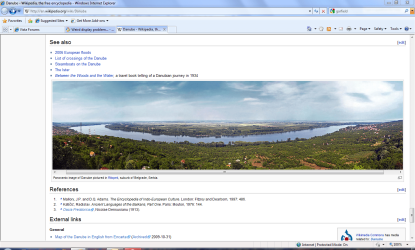
3) Danube - Wikipedia, the free encyclopedia for example - check the panoramic picture on the bottom of that page. When i scroll down to that picture, display just goes off and when i scroll back up (or down) away from the picture, display is back on.

I cannot remember which webpages cause this problems but i remember that problems appeared every time when i tried to view the picture galleries (it's not text, but picture related).

I hope someone will have the clue what's the problem :)
 

My Computer

OS
Windows 7
CPU
Intel C2D 2.66 Ghz
Motherboard
Gigabyte P35 DS3R
Memory
4GB Kingmax DDR 2
Graphics Card(s)
Ati Radeon HD2600 XT
Sound Card
Integrated
Monitor(s) Displays
Philips Brilliance 190p
Hard Drives
2x 320 GB Maxtor
PSU
Codegen 480W
Case
Gigabyte Triton
Cooling
Intel box
I must commend you for filling out your system specs. Saves me a question! I assume you have the 64-bit version, because you have 4GB of RAM. Is this correct? If so, try this driver. It can be found on this page.
 

My Computer

Computer Manufacturer/Model Number
Custom
OS
Windows 7 Professional x64
CPU
Intel i7 2600K OC'd @ 4620 MHz
Motherboard
Asus P8Z68-V Pro
Memory
16GB GSkill Sniper 2133 Mhz (4x4GB)
Graphics Card(s)
EVGA GeForce GTX 480 SuperClocked+
Sound Card
Realtek High Definition Audio
Monitor(s) Displays
2x Acer S273HLbmii 27"
Screen Resolution
2 x 1920x1080
Hard Drives
64GB Crucial M4 SSD

Storage: Hitachi 1TB 5400RPM, Samsung 1.5TB 5400RPM
PSU
Corsair HW Series 750w (modular)
Case
Cooler Master HAF 932 Advanced Blue Edition
Cooling
CM Hyper 212+ CPU cooler, 3x 230mm + 1x 140mm case fans
Keyboard
Logitech MK320 (wireless)
Mouse
Logitech MK320 (wireless)
Internet Speed
30 Mb/s : 2 Mb/s
It's displaying normally for me. Incidentally, it is a jpg not png.
Capture.PNG
 

My Computer

Computer type
PC/Desktop
Computer Manufacturer/Model Number
Dwarf Dwf/11/2012 r09/2013
OS
Windows 8.1 Pro RTM x64
CPU
Intel Core-i5-3570K 4-core @ 3.4GHz (Ivy Bridge) (OC 4.4GHz)
Motherboard
ASRock Z77 Extreme4-M
Memory
4 x 4GB DDR3-1600 Corsair Vengeance CMZ8GX3M2A1600C9B (16GB)
Graphics Card(s)
MSI GeForce GTX770 Gaming OC 2GB
Sound Card
Realtek High Definition on board solution (ALC 898)
Monitor(s) Displays
ViewSonic VA1912w Widescreen (VGA)
Screen Resolution
1440x900
Hard Drives
OCZ Agility 3 SSD 120GB SATA III x2 (RAID 0)
Samsung HD501LJ 500GB SATA II x2
Hitachi HDS721010CLA332 1TB SATA II
Iomega 1.5TB Ext USB 2.0
WD 2.0TB Ext USB 3.0
PSU
XFX Pro Series 850W Semi-Modular
Case
Gigabyte IF233
Cooling
1 x 120mm Front Inlet 1 x 120mm Rear Exhaust
Keyboard
Microsoft Comfort Curve Keyboard 3000 (USB)
Mouse
Microsoft Comfort Mouse 3000 for Business (USB)
Internet Speed
NetGear DG834Gv3 ADSL Modem/Router (Ethernet) ~4.0 Mb/s (O2)
Antivirus
Avast! 8.0.1497
Browser
IE 11
Other Info
Optical Drive: HL-DT-ST BD-RE BH10LS30 SATA Bluray
Lexmark S305 Printer/Scanner/Copier (USB)
WEI Score: 8.1/8.1/8.5/8.5/8.25
Asus Eee PC 1011PX Netbook (Windows 7 x86 Starter)
@Dwarf:

Thanks for your correction! Sorry for my mistake, unfortunately - i have just assumed that this picture is PNG but that's the picture allright!

@Jonathan_King:

No, its the 32-bit version - i have 32 bit Intel Core 2 Duo :)
 

My Computer

OS
Windows 7
CPU
Intel C2D 2.66 Ghz
Motherboard
Gigabyte P35 DS3R
Memory
4GB Kingmax DDR 2
Graphics Card(s)
Ati Radeon HD2600 XT
Sound Card
Integrated
Monitor(s) Displays
Philips Brilliance 190p
Hard Drives
2x 320 GB Maxtor
PSU
Codegen 480W
Case
Gigabyte Triton
Cooling
Intel box

My Computer

Computer Manufacturer/Model Number
Custom
OS
Windows 7 Professional x64
CPU
Intel i7 2600K OC'd @ 4620 MHz
Motherboard
Asus P8Z68-V Pro
Memory
16GB GSkill Sniper 2133 Mhz (4x4GB)
Graphics Card(s)
EVGA GeForce GTX 480 SuperClocked+
Sound Card
Realtek High Definition Audio
Monitor(s) Displays
2x Acer S273HLbmii 27"
Screen Resolution
2 x 1920x1080
Hard Drives
64GB Crucial M4 SSD

Storage: Hitachi 1TB 5400RPM, Samsung 1.5TB 5400RPM
PSU
Corsair HW Series 750w (modular)
Case
Cooler Master HAF 932 Advanced Blue Edition
Cooling
CM Hyper 212+ CPU cooler, 3x 230mm + 1x 140mm case fans
Keyboard
Logitech MK320 (wireless)
Mouse
Logitech MK320 (wireless)
Internet Speed
30 Mb/s : 2 Mb/s
Hi Jonathan!

Can you please post the url which leads to the driver file (when i click your link it says it's unauthorised download).

Thanks :)
 

My Computer

OS
Windows 7
CPU
Intel C2D 2.66 Ghz
Motherboard
Gigabyte P35 DS3R
Memory
4GB Kingmax DDR 2
Graphics Card(s)
Ati Radeon HD2600 XT
Sound Card
Integrated
Monitor(s) Displays
Philips Brilliance 190p
Hard Drives
2x 320 GB Maxtor
PSU
Codegen 480W
Case
Gigabyte Triton
Cooling
Intel box

My Computer

Computer Manufacturer/Model Number
Custom
OS
Windows 7 Professional x64
CPU
Intel i7 2600K OC'd @ 4620 MHz
Motherboard
Asus P8Z68-V Pro
Memory
16GB GSkill Sniper 2133 Mhz (4x4GB)
Graphics Card(s)
EVGA GeForce GTX 480 SuperClocked+
Sound Card
Realtek High Definition Audio
Monitor(s) Displays
2x Acer S273HLbmii 27"
Screen Resolution
2 x 1920x1080
Hard Drives
64GB Crucial M4 SSD

Storage: Hitachi 1TB 5400RPM, Samsung 1.5TB 5400RPM
PSU
Corsair HW Series 750w (modular)
Case
Cooler Master HAF 932 Advanced Blue Edition
Cooling
CM Hyper 212+ CPU cooler, 3x 230mm + 1x 140mm case fans
Keyboard
Logitech MK320 (wireless)
Mouse
Logitech MK320 (wireless)
Internet Speed
30 Mb/s : 2 Mb/s
I believe that could be it! - I have installed the latest driver (mine was from November '09) from link Jonathan_King posted and it seems it's working, there is no more crazy display shut down.

Offcourse i need to test it for a while just to be 100% sure but i believe that this could be the end of my troubles :D.

Thank you so much for your help :)
 

My Computer

OS
Windows 7
CPU
Intel C2D 2.66 Ghz
Motherboard
Gigabyte P35 DS3R
Memory
4GB Kingmax DDR 2
Graphics Card(s)
Ati Radeon HD2600 XT
Sound Card
Integrated
Monitor(s) Displays
Philips Brilliance 190p
Hard Drives
2x 320 GB Maxtor
PSU
Codegen 480W
Case
Gigabyte Triton
Cooling
Intel box
I hope so. Thanks for posting back. Anything else we can help you with?
 

My Computer

Computer Manufacturer/Model Number
Custom
OS
Windows 7 Professional x64
CPU
Intel i7 2600K OC'd @ 4620 MHz
Motherboard
Asus P8Z68-V Pro
Memory
16GB GSkill Sniper 2133 Mhz (4x4GB)
Graphics Card(s)
EVGA GeForce GTX 480 SuperClocked+
Sound Card
Realtek High Definition Audio
Monitor(s) Displays
2x Acer S273HLbmii 27"
Screen Resolution
2 x 1920x1080
Hard Drives
64GB Crucial M4 SSD

Storage: Hitachi 1TB 5400RPM, Samsung 1.5TB 5400RPM
PSU
Corsair HW Series 750w (modular)
Case
Cooler Master HAF 932 Advanced Blue Edition
Cooling
CM Hyper 212+ CPU cooler, 3x 230mm + 1x 140mm case fans
Keyboard
Logitech MK320 (wireless)
Mouse
Logitech MK320 (wireless)
Internet Speed
30 Mb/s : 2 Mb/s
Hi Jonathan,

Thanks again for your help. Actually i do have some other minor problems with Windows 7 but they are not so serious.

For example, when i put Windows to sleep mode (or when they go to sleep mode automatically after 30 mins) i am not able to turn off my monitor via the power switch (it sounds crazy, i know). The main problem here is that when i wake up Windows back it seems that they do not send the "video" signal to the monitor so the screen stays blank. What i need to do is this: plug out the monitor power cord and plug it right back in. After that, everything seems to be working fine until the next time.

I have googled this and found that Win 7 has some additional options for network cards like "Enable this device to wake up the computer" and similar. I have switched that options off, so now pc sometimes does switch off monitor completely (and powers it on back again) but sometimes it still "hangs" with no video and it is not possible for windows to "turn it on" automatically again after that.

So i believe that there is some similar option like this but i am unsure what it is :sarc:

Second minor problem regards my internet banking USB card reader. If this device is plugged into the USB port while Windows 7 is in loading process, they are unusable afterwards. What i mean by that? Well, what ever i try to run (Control Panel, Internet Explorer, Windows Explorer, Notepad, Calculator...) it won't start, actually i am not sure does it start at all or is it just "invisible" to me because i cannot check it in task manager (it is also not visible for me). Only way to fix this is to restart the computer. There is absolutely no other way for me.

So, what i do is this - plug out this USB device (only this one) , and when Windows are loaded, i plug it right back in and everything works fine. This also occurs when i wake up windows from sleep mode, if i have the USB card reader plugged in, Windows become unusable.

Strange problems i know, but they are not so bad as they do not interfere when i work.
 

My Computer

OS
Windows 7
CPU
Intel C2D 2.66 Ghz
Motherboard
Gigabyte P35 DS3R
Memory
4GB Kingmax DDR 2
Graphics Card(s)
Ati Radeon HD2600 XT
Sound Card
Integrated
Monitor(s) Displays
Philips Brilliance 190p
Hard Drives
2x 320 GB Maxtor
PSU
Codegen 480W
Case
Gigabyte Triton
Cooling
Intel box
Unfortunately, problems with my display appeared again :(
 

My Computer

OS
Windows 7
CPU
Intel C2D 2.66 Ghz
Motherboard
Gigabyte P35 DS3R
Memory
4GB Kingmax DDR 2
Graphics Card(s)
Ati Radeon HD2600 XT
Sound Card
Integrated
Monitor(s) Displays
Philips Brilliance 190p
Hard Drives
2x 320 GB Maxtor
PSU
Codegen 480W
Case
Gigabyte Triton
Cooling
Intel box
Did Windows do an update automatically? Try restoring to your latest restore point. If it does not work, do what you did above again, then promptly go into Windows Update and tell it not to install updates automatically.
 

My Computer

Computer Manufacturer/Model Number
Custom
OS
Windows 7 Professional x64
CPU
Intel i7 2600K OC'd @ 4620 MHz
Motherboard
Asus P8Z68-V Pro
Memory
16GB GSkill Sniper 2133 Mhz (4x4GB)
Graphics Card(s)
EVGA GeForce GTX 480 SuperClocked+
Sound Card
Realtek High Definition Audio
Monitor(s) Displays
2x Acer S273HLbmii 27"
Screen Resolution
2 x 1920x1080
Hard Drives
64GB Crucial M4 SSD

Storage: Hitachi 1TB 5400RPM, Samsung 1.5TB 5400RPM
PSU
Corsair HW Series 750w (modular)
Case
Cooler Master HAF 932 Advanced Blue Edition
Cooling
CM Hyper 212+ CPU cooler, 3x 230mm + 1x 140mm case fans
Keyboard
Logitech MK320 (wireless)
Mouse
Logitech MK320 (wireless)
Internet Speed
30 Mb/s : 2 Mb/s
Hi Jonathan,

I have tried something else: i have connected my display and graphics card via the D-Sub cable and it seems it's working okay. When i connect via the DVI problems re-appear again. So i guess the problem is DVI related.

Thanks again,
Zimzon
 

My Computer

OS
Windows 7
CPU
Intel C2D 2.66 Ghz
Motherboard
Gigabyte P35 DS3R
Memory
4GB Kingmax DDR 2
Graphics Card(s)
Ati Radeon HD2600 XT
Sound Card
Integrated
Monitor(s) Displays
Philips Brilliance 190p
Hard Drives
2x 320 GB Maxtor
PSU
Codegen 480W
Case
Gigabyte Triton
Cooling
Intel box
Interesting. Not sure I have a solution. The one thing I would try is updating your chipset drivers. Worth a shot, perhaps.
 

My Computer

Computer Manufacturer/Model Number
Custom
OS
Windows 7 Professional x64
CPU
Intel i7 2600K OC'd @ 4620 MHz
Motherboard
Asus P8Z68-V Pro
Memory
16GB GSkill Sniper 2133 Mhz (4x4GB)
Graphics Card(s)
EVGA GeForce GTX 480 SuperClocked+
Sound Card
Realtek High Definition Audio
Monitor(s) Displays
2x Acer S273HLbmii 27"
Screen Resolution
2 x 1920x1080
Hard Drives
64GB Crucial M4 SSD

Storage: Hitachi 1TB 5400RPM, Samsung 1.5TB 5400RPM
PSU
Corsair HW Series 750w (modular)
Case
Cooler Master HAF 932 Advanced Blue Edition
Cooling
CM Hyper 212+ CPU cooler, 3x 230mm + 1x 140mm case fans
Keyboard
Logitech MK320 (wireless)
Mouse
Logitech MK320 (wireless)
Internet Speed
30 Mb/s : 2 Mb/s
Back
Top