Weird Font Rendering and another Silly Question

bakekrukow

New member
Local time
7:37 AM
Messages
5
I can't possibly be the only one to have noticed this, but I haven't found any other threads that discuss it.

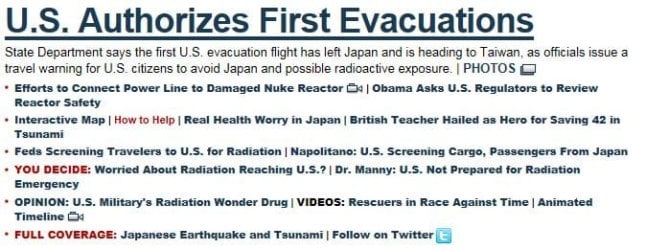
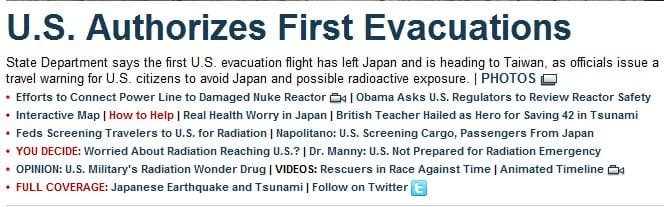
The way fonts are rendered in IE9 is just plain weird. It makes some things too big, and distorts the whole page. I've attached two screenshots. One is IE9, and the second is the correct rendering in Chrome. Anyone know how to fix this?

And anther silly question for the obssessive-compulsive types out there. Is there any way to reset the length of the address bar? I dragged it by accident and now I'm going crazy trying to get it exactley the way it was. :geek:
 

Attachments

  • ie9snip.JPG
    ie9snip.JPG
    48.4 KB · Views: 135
  • chromesnip.JPG
    chromesnip.JPG
    47.2 KB · Views: 126

My Computer

OS
Windows 7 Home Premium x64

My Computer

Computer type
PC/Desktop
Computer Manufacturer/Model Number
Packard Bell
OS
Windows 7 Home Premium 64bit
CPU
Intel(R) Core(TM) i3-2120 CPU @ 3.30GHz
Motherboard
Packard Bell IPISB-AG
Memory
3.00 GB
Graphics Card(s)
(1) Intel(R) HD Graphics (2) VNC Mirror Driver
Sound Card
Realtek High Definition Audio
Monitor(s) Displays
AIO LCD
Screen Resolution
1920 x 1080
Hard Drives
WDC WD10EADX-22TDHB0 ATA Device
Fixed hard disk media
4 partitions
931.51 GB
Keyboard
Wireless
Mouse
Wireless
Antivirus
Microsoft Security Essentials
Browser
IE; Firefox
Other Info
Also:
Samsung N220 Plus Netbook - Windows 7 Home
HP laptop
iPad 5
I get fonts very blurry in IE9 but using Windows Clear type Tuner might fix it for IE9 but would make it worse for every thing else .
Sounds like your problem is some other issue.
Resizeing the address bar is easy just place the mouse cursor on the end between Address bar & the first tab & it will change into adouble headed arrow , right click & drag.
If one of your problems is blurry text it might be best to switch to another browser untill Microsoft fix it.
I'm very surprised that IE 9 was made final before this was fixed.
 

My Computer

Computer type
PC/Desktop
Computer Manufacturer/Model Number
self build
OS
Windows 7 Ultimate 64 bit
CPU
Intel Core i7 4770K overclocked to 4.7GHz Quad Core Haswell
Motherboard
Asus Z87 Pro (Socket 1150) ATX Motherboard
Memory
16GB Team Group Vulcan Gold 2133MHz
Graphics Card(s)
ATI Radeon HD 7880 Series Display adapter
Monitor(s) Displays
NEC LCD2690WUXi2
Screen Resolution
26" 1920 x 1200
Hard Drives
Samsung 500GB SSD 840 EVO SATA 6Gb/s
Samsung 250GB SSD 840 EVO SATA 6Gb/s
PSU
Corsair AX760 Platinum
Case
Cooler Master HAF X Gaming Tower
Cooling
XSPC RayStorm 750 RS360 Water cooling
Mouse
Razer Death Adder left handed
Internet Speed
126Mb download 11.5Mb up
Antivirus
Avast free
Browser
Opera
Other Info
Main Browser is Opera
Favorite software Adobe Lightroom & Photoshop
best plugins Nik software
Firewall : Private firewall 7
I get fonts very blurry in IE9 but using Windows Clear type Tuner might fix it for IE9 but would make it worse for every thing else...I'm very surprised that IE 9 was made final before this was fixed.
Thanks for the warning. Next week IE9 will be offered on Windows Update, so some of us may choose to avoid/hide it for a while.
 

My Computer

Computer type
PC/Desktop
Computer Manufacturer/Model Number
OQO 2+
OS
Windows 8 Pro w/MC 32-bit
CPU
Intel Atom 1.86 GHz
Motherboard
OQO 2+
Memory
2 GB
Graphics Card(s)
Intel GMA 500
Sound Card
IDT
Monitor(s) Displays
LCD
Screen Resolution
800 x 480 (portable) 1280 x 1024 (docked)
Hard Drives
64 GB SSD
PSU
9 Ah Battery (portable) or OQO Brick (docked)
Case
Shirt Pocket Sized
Cooling
Tiny Fan
Keyboard
Slide out (portable) DiNovo Edge (docked)
Mouse
Eraser head (portable) Logitech Bluetooth (docked)
Internet Speed
WWAN or 802.11G (portable) T1 (docked)
Browser
IE 10
Other Info
DVD-RW OQO Docking Station
Back
Top