weird live mail problem

tp3813

New member
Local time
5:24 AM
Messages
6
Have a weird mail problem.
after starting Live mail found that all mails in 4 accounts (Yahoo and Gmail) had vanished.

However got them all back including previously deleted ones, after I clicked send/receive button. But only got back received mails, all other in sent folders still vanished.

But weirdest of all, when I click on send/receive on one of the accounts,- a Yahoo one- it keeps downloading messages. Thought it was normal receive at first , but after 20 mins and reaching 150.000 mails downloading, realised something was wrong. Tried several times but on this one account, just seems to download thousands of messages- although nothing actually appears in the folder.Just seems to download forever!!
Never seen anything so weird. Tried computer restart etc, but cant get rid of this problem-any ideas?
 

My Computer

Computer Manufacturer/Model Number
packard bell
OS
windows 7 32 bit
CPU
2.4
Memory
4 GB
Graphics Card(s)
nvidia
Monitor(s) Displays
LCD TV 37
Hard Drives
650 GB
Which version of windows live mail you have? The one with essential 2011 or of 2009 - 2010?
2011 one only works with hotmail accounts, you can try of 2009 which I use it, it works with all the emails, but it works the best with hotmail, as it hasn't been created for yahoo.
 

My Computer

OS
Windows 7 Home Premium 64bit
>Which version of windows live mail you have? The one with essential 2011 or of 2009 - 2010?
>2011 one only works with hotmail accounts

its Version 2011 (Build 15.4.3508.1109). But until this problem, worked fine for months with Yahoo and Gmail
 

My Computer

Computer Manufacturer/Model Number
packard bell
OS
windows 7 32 bit
CPU
2.4
Memory
4 GB
Graphics Card(s)
nvidia
Monitor(s) Displays
LCD TV 37
Hard Drives
650 GB
>Which version of windows live mail you have? The one with essential 2011 or of 2009 - 2010?
>2011 one only works with hotmail accounts

its Version 2011 (Build 15.4.3508.1109). But until this problem, worked fine for months with Yahoo and Gmail
My WL Mail 2011 works with Gmail, Hotmail, AOL, Live.co.uk & Yahoo.
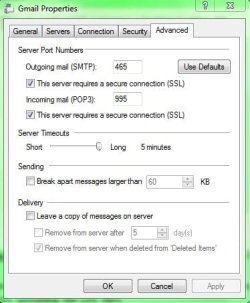
As I'm only using Gmail @ present, see my image for advanced settings.

RR.JPG
 

My Computer

Computer Manufacturer/Model Number
Look in my Signature.
OS
Win7 H.Prem. 32bit+SP1
>My WL Mail 2011 works with Gmail, Hotmail, AOL, Live.co.uk & Yahoo.
>As I'm only using Gmail @ present, see my image for advanced settings

Yeah I know all that , but that was not the question!
trying the stop the non stop downloading of non existing messages on that yahoo account was the problem!
 

My Computer

Computer Manufacturer/Model Number
packard bell
OS
windows 7 32 bit
CPU
2.4
Memory
4 GB
Graphics Card(s)
nvidia
Monitor(s) Displays
LCD TV 37
Hard Drives
650 GB
>My WL Mail 2011 works with Gmail, Hotmail, AOL, Live.co.uk & Yahoo.
>As I'm only using Gmail @ present, see my image for advanced settings

Yeah I know all that , but that was not the question!
trying the stop the non stop downloading of non existing messages on that yahoo account was the problem!
Is the setting for Yahoo correct ? Thats why I posted my Gmail image for comparison.
 

My Computer

Computer Manufacturer/Model Number
Look in my Signature.
OS
Win7 H.Prem. 32bit+SP1
>Is the setting for Yahoo correct ? Thats why I posted my Gmail image for comparison.

Ah right... well settings are ok checked them all ...and the other Yahoo accounts and the Gmail one, are no problem -just this one particular yahoo account (which was set as default account)

even tried deleting the account and reinstalling it-same shit again!! Driving me nuts!
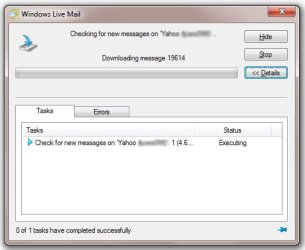
in attached pic thats the results after a few minutes 19.000 messages!
If I dont stop it, just keeps going forever to hundreds of thousands!
 

Attachments

  • email.jpg
    email.jpg
    26 KB · Views: 0
Last edited:

My Computer

Computer Manufacturer/Model Number
packard bell
OS
windows 7 32 bit
CPU
2.4
Memory
4 GB
Graphics Card(s)
nvidia
Monitor(s) Displays
LCD TV 37
Hard Drives
650 GB
>Is the setting for Yahoo correct ? Thats why I posted my Gmail image for comparison.

Ah right... well settings are ok checked them all ...and the other Yahoo accounts and the Gmail one, are no problem -just this one particular yahoo account (which was set as default account)

even tried deleting the account and reinstalling it-same shit again!! Driving me nuts!
in attached pic thats the results after a few minutes 19.000 messages!
If I dont stop it, just keeps going forever to hundreds of thousands!
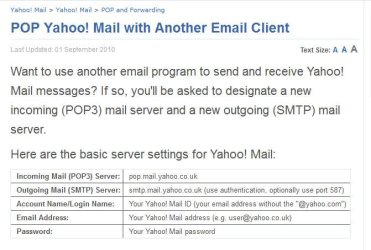
This is how to set Yahoo, also check the advanced tab as my Gmail image.

RR.JPG
 

My Computer

Computer Manufacturer/Model Number
Look in my Signature.
OS
Win7 H.Prem. 32bit+SP1
>This is how to set Yahoo, also check the advanced tab as my Gmail image.

well, like I said settings are not the problem, same as the other Yahoo accounts and they work fine. In fact if someone sends emails to this problem account they do actually arrive, but then this shit with thousands of messages apparently downloading continues unabated until manually stopped.

Weirdest thing I ever seen and everyone else I asked also never come across this before...its a bleedin mystery!
 

My Computer

Computer Manufacturer/Model Number
packard bell
OS
windows 7 32 bit
CPU
2.4
Memory
4 GB
Graphics Card(s)
nvidia
Monitor(s) Displays
LCD TV 37
Hard Drives
650 GB
There is a message in the Yahoo mailbox that is not downloading for some reason. This indicates to WLMail that the POP session has failed (not all the new messages were downloaded), so it starts again from the beginning. To solve it, in Yahoo webmail transfer all the messages in your Inbox to a temporary folder. Empty the junk, as well, in case that's also being downloaded into WLMail. Then move half of the messages from the temp folder back to the inbox and try downloading to WLMail. If it completes, you know the problem is in the temp folder. If it doesn't it's in the half in the inbox. Keep halving the bad half and downloading until you can spot the culprit.
 

My Computer

Computer Manufacturer/Model Number
Toshiba Satellite Pro L670-11D
OS
W7 Pro 64-bit SP1
CPU
Intel Core i5 CPU M 430 @ 2.27GHz
Memory
4GB
Graphics Card(s)
ATI Mobility Radeon HD 5650
Sound Card
Realtek HD
>There is a message in the Yahoo mailbox that is not downloading for some reason.

Thanks Firedog, indeed that seems to have been the problem. Actually I had already done what you suggested re webmail, but had forgotten to deal with Junk mail, once I done that, problem ceased and everything back to normal, thank Christ.
Thanks again for all the advice from everyone!
 

My Computer

Computer Manufacturer/Model Number
packard bell
OS
windows 7 32 bit
CPU
2.4
Memory
4 GB
Graphics Card(s)
nvidia
Monitor(s) Displays
LCD TV 37
Hard Drives
650 GB
Back
Top