Weird Pop-Up While Working Within Windows

sparker781

New member
Member
Local time
3:05 PM
Messages
82
Location
Malden, MA
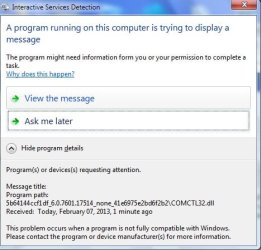
So as I am working in Windows within Outlook checking email I get this message titled "Interactive Services Protection" I am going to upload the screen shot cause in all of my years in IT I've never seen this before:

Any help is appreciated.
 

Attachments

  • WhatThe..jpg
    WhatThe..jpg
    34 KB · Views: 10

My Computer

Computer type
PC/Desktop
Computer Manufacturer/Model Number
Dell Inspiron 530
OS
Winodws 7 Ultimate 32 Bit
CPU
2.80 GHz
Memory
3GB
Monitor(s) Displays
AOC
Hard Drives
Main Hard Drive is 500gb

Second Hard Drive is 1TB
Keyboard
Dell Keyboard
Mouse
Dell Optical Mouse
Antivirus
AVG Internet Security 2014
Browser
Mozilla Firefox
Which version of Outlook is it?

Did this come up as soon as you tried to check for new e-mails?
 

My Computer

Computer type
PC/Desktop
Hi,
This occurs due to the new Interactive Services Detection feature available in Windows Vista and Windows 7. The Interactive Services Detection is a feature for legacy applications that detect if a service is trying to interact with the Windows desktop. This feature can be disabled by editing a service on the Windows computer.

To disable Interactive Services Detection do the following:


Click Start > Control Panel and then double-click Administrative Tools.
Double-click Services.
Scroll down and double-click Interactive Services Detection.
On the General tab, change the Startup type to Manual or Disabled.
Click OK and restart the computer.

It should work from there.

 

My Computer

Computer Manufacturer/Model Number
I Built it
OS
Windows 7 Ultimate x64
CPU
Intel i5
Monitor(s) Displays
1920x1080 acer LCD
Interactive Services Protection

What is it exactly? Do I need it?
 

My Computer

Computer type
PC/Desktop
Computer Manufacturer/Model Number
Dell Inspiron 530
OS
Winodws 7 Ultimate 32 Bit
CPU
2.80 GHz
Memory
3GB
Monitor(s) Displays
AOC
Hard Drives
Main Hard Drive is 500gb

Second Hard Drive is 1TB
Keyboard
Dell Keyboard
Mouse
Dell Optical Mouse
Antivirus
AVG Internet Security 2014
Browser
Mozilla Firefox
What is it exactly? Do I need it?

It's like User Account Control: it's a way for Windows to protect itself from the user. So, probably not.

Which version of Outlook is it?

Did this come up as soon as you tried to check for new e-mails?
 

My Computer

Computer type
PC/Desktop
Its the new Outlook 13. Got a copy of it from the company I work for. I checked for new email fine but then as I said all of a sudden that popped up...I am kicking myself cause when it popped up and gave me the name of the application that was causing the issue and it listed something with a series of letters and number.exe at the end. Do you think I should worry? Should I run a virus scan?
 

My Computer

Computer type
PC/Desktop
Computer Manufacturer/Model Number
Dell Inspiron 530
OS
Winodws 7 Ultimate 32 Bit
CPU
2.80 GHz
Memory
3GB
Monitor(s) Displays
AOC
Hard Drives
Main Hard Drive is 500gb

Second Hard Drive is 1TB
Keyboard
Dell Keyboard
Mouse
Dell Optical Mouse
Antivirus
AVG Internet Security 2014
Browser
Mozilla Firefox
Back
Top