Weird problem with philips 105e1

asif105878

New member
Local time
6:41 AM
Messages
3
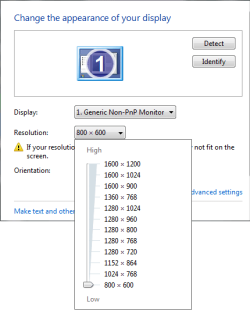
I'm not sure if its a problem with my monitor driver or graphics card driver. After I installed win 7 x64, windows sets my monitor driver to generic non-pnp monitor, supporting resolutions up to 1600x1200 and refresh rates up to 200 Hz, but my monitor actually supports resolutions up to 1024x768 and refresh rate of 120Hz. If I manually install my monitor driver from the list of incompatible drivers, the 'screen resolution' dialog box shows :
Display:1.display device on:VGA
It also shows that my monitor supports resolutions up to 1600x1200!
My graphics card in GeForce 8500GT and driver version is 195.62.

This is generally not a problem as I manually set resolution to 800x600 and refresh rate to 85Hz. but when I play some games or select a higher resolution from the game, I get a black screen. This problem persists even I start the game after selecting a higher resolution from the 'screen resolution' dialog box.
 

Attachments

  • Untitled1.png
    Untitled1.png
    8.9 KB · Views: 73
  • Capture1.PNG
    Capture1.PNG
    9.6 KB · Views: 66

My Computer

Computer Manufacturer/Model Number
Intel
OS
Windows 7 x64, Windows Xp SP3
CPU
Intel Pentium Dual-Core E2180 2GHz,
Motherboard
DG33FBC
Memory
2GB DDR2
Graphics Card(s)
GeForce 8500GT 256MB
Sound Card
Creative Sound Blaster Live! Value
Monitor(s) Displays
Philips 105E1
Screen Resolution
800x600, 1024x768
Hard Drives
1TB Smsung SATA
320GB Smsung SATA
Keyboard
Perfect F-21DQ
Mouse
A4tech OP-005D
Internet Speed
56kbps
I'm not sure if its a problem with my monitor driver or graphics card driver. After I installed win 7 x64, windows sets my monitor driver to generic non-pnp monitor, supporting resolutions up to 1600x1200 and refresh rates up to 200 Hz, but my monitor actually supports resolutions up to 1024x768 and refresh rate of 120Hz. If I manually install my monitor driver from the list of incompatible drivers, the 'screen resolution' dialog box shows :
Display:1.display device on:VGA
It also shows that my monitor supports resolutions up to 1600x1200!
My graphics card in GeForce 8500GT and driver version is 195.62.

This is generally not a problem as I manually set resolution to 800x600 and refresh rate to 85Hz. but when I play some games or select a higher resolution from the game, I get a black screen. This problem persists even I start the game after selecting a higher resolution from the 'screen resolution' dialog box.

Thats weird. Its always safest to put the resolution at the highest supported one. If you set a refresh rate at 200hz even tho the monitor doesnt support it, you risk pemanent damage. Is the "hide resolutions that dont support my screen" option checked? Are you sure you have the latest driver installed?
 

My Computer

Computer Manufacturer/Model Number
Acer Veriton m261 (modded)
OS
Win 7 pro 64-bit, Ubuntu 9.10 64-bit
CPU
Intel Core 2 Duo 2.60 Ghz
Motherboard
Whatever came with the system
Memory
4 gb ddr2 667 Mhz
Graphics Card(s)
NVidia Geforce 9400 GS 1 gb ddr2 550 mhz GPU
Sound Card
Intergrated
Monitor(s) Displays
samsung SyncMaster 2494 24"
Screen Resolution
1080p
Hard Drives
80gb - IDE
750gb - SATA II
PSU
whatever came with the system
Case
whatever came with the system
Cooling
whatever came with the system
Keyboard
Apple Aluminium (Awesome)
Mouse
Some awesome Dell mouse, really good.
Internet Speed
100mbps
Is the "hide resolutions that dont support my screen" option checked? Are you sure you have the latest driver installed?

Yes this option is checked. The latest driver is 196.something. I have yet to try that driver.
 

My Computer

Computer Manufacturer/Model Number
Intel
OS
Windows 7 x64, Windows Xp SP3
CPU
Intel Pentium Dual-Core E2180 2GHz,
Motherboard
DG33FBC
Memory
2GB DDR2
Graphics Card(s)
GeForce 8500GT 256MB
Sound Card
Creative Sound Blaster Live! Value
Monitor(s) Displays
Philips 105E1
Screen Resolution
800x600, 1024x768
Hard Drives
1TB Smsung SATA
320GB Smsung SATA
Keyboard
Perfect F-21DQ
Mouse
A4tech OP-005D
Internet Speed
56kbps
Is the "hide resolutions that dont support my screen" option checked? Are you sure you have the latest driver installed?

Yes this option is checked. The latest driver is 196.something. I have yet to try that driver.
I think thats the newest. Try that, you can also go to the Nvidia control panel and check for settings in there. I'm now on a laptop with intel graphics so cant give you instructions. Just browse around, im sure you'll find something there.
 

My Computer

Computer Manufacturer/Model Number
Acer Veriton m261 (modded)
OS
Win 7 pro 64-bit, Ubuntu 9.10 64-bit
CPU
Intel Core 2 Duo 2.60 Ghz
Motherboard
Whatever came with the system
Memory
4 gb ddr2 667 Mhz
Graphics Card(s)
NVidia Geforce 9400 GS 1 gb ddr2 550 mhz GPU
Sound Card
Intergrated
Monitor(s) Displays
samsung SyncMaster 2494 24"
Screen Resolution
1080p
Hard Drives
80gb - IDE
750gb - SATA II
PSU
whatever came with the system
Case
whatever came with the system
Cooling
whatever came with the system
Keyboard
Apple Aluminium (Awesome)
Mouse
Some awesome Dell mouse, really good.
Internet Speed
100mbps
Well I installed nvidia driver 196.21 today and the same problem persists
 

My Computer

Computer Manufacturer/Model Number
Intel
OS
Windows 7 x64, Windows Xp SP3
CPU
Intel Pentium Dual-Core E2180 2GHz,
Motherboard
DG33FBC
Memory
2GB DDR2
Graphics Card(s)
GeForce 8500GT 256MB
Sound Card
Creative Sound Blaster Live! Value
Monitor(s) Displays
Philips 105E1
Screen Resolution
800x600, 1024x768
Hard Drives
1TB Smsung SATA
320GB Smsung SATA
Keyboard
Perfect F-21DQ
Mouse
A4tech OP-005D
Internet Speed
56kbps
Back
Top