Weird RAM Usage

Francis93

New member
Guru
Local time
5:59 AM
Messages
1,113
Hey guys,

First of all, I have 2 Gbytes of RAM.

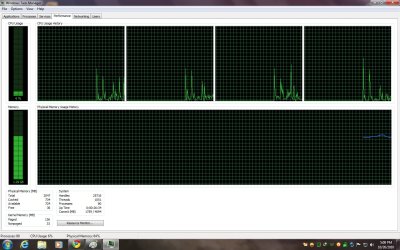
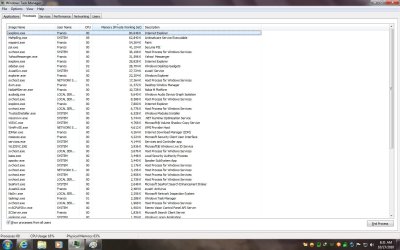
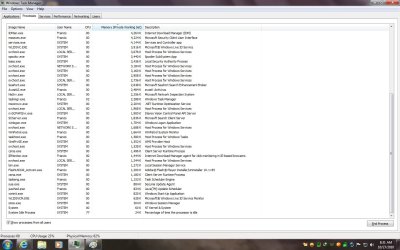
In the past days, RAM usage on my PC was normal like 600-700mb at idle, 800-1500mb when used. Since yesterday, RAM usage became weird, like MSE v2 consuming like 70mb (see attached screenshot), Emsisoft Anti-Malware at around 30mb (before it was 1-2mb only), svchost.exe at around 30mb as well, and a bunch of processes (see screenshot).

Processes started hogging my RAM after I re-enabled scheduled scanning on MSE. Disabling scheduled scanning on MSE doesn't work. Reinstalling the program doesn't work either. I have uninstalled some startup/background apps but it doesn't work. RAM usage is now at 900-1500mb at IDLE.

Please help.

Thanks.
 

Attachments
  • RAM.jpg
    RAM.jpg
    294 KB · Views: 26
  • RAM2.jpg
    RAM2.jpg
    310.3 KB · Views: 14
  • RAM3.jpg
    RAM3.jpg
    488.6 KB · Views: 18

My Computer

Computer type
PC/Desktop
Computer Manufacturer/Model Number
Custom Built
OS
Windows 7 Ultimate x64
CPU
Intel(R) Core(TM) 2 Quad Q8200 @ 2.33 GHz
Motherboard
Asus P5KPL-AM SE Motherboard
Memory
2x2GB Kingston DDR2
Graphics Card(s)
1GB AMD Radeon HD 5450
Sound Card
VIA Technologies High Definition Audio Device
Monitor(s) Displays
Samsung SyncMaster 733NW
Screen Resolution
1440x900
Hard Drives
SEAGATE 320GB Barracuda® 7200.12, SATA 3 Gb/s, 7200 RPM, 16MB cache x 2
Case
Custom Casing
Cooling
Ice cubes from the freezer ;)
Keyboard
Generic Plug & Play Keyboard
Mouse
Optical Mouse
Internet Speed
Very slow
Hi Francis,

At first glance, you have three AV suites- MSE, avast and Emsisoft. Dont know whether they are all running in real time or whether one or more is on-demand only. You may want to check whether you need that many. If you want my advice, use MSE as your resident AV, along with an on-demand scanner like MBAM. Uninstall the rest, your security needs will be taken care of.

Also, you have a lot of instances of chrome running. Plus in general quite a no. of processes (77). Since you have only 2 gigs of RAM, take a look at trimming processes a bit, that'll bring RAM usage down. You can check msconfig for processes and services that start automatically at windows startup and if they are not important, just uncheck. You can start anything you need later manually.
 

My Computer

Computer Manufacturer/Model Number
Too many to describe...
OS
Windows 7 x64 pro/ Windows 7 x86 Pro/ XP SP3 x86
Hi Francis,

At first glance, you have three AV suites- MSE, avast and Emsisoft. Dont know whether they are all running in real time or whether one or more is on-demand only. You may want to check whether you need that many. If you want my advice, use MSE as your resident AV, along with an on-demand scanner like MBAM. Uninstall the rest, your security needs will be taken care of.

Also, you have a lot of instances of chrome running. Plus in general quite a no. of processes (77). Since you have only 2 gigs of RAM, take a look at trimming processes a bit, that'll bring RAM usage down. You can check msconfig for processes and services that start automatically at windows startup and if they are not important, just uncheck. You can start anything you need later manually.

Hello Bill,

So, MSE eating up 70mb of RAM is just normal? Are the processes in the screenshot eating up RAM normally? Emsisoft isn't running in the background as you can see in my system tray. I use it as my on-demand scanner but I don't know why is it running in the background and consumes 30mb unlike before it was only 1-2mb. Right now, avast is using 18mb.

As I said a while ago, uninstalling avast! or MSE doesn't seem to help. If they are uninstalled, then there is a slight decrease in memory because some programs and services are still hogging the memory.

I'm running Chrome 8 dev. It shouldn't be a memory hog right now but :(.
 

My Computer

Computer type
PC/Desktop
Computer Manufacturer/Model Number
Custom Built
OS
Windows 7 Ultimate x64
CPU
Intel(R) Core(TM) 2 Quad Q8200 @ 2.33 GHz
Motherboard
Asus P5KPL-AM SE Motherboard
Memory
2x2GB Kingston DDR2
Graphics Card(s)
1GB AMD Radeon HD 5450
Sound Card
VIA Technologies High Definition Audio Device
Monitor(s) Displays
Samsung SyncMaster 733NW
Screen Resolution
1440x900
Hard Drives
SEAGATE 320GB Barracuda® 7200.12, SATA 3 Gb/s, 7200 RPM, 16MB cache x 2
Case
Custom Casing
Cooling
Ice cubes from the freezer ;)
Keyboard
Generic Plug & Play Keyboard
Mouse
Optical Mouse
Internet Speed
Very slow
Have you updated to the new MSE? Its supposed to have a smaller memort footprint.
 

My Computer

Computer Manufacturer/Model Number
Too many to describe...
OS
Windows 7 x64 pro/ Windows 7 x86 Pro/ XP SP3 x86
Have you updated to the new MSE? Its supposed to have a smaller memort footprint.

I'm using the beta (2.0.375.0). I know, but its using 70mb as if its an internet security suite. Even programs that are supposed to utilize less resources are now resource hungry.
 

My Computer

Computer type
PC/Desktop
Computer Manufacturer/Model Number
Custom Built
OS
Windows 7 Ultimate x64
CPU
Intel(R) Core(TM) 2 Quad Q8200 @ 2.33 GHz
Motherboard
Asus P5KPL-AM SE Motherboard
Memory
2x2GB Kingston DDR2
Graphics Card(s)
1GB AMD Radeon HD 5450
Sound Card
VIA Technologies High Definition Audio Device
Monitor(s) Displays
Samsung SyncMaster 733NW
Screen Resolution
1440x900
Hard Drives
SEAGATE 320GB Barracuda® 7200.12, SATA 3 Gb/s, 7200 RPM, 16MB cache x 2
Case
Custom Casing
Cooling
Ice cubes from the freezer ;)
Keyboard
Generic Plug & Play Keyboard
Mouse
Optical Mouse
Internet Speed
Very slow

My Computer

Computer Manufacturer/Model Number
Too many to describe...
OS
Windows 7 x64 pro/ Windows 7 x86 Pro/ XP SP3 x86
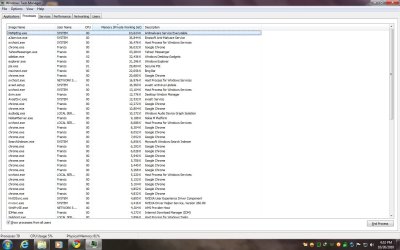
I see 19 Google Chrome running is that correct. Keep in mind, just because something is on the task bar doesn't mean it isn't running in the back ground.
 

My Computer

Computer type
PC/Desktop
Computer Manufacturer/Model Number
Home made Desktop
OS
Windows 10 Pro. 64/ version 1709 Windows 7 Pro/64
CPU
Intel i7-6800K @ 4.3
Motherboard
ASUS X-99 Deluxe II
Memory
Corsair Platinum 16 gig @2400
Graphics Card(s)
EVGA GTX 1070 OC
Monitor(s) Displays
Asus 27" LED LCD/VE278Q
Screen Resolution
1920-1080 or 1280-720 HDMI
Hard Drives
INTEL SSD 730-240 Gb Sata 3.0/
PSU
EVGA Platium 1200W
Case
Phanteks Luxe Tempered Glass 8 fans/ one radiator
Cooling
XSPC/ Water Cooled CPU
Keyboard
Das 4 Professional
Mouse
Logitech M705/MX Anywhere 2-S
Internet Speed
100 mbits
Antivirus
Microsoft Security Essentials/ Malwarebytes Premium 3.0/ SAS
Browser
I.E. 11 default/Firefox/ ISP Time Warner Cable/Spectrum
Other Info
LG BluRay Burner/
Sound system-KLipsch-THX/
Icy Dock ssd Hot Swap bays.
I see 19 Google Chrome running is that correct. Keep in mind, just because something is on the task bar doesn't mean it isn't running in the back ground.

That is normal, Google Chrome does this for some reason.
 

My Computer

Computer Manufacturer/Model Number
HP
OS
Windows 7 Home Premium 64 Bit
CPU
AMD
Memory
4 Gig
Graphics Card(s)
ATI
Sound Card
Beats Audio
Monitor(s) Displays
17 inch
Screen Resolution
1440 x 900
Cooling
Air
Try a clean boot diagnosis, may help identify any software/driver conflicts.

How to troubleshoot a problem by performing a clean boot in Windows Vista or in Windows 7

You can also poke around in the Resource Monitor, look for hard faults, reserved memory.

Investigate memory usage with Windows 7 Resource Monitor | Microsoft Windows | TechRepublic.com

The only other things I can think off is to turn off search, indexing and superfetch. Also, restart your computer, some program may be leaking memory.

These are the screenshots taken during clean boot. :(
Looks like IE9, Paint, Secunia are now top resource eaters.
 

Attachments

  • RAM6.jpg
    RAM6.jpg
    315.7 KB · Views: 14
  • RAM7.jpg
    RAM7.jpg
    311.5 KB · Views: 5

My Computer

Computer type
PC/Desktop
Computer Manufacturer/Model Number
Custom Built
OS
Windows 7 Ultimate x64
CPU
Intel(R) Core(TM) 2 Quad Q8200 @ 2.33 GHz
Motherboard
Asus P5KPL-AM SE Motherboard
Memory
2x2GB Kingston DDR2
Graphics Card(s)
1GB AMD Radeon HD 5450
Sound Card
VIA Technologies High Definition Audio Device
Monitor(s) Displays
Samsung SyncMaster 733NW
Screen Resolution
1440x900
Hard Drives
SEAGATE 320GB Barracuda® 7200.12, SATA 3 Gb/s, 7200 RPM, 16MB cache x 2
Case
Custom Casing
Cooling
Ice cubes from the freezer ;)
Keyboard
Generic Plug & Play Keyboard
Mouse
Optical Mouse
Internet Speed
Very slow
Upgrade your RAM to max possible. :D
 

My Computer

Computer Manufacturer/Model Number
Too many to describe...
OS
Windows 7 x64 pro/ Windows 7 x86 Pro/ XP SP3 x86

My Computer

Computer type
PC/Desktop
Computer Manufacturer/Model Number
Custom Built
OS
Windows 7 Ultimate x64
CPU
Intel(R) Core(TM) 2 Quad Q8200 @ 2.33 GHz
Motherboard
Asus P5KPL-AM SE Motherboard
Memory
2x2GB Kingston DDR2
Graphics Card(s)
1GB AMD Radeon HD 5450
Sound Card
VIA Technologies High Definition Audio Device
Monitor(s) Displays
Samsung SyncMaster 733NW
Screen Resolution
1440x900
Hard Drives
SEAGATE 320GB Barracuda® 7200.12, SATA 3 Gb/s, 7200 RPM, 16MB cache x 2
Case
Custom Casing
Cooling
Ice cubes from the freezer ;)
Keyboard
Generic Plug & Play Keyboard
Mouse
Optical Mouse
Internet Speed
Very slow
Back
Top