
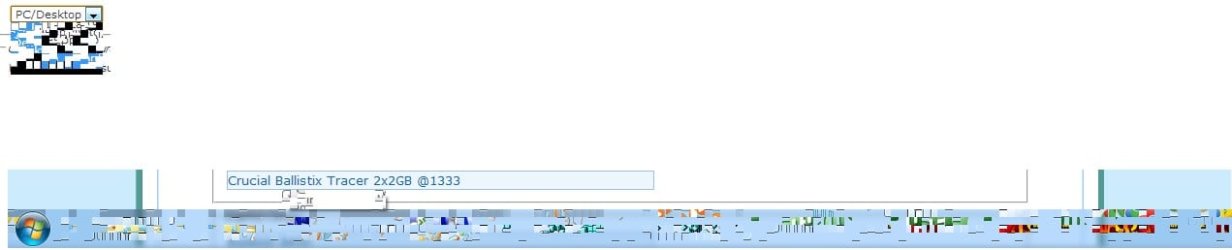
Weird scrambled taskbar and pop up dialogs

biod13sel

New member
Local time
4:14 AM
Messages
5
Hello everybody, hope someone can help shed some light on this for me. As you can hopefully see in my pics that I attached here, my task bar is unusable as well as any drop down windows or pop up dialog from hovering over something. I am unsure of where to go from here as it is such a weird issue that I have never seen before and dont even know how to search for it. I initially thought it was just my GPU or GPU software but my software is up to date and I have ran a few tests across the hardware with no issues. On minimum settings I am pulling 14-17 FPS on furmark with no errors. Thanks in advance for any insight on this.
 

Attachments
  • taskbar.jpg
    taskbar.jpg
    20.6 KB · Views: 23

My Computer My Computer

Computer type
PC/Desktop
Computer Manufacturer/Model Number
custom
OS
Windows 7 Ultimate 64bit
CPU
Intel Core 2 Duo E7400
Motherboard
MSI G41
Memory
Crucial Ballistix Tracer 2x2GB @1333
Graphics Card(s)
Radeon 4850
Hard Drives
WD Black 250 GB
Welcome to the Seven forums.

What happens if you change themes?

Just for fun, try the classic theme.
 

My Computer My Computer

Computer type
Laptop
Computer Manufacturer/Model Number
Employer provided Dell Latitude
OS
W7 Pro SP1 64bit
CPU
i7
Memory
8GB
Graphics Card(s)
Intel HD Graphics
Hard Drives
crappy SSD
Antivirus
Employer mandated Symantec Endpoint Protection
Browser
Pale Moon 64bit, IE11 64bit & Chrome 64bit
Run system file checker

sfc /scannow

instructions are below.
 

My Computer My Computer

Computer type
PC/Desktop
Computer Manufacturer/Model Number
Skylake Special #666
OS
Windows 10 Pro x64
CPU
Intel Core i7 6700K
Motherboard
Asus Sabertooth Z170 Mark 1
Memory
GSkill TridentZ RGB 16GB 3600 16-16-16-36
Graphics Card(s)
EVGA GTX 980 Ti SC x2
Sound Card
Realtek High Definition
Monitor(s) Displays
AOC G2460PG
Screen Resolution
1920 x 1080 144Hz
Hard Drives
Samsung 860 Pro 256GB, Seagate Barracuda 4TB x2
PSU
EVGA 1000 P2, EVGA White Custom Braided Cables
Case
Corsair Vengeance C70 Gunmetal Black
Cooling
Corsair H100i v2, Corsair ML120 x2, Thermal Grizzly Kryonaut
Keyboard
Logitech G910 Orion Spectrum
Mouse
Logitech G700s
Internet Speed
Verizon Fios Quantum Gateway 75/75
Antivirus
Windows Defender, Malwarebytes Free 3.8.3
Browser
Chrome
Other Info
Corsair SP120 x4, LG Blu-ray Drive, Durabrand HT-395 100 Watt Dolby Digital Amp, Corsair H2100 Wireless 7.1 Headset
Thanks for the welcome as well as the responses. Sorry about the delay - been a long week TGIF. Strangely enough, simply switching the themes seems to work. But none of the aero themes work. I am running the scan as well to see what happens there. Since the non aero themes work fine does this point to a corrupt file associated with those themes? Maybe the transparency portion of the theme? Will this scan have the ability to detect this or will I have to delve deeper with maybe a chkdsk or maybe even a windows repair? Thanks again fellows.
 

My Computer My Computer

Computer type
PC/Desktop
Computer Manufacturer/Model Number
custom
OS
Windows 7 Ultimate 64bit
CPU
Intel Core 2 Duo E7400
Motherboard
MSI G41
Memory
Crucial Ballistix Tracer 2x2GB @1333
Graphics Card(s)
Radeon 4850
Hard Drives
WD Black 250 GB
I'll let AddRAM answer your questions about what the SFC scan can do.

Are you using any remote control software that installed a mirror driver (UltraVNC, LogMeIn, ...)? If so, uninstall that mirror driver. If that is not applicable or does not help, then my next suggestion would be to uninstall all of your video drivers, restart the computer and then reinstall them again. If the Aero transparencies still mess up, then consider installing older video drivers - going back one version.
 

My Computer My Computer

Computer type
Laptop
Computer Manufacturer/Model Number
Employer provided Dell Latitude
OS
W7 Pro SP1 64bit
CPU
i7
Memory
8GB
Graphics Card(s)
Intel HD Graphics
Hard Drives
crappy SSD
Antivirus
Employer mandated Symantec Endpoint Protection
Browser
Pale Moon 64bit, IE11 64bit & Chrome 64bit
For this pc I do have teamviewer installed but do not believe they use any mirrors but could be incorrect there. I will look in to that as well as going with the re-install on the video drivers. The Radeon stuff can be buggy at times thats for sure. The scan did show errors and repaired them but did not resolve the issue so it just may be a bit deeper. I will redo the video stuff in the AM and report back on how it turns out. Thanks
 

My Computer My Computer

Computer type
PC/Desktop
Computer Manufacturer/Model Number
custom
OS
Windows 7 Ultimate 64bit
CPU
Intel Core 2 Duo E7400
Motherboard
MSI G41
Memory
Crucial Ballistix Tracer 2x2GB @1333
Graphics Card(s)
Radeon 4850
Hard Drives
WD Black 250 GB
Please run the SFC scan more than once when it find things. I would say to keep running it (within reason) until you get two clean scans in a row.
 

My Computer My Computer

Computer type
Laptop
Computer Manufacturer/Model Number
Employer provided Dell Latitude
OS
W7 Pro SP1 64bit
CPU
i7
Memory
8GB
Graphics Card(s)
Intel HD Graphics
Hard Drives
crappy SSD
Antivirus
Employer mandated Symantec Endpoint Protection
Browser
Pale Moon 64bit, IE11 64bit & Chrome 64bit

My Computer My Computer

Computer type
PC/Desktop
Computer Manufacturer/Model Number
Home made Desktop
OS
Windows 10 Pro. 64/ version 1709 Windows 7 Pro/64
CPU
Intel i7-6800K @ 4.3
Motherboard
ASUS X-99 Deluxe II
Memory
Corsair Platinum 16 gig @2400
Graphics Card(s)
EVGA GTX 1070 OC
Monitor(s) Displays
Asus 27" LED LCD/VE278Q
Screen Resolution
1920-1080 or 1280-720 HDMI
Hard Drives
INTEL SSD 730-240 Gb Sata 3.0/
PSU
EVGA Platium 1200W
Case
Phanteks Luxe Tempered Glass 8 fans/ one radiator
Cooling
XSPC/ Water Cooled CPU
Keyboard
Das 4 Professional
Mouse
Logitech M705/MX Anywhere 2-S
Internet Speed
100 mbits
Antivirus
Microsoft Security Essentials/ Malwarebytes Premium 3.0/ SAS
Browser
I.E. 11 default/Firefox/ ISP Time Warner Cable/Spectrum
Other Info
LG BluRay Burner/
Sound system-KLipsch-THX/
Icy Dock ssd Hot Swap bays.
Thanks everybody for the replies and help. I have re-installed the software and drivers for my video card and am running the extra scans now. I have not checked to see if the video driver install fixed the problem yet, figured I would wait until the scans are done. Will let you guys know what happens.
 

My Computer My Computer

Computer type
PC/Desktop
Computer Manufacturer/Model Number
custom
OS
Windows 7 Ultimate 64bit
CPU
Intel Core 2 Duo E7400
Motherboard
MSI G41
Memory
Crucial Ballistix Tracer 2x2GB @1333
Graphics Card(s)
Radeon 4850
Hard Drives
WD Black 250 GB
Thanks for the welcome as well as the responses. Sorry about the delay - been a long week TGIF. Strangely enough, simply switching the themes seems to work. But none of the aero themes work. I am running the scan as well to see what happens there. Since the non aero themes work fine does this point to a corrupt file associated with those themes? Maybe the transparency portion of the theme? Will this scan have the ability to detect this or will I have to delve deeper with maybe a chkdsk or maybe even a windows repair? Thanks again fellows.
It might be possible that your graphics card/chip is partially damaged. Aero uses more of the GPU and would use portions that non-aero themes don't touch.
 

My Computer My Computer

Computer type
PC/Desktop
Computer Manufacturer/Model Number
Apple 17" iMac MA199LL (Early 2006)
OS
Windows 8 Pro (32-bit)
CPU
1.83GHz Intel Core Duo
Memory
2GB 667MHz DDR2 SDRAM (PC2-5300) (upgrade)
Graphics Card(s)
ATI Radeon X1600 with 128MB GDDR3 memory
Monitor(s) Displays
17-inch TFT active-matrix LCD, millions of colors
Screen Resolution
1440 x 900
Hard Drives
Hitachi 320GB HDT721032SLA360 7200RPM SATA II (upgrade)
Keyboard
Microsoft Wired Keyboard 600
Mouse
Microsoft Basic Optical Mouse v2.0
Internet Speed
4 Mbps
Antivirus
Microsoft Security Essentials
Browser
Google Chrome
Other Info
WEI:
Base Score: 3.9 Processor: 4.4 Memory 4.7
Graphics: 3.9 Gaming Graphics: 4.1 Primary HD: 5.9
That was my first thought as well but would I not have seen at least some artifacting of some sort when I ran the tests across? I mean when I run furmark even @ 1080 it does not skip a beat. No nothing to show that. I would think if it was something with the card itself when it was stressed that hard it would be real hard if not impossible for it to hide itself. These are just my thoughts and please correct me if I am wrong as that is why I came here. If you have another test that I could run across the hardware - a bench or something that you would recommend I will be more than happy to run it across. I just got my first clean scan so am going to reboot and run again and then see where I am at.
 

My Computer My Computer

Computer type
PC/Desktop
Computer Manufacturer/Model Number
custom
OS
Windows 7 Ultimate 64bit
CPU
Intel Core 2 Duo E7400
Motherboard
MSI G41
Memory
Crucial Ballistix Tracer 2x2GB @1333
Graphics Card(s)
Radeon 4850
Hard Drives
WD Black 250 GB
Maybe windows experince index? It's a crap benchmark, but it should test things that aero uses.
 

My Computer My Computer

Computer type
PC/Desktop
Computer Manufacturer/Model Number
Apple 17" iMac MA199LL (Early 2006)
OS
Windows 8 Pro (32-bit)
CPU
1.83GHz Intel Core Duo
Memory
2GB 667MHz DDR2 SDRAM (PC2-5300) (upgrade)
Graphics Card(s)
ATI Radeon X1600 with 128MB GDDR3 memory
Monitor(s) Displays
17-inch TFT active-matrix LCD, millions of colors
Screen Resolution
1440 x 900
Hard Drives
Hitachi 320GB HDT721032SLA360 7200RPM SATA II (upgrade)
Keyboard
Microsoft Wired Keyboard 600
Mouse
Microsoft Basic Optical Mouse v2.0
Internet Speed
4 Mbps
Antivirus
Microsoft Security Essentials
Browser
Google Chrome
Other Info
WEI:
Base Score: 3.9 Processor: 4.4 Memory 4.7
Graphics: 3.9 Gaming Graphics: 4.1 Primary HD: 5.9
Back
Top