
Weird screen at boot

DMGrier

New member
Member
Local time
5:54 AM
Messages
35
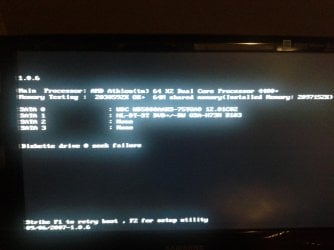
So my mom's husband ask if I could work on some computer he bought I am guessing around 5 or 6 years ago, It is a Dell Inspiron 531 with Vista. I was trying to boot into safe mode and from a google search it seems like F8 or F11 where the keys to try to get into safe mode. neither one worked but now brings up this screen which I will attach and I am not sure how to get rid of it.

After this screen appeared I tired to set the Bios back to defaults and even install a legit version of Windows 7,but now I have to come to this screen every time and push F1 to get the computer to boot normal, any suggestion on how to fix this.
 

Attachments
  • IMG_20140815_221257.jpg
    IMG_20140815_221257.jpg
    249.8 KB · Views: 1

My Computer

Computer Manufacturer/Model Number
Sony Vaio
OS
Windows 7
CPU
Intel core i3 2.5 Ghz
Memory
4 GB DDR3
Graphics Card(s)
Intel HD 300
Screen Resolution
1366×768 pixels
Hard Drives
500 GB 5400 rpm
Internet Speed
Wi-Fi 802.11 a/b/g/n
I'm guessing the pc don't have a floppy drive, but in your screenshot it seems to be looking for one, hence the error message. You say you've reset the BIOS - this often enables stuff you don't have (like a floppy drive). Go back into the BIOS and see if a floppy is enabled. A BIOS reset may also have put the (missing) floppy as 1st in the boot order, which might throw up an error.
 

My Computer

Computer type
PC/Desktop
Computer Manufacturer/Model Number
self build
OS
Windows 7 pro x64 SP1
CPU
Intel i7-2600k o/c to 4.6GHz
Motherboard
MSI Z68-GD80
Memory
8GB Mushkin 1866MHz
Graphics Card(s)
Nvidia GTX 750 Ti 2GB
Sound Card
integrated
Monitor(s) Displays
Liyama ProLite 27"
Screen Resolution
1920*1080 px
Hard Drives
Seagate 2TB
PSU
Coolermaster GX 750W
Case
Antec 300 case + 5 fans
Cooling
Dark Rock Pro
Internet Speed
62Mbit down 18Mbit up
Antivirus
MSE
Browser
Firefox
Other Info
Blackgold BGT3650 Quad HD TV card. Also have various 3770 + 4770K render boxes.
I did the Bios reset in hoping to fix this. I have already went in and changed the boot priority back to HDD. I believe this screen has been triggered by pushing F8 and F11.

Any other thoughts on what it could be?
 

My Computer

Computer Manufacturer/Model Number
Sony Vaio
OS
Windows 7
CPU
Intel core i3 2.5 Ghz
Memory
4 GB DDR3
Graphics Card(s)
Intel HD 300
Screen Resolution
1366×768 pixels
Hard Drives
500 GB 5400 rpm
Internet Speed
Wi-Fi 802.11 a/b/g/n
like other poster stated in the bios you need to disable floppy drive ,not just move it in the boot option order ,its usuall on the first screen of the bios ,depending the bios type
 

My Computer

Computer Manufacturer/Model Number
Dell optiplex 745 sff
OS
win8pro 32 bit win 7Ulitmate 32 bit
CPU
intel duel core 2.13
Motherboard
dell
Memory
3 gig ddr2
Graphics Card(s)
ATI Radeon 5400 series 1gig ddr3
Sound Card
onboard Intel hd
Monitor(s) Displays
ViewSonic LCD 19"
Screen Resolution
1680x1050
Hard Drives
320 gig external
Keyboard
Microsoft curve 2000
Mouse
lenovo
Internet Speed
20high speed
In addition to setting either the HDD or ODD as first one must set the floppy drive [A: and/or B:] as Disabled or Not Present to stop the BIOS from seeking it which prompts the error.
 

My Computer

Computer type
PC/Desktop
Computer Manufacturer/Model Number
Customs, Dell, Gateway, HP, Toshiba, Acer, ASUS
OS
Windows 7 Ultimate 64-bit, Windows 8.1 64-bit, Mac OS X 10.10, Linux Mint 17, Windows 10 Pro TP
Keyboard
Microsoft
Mouse
Microsoft
Alright guys I found the floppy in the bios and disabled and it is now fixed, thanks for the help. I am sorry I ruled floppy out so quickly I just didn't understand as it did not how that screen until I tried to enter safe mode without even entering the bios. Just weird how it set floppy before I reset the bios. Thanks again.
 

My Computer

Computer Manufacturer/Model Number
Sony Vaio
OS
Windows 7
CPU
Intel core i3 2.5 Ghz
Memory
4 GB DDR3
Graphics Card(s)
Intel HD 300
Screen Resolution
1366×768 pixels
Hard Drives
500 GB 5400 rpm
Internet Speed
Wi-Fi 802.11 a/b/g/n
Alright guys I found the floppy in the bios and disabled and it is now fixed, thanks for the help. I am sorry I ruled floppy out so quickly I just didn't understand as it did not how that screen until I tried to enter safe mode without even entering the bios. Just weird how it set floppy before I reset the bios. Thanks again.
only think I know of that would cause it to have reset the floppy is a bad bios battery, that would cause the bios to revert to defaults also
 

My Computer

Computer Manufacturer/Model Number
Dell optiplex 745 sff
OS
win8pro 32 bit win 7Ulitmate 32 bit
CPU
intel duel core 2.13
Motherboard
dell
Memory
3 gig ddr2
Graphics Card(s)
ATI Radeon 5400 series 1gig ddr3
Sound Card
onboard Intel hd
Monitor(s) Displays
ViewSonic LCD 19"
Screen Resolution
1680x1050
Hard Drives
320 gig external
Keyboard
Microsoft curve 2000
Mouse
lenovo
Internet Speed
20high speed
Back
Top