
Weird set of issues - crash, "Microsoft call" and dead monitor

tgfyhre

New member
Member
VIP
Local time
8:38 PM
Messages
332
Weird set of issues - crash, "Microsoft call" and dead monitor

This is a strange one so I hope somebody can help give me their opinion.

My girlfriend's sister was upset the other day when I arrived at her house because she said her HP Pavillion XP computer (which is at least 5 or 6 years old) crashed and Microsoft called her about a virus. I immediately told her to hang up because it was a scam and Microsoft doesn't call people about viruses. So then I asked what happened and she said all of a sudden she got a blue screen and then it shut down on her. Like 5 or 10 minutes later she got a phone call saying they were Microsoft and they detected a virus on her computer.

I went in and checked the error logs and the only thing I could find were several errors involving "FTsata2" which looks like it's been going on for a little while at least. I ran her Avira, which was up to date, and ran Spybot, and no viruses were found. She said that Avira's "Luke Filewalker" popup came up before the crash, but no virus or activity was logged for Avira when I checked. I then ran ccleaner to be safe, and then rebooted. It seemed to start up fine, so I left.

About 2 hours later, I came back and her monitor was no longer working (also an older HP). I turned off the computer with the power switch and powered it back up, and the monitor didn't react. Just random flashes, but the blue power button kept blinking, which I found out indicates a problem with the monitor. I took it home to try it on my PC, and sure enough, the monitor is dead.

This now seems very strange that:

- she got a blue-screen of death and the computer crashed
- she got a call from "Microsoft" within minutes saying she had a virus
- her monitor died

all within a few hours. She doesn't want to buy a new computer unless she absolutely has to, so she wants to try a cheap used monitor first just to see if the PC still runs. I suggested that she at least start with a new monitor, but she's now afraid that maybe her PC killed her monitor. This may be a stupid question but is that even possible? Does any of this make any sense? She's afraid her PC still might have issues and plugging in a new monitor may fry the new monitor too. Is there any way possible that this can happen? I told her that can't happen and this whole thing is just a bunch of weird coincidences, but she insists it's got to be all linked somehow, and I admit, the timing is really unlikely to be just a coincidence.

Any thought other than the obvious "get a new PC"?
 

My Computer My Computer

At a glance

Windows 7 32bit Home PremiumIntel Core I7 920 Bloomfield3 GB Corsair DDR3 (3x1GB)NVidia GTX 570 (1 GB RAM)
Computer type
PC/Desktop
Computer Manufacturer/Model Number
custom build
OS
Windows 7 32bit Home Premium
CPU
Intel Core I7 920 Bloomfield
Motherboard
Asus P6T Deluxe v1
Memory
3 GB Corsair DDR3 (3x1GB)
Graphics Card(s)
NVidia GTX 570 (1 GB RAM)
Sound Card
on board
Monitor(s) Displays
Dell P2314H
Screen Resolution
1920x1080
Hard Drives
Western Digital Black 1TB (main OS)
PSU
XION Supernova XON-800R14N 800W
Case
Antec 1200
Cooling
Arctic Freezer 7 Pro Rev. 2
Keyboard
AZIO Prism
Mouse
Logitech G700S
Internet Speed
Verizon FiOS 85/85
Antivirus
Avast
Browser
Firefox/Chrome
Other Info
SansDigital rr622 RocketRaid (with non-raid Driver)
Renesas USB 3.0 card
Is the power source of the monitor independent? If its power comes from the PSU I'd start looking badly at the PSU. There is no way to damage a monitor through a VGA/DVI cable. It is data-only.

In other cases (more likely), my guess would be that the area where she lives did experience voltage spikes, and while the PSU managed to maybe survive this and protect the PC (of course this caused the crashing), the monitor did not.
The main reason why I always recommend people to get a decent UPS (Uninterruptible power supply). At worst it's the UPS that dies.

I'd call coincidence on the "microsoft" call, that is and has always been a scam. Unless they got up a few notches and start making voltage spikes to then farm people scared by the bluescreens).

As for the BSOD, please follow these instructions and upload the results, so a BSOD analyst can have a look at them and see what did happen.
 

My Computer My Computer

At a glance

Win 7 Pro 64-bit 7601AMD Phenom 9650 QuadCore, revision DR-B35 GB yes I run 2x 2GB and 1x 1GB, different b...NVIDIA GeForce 9800 GT 512 Mb, unknown manufa...
Computer type
PC/Desktop
Computer Manufacturer/Model Number
custom built
OS
Win 7 Pro 64-bit 7601
CPU
AMD Phenom 9650 QuadCore, revision DR-B3
Motherboard
ASUS M4A78
Memory
5 GB yes I run 2x 2GB and 1x 1GB, different brand, spank me.
Graphics Card(s)
NVIDIA GeForce 9800 GT 512 Mb, unknown manufacturer.
Sound Card
Crappy Realtek Integrated Audio
Monitor(s) Displays
Fujitsu Siemens P19-3P
Screen Resolution
1280 x 1024 x 32 bits @ 60 Hz Oh yeah, 4:3 rocks!
Hard Drives
(1) MAXTOR S TM3320613AS SATA Disk Device (2) STM35004 18AS SATA Disk Device (3) TOSHIBA USB 2.5"-HDD
PSU
whatever, around 450w
Case
Scavenged from old company PC, 10+ years old
Cooling
CPU fan, GPU fan, case fan, nothing fancy
Keyboard
Microsoft, PS/2, white.
Mouse
Optical, logitec.
Internet Speed
effective max speeds: 70-ish kB/s down 30-ish kB/s up
Antivirus
Avira, free edition.
Browser
Firefox with FXChrome to make it look like Google Chrome :P
Other Info
Was discarded by previous owner due to "horrible performance".
Was running Win Xp from a IDE drive. Yeah. Was a pain.
SATA II drive and Win7 and it zips away! Yay!
Is the power source of the monitor independent? If its power comes from the PSU I'd start looking badly at the PSU. There is no way to damage a monitor through a VGA/DVI cable. It is data-only.

In other cases (more likely), my guess would be that the area where she lives did experience voltage spikes, and while the PSU managed to maybe survive this and protect the PC (of course this caused the crashing), the monitor did not.
The main reason why I always recommend people to get a decent UPS (Uninterruptible power supply). At worst it's the UPS that dies.

I'd call coincidence on the "microsoft" call, that is and has always been a scam. Unless they got up a few notches and start making voltage spikes to then farm people scared by the bluescreens).

As for the BSOD, please follow these instructions and upload the results, so a BSOD analyst can have a look at them and see what did happen.

The power supply for the monitor is independent from the PC - it's just a basic monitor with a standard power cable. The connection to the PC is VGA.

I don't think she has a proper surge protector, just a basic power strip, so it may have been a surge after all. I have a good UPS for my PC and a surge protector. I wasn't there for the BSOD so I don't know what it said.

She refuses though to believe that it was a coincidence that she got the call moments after the crash/possible power surge.

So then it's not possible for the PC to fry the monitor if it has it's own power cable, simply through the VGA cable? I didn't think so but I told her I would verify it just to be cautious.
 

My Computer My Computer

At a glance

Windows 7 32bit Home PremiumIntel Core I7 920 Bloomfield3 GB Corsair DDR3 (3x1GB)NVidia GTX 570 (1 GB RAM)
Computer type
PC/Desktop
Computer Manufacturer/Model Number
custom build
OS
Windows 7 32bit Home Premium
CPU
Intel Core I7 920 Bloomfield
Motherboard
Asus P6T Deluxe v1
Memory
3 GB Corsair DDR3 (3x1GB)
Graphics Card(s)
NVidia GTX 570 (1 GB RAM)
Sound Card
on board
Monitor(s) Displays
Dell P2314H
Screen Resolution
1920x1080
Hard Drives
Western Digital Black 1TB (main OS)
PSU
XION Supernova XON-800R14N 800W
Case
Antec 1200
Cooling
Arctic Freezer 7 Pro Rev. 2
Keyboard
AZIO Prism
Mouse
Logitech G700S
Internet Speed
Verizon FiOS 85/85
Antivirus
Avast
Browser
Firefox/Chrome
Other Info
SansDigital rr622 RocketRaid (with non-raid Driver)
Renesas USB 3.0 card
I wasn't there for the BSOD so I don't know what it said.
BSODs write logs so that someone can see what the heck happened later (logs are also more talkative than the blue screen), this to extract them, then upload so we can have a look. It's all automated, don't worry.

She refuses though to believe that it was a coincidence that she got the call moments after the crash/possible power surge.
The fact she needs to be convinced with is that such calls are utter and outrageous scams. That's the only thing I'm 100% sure of. MS does not and never did give a flying ... about virus infecting your PC.

Given that it was a scam, that just links the scam to a possible power surge.

So then it's not possible for the PC to fry the monitor if it has it's own power cable, simply through the VGA cable?
Correct. VGA is data-only cable, there is no way for it to carry enough juice to fry anything.
Unless someone throws a bucket of water on the PC anyway, and everything short-circuits.
 

My Computer My Computer

At a glance

Win 7 Pro 64-bit 7601AMD Phenom 9650 QuadCore, revision DR-B35 GB yes I run 2x 2GB and 1x 1GB, different b...NVIDIA GeForce 9800 GT 512 Mb, unknown manufa...
Computer type
PC/Desktop
Computer Manufacturer/Model Number
custom built
OS
Win 7 Pro 64-bit 7601
CPU
AMD Phenom 9650 QuadCore, revision DR-B3
Motherboard
ASUS M4A78
Memory
5 GB yes I run 2x 2GB and 1x 1GB, different brand, spank me.
Graphics Card(s)
NVIDIA GeForce 9800 GT 512 Mb, unknown manufacturer.
Sound Card
Crappy Realtek Integrated Audio
Monitor(s) Displays
Fujitsu Siemens P19-3P
Screen Resolution
1280 x 1024 x 32 bits @ 60 Hz Oh yeah, 4:3 rocks!
Hard Drives
(1) MAXTOR S TM3320613AS SATA Disk Device (2) STM35004 18AS SATA Disk Device (3) TOSHIBA USB 2.5"-HDD
PSU
whatever, around 450w
Case
Scavenged from old company PC, 10+ years old
Cooling
CPU fan, GPU fan, case fan, nothing fancy
Keyboard
Microsoft, PS/2, white.
Mouse
Optical, logitec.
Internet Speed
effective max speeds: 70-ish kB/s down 30-ish kB/s up
Antivirus
Avira, free edition.
Browser
Firefox with FXChrome to make it look like Google Chrome :P
Other Info
Was discarded by previous owner due to "horrible performance".
Was running Win Xp from a IDE drive. Yeah. Was a pain.
SATA II drive and Win7 and it zips away! Yay!
Thanks again! Yeah, she's convinced that it wasn't Microsoft now - she just can't believe the timing. She thinks somehow a virus crashed her computer and the same virus alerted the scammers who put the virus on her PC, who then called her after the crash had occurred to try and scam her. I wasn't aware that scams worked like that - I thought it was just random calls. I think it's just one of those crazy coincidences but it does seem really odd.

I didn't know about that BSOD tool - thanks! I'll give that a try too.
 

My Computer My Computer

At a glance

Windows 7 32bit Home PremiumIntel Core I7 920 Bloomfield3 GB Corsair DDR3 (3x1GB)NVidia GTX 570 (1 GB RAM)
Computer type
PC/Desktop
Computer Manufacturer/Model Number
custom build
OS
Windows 7 32bit Home Premium
CPU
Intel Core I7 920 Bloomfield
Motherboard
Asus P6T Deluxe v1
Memory
3 GB Corsair DDR3 (3x1GB)
Graphics Card(s)
NVidia GTX 570 (1 GB RAM)
Sound Card
on board
Monitor(s) Displays
Dell P2314H
Screen Resolution
1920x1080
Hard Drives
Western Digital Black 1TB (main OS)
PSU
XION Supernova XON-800R14N 800W
Case
Antec 1200
Cooling
Arctic Freezer 7 Pro Rev. 2
Keyboard
AZIO Prism
Mouse
Logitech G700S
Internet Speed
Verizon FiOS 85/85
Antivirus
Avast
Browser
Firefox/Chrome
Other Info
SansDigital rr622 RocketRaid (with non-raid Driver)
Renesas USB 3.0 card
yeah, scams work like you said. How the heck did they get her phone number from a virus?
That virus would be a pretty damn smart piece of code to scan inside her stuff on the PC to find things that could eventually lead to her phone number. Then someone has to waste time to search the phone number with the data the virus has acquired.

Compare the above to "grab a bunch of phone numbers ---> profit".
 

My Computer My Computer

At a glance

Win 7 Pro 64-bit 7601AMD Phenom 9650 QuadCore, revision DR-B35 GB yes I run 2x 2GB and 1x 1GB, different b...NVIDIA GeForce 9800 GT 512 Mb, unknown manufa...
Computer type
PC/Desktop
Computer Manufacturer/Model Number
custom built
OS
Win 7 Pro 64-bit 7601
CPU
AMD Phenom 9650 QuadCore, revision DR-B3
Motherboard
ASUS M4A78
Memory
5 GB yes I run 2x 2GB and 1x 1GB, different brand, spank me.
Graphics Card(s)
NVIDIA GeForce 9800 GT 512 Mb, unknown manufacturer.
Sound Card
Crappy Realtek Integrated Audio
Monitor(s) Displays
Fujitsu Siemens P19-3P
Screen Resolution
1280 x 1024 x 32 bits @ 60 Hz Oh yeah, 4:3 rocks!
Hard Drives
(1) MAXTOR S TM3320613AS SATA Disk Device (2) STM35004 18AS SATA Disk Device (3) TOSHIBA USB 2.5"-HDD
PSU
whatever, around 450w
Case
Scavenged from old company PC, 10+ years old
Cooling
CPU fan, GPU fan, case fan, nothing fancy
Keyboard
Microsoft, PS/2, white.
Mouse
Optical, logitec.
Internet Speed
effective max speeds: 70-ish kB/s down 30-ish kB/s up
Antivirus
Avira, free edition.
Browser
Firefox with FXChrome to make it look like Google Chrome :P
Other Info
Was discarded by previous owner due to "horrible performance".
Was running Win Xp from a IDE drive. Yeah. Was a pain.
SATA II drive and Win7 and it zips away! Yay!
Yup, I agree. It doesn't sound plausible. As weird as the coincidence is, I think that's what it was. By the way, will her PC still have the dump info I would need if I wanted to run the SF Diagnostic tool? I didn't configure it beforehand and she's running XP not 7, also I ran ccleaner on it the other day so I don't know if that would have cleared everything out or not. I'm leaning towards thinking it was a surge like you suggested since the monitor got fried at the same time.
 

My Computer My Computer

At a glance

Windows 7 32bit Home PremiumIntel Core I7 920 Bloomfield3 GB Corsair DDR3 (3x1GB)NVidia GTX 570 (1 GB RAM)
Computer type
PC/Desktop
Computer Manufacturer/Model Number
custom build
OS
Windows 7 32bit Home Premium
CPU
Intel Core I7 920 Bloomfield
Motherboard
Asus P6T Deluxe v1
Memory
3 GB Corsair DDR3 (3x1GB)
Graphics Card(s)
NVidia GTX 570 (1 GB RAM)
Sound Card
on board
Monitor(s) Displays
Dell P2314H
Screen Resolution
1920x1080
Hard Drives
Western Digital Black 1TB (main OS)
PSU
XION Supernova XON-800R14N 800W
Case
Antec 1200
Cooling
Arctic Freezer 7 Pro Rev. 2
Keyboard
AZIO Prism
Mouse
Logitech G700S
Internet Speed
Verizon FiOS 85/85
Antivirus
Avast
Browser
Firefox/Chrome
Other Info
SansDigital rr622 RocketRaid (with non-raid Driver)
Renesas USB 3.0 card
Yeah, CCleaner usually nukes those logs in a vane attempt to do something.

That program should work on XP too, at least for what we need. Otherwise the files we need are located in C:\WINDOWS\Minidump.


My Computer My Computer

At a glance

Win 7 Pro 64-bit 7601AMD Phenom 9650 QuadCore, revision DR-B35 GB yes I run 2x 2GB and 1x 1GB, different b...NVIDIA GeForce 9800 GT 512 Mb, unknown manufa...
Computer type
PC/Desktop
Computer Manufacturer/Model Number
custom built
OS
Win 7 Pro 64-bit 7601
CPU
AMD Phenom 9650 QuadCore, revision DR-B3
Motherboard
ASUS M4A78
Memory
5 GB yes I run 2x 2GB and 1x 1GB, different brand, spank me.
Graphics Card(s)
NVIDIA GeForce 9800 GT 512 Mb, unknown manufacturer.
Sound Card
Crappy Realtek Integrated Audio
Monitor(s) Displays
Fujitsu Siemens P19-3P
Screen Resolution
1280 x 1024 x 32 bits @ 60 Hz Oh yeah, 4:3 rocks!
Hard Drives
(1) MAXTOR S TM3320613AS SATA Disk Device (2) STM35004 18AS SATA Disk Device (3) TOSHIBA USB 2.5"-HDD
PSU
whatever, around 450w
Case
Scavenged from old company PC, 10+ years old
Cooling
CPU fan, GPU fan, case fan, nothing fancy
Keyboard
Microsoft, PS/2, white.
Mouse
Optical, logitec.
Internet Speed
effective max speeds: 70-ish kB/s down 30-ish kB/s up
Antivirus
Avira, free edition.
Browser
Firefox with FXChrome to make it look like Google Chrome :P
Other Info
Was discarded by previous owner due to "horrible performance".
Was running Win Xp from a IDE drive. Yeah. Was a pain.
SATA II drive and Win7 and it zips away! Yay!
OK, well thanks again for all the advice. Very much appreciated!
 

My Computer My Computer

At a glance

Windows 7 32bit Home PremiumIntel Core I7 920 Bloomfield3 GB Corsair DDR3 (3x1GB)NVidia GTX 570 (1 GB RAM)
Computer type
PC/Desktop
Computer Manufacturer/Model Number
custom build
OS
Windows 7 32bit Home Premium
CPU
Intel Core I7 920 Bloomfield
Motherboard
Asus P6T Deluxe v1
Memory
3 GB Corsair DDR3 (3x1GB)
Graphics Card(s)
NVidia GTX 570 (1 GB RAM)
Sound Card
on board
Monitor(s) Displays
Dell P2314H
Screen Resolution
1920x1080
Hard Drives
Western Digital Black 1TB (main OS)
PSU
XION Supernova XON-800R14N 800W
Case
Antec 1200
Cooling
Arctic Freezer 7 Pro Rev. 2
Keyboard
AZIO Prism
Mouse
Logitech G700S
Internet Speed
Verizon FiOS 85/85
Antivirus
Avast
Browser
Firefox/Chrome
Other Info
SansDigital rr622 RocketRaid (with non-raid Driver)
Renesas USB 3.0 card
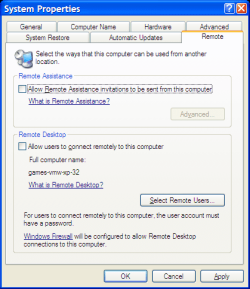
Make sure that "Remote Desktop" and "Remote Assistance" are disabled.
XP Remote Assistance.png
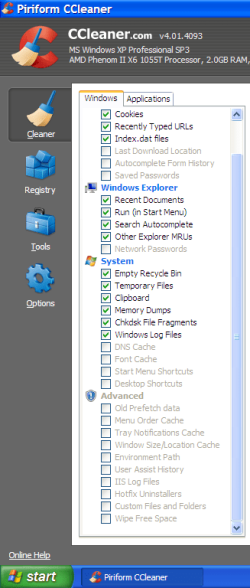
Yeah, CCleaner usually nukes those logs in a vane attempt to do something.

It nukes them to recover space.
You can change what CCleaner removes by adjusting the Cleaner selections.
CCleaner Options.png
 

My Computer My Computer

At a glance

W7 Ultimate SP1, LM19.2 MATE, W10 Home 1703, ...AMD Phenom II x6 1100T, 3.3 GHz12GB DDR3 1333 G-Skill (4GB x 2), G-Skill (2G...NVIDIA GeForce GTX 660
Computer type
PC/Desktop
Computer Manufacturer/Model Number
n/a
OS
W7 Ultimate SP1, LM19.2 MATE, W10 Home 1703, W10 Pro 1703 VM, #All 64 bit
CPU
AMD Phenom II x6 1100T, 3.3 GHz
Motherboard
ASUS M4A88T-M/USB3 (AM3)
Memory
12GB DDR3 1333 G-Skill (4GB x 2), G-Skill (2GB x 2)
Graphics Card(s)
NVIDIA GeForce GTX 660
Sound Card
Realtek?
Monitor(s) Displays
Samsung S23B350
Screen Resolution
1920x1080
Hard Drives
WD Green 2TB (SATA), WD Green 3TB (SATA), WD Blue 4TB (SATA), WD Blue 6TB (SATA)
PSU
Cooler Master
Case
Antec GX300 Tower
Cooling
3x Antec TRICOOL 120mm Fans
Mouse
Wired Optical
Internet Speed
DSL
Antivirus
Avast
Browser
Pale Moon (64 bit)
Other Info
2018-12-27 Upgraded HDDs
2015-12-10 Upgraded case, graphics card, storage
2015-08-15 Upgraded motherboard & RAM
2015-07-15 Upgraded LM17.1 to LM17.2
Back
Top