Weird situation

xbeware

New member
Local time
11:42 PM
Messages
6
For 2 years now I've been using a router to share the connection to both my laptop and PC(an intermediar cable from the router to the pc). Last week i tried to connect the internet cable from my ISP directly to my PC because I can't stream with the reduced speed (router cuts the speed in half or something) and I had a little surprise: the internet port on the back of my pc wouldn't blink,the connection not being recognised.I called from the tech suport from my ISP and they didn't know how to solve the problem either( tried pinging the connection, tried other cables,etc).
The weird thing is that 2 yeears ago when i bought the pc I tested the direct connection and it worked just fine. So now I can have internet only with a cable pluged from the router to my PC.(windows7 btw)
 

My Computer

Computer type
PC/Desktop
OS
romania
CPU
Intel Core i5 3470 3.20GHz
Motherboard
Gigabyte GA-B75-D3V
Memory
Kingston HyperX Red Limited Edition 8GB DDR3 1600MHz CL9 Dua
Graphics Card(s)
Palit GeForce GTX 650 Ti OC 1GB DDR5 128-bit
Hard Drives
Western Digital 1TB SATA-III 7200 rpm 64MB Caviar Blue
Browser
chrome

Attachments

  • DEVICE1.PNG
    DEVICE1.PNG
    12.2 KB · Views: 0

My Computer

Computer type
PC/Desktop
Computer Manufacturer/Model Number
Own build (new) Desk1 / Asus ROG Win 7 / Desk2 1st build
OS
Desk1 7 Home Prem / Desk2 10 Pro / Main lap Asus ROG 10 Pro 2 laptop Toshiba 7 Pro Asus P2520 7 & 10
CPU
Desk1 i5 3750K / Laptop i7 GTX 860M / Desk2 i5 2500
Motherboard
Desk1 Asus P877-V / Desk2 Gigabyte H67 UD3H / Laptop ?
Memory
Desk1 8GB (1866) / Desk2 16GB (1333) / Laptop 8Gb DDR3
Graphics Card(s)
Desk 1& 2NVidia GTX 650 & Laptops on board Intel
Sound Card
Desk 1 & 2 -XONAR DG Realtek High Def audio Laptop
Monitor(s) Displays
Desk 1 Benq HD 2450 / Desk2 Philips 24" / Laptop 17.5"
Screen Resolution
1920x1080 D1 & D2 & Laptop 1
Hard Drives
Desk1 Samsung 120GB 830 SSD
Asus ROG 256GB 850 Pro SSD
Desk2 Samsung 840 256 SSD
Toshiba 120GB EVO
PSU
Desk 1 Corsair HX 1050/ Laptop ? / Desk 2 Corsair HX 650
Case
Desk 1 Cooler HAF XM ? Toshiba laptop / Desk2 Coolermaster
Cooling
Fans on all Desk1 -2 Desk2 - all Coolermasters 5 Laptop ?
Keyboard
Desk 1 MS Sidewinder X6 Desk 2 MS Sidewinder X 4
Mouse
Desk 1&2 - Gigabyte MS 900 gamer - laptop - Logitec wireless
Internet Speed
ADSL2+
Other Info
One other Desktop (tester) and spare Toshba laptop both with SSD's
Running Kaspersky 2016 ISS on all machines config'd identically
Logitec audio stereo systems on each machine (x3)
Canon MG5250MFC
Router/modem TP-Link running WPA2SK
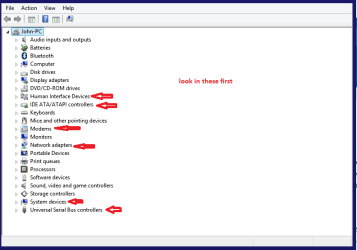
i don't have any yellow triangles in any of these categories and i don't have the modem one at all(not using a modem).
 

My Computer

Computer type
PC/Desktop
OS
romania
CPU
Intel Core i5 3470 3.20GHz
Motherboard
Gigabyte GA-B75-D3V
Memory
Kingston HyperX Red Limited Edition 8GB DDR3 1600MHz CL9 Dua
Graphics Card(s)
Palit GeForce GTX 650 Ti OC 1GB DDR5 128-bit
Hard Drives
Western Digital 1TB SATA-III 7200 rpm 64MB Caviar Blue
Browser
chrome

My Computer

Computer Manufacturer/Model Number
Lenovo Desktop/Samsung Laptop
OS
Win7 & Win8 64bit
CPU
Intel i5
Internet Speed
Charter-20 Mbps
Antivirus
Avast
Browser
FF, IE9 and Chrome
1. Is this a wired or wireless connection issue?
wired

2. Who is your Internet Service Provider (ISP)?
Romania : RCS-RDS

3. What type of Broadband connection are you using?
Cable (Fiberlink)

4. What is the exact Make and Model of your Modem, Router or Modem/Router Combo -
Dlink DI524
5. What is the Name of the Anti-Virus, Security or Firewall Software installed from the problematic computer -
actualy i didnt have any antivirus installed. i did install one a few days ago but the problem was not solved with a clean up. (i installed malwarebytes antymalware and eset smart security 7).

http://i.imgur.com/opVurjv.png
http://i.imgur.com/ecIYK6S.png
http://i.imgur.com/4XJD1Tm.png
http://i.imgur.com/cL9QreW.png

http://i.imgur.com/EgbxL39.png
 

Attachments

My Computer

Computer type
PC/Desktop
OS
romania
CPU
Intel Core i5 3470 3.20GHz
Motherboard
Gigabyte GA-B75-D3V
Memory
Kingston HyperX Red Limited Edition 8GB DDR3 1600MHz CL9 Dua
Graphics Card(s)
Palit GeForce GTX 650 Ti OC 1GB DDR5 128-bit
Hard Drives
Western Digital 1TB SATA-III 7200 rpm 64MB Caviar Blue
Browser
chrome
Sorry for the late reply, I have been super busy....Thanks for all the info provided.

You've mentioned here that your computer's internet works when directly plugged to the router.
So now I can have internet only with a cable plugged from the router to my PC.(windows7 btw)

Just to clarify, when you did the ipconfig/all output (one showing disconnected and one has a working connection) was it plugged in to the same router and broadband?

Will appreciate another reply. Thanks.
 

My Computer

Computer Manufacturer/Model Number
Lenovo Desktop/Samsung Laptop
OS
Win7 & Win8 64bit
CPU
Intel i5
Internet Speed
Charter-20 Mbps
Antivirus
Avast
Browser
FF, IE9 and Chrome
when the connection was working the computer was connected to the router and when it showed disconnected , the cable was plugged directly into the pc( no router involved)
 

My Computer

Computer type
PC/Desktop
OS
romania
CPU
Intel Core i5 3470 3.20GHz
Motherboard
Gigabyte GA-B75-D3V
Memory
Kingston HyperX Red Limited Edition 8GB DDR3 1600MHz CL9 Dua
Graphics Card(s)
Palit GeForce GTX 650 Ti OC 1GB DDR5 128-bit
Hard Drives
Western Digital 1TB SATA-III 7200 rpm 64MB Caviar Blue
Browser
chrome
Since when does a router prevent streaming or cut the connection speed in half?

I think this is the problem that needs to be addressed.
 

My Computer

Computer type
PC/Desktop
Computer Manufacturer/Model Number
Home built
OS
Windows 7 Ult, Windows 8.1 Pro,
CPU
Q9650-4.275GHz, E8600 4.5GHz, E6750-3.8GHz
Motherboard
Evga 780i FTW
Memory
G.Skill PC2 9600 1200Mhz 5 5 5 15 2T
Graphics Card(s)
GTX480
Sound Card
Asus Xonar D2
Monitor(s) Displays
HannsG
Screen Resolution
1680X1050
Hard Drives
GSkill Phoenix Pro 120GB SSD
PSU
ThermalTake Toughpower 1000Watt modular
Case
ThermalTake XaserV
Cooling
Xigmatek S1283
Keyboard
Logitech G15
Mouse
Logitech G9
Internet Speed
T1

My Computer

Computer type
PC/Desktop
Computer Manufacturer/Model Number
Home made Desktop
OS
Windows 10 Pro. 64/ version 1709 Windows 7 Pro/64
CPU
Intel i7-6800K @ 4.3
Motherboard
ASUS X-99 Deluxe II
Memory
Corsair Platinum 16 gig @2400
Graphics Card(s)
EVGA GTX 1070 OC
Monitor(s) Displays
Asus 27" LED LCD/VE278Q
Screen Resolution
1920-1080 or 1280-720 HDMI
Hard Drives
INTEL SSD 730-240 Gb Sata 3.0/
PSU
EVGA Platium 1200W
Case
Phanteks Luxe Tempered Glass 8 fans/ one radiator
Cooling
XSPC/ Water Cooled CPU
Keyboard
Das 4 Professional
Mouse
Logitech M705/MX Anywhere 2-S
Internet Speed
100 mbits
Antivirus
Microsoft Security Essentials/ Malwarebytes Premium 3.0/ SAS
Browser
I.E. 11 default/Firefox/ ISP Time Warner Cable/Spectrum
Other Info
LG BluRay Burner/
Sound system-KLipsch-THX/
Icy Dock ssd Hot Swap bays.
Back
Top