
Hello guys, im new around, congratz for the forum it's pretty informative.
-Computer composition-
Cpu: Q9300(with a thermaltake cooler+fan)
M/B: p5n-d
Ram: 4*1gb ddr2 800mhz corsair
Gpu: gf 9800 gtx 512mb
Psu: 750w thermaltake
HDDs: 2*500gb seagate 7200rpm + 1 external 1tb seagate(usb connected)
My problems started a week ago or so, by that time i was using vista(x64) and at a point my computer was getting really slow so i though i should do a clean install.
I did a mistake with the partitions when i bought the comp, i made 4 partitions on the 1st disk, with only 30gb for the OS partition. Except that i had a "music" partition and a "games" one which i was using a lot the last year. So i guess the disk was in some hard pressure there, having the OS running, playing some games and listening music at the same time. I didn't have problems that would worry me though.
I did a partition clean up(partition magic) and then did a clean install of vista(x64) again but i felt that the slowdowns were still there. So i started thinking that something was wrong with the hardware. Firstly i checked the temperatures, my cpu was "normal" at 60-70 C, my gpu was 60-80 C. i even raised the gpu fan to reduce the gpu temperatures(100% fan speed reduced the temp by 10+ C) but still my gpu was "normal" too. I tried to test a bit the disk if there was something wrong with it but nothing came out of that.
So i heard about windows 7 and that they are a lot better than vista(indeed they are). So i downloaded the version 7100(x64) from microsoft's site and installed it. At the start the computer was really fast and i was really happy with it cause i thought i solved the problem. I installed the usual stuff, graphic drivers(the latest for win7x64), firefox, windows live messenger+mail, a couple of games and winamp.
After some use though the slowdowns came up again, i don't have anything that could slow down the boot for example, i tried to remove all the startup applications. The slowdowns are really big though it takes like 5mins to start windows and after that it keeps being slow for 5more mins. I even disabled aero and for a bit made windows fly but that was just for some mins.
I was monitoring the cpu+ram and they were at normal states, i didn't have much cpu usage but the applications that i clicked to run was taking 20+ sec to get started, it was like big freezes of the disk and then come backs, can't explain it better.
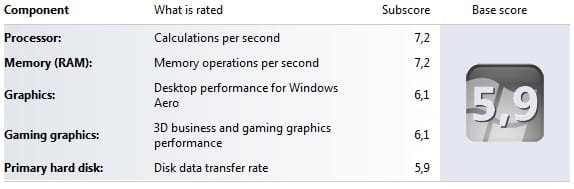
My WEI ratings are pretty decent, i got 5.9 with the disk being the slower part.
Any suggestions that could help me find the problem? Before i spent money to get new parts and test the hell out of it!
Thanks in advance and sorry for the big post.
-Computer composition-
Cpu: Q9300(with a thermaltake cooler+fan)
M/B: p5n-d
Ram: 4*1gb ddr2 800mhz corsair
Gpu: gf 9800 gtx 512mb
Psu: 750w thermaltake
HDDs: 2*500gb seagate 7200rpm + 1 external 1tb seagate(usb connected)
My problems started a week ago or so, by that time i was using vista(x64) and at a point my computer was getting really slow so i though i should do a clean install.
I did a mistake with the partitions when i bought the comp, i made 4 partitions on the 1st disk, with only 30gb for the OS partition. Except that i had a "music" partition and a "games" one which i was using a lot the last year. So i guess the disk was in some hard pressure there, having the OS running, playing some games and listening music at the same time. I didn't have problems that would worry me though.
I did a partition clean up(partition magic) and then did a clean install of vista(x64) again but i felt that the slowdowns were still there. So i started thinking that something was wrong with the hardware. Firstly i checked the temperatures, my cpu was "normal" at 60-70 C, my gpu was 60-80 C. i even raised the gpu fan to reduce the gpu temperatures(100% fan speed reduced the temp by 10+ C) but still my gpu was "normal" too. I tried to test a bit the disk if there was something wrong with it but nothing came out of that.
So i heard about windows 7 and that they are a lot better than vista(indeed they are). So i downloaded the version 7100(x64) from microsoft's site and installed it. At the start the computer was really fast and i was really happy with it cause i thought i solved the problem. I installed the usual stuff, graphic drivers(the latest for win7x64), firefox, windows live messenger+mail, a couple of games and winamp.
After some use though the slowdowns came up again, i don't have anything that could slow down the boot for example, i tried to remove all the startup applications. The slowdowns are really big though it takes like 5mins to start windows and after that it keeps being slow for 5more mins. I even disabled aero and for a bit made windows fly but that was just for some mins.
I was monitoring the cpu+ram and they were at normal states, i didn't have much cpu usage but the applications that i clicked to run was taking 20+ sec to get started, it was like big freezes of the disk and then come backs, can't explain it better.
My WEI ratings are pretty decent, i got 5.9 with the disk being the slower part.
Any suggestions that could help me find the problem? Before i spent money to get new parts and test the hell out of it!
Thanks in advance and sorry for the big post.
Attachments
My Computer
- OS
- win7 7600x64 RTM
- CPU
- Q9300
- Motherboard
- P5N-D
- Memory
- DDR2 Corsair 4*1gb 800Mhz
- Graphics Card(s)
- Nvidia Ge Force 9800 gtx
- Sound Card
- SB audigy
- Monitor(s) Displays
- Samsung syncmaster 2232bw
- Screen Resolution
- 1680*1050
- Hard Drives
- 1*60gb SSD (system)
2*500gb Sata 7200rpm (raid 0)
1*1tb external(backup)
- PSU
- thermaltake 750w
- Case
- Thermaltake(something :P)
- Cooling
- Normal fans // Cpu cooler+fan(Thermaltake)





 lol
lol