Weird sound problems, Audigy 2 ZS.

Spidah

New member
Local time
9:55 AM
Messages
22
Hey guys again!

Hey again. I got the same problem again <.< no sound whatsoever. Could u tell me how to change to onboard sound? so it uses the onboard sound.. Please answer quickly.

I still seem to have this problem, no sound coming out of my computer.
I installed windows 7 build 7600 a while ago and i haven't had any luck
to get the sound to work on my computer. I was wondering, since after
i had no luck with windows 7, i tried Ubuntu. And the sound wasn't working
on Ubuntu either, that's the Ubuntu 9.04. The newest i suppose. So then
i found somewhere in the Ubuntu forums, that some guy removed his sound
card from the computer, restarted the computer and voila, the sound was
working properly. So i tried it out, and yes, it worked. After this, i tested Ubuntu
out, but it was kinda confusing for me, really irritating to use to be specific. After i had tested Ubuntu out, i figured, maybe this will work on the Windows 7
(To remove sound card from the computer) So i had to go all trough these steps
, cuz after i installed ubuntu, i didn't have an NTFS drive where i could install my Windows 7 again. So i downloaded the GParted, created an NTFS partition, and finally got to installing my Windows 7. It successfully installed the Win 7, but still i had no sound. Now, i am just wondering, if before, when i had my Windows 7, and i had the Sound Card (which is SB Audigy 2 ZS (WDM)) btw, if i installed the wrong drivers for it, i mean that can't be though, cuz i got them straight from the creative sound blaster sites, and i specifically located the one that would be suitable with Windows 7. So maybe when i installed the Driver, the driver didn't install correctly? Or maybe i just need to forget about my Sound Card, and somehow enable the Onboard audio?

Okay, even though u can check my PC's information by clicking my name, i'll display them here.

OS: Windows 7 Ultimate 32-bit (6.1, Build 7600)
Motherboard: Asus P5PL2
Processor: Intel(R) Pentium(R) 4 CPU 3.20GHz (2 CPUs), ~3.2GHz
Memory: 1024MB RAM
Sound Card: SB Audigy 2 ZS (WDM)
Video Card: nVidia GeForce 9600 GT

I would really love if someone could help me with this problem i have been having with the cool-ass OS!
 

My Computer My Computer

Computer Manufacturer/Model Number
AsusTEK
OS
Windows 7 Ultimate 32-bit (6.1, Build 7600)
CPU
Intel(R) Pentium(R) 4 CPU 3.20GHz (2CPUs), ~3.2GHz
Motherboard
Asus P5PL2
Memory
1024MB RAM
Graphics Card(s)
nVidia GeForce 9600 GT
Sound Card
Creative SB Audigy 2 ZS (WDM)
Monitor(s) Displays
ViewSonic VA1912w Series
Hey, this weird thing happened to me. I went to Playback Devices, and plugged my headphones directly in to the Sound Card, and i ran a test on the SPDIF Out, and i actually had sound. So, i set my SPDIF as default device, even went to Youtube and opened a clip, and still i had sound. Then i plugged my monitor cable instead of the Headphones, and then the sound didn't work. So now i changed the headphones back, and the sound didn't work anymore.

Whats the problem here? :S
 

My Computer My Computer

Computer Manufacturer/Model Number
AsusTEK
OS
Windows 7 Ultimate 32-bit (6.1, Build 7600)
CPU
Intel(R) Pentium(R) 4 CPU 3.20GHz (2CPUs), ~3.2GHz
Motherboard
Asus P5PL2
Memory
1024MB RAM
Graphics Card(s)
nVidia GeForce 9600 GT
Sound Card
Creative SB Audigy 2 ZS (WDM)
Monitor(s) Displays
ViewSonic VA1912w Series
Last edited:

My Computer My Computer

Computer Manufacturer/Model Number
Self Built
OS
Windows 7 ultimate 64 bit / XP Home sp3
CPU
intel Core 2 Duo E8400 3.0ghz
Motherboard
Asus P5ND bios 1401
Memory
8 gigs 1066 OCZ Fata1ty
Graphics Card(s)
EVGA GTX 580 Call of Duty Black Ops Edition
Sound Card
Creative Soundblaster Audigy 2zs
Monitor(s) Displays
Asus 24in LCD's 2MS X2
Screen Resolution
1920x1080p @60Hz
Hard Drives
WD Caviar 500 Black/ WD Caviar 200 Blue
PSU
OCZ 700W GameXtreme
Case
NZXT Apollo
Cooling
Corsair H50 CPU/120mm x3 /60mm x2 /Corsair Dominator Ram
Keyboard
Logitech Bluetooth Wireless MX5000
Mouse
Logitech Bluetooth Wireless MX1000
Internet Speed
Download 19.83 Upload 0.97
Other Info
Logitech Z2300 Speakers/ Bose Noise Cancelling Headphones/Avermedia PCI-e Hybrid TV Bravo/Epson NX415 all in one/ 4 Port Powered USB Hub/ LG 10x Bluray Burner /TSST Corp DVDRW External
Thank you for ur reply, i will try this out when i get home.
I actually study in a school where we have intelligent teachers about sound devices and drivers etc.. my teacher actually said that i should just disable the onboard audio. I hope that will work, if not, i will try the thing u posted!

I will let you know if i get it working.
 

My Computer My Computer

Computer Manufacturer/Model Number
AsusTEK
OS
Windows 7 Ultimate 32-bit (6.1, Build 7600)
CPU
Intel(R) Pentium(R) 4 CPU 3.20GHz (2CPUs), ~3.2GHz
Motherboard
Asus P5PL2
Memory
1024MB RAM
Graphics Card(s)
nVidia GeForce 9600 GT
Sound Card
Creative SB Audigy 2 ZS (WDM)
Monitor(s) Displays
ViewSonic VA1912w Series
Once again an assumption has bite me. I had assumed you had already disabled the on board sound although I don't think this is where the problem arises from.
 

My Computer My Computer

Computer Manufacturer/Model Number
Self Built
OS
Windows 7 ultimate 64 bit / XP Home sp3
CPU
intel Core 2 Duo E8400 3.0ghz
Motherboard
Asus P5ND bios 1401
Memory
8 gigs 1066 OCZ Fata1ty
Graphics Card(s)
EVGA GTX 580 Call of Duty Black Ops Edition
Sound Card
Creative Soundblaster Audigy 2zs
Monitor(s) Displays
Asus 24in LCD's 2MS X2
Screen Resolution
1920x1080p @60Hz
Hard Drives
WD Caviar 500 Black/ WD Caviar 200 Blue
PSU
OCZ 700W GameXtreme
Case
NZXT Apollo
Cooling
Corsair H50 CPU/120mm x3 /60mm x2 /Corsair Dominator Ram
Keyboard
Logitech Bluetooth Wireless MX5000
Mouse
Logitech Bluetooth Wireless MX1000
Internet Speed
Download 19.83 Upload 0.97
Other Info
Logitech Z2300 Speakers/ Bose Noise Cancelling Headphones/Avermedia PCI-e Hybrid TV Bravo/Epson NX415 all in one/ 4 Port Powered USB Hub/ LG 10x Bluray Burner /TSST Corp DVDRW External
Okay, now i have disabled the on board sound, and i have uninstalled the drivers, and i downloaded the driver from the link u gave. I have downloaded that driver before, and installed it, and i assumed it installed correctly etc, but, this time i ran it trough "Troubleshoot Compatibility", and i tried varies of choices; Windows XP SP 2, Windows Vista, Windows Vista SP 1 and SP 2, but none of them actually detected a supported product, assuming my sound card, from my system. And i am amazed how it cant detect it, i mean it's not hard to push a sound card in the slot, and screw one bolt. I mean there's no wires etc.. and there is only one place where to put it so, a monkey could do it.

Any suggestions now? :s

Btw thanks a lot for taking the time to help me! :o
 

My Computer My Computer

Computer Manufacturer/Model Number
AsusTEK
OS
Windows 7 Ultimate 32-bit (6.1, Build 7600)
CPU
Intel(R) Pentium(R) 4 CPU 3.20GHz (2CPUs), ~3.2GHz
Motherboard
Asus P5PL2
Memory
1024MB RAM
Graphics Card(s)
nVidia GeForce 9600 GT
Sound Card
Creative SB Audigy 2 ZS (WDM)
Monitor(s) Displays
ViewSonic VA1912w Series
OK lets try this, remove the sound card. Uninstall the drivers. Enable on board sound and see if windows will load the drivers for your on board sound. This way we know if you can get sound at all. If so then disable it in the bios replace the sound card reboot and see if windows recognizes the card and automatically installs the generic drivers as it did for me. You stated above you recently upgraded to 7600 So I have to ask where did you get the ISO and did you burn it at the slowest speed. But then also you said that you installed Ubuntu and had the same problem. When was the last time, with what Os did your sound card work? I'm trying to figure out if you have a bad ISO, or a bad sound card, or a bad PCI slot. Since it isn't even being recognized with 2 different OS. It would also to be nice to see a snip of your device mngr when the card is installed. How to use the snipping tool (if you don't already know) http://www.sevenforums.com/general-...ed-method-uploading-posting-screen-shots.html I know this is a lot of information but these are things I would try. TX Fabe
 

My Computer My Computer

Computer Manufacturer/Model Number
Self Built
OS
Windows 7 ultimate 64 bit / XP Home sp3
CPU
intel Core 2 Duo E8400 3.0ghz
Motherboard
Asus P5ND bios 1401
Memory
8 gigs 1066 OCZ Fata1ty
Graphics Card(s)
EVGA GTX 580 Call of Duty Black Ops Edition
Sound Card
Creative Soundblaster Audigy 2zs
Monitor(s) Displays
Asus 24in LCD's 2MS X2
Screen Resolution
1920x1080p @60Hz
Hard Drives
WD Caviar 500 Black/ WD Caviar 200 Blue
PSU
OCZ 700W GameXtreme
Case
NZXT Apollo
Cooling
Corsair H50 CPU/120mm x3 /60mm x2 /Corsair Dominator Ram
Keyboard
Logitech Bluetooth Wireless MX5000
Mouse
Logitech Bluetooth Wireless MX1000
Internet Speed
Download 19.83 Upload 0.97
Other Info
Logitech Z2300 Speakers/ Bose Noise Cancelling Headphones/Avermedia PCI-e Hybrid TV Bravo/Epson NX415 all in one/ 4 Port Powered USB Hub/ LG 10x Bluray Burner /TSST Corp DVDRW External
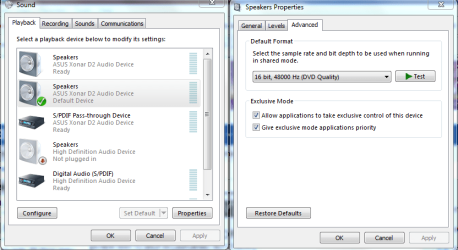
If you havn't cleared the cmos yet it might be a good time to do that. After that try doing this.
 

Attachments

  • application control of this device.PNG
    application control of this device.PNG
    34.8 KB · Views: 577

My Computer My Computer

Computer type
PC/Desktop
Computer Manufacturer/Model Number
Home built
OS
Windows 7 Ult, Windows 8.1 Pro,
CPU
Q9650-4.275GHz, E8600 4.5GHz, E6750-3.8GHz
Motherboard
Evga 780i FTW
Memory
G.Skill PC2 9600 1200Mhz 5 5 5 15 2T
Graphics Card(s)
GTX480
Sound Card
Asus Xonar D2
Monitor(s) Displays
HannsG
Screen Resolution
1680X1050
Hard Drives
GSkill Phoenix Pro 120GB SSD
PSU
ThermalTake Toughpower 1000Watt modular
Case
ThermalTake XaserV
Cooling
Xigmatek S1283
Keyboard
Logitech G15
Mouse
Logitech G9
Internet Speed
T1
OK lets try this, remove the sound card. Uninstall the drivers. Enable on board sound and see if windows will load the drivers for your on board sound. This way we know if you can get sound at all. If so then disable it in the bios replace the sound card reboot and see if windows recognizes the card and automatically installs the generic drivers as it did for me. You stated above you recently upgraded to 7600 So I have to ask where did you get the ISO and did you burn it at the slowest speed. But then also you said that you installed Ubuntu and had the same problem. When was the last time, with what Os did your sound card work? I'm trying to figure out if you have a bad ISO, or a bad sound card, or a bad PCI slot. Since it isn't even being recognized with 2 different OS. It would also to be nice to see a snip of your device mngr when the card is installed. How to use the snipping tool (if you don't already know) http://www.sevenforums.com/general-...ed-method-uploading-posting-screen-shots.html I know this is a lot of information but these are things I would try. TX Fabe


Okay, i tried removing the sound card, uninstalled all the drivers, including on board. Restarted the computer, enabled on board sound from BIOS, logged in, and it apparently founded the drivers for the on board. But, no sound at all. Next i tried to uninstall everything again, disable the on board sound, put the sound card back in the computer again, restarted and yes, it found the sound card drivers and installed them.

I didn't upgrade to 7600. Everything worked in XP, although i am not even sure anymore if it used my on board or the sound card. I'm pretty sure it used my sound card though. Anyway, I downloaded it, burned on a DVD-R 4,7G CD with Nero. I burned it at the slowest i could choose, 4x speed.

And yes, i had the same problem with Ubuntu, although, in ubuntu, i had my sound card in, but i also had my on board enabled, even still i could hear the drums before the "Log In" when u start your computer.. after that, dead silence. So i removed the whole sound card from my computer and everything worked. The last time my sound card worked was with XP i guess.

Is it possible that where i am plugged now, is wrong? i mean, shouldn't i plug in to the green one? one of my friends actually said, that after he installed windows 7, that he had to plug in to the blue one lol, which is weird, since it is kinda not possible that sound would come out from it. Or maybe i in fact do have a bad PCI Slot.

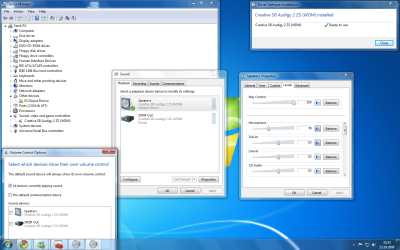
Here's all the audio stuff.
Desktop.png

Hope you can help me more :/ i would really like to figure where the problem lies. Thank you!
 
Last edited:

My Computer My Computer

Computer Manufacturer/Model Number
AsusTEK
OS
Windows 7 Ultimate 32-bit (6.1, Build 7600)
CPU
Intel(R) Pentium(R) 4 CPU 3.20GHz (2CPUs), ~3.2GHz
Motherboard
Asus P5PL2
Memory
1024MB RAM
Graphics Card(s)
nVidia GeForce 9600 GT
Sound Card
Creative SB Audigy 2 ZS (WDM)
Monitor(s) Displays
ViewSonic VA1912w Series
If you havn't cleared the cmos yet it might be a good time to do that. After that try doing this.

I am not sure what do you mean by clearing the cmos? i ain't a genius in these computer things ^^ just a basic user. :o
 

My Computer My Computer

Computer Manufacturer/Model Number
AsusTEK
OS
Windows 7 Ultimate 32-bit (6.1, Build 7600)
CPU
Intel(R) Pentium(R) 4 CPU 3.20GHz (2CPUs), ~3.2GHz
Motherboard
Asus P5PL2
Memory
1024MB RAM
Graphics Card(s)
nVidia GeForce 9600 GT
Sound Card
Creative SB Audigy 2 ZS (WDM)
Monitor(s) Displays
ViewSonic VA1912w Series
Captclear cmos.PNG

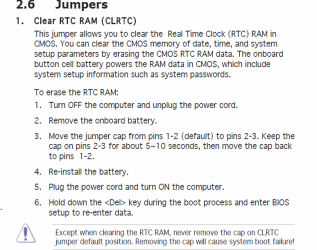
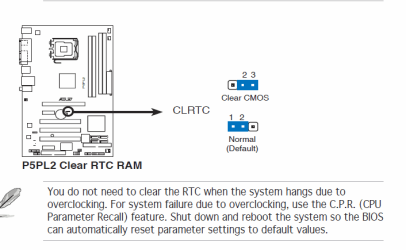
Picture clear cmos chaper 2-p19.PNGTo clear the cmos refer to chapter 2 page 19 of your user manual I got thes from the online PDF. jumper location Clearing the CMOS sets your bios to default settings. Your manual shows 3 PCI slots have you tried it in a different slot? I think you have a bad ISO. You need to download the enterprise edtion form MS it has a 30 day trial.
 

My Computer My Computer

Computer Manufacturer/Model Number
Self Built
OS
Windows 7 ultimate 64 bit / XP Home sp3
CPU
intel Core 2 Duo E8400 3.0ghz
Motherboard
Asus P5ND bios 1401
Memory
8 gigs 1066 OCZ Fata1ty
Graphics Card(s)
EVGA GTX 580 Call of Duty Black Ops Edition
Sound Card
Creative Soundblaster Audigy 2zs
Monitor(s) Displays
Asus 24in LCD's 2MS X2
Screen Resolution
1920x1080p @60Hz
Hard Drives
WD Caviar 500 Black/ WD Caviar 200 Blue
PSU
OCZ 700W GameXtreme
Case
NZXT Apollo
Cooling
Corsair H50 CPU/120mm x3 /60mm x2 /Corsair Dominator Ram
Keyboard
Logitech Bluetooth Wireless MX5000
Mouse
Logitech Bluetooth Wireless MX1000
Internet Speed
Download 19.83 Upload 0.97
Other Info
Logitech Z2300 Speakers/ Bose Noise Cancelling Headphones/Avermedia PCI-e Hybrid TV Bravo/Epson NX415 all in one/ 4 Port Powered USB Hub/ LG 10x Bluray Burner /TSST Corp DVDRW External
I don't think i have a bad ISO, since i had the same problem when i had Ubuntu, and i fixed it with taking the whole Sound Card out of the computer. Im gonna try that thing u got there from the manual in a sec.
 

My Computer My Computer

Computer Manufacturer/Model Number
AsusTEK
OS
Windows 7 Ultimate 32-bit (6.1, Build 7600)
CPU
Intel(R) Pentium(R) 4 CPU 3.20GHz (2CPUs), ~3.2GHz
Motherboard
Asus P5PL2
Memory
1024MB RAM
Graphics Card(s)
nVidia GeForce 9600 GT
Sound Card
Creative SB Audigy 2 ZS (WDM)
Monitor(s) Displays
ViewSonic VA1912w Series
Okay, the weird thing happened again. I simply tried to plug in straight in to the sound card, and not in the green one, and it started to work again, i got sound o.O I'm never going to plug it out again :D although i hope it doesn't disable when i restart the computer. Wish me luck!
 

My Computer My Computer

Computer Manufacturer/Model Number
AsusTEK
OS
Windows 7 Ultimate 32-bit (6.1, Build 7600)
CPU
Intel(R) Pentium(R) 4 CPU 3.20GHz (2CPUs), ~3.2GHz
Motherboard
Asus P5PL2
Memory
1024MB RAM
Graphics Card(s)
nVidia GeForce 9600 GT
Sound Card
Creative SB Audigy 2 ZS (WDM)
Monitor(s) Displays
ViewSonic VA1912w Series
Their seems to finally be an updated realtek driver that works. Also if your having to use a different port (one other than the green) it sounds as if windows isn't mapping your ports properly. Here is a thread on the remapping process http://www.sevenforums.com/sound-audio/2197-realtek-hd-changing-jack-output-reassignments-fix.html Of course this would mean going back to the on-board sound which in your case form looking at your MB manual only has 3 jacks to begin with. and this doesn't address the 2 ZS card.
 

My Computer My Computer

Computer Manufacturer/Model Number
Self Built
OS
Windows 7 ultimate 64 bit / XP Home sp3
CPU
intel Core 2 Duo E8400 3.0ghz
Motherboard
Asus P5ND bios 1401
Memory
8 gigs 1066 OCZ Fata1ty
Graphics Card(s)
EVGA GTX 580 Call of Duty Black Ops Edition
Sound Card
Creative Soundblaster Audigy 2zs
Monitor(s) Displays
Asus 24in LCD's 2MS X2
Screen Resolution
1920x1080p @60Hz
Hard Drives
WD Caviar 500 Black/ WD Caviar 200 Blue
PSU
OCZ 700W GameXtreme
Case
NZXT Apollo
Cooling
Corsair H50 CPU/120mm x3 /60mm x2 /Corsair Dominator Ram
Keyboard
Logitech Bluetooth Wireless MX5000
Mouse
Logitech Bluetooth Wireless MX1000
Internet Speed
Download 19.83 Upload 0.97
Other Info
Logitech Z2300 Speakers/ Bose Noise Cancelling Headphones/Avermedia PCI-e Hybrid TV Bravo/Epson NX415 all in one/ 4 Port Powered USB Hub/ LG 10x Bluray Burner /TSST Corp DVDRW External
Hi Spidah

I know i'm getting into this discussion late, but having an Audigy ZS Gamer myself i have a couple suggestions. First get the latest Vista drivers from Creative, install them in compatibility mode. Then set up the sound in Windows, you also have to set it up in Creative as well. If you don't set it up in both places it will not work. Hope this helps.

Smitty
 

My Computer My Computer

Computer Manufacturer/Model Number
Dell XPS 730
OS
Windows 7 Home Premium 64 bit
CPU
Intel Core 2 quad Extreme Q9770 @ 3.2 GHz
Memory
4x2 GB Muskin 1600 MHz ram
Graphics Card(s)
NVidia GTX 250
Sound Card
Soundblaster X-Fi Fatality Champion
Monitor(s) Displays
2 Dell 2007WFP Ultrascans
Screen Resolution
3360 x 1050
Hard Drives
WD Black 1TB sata, 2-WD Black 500 sata, 2-Seagate 500 Go external
PSU
1000 Watt
Cooling
air
Keyboard
MS Natrual Keyboard Pro
Mouse
Logitech Wireless Trackball
Internet Speed
DSL Elite
Hi Spidah

I know i'm getting into this discussion late, but having an Audigy ZS Gamer myself i have a couple suggestions. First get the latest Vista drivers from Creative, install them in compatibility mode. Then set up the sound in Windows, you also have to set it up in Creative as well. If you don't set it up in both places it will not work. Hope this helps.

Smitty

Thanks for the post, but how to install them in compatibility mode? or how do u set them up in creative to be correct setups?
 

My Computer My Computer

Computer Manufacturer/Model Number
AsusTEK
OS
Windows 7 Ultimate 32-bit (6.1, Build 7600)
CPU
Intel(R) Pentium(R) 4 CPU 3.20GHz (2CPUs), ~3.2GHz
Motherboard
Asus P5PL2
Memory
1024MB RAM
Graphics Card(s)
nVidia GeForce 9600 GT
Sound Card
Creative SB Audigy 2 ZS (WDM)
Monitor(s) Displays
ViewSonic VA1912w Series
Hi Spidah

I know i'm getting into this discussion late, but having an Audigy ZS Gamer myself i have a couple suggestions. First get the latest Vista drivers from Creative, install them in compatibility mode. Then set up the sound in Windows, you also have to set it up in Creative as well. If you don't set it up in both places it will not work. Hope this helps.

Smitty

Thanks for the post, but how to install them in compatibility mode? or how do u set them up in creative to be correct setups?

Just right click on the driver file and choose to install in Vista compatablity mode.
 

My Computer My Computer

Computer type
PC/Desktop
Computer Manufacturer/Model Number
Home built
OS
Windows 7 Ult, Windows 8.1 Pro,
CPU
Q9650-4.275GHz, E8600 4.5GHz, E6750-3.8GHz
Motherboard
Evga 780i FTW
Memory
G.Skill PC2 9600 1200Mhz 5 5 5 15 2T
Graphics Card(s)
GTX480
Sound Card
Asus Xonar D2
Monitor(s) Displays
HannsG
Screen Resolution
1680X1050
Hard Drives
GSkill Phoenix Pro 120GB SSD
PSU
ThermalTake Toughpower 1000Watt modular
Case
ThermalTake XaserV
Cooling
Xigmatek S1283
Keyboard
Logitech G15
Mouse
Logitech G9
Internet Speed
T1
Hi Spidah

I know i'm getting into this discussion late, but having an Audigy ZS Gamer myself i have a couple suggestions. First get the latest Vista drivers from Creative, install them in compatibility mode. Then set up the sound in Windows, you also have to set it up in Creative as well. If you don't set it up in both places it will not work. Hope this helps.

Smitty

Thanks for the post, but how to install them in compatibility mode? or how do u set them up in creative to be correct setups?

Just right click on the driver file and choose to install in Vista compatablity mode.

Okay, so how do i setup the creative setups?
 

My Computer My Computer

Computer Manufacturer/Model Number
AsusTEK
OS
Windows 7 Ultimate 32-bit (6.1, Build 7600)
CPU
Intel(R) Pentium(R) 4 CPU 3.20GHz (2CPUs), ~3.2GHz
Motherboard
Asus P5PL2
Memory
1024MB RAM
Graphics Card(s)
nVidia GeForce 9600 GT
Sound Card
Creative SB Audigy 2 ZS (WDM)
Monitor(s) Displays
ViewSonic VA1912w Series
Back
Top