Solved Weirdly Low FPS but 20% GPU

trowieuk

Banned
Local time
7:23 PM
Messages
56
Not sure why my AMD Radeon HD 7750 Xfx Core Edition isn't performing as it should, Trying to play Vindictus Europe. The system requirements are extremely low, my GPU exceeds the recommended requirement by 73%.. I should be hitting atleast 70FPS on high and 90FPS on low, but im getting 20-30FPS on low with only 20% GPU usage, it's not just vindictus it's other games too so we can rule that out. The GPU hasn't been overclocked either. Any idea's whats wrong?
 

My Computer

Computer type
PC/Desktop
Computer Manufacturer/Model Number
Custom build
OS
Windows 7 64bit
CPU
AMD Athlon(tm) X4 750K Quad Core Processor
Motherboard
MSI
Memory
8GB
Graphics Card(s)
AMD Radeon HD 7750 XFX Core Edition
Hard Drives
ST1000DM003-1CH162 ATA Device 1TB
Antivirus
AVG
Browser
FireFox
download msi afterburner and see what your clock speeds are at. and while you're at it tick the default speeds box. should solve the issue. chances are your card was bundled with a 3rd party oc app and thats causing the issues.
 

My Computer

Computer type
PC/Desktop
Computer Manufacturer/Model Number
Built by badgers!!!
OS
Windows 7 Ultimate x64, & Mac OS X 10.9.2
CPU
Intel Core i5 2500k
Motherboard
Asus P8z68 LE
Memory
Corsair Vengence 8gb 1866mhz
Graphics Card(s)
Nvidia GTX 770 OC
Monitor(s) Displays
2x ASUS LED 22" IPS
Screen Resolution
3840x1080
Hard Drives
240GB Crucial M500 SSD
120gb Corsair Force 3 SSD
1TB Western Digital
PSU
Corsair HX650w Modular
Case
Corsair Air 540
Cooling
Corsair H60 Push/Pull
Keyboard
Corsair K70/ Logitech G27 wheel
Mouse
Saitek R.A.T 9
Internet Speed
Too slow!
Other Info
AMD fusion E350N Home server-Windows Home Server 2011 (also made by badgers!)
2011 Macbook 2.4ghz Core2Duo, 4gb ddr3, 120gb Ocz Vertex SSD
download msi afterburner and see what your clock speeds are at. and while you're at it tick the default speeds box. should solve the issue. chances are your card was bundled with a 3rd party oc app and thats causing the issues.

Thanks for getting back to me!

The clock speed is at 667MHz - I haven't done any OC, wouldn't see a noticable improvement on my GPU. What default speed box? Everything in AB is at default except for the fan curve.
 

My Computer

Computer type
PC/Desktop
Computer Manufacturer/Model Number
Custom build
OS
Windows 7 64bit
CPU
AMD Athlon(tm) X4 750K Quad Core Processor
Motherboard
MSI
Memory
8GB
Graphics Card(s)
AMD Radeon HD 7750 XFX Core Edition
Hard Drives
ST1000DM003-1CH162 ATA Device 1TB
Antivirus
AVG
Browser
FireFox
The core clock should be at 800 MHz and the memory clock at 1125 MHz. Keep in mind, the 7700 series will downclock to save power during times of low demand. My 7770 runs at 300 MHz when it has no load, but goes up to 1 GHz under load. That's normal to see a lower core clock. You need to run an afterburner test and see if the core clock goes up to 800 MHz.
 

My Computer

Computer type
PC/Desktop
Computer Manufacturer/Model Number
Mellon Labs (custom build)
OS
Win 7 Pro x64/Win 10 Pro x64 dual boot
CPU
AMD FX 8350 Vishera @ 4200
Motherboard
ASUS M5A97 R2.0
Memory
16 GB Mushkin Blackline DDR3-2400 @ 1866 (9-10-10-10-31)
Graphics Card(s)
XFX Radeon R9 280 Double D Black Edition
Sound Card
Realtek HD Audio on MB. Sounds great.
Monitor(s) Displays
Acer 24", Acer 22"
Screen Resolution
3840 x 1080
Hard Drives
1 x Mushkin Chronos 120 GB SSD (Win 10)
1 x Samsung 850 EVO 250 GB SSD (Win 7)
1 x WD 1TB SATA Blue
1 x WD 1TB SATA Green
PSU
Corsair TX-750
Case
CoolerMaster HAF 912+
Cooling
Coolermaster Seidon 240M Liquid AIO. 6 case fans
Keyboard
Logitech G710+
Mouse
Logitech G500s
Internet Speed
Much better since I got fiber, but still way overpriced.
Antivirus
MSE, Malware Bytes for scanning
Browser
Firefox
Other Info
Corsair VOID USB headphones.

A Mellon Labs X-1 - LCD Smartie driven system status display.

Brought to you by the letter E
The core clock should be at 800 MHz and the memory clock at 1125 MHz. Keep in mind, the 7700 series will downclock to save power during times of low demand. My 7770 runs at 300 MHz when it has no load, but goes up to 1 GHz under load. That's normal to see a lower core clock. You need to run an afterburner test and see if the core clock goes up to 800 MHz.

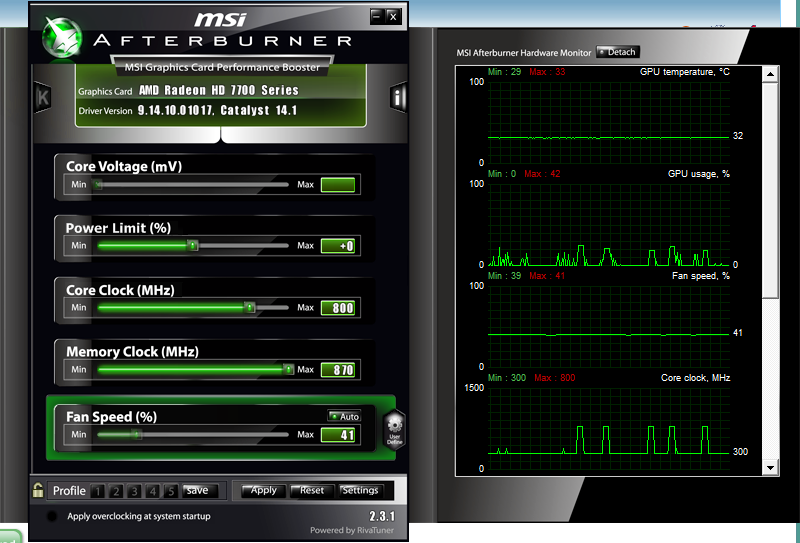
Core clock is at 800MHz but the memory clock only goes up to 870MHz. When I run NovaBench the GPU usage goes to 90-100% and it does go up to 800MHz.
 

My Computer

Computer type
PC/Desktop
Computer Manufacturer/Model Number
Custom build
OS
Windows 7 64bit
CPU
AMD Athlon(tm) X4 750K Quad Core Processor
Motherboard
MSI
Memory
8GB
Graphics Card(s)
AMD Radeon HD 7750 XFX Core Edition
Hard Drives
ST1000DM003-1CH162 ATA Device 1TB
Antivirus
AVG
Browser
FireFox
in MSI after burner try setting the clock and memory speeds manually to what they should be at default, and see if this helps.

HAve you got the latest AMD driver?
 

My Computer

Computer type
PC/Desktop
Computer Manufacturer/Model Number
Built by badgers!!!
OS
Windows 7 Ultimate x64, & Mac OS X 10.9.2
CPU
Intel Core i5 2500k
Motherboard
Asus P8z68 LE
Memory
Corsair Vengence 8gb 1866mhz
Graphics Card(s)
Nvidia GTX 770 OC
Monitor(s) Displays
2x ASUS LED 22" IPS
Screen Resolution
3840x1080
Hard Drives
240GB Crucial M500 SSD
120gb Corsair Force 3 SSD
1TB Western Digital
PSU
Corsair HX650w Modular
Case
Corsair Air 540
Cooling
Corsair H60 Push/Pull
Keyboard
Corsair K70/ Logitech G27 wheel
Mouse
Saitek R.A.T 9
Internet Speed
Too slow!
Other Info
AMD fusion E350N Home server-Windows Home Server 2011 (also made by badgers!)
2011 Macbook 2.4ghz Core2Duo, 4gb ddr3, 120gb Ocz Vertex SSD
in MSI after burner try setting the clock and memory speeds manually to what they should be at default, and see if this helps.

HAve you got the latest AMD driver?

They are at default 800MHz and 667MHz, I haven't OC.
 

My Computer

Computer type
PC/Desktop
Computer Manufacturer/Model Number
Custom build
OS
Windows 7 64bit
CPU
AMD Athlon(tm) X4 750K Quad Core Processor
Motherboard
MSI
Memory
8GB
Graphics Card(s)
AMD Radeon HD 7750 XFX Core Edition
Hard Drives
ST1000DM003-1CH162 ATA Device 1TB
Antivirus
AVG
Browser
FireFox
but the memory clock should be 1125mhz, set it to that and see.
 

My Computer

Computer type
PC/Desktop
Computer Manufacturer/Model Number
Built by badgers!!!
OS
Windows 7 Ultimate x64, & Mac OS X 10.9.2
CPU
Intel Core i5 2500k
Motherboard
Asus P8z68 LE
Memory
Corsair Vengence 8gb 1866mhz
Graphics Card(s)
Nvidia GTX 770 OC
Monitor(s) Displays
2x ASUS LED 22" IPS
Screen Resolution
3840x1080
Hard Drives
240GB Crucial M500 SSD
120gb Corsair Force 3 SSD
1TB Western Digital
PSU
Corsair HX650w Modular
Case
Corsair Air 540
Cooling
Corsair H60 Push/Pull
Keyboard
Corsair K70/ Logitech G27 wheel
Mouse
Saitek R.A.T 9
Internet Speed
Too slow!
Other Info
AMD fusion E350N Home server-Windows Home Server 2011 (also made by badgers!)
2011 Macbook 2.4ghz Core2Duo, 4gb ddr3, 120gb Ocz Vertex SSD
The memory clock doesn't go above 870... see
aGSdQWe.png
 

My Computer

Computer type
PC/Desktop
Computer Manufacturer/Model Number
Custom build
OS
Windows 7 64bit
CPU
AMD Athlon(tm) X4 750K Quad Core Processor
Motherboard
MSI
Memory
8GB
Graphics Card(s)
AMD Radeon HD 7750 XFX Core Edition
Hard Drives
ST1000DM003-1CH162 ATA Device 1TB
Antivirus
AVG
Browser
FireFox
in MSI after burner try setting the clock and memory speeds manually to what they should be at default, and see if this helps.

HAve you got the latest AMD driver?

They are at default 800MHz and 667MHz, I haven't OC.
The memory clock is supposed to be at 1125 MHz, that's not an OC. That's the speed it's supposed to be at. Your card isn't running at the right memory speed.

EDIT:
Just saw your screen shot. Something isn't right here. What's the exact model of your graphics card? Are you sure it's a Core Edition?
 

My Computer

Computer type
PC/Desktop
Computer Manufacturer/Model Number
Mellon Labs (custom build)
OS
Win 7 Pro x64/Win 10 Pro x64 dual boot
CPU
AMD FX 8350 Vishera @ 4200
Motherboard
ASUS M5A97 R2.0
Memory
16 GB Mushkin Blackline DDR3-2400 @ 1866 (9-10-10-10-31)
Graphics Card(s)
XFX Radeon R9 280 Double D Black Edition
Sound Card
Realtek HD Audio on MB. Sounds great.
Monitor(s) Displays
Acer 24", Acer 22"
Screen Resolution
3840 x 1080
Hard Drives
1 x Mushkin Chronos 120 GB SSD (Win 10)
1 x Samsung 850 EVO 250 GB SSD (Win 7)
1 x WD 1TB SATA Blue
1 x WD 1TB SATA Green
PSU
Corsair TX-750
Case
CoolerMaster HAF 912+
Cooling
Coolermaster Seidon 240M Liquid AIO. 6 case fans
Keyboard
Logitech G710+
Mouse
Logitech G500s
Internet Speed
Much better since I got fiber, but still way overpriced.
Antivirus
MSE, Malware Bytes for scanning
Browser
Firefox
Other Info
Corsair VOID USB headphones.

A Mellon Labs X-1 - LCD Smartie driven system status display.

Brought to you by the letter E
How old is the computer, and the card?
 

My Computer

Computer type
Laptop
Computer Manufacturer/Model Number
HP
OS
Windows 7 home Premium 64 bit
CPU
AMD A6
Memory
8 GB DDR3
Antivirus
MSE
Browser
Firefox/Chrome
in MSI after burner try setting the clock and memory speeds manually to what they should be at default, and see if this helps.

HAve you got the latest AMD driver?

They are at default 800MHz and 667MHz, I haven't OC.
The memory clock is supposed to be at 1125 MHz, that's not an OC. That's the speed it's supposed to be at. Your card isn't running at the right memory speed.

EDIT:
Just saw your screen shot. Something isn't right here. What's the exact model of your graphics card?

Those are settings it's always been on..

Radeon HD 7750 XFX Core Edition
 

My Computer

Computer type
PC/Desktop
Computer Manufacturer/Model Number
Custom build
OS
Windows 7 64bit
CPU
AMD Athlon(tm) X4 750K Quad Core Processor
Motherboard
MSI
Memory
8GB
Graphics Card(s)
AMD Radeon HD 7750 XFX Core Edition
Hard Drives
ST1000DM003-1CH162 ATA Device 1TB
Antivirus
AVG
Browser
FireFox

My Computer

Computer type
PC/Desktop
Computer Manufacturer/Model Number
Custom build
OS
Windows 7 64bit
CPU
AMD Athlon(tm) X4 750K Quad Core Processor
Motherboard
MSI
Memory
8GB
Graphics Card(s)
AMD Radeon HD 7750 XFX Core Edition
Hard Drives
ST1000DM003-1CH162 ATA Device 1TB
Antivirus
AVG
Browser
FireFox

My Computer

Computer type
PC/Desktop
Computer Manufacturer/Model Number
Mellon Labs (custom build)
OS
Win 7 Pro x64/Win 10 Pro x64 dual boot
CPU
AMD FX 8350 Vishera @ 4200
Motherboard
ASUS M5A97 R2.0
Memory
16 GB Mushkin Blackline DDR3-2400 @ 1866 (9-10-10-10-31)
Graphics Card(s)
XFX Radeon R9 280 Double D Black Edition
Sound Card
Realtek HD Audio on MB. Sounds great.
Monitor(s) Displays
Acer 24", Acer 22"
Screen Resolution
3840 x 1080
Hard Drives
1 x Mushkin Chronos 120 GB SSD (Win 10)
1 x Samsung 850 EVO 250 GB SSD (Win 7)
1 x WD 1TB SATA Blue
1 x WD 1TB SATA Green
PSU
Corsair TX-750
Case
CoolerMaster HAF 912+
Cooling
Coolermaster Seidon 240M Liquid AIO. 6 case fans
Keyboard
Logitech G710+
Mouse
Logitech G500s
Internet Speed
Much better since I got fiber, but still way overpriced.
Antivirus
MSE, Malware Bytes for scanning
Browser
Firefox
Other Info
Corsair VOID USB headphones.

A Mellon Labs X-1 - LCD Smartie driven system status display.

Brought to you by the letter E

Attachments

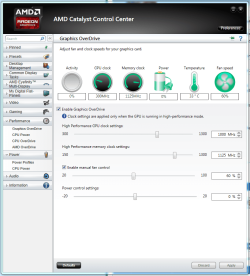
  • CCCSS.png
    CCCSS.png
    51.9 KB · Views: 2

My Computer

Computer type
PC/Desktop
Computer Manufacturer/Model Number
Custom build
OS
Windows 7 64bit
CPU
AMD Athlon(tm) X4 750K Quad Core Processor
Motherboard
MSI
Memory
8GB
Graphics Card(s)
AMD Radeon HD 7750 XFX Core Edition
Hard Drives
ST1000DM003-1CH162 ATA Device 1TB
Antivirus
AVG
Browser
FireFox
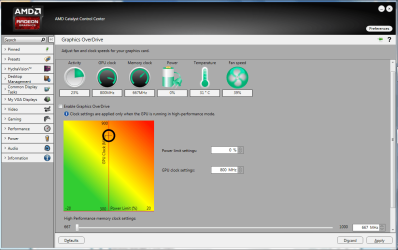
Well, it looks like your RAM clock is set at 667, which I don't really understand. The card is not performing at spec. What is your power profile set to? Is it high performance? Maybe that will make a difference.

You shouldn't have to manually set the memory clock speed.

This is weird.
 

My Computer

Computer type
PC/Desktop
Computer Manufacturer/Model Number
Mellon Labs (custom build)
OS
Win 7 Pro x64/Win 10 Pro x64 dual boot
CPU
AMD FX 8350 Vishera @ 4200
Motherboard
ASUS M5A97 R2.0
Memory
16 GB Mushkin Blackline DDR3-2400 @ 1866 (9-10-10-10-31)
Graphics Card(s)
XFX Radeon R9 280 Double D Black Edition
Sound Card
Realtek HD Audio on MB. Sounds great.
Monitor(s) Displays
Acer 24", Acer 22"
Screen Resolution
3840 x 1080
Hard Drives
1 x Mushkin Chronos 120 GB SSD (Win 10)
1 x Samsung 850 EVO 250 GB SSD (Win 7)
1 x WD 1TB SATA Blue
1 x WD 1TB SATA Green
PSU
Corsair TX-750
Case
CoolerMaster HAF 912+
Cooling
Coolermaster Seidon 240M Liquid AIO. 6 case fans
Keyboard
Logitech G710+
Mouse
Logitech G500s
Internet Speed
Much better since I got fiber, but still way overpriced.
Antivirus
MSE, Malware Bytes for scanning
Browser
Firefox
Other Info
Corsair VOID USB headphones.

A Mellon Labs X-1 - LCD Smartie driven system status display.

Brought to you by the letter E
Well, it looks like your RAM clock is set at 667, which I don't really understand. The card is not performing at spec. What is your power profile set to? Is it high performance? Maybe that will make a difference.

You shouldn't have to manually set the memory clock speed.

This is weird.

Power profile is set to high performance. Why would my RAM clock be showing in AMD and MSI and not GPU Memory clock? Obviously something is wrong and thats why im getting really low FPS with no GPU usage. I've been looking online for hours, I've run chkdsk no errors, re-seated hdd, ram sticks, gpu, psu, fresh windows 7 install, used tweaking.com, I've tried all the basic stuff and don't know what else to try :(
 

My Computer

Computer type
PC/Desktop
Computer Manufacturer/Model Number
Custom build
OS
Windows 7 64bit
CPU
AMD Athlon(tm) X4 750K Quad Core Processor
Motherboard
MSI
Memory
8GB
Graphics Card(s)
AMD Radeon HD 7750 XFX Core Edition
Hard Drives
ST1000DM003-1CH162 ATA Device 1TB
Antivirus
AVG
Browser
FireFox
This is whats showing in Device Manager "PCI\VEN_1002&DEV_683F&SUBSYS_32481682" Do you know if that tells you model etc?
 

My Computer

Computer type
PC/Desktop
Computer Manufacturer/Model Number
Custom build
OS
Windows 7 64bit
CPU
AMD Athlon(tm) X4 750K Quad Core Processor
Motherboard
MSI
Memory
8GB
Graphics Card(s)
AMD Radeon HD 7750 XFX Core Edition
Hard Drives
ST1000DM003-1CH162 ATA Device 1TB
Antivirus
AVG
Browser
FireFox
would a benchmark and screenshot of gpu info help?
 

My Computer

Computer type
PC/Desktop
Computer Manufacturer/Model Number
Custom build
OS
Windows 7 64bit
CPU
AMD Athlon(tm) X4 750K Quad Core Processor
Motherboard
MSI
Memory
8GB
Graphics Card(s)
AMD Radeon HD 7750 XFX Core Edition
Hard Drives
ST1000DM003-1CH162 ATA Device 1TB
Antivirus
AVG
Browser
FireFox

My Computer

Computer type
PC/Desktop
Computer Manufacturer/Model Number
Custom build
OS
Windows 7 64bit
CPU
AMD Athlon(tm) X4 750K Quad Core Processor
Motherboard
MSI
Memory
8GB
Graphics Card(s)
AMD Radeon HD 7750 XFX Core Edition
Hard Drives
ST1000DM003-1CH162 ATA Device 1TB
Antivirus
AVG
Browser
FireFox
Back
Top