I'm really stumped on this one. Last week I went to rename one song in my Windows 7 Music Library folder. I clicked 'rename' and put the cursor inside the blue highlighted name field. When I clicked to start typing the new title, all 80 songs were renamed to the same title. When that happened I did see a very brief green loading bar (?) appear at the top of the screen. All of the actual songs are intact and have not been affected; only now all the songs in this folder have the same name. Any simple soluitions? I'm guessing I must have had a finger-slip on the keyboard somewhere. I am a novice. Thank you very much. larryk
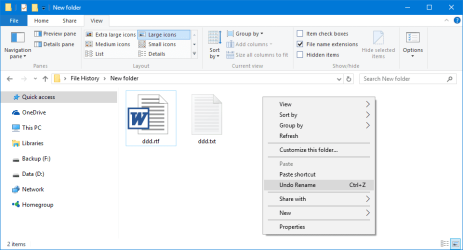
At least this is making more sense now....Yes, it is VERY possible I had all the songs highlighted; I probably wasn't paying any attention to the very light blue color and was charging ahead too fast. Unfortunately, do not see an 'undo rename' and Ctl+z doesn't seem to do anything. I do see a 'Previous versions', but haven't tried that. Keep going.....sounds like you know your stuff!! Thanks, Larry
Phooey; that's what I was afraid of ! Sounds like a good rainy day project for me. But I guess it could have been worse. Yes, I do have a back-up...but only about 75% current. Glad I only had 90 songs, and not 900 !
But at least you solved my mystery and made my light bulb come on. I will definitely be checking that in the future. Thanks again Brink.
Getting closer to resolving this Music folder rename.
Well now I really am feeling dumb. It just happened to me again...after I got them all straightened out ! I'm so glad I drink! But I am paying attention now, and this is what I am noticing (and I don't remember this behavior before)......when I hover the mouse over the song in question, all the folders turn blue (highlighted).
I then click on a blank area and all are unhighlighted......until I put the cursor back on the song. I know this must be something simple I'm overlooking. Now that they all have the same name, this is not happening anymore. I thought I had seen this happening when I was in my Picture Library also. Any ideas? Thanks, Larry