what am i doing wrong?

skald89

New member
Local time
5:41 PM
Messages
35
What am I doing wrong?

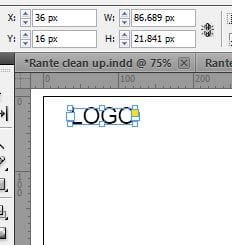
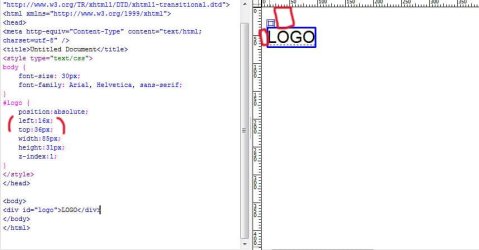
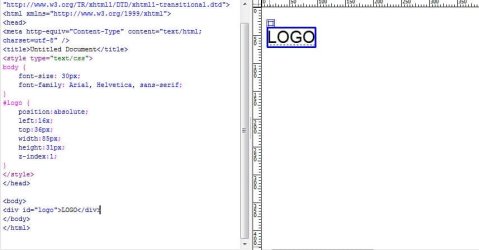
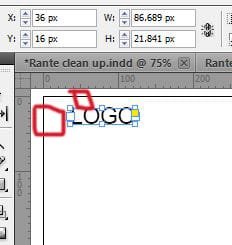
The position in pixels that Indesign shows me looks wrong when putting it into dreamweaver.
 

Attachments
  • Position- boxes.jpg
    Position- boxes.jpg
    31.5 KB · Views: 52
  • Position.JPG
    Position.JPG
    15.3 KB · Views: 52
  • Dreamweaver- boxes.jpg
    Dreamweaver- boxes.jpg
    51.7 KB · Views: 11
  • Dreamweaver.JPG
    Dreamweaver.JPG
    41.8 KB · Views: 8
  • Indesign file- boxes.jpg
    Indesign file- boxes.jpg
    19.2 KB · Views: 5
  • Indesign file.JPG
    Indesign file.JPG
    12.2 KB · Views: 4

My Computer

OS
windows 7 64bit
Pardon me if I sound stupid in my response, but couldn't you simply alter the absolute location in dreamweaver using the code portion of it, and place it precisely where you want?
 

My Computer

Computer Manufacturer/Model Number
HP 6000 Pro Micro Tower
OS
W7 Professional x64
CPU
Core 2 Duo 2.93
Memory
2 GB
Graphics Card(s)
ATI Radeon 4695
Monitor(s) Displays
Two HP 17's
Hard Drives
150GB Sata Drive
Case
Tiny. Kinda cute.
Keyboard
HP Supplied. Surprisingly nice.
Mouse
Gateway Mouse from an E2610D
Internet Speed
45 mbps
Pardon me if I sound stupid in my response, but couldn't you simply alter the absolute location in dreamweaver using the code portion of it, and place it precisely where you want?


Yes, but then I would have to sit there and do it for every last element and basically be redesigning and spending hours trying to figure just that out on each page.
 

My Computer

OS
windows 7 64bit
Well, if you need to do the same thing to a lot of pages, I suggest using Edit Pad. As far as I can tell, the spacing applied to InDesign isn't something that would transfer to Dreamweaver, unless InDesign has some kind of "send to Dreamweaver" function I'm aware of (i.e: if you're simply importing the image, then the spacing won't be there. It'll be just the image that was imported).
 

My Computer

Computer Manufacturer/Model Number
HP 6000 Pro Micro Tower
OS
W7 Professional x64
CPU
Core 2 Duo 2.93
Memory
2 GB
Graphics Card(s)
ATI Radeon 4695
Monitor(s) Displays
Two HP 17's
Hard Drives
150GB Sata Drive
Case
Tiny. Kinda cute.
Keyboard
HP Supplied. Surprisingly nice.
Mouse
Gateway Mouse from an E2610D
Internet Speed
45 mbps
Well, if you need to do the same thing to a lot of pages, I suggest using Edit Pad. As far as I can tell, the spacing applied to InDesign isn't something that would transfer to Dreamweaver, unless InDesign has some kind of "send to Dreamweaver" function I'm aware of (i.e: if you're simply importing the image, then the spacing won't be there. It'll be just the image that was imported).

Im not exporting from Indesign.

I created a file in Indesign, and when making it all my measurements were set to pixels. I am taking the data I have from my file and putting it into dreamweaver manually.

In Indesign the logo is at :
x - 36px
y - 16px

In Dreamweaver I coded:
top:36px;
left:16x;

As you can see in the pics I added its not the same thing when transferred over to Dreamweaver.

Indesign does have an export to dreamweaver. I tried it once and it just took everything and made all my text into one big list. I dont know how to use it so I cant say anything else about it. Im not doing that so it doesnt make a difference I think.
 

My Computer

OS
windows 7 64bit
My html/css memory is a bit rusty, but I would say, no offense, that if you coded it in Dreamweaver and it isn't the same, there's an error in your code somewhere that's altering it's location.

> Perhaps an unclosed tag for alignment, or some such?
> Open it in several browsers, and see how it's location looks from there.
> Try making a new website. Put JUST the logo on it, specifically stated to your location.
> Last would be to try a different doc type, and see if maybe XHTML handles spacing a bit differently.
 

My Computer

Computer Manufacturer/Model Number
HP 6000 Pro Micro Tower
OS
W7 Professional x64
CPU
Core 2 Duo 2.93
Memory
2 GB
Graphics Card(s)
ATI Radeon 4695
Monitor(s) Displays
Two HP 17's
Hard Drives
150GB Sata Drive
Case
Tiny. Kinda cute.
Keyboard
HP Supplied. Surprisingly nice.
Mouse
Gateway Mouse from an E2610D
Internet Speed
45 mbps
Back
Top