Solved What Are Add Ons, And Should I Turn Them Off?

woodbine

New member
Member
VIP
Local time
4:28 AM
Messages
178
Location
Bristol, UK
Soon after I had unistalled Avira A/V and installed free Avira a/v (poss a coincidence), I got a standard Windows pop-up across the bottom of the screen on my desktop pc. It said something like (can't remember exactly) " to improve performance of your computer, turn off/disable add ons". I had the choice of either turning them off then, or being reminded to do it later. I chose to be reminded, as I'm not sure what to do.

What are add ons? Should I be turning them off/disabling them? What are the likely consequences?

Thanks for any advice, and apologies for being a bit vague.
 
Last edited:

My Computer My Computer

At a glance

Windows 7 Home Premium 64 bit SP1Intel i3 5403GB DDR3SD
Computer type
PC/Desktop
Computer Manufacturer/Model Number
Acer Aspire Desktop M3910
OS
Windows 7 Home Premium 64 bit SP1
CPU
Intel i3 540
Memory
3GB DDR3SD
Monitor(s) Displays
LG Flatron L1960TR
Screen Resolution
1280x1024
Keyboard
Acer
Mouse
Genius
Antivirus
Avast (Free)
Browser
I E 11
Hi,
Security browser add-ons usually slow the browser down to a crawl.
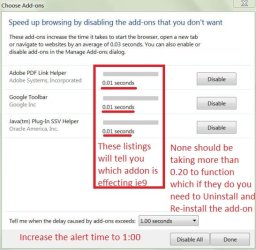
If you're getting a popup in ie11 which it sounds like you're using you can click on the popup message and it will take you straight to the settings to alter or see which ones are slowing down your browser
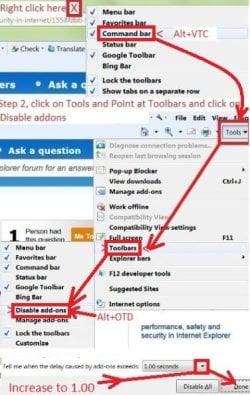
Here's the long way to get to the settings
Disable addons.jpg
disable addons-2.JPG
What are browser add-ons well that one; well first let me say you can right click ie11 and most all browsers that are pinned to your taskbar and select open In-Private browsing and get around most browser add-ond from being used.

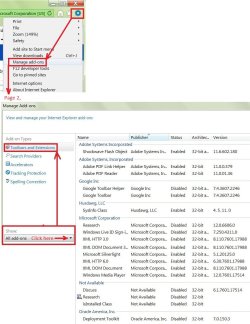
Most are not necessary if you post a screen shot of what you have installed possibly it would be easier for us to say if you need them or not :)
Manage add-ons gear symbol-all.jpg
 

My Computer My Computer

At a glance

Win-7-Pro64bit 7-H-Prem-64biti7-5930K 2nd i9-9940x both water blocked VRM'...Trident-z 3200C14 2nd Trident-z 3600C16EVGA 1080ti ftw3 2nd Titan Xp both water blocked
Computer type
PC/Desktop
Computer Manufacturer/Model Number
Custom assembled by me :}
OS
Win-7-Pro64bit 7-H-Prem-64bit
CPU
i7-5930K 2nd i9-9940x both water blocked VRM's too
Motherboard
ASUS SABERTOOTH X99 2nd ASUS x299 Apex
Memory
Trident-z 3200C14 2nd Trident-z 3600C16
Graphics Card(s)
EVGA 1080ti ftw3 2nd Titan Xp both water blocked
Sound Card
Built-in Realtek
Monitor(s) Displays
1-AOC G2460PG 24"G-Sync 144Hz/ 2nd 1-ASUS VG248QE 24" 144Hz
Screen Resolution
1920 x 1080 144Hz
Hard Drives
2-Samsung M.2 Evo & Evo Plus
2-Samsung 850 EVO 500GB SSD's/ 3-2.5 W.D. Black 1tb-&3-1tb/3-3.5 WD Black 1tb hdd's
PSU
EVGA SuperNOVA 1000-P2 2nd 1200-P2
Case
2-Corsair Obsidian Series 450D Black ATX Mid Tower
Cooling
Custom water loops
Keyboard
Logitech G710+/ 2nd Logitech G910
Mouse
2-RedDragon M901 Perdition 16400 dpi Gaming mouse = wired
Internet Speed
Comcast Ping 19ms 89.31mbps download speed 6.12mbps upload
Antivirus
Malwarebytes Pro/ Superantispyware Pro
Browser
FireFox & Pale moon
Other Info
2nd ASUS X299 Apex/Intel i9-9940x with Custom water loop/7H-Prem-x64/Corsair 450D case/Ram Trident-z 3600C16 4x8gb / Samsung970Evo plus 500gb SSD/Dual ssd EZ swap evo/PSU EVGA SuperNova 1200w-P2 80+Platinum/GPU Titan Xp /8-ML-140 on push-pull on 2-280GTX rads
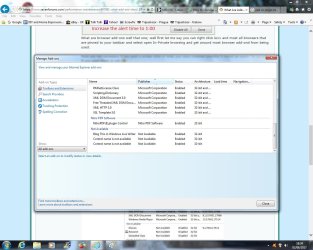
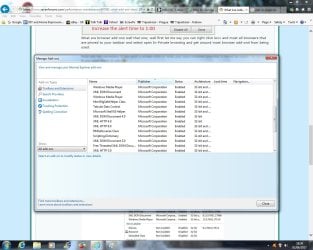
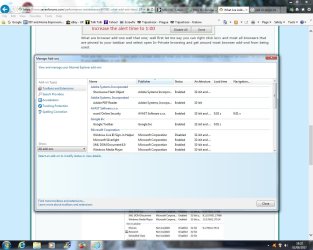
Hi Thrash and thanks for your reply. Below are the lists of browser add ons. The Nitro PDF one is an active-x, and since I changed to Avast a/virus, it has flagged this one up twice. Once in a smart scan. Can't remember exactly what it said about it, poss insecure, out of date, unstable, or similar.

My IE11 regularly stops working briefly, and I get the standard warning saying it has stopped working and asking if I want Windows to look for a solution. It has never been able to, so I usually just restart IE and carry on. Seems to happen more in the early part of a browsing session. However, today is the first time it has closed accompanied by an IE warning that it has closed to protect my PC.

Also, in one of your attachments, are you saying that I should change the delay caused by add ons/alert time setting to 1 second?

A Google tool bar also appears in the list. I'm not aware that I have/use one. Is this part of IE?
 

Attachments

  • Add Ons 1.jpg
    Add Ons 1.jpg
    110.8 KB · Views: 1
  • Add Ons 4.jpg
    Add Ons 4.jpg
    52.3 KB · Views: 1
  • Add Ons 7.jpg
    Add Ons 7.jpg
    129.6 KB · Views: 1
  • Add Ons 6.jpg
    Add Ons 6.jpg
    137.1 KB · Views: 3
  • Add Ons 5.jpg
    Add Ons 5.jpg
    128.8 KB · Views: 3

My Computer My Computer

At a glance

Windows 7 Home Premium 64 bit SP1Intel i3 5403GB DDR3SD
Computer type
PC/Desktop
Computer Manufacturer/Model Number
Acer Aspire Desktop M3910
OS
Windows 7 Home Premium 64 bit SP1
CPU
Intel i3 540
Memory
3GB DDR3SD
Monitor(s) Displays
LG Flatron L1960TR
Screen Resolution
1280x1024
Keyboard
Acer
Mouse
Genius
Antivirus
Avast (Free)
Browser
I E 11
Hi,
No google toolbar is not built into ie11 but is installed with other downloads like adobe shockwave flash element plus a few other add-ons will add it on to with other downloads
Go to Uninstall a program and uninstall it if you want too.

No I wouldn't increase the alter timing that much anymore that is an old screen shot 0.50 might be a little better if the popups get too annoying :)

Personally with all of the add-ons you show I'd reset ie11 and when prompted if you want to enable add-ons just click on No
Be sure on the link to delete personal settings
Internet Explorer - Reset - Windows 7 Help Forums

But be sure to export your favorites first although I have never lost any it has happen to others so if it does happen all you'd have to do is import the html file you exported.
Internet Explorer - Import and Export Favorites - Windows 7 Help Forums
Reset-recommended settings - small.jpg
 

My Computer My Computer

At a glance

Win-7-Pro64bit 7-H-Prem-64biti7-5930K 2nd i9-9940x both water blocked VRM'...Trident-z 3200C14 2nd Trident-z 3600C16EVGA 1080ti ftw3 2nd Titan Xp both water blocked
Computer type
PC/Desktop
Computer Manufacturer/Model Number
Custom assembled by me :}
OS
Win-7-Pro64bit 7-H-Prem-64bit
CPU
i7-5930K 2nd i9-9940x both water blocked VRM's too
Motherboard
ASUS SABERTOOTH X99 2nd ASUS x299 Apex
Memory
Trident-z 3200C14 2nd Trident-z 3600C16
Graphics Card(s)
EVGA 1080ti ftw3 2nd Titan Xp both water blocked
Sound Card
Built-in Realtek
Monitor(s) Displays
1-AOC G2460PG 24"G-Sync 144Hz/ 2nd 1-ASUS VG248QE 24" 144Hz
Screen Resolution
1920 x 1080 144Hz
Hard Drives
2-Samsung M.2 Evo & Evo Plus
2-Samsung 850 EVO 500GB SSD's/ 3-2.5 W.D. Black 1tb-&3-1tb/3-3.5 WD Black 1tb hdd's
PSU
EVGA SuperNOVA 1000-P2 2nd 1200-P2
Case
2-Corsair Obsidian Series 450D Black ATX Mid Tower
Cooling
Custom water loops
Keyboard
Logitech G710+/ 2nd Logitech G910
Mouse
2-RedDragon M901 Perdition 16400 dpi Gaming mouse = wired
Internet Speed
Comcast Ping 19ms 89.31mbps download speed 6.12mbps upload
Antivirus
Malwarebytes Pro/ Superantispyware Pro
Browser
FireFox & Pale moon
Other Info
2nd ASUS X299 Apex/Intel i9-9940x with Custom water loop/7H-Prem-x64/Corsair 450D case/Ram Trident-z 3600C16 4x8gb / Samsung970Evo plus 500gb SSD/Dual ssd EZ swap evo/PSU EVGA SuperNova 1200w-P2 80+Platinum/GPU Titan Xp /8-ML-140 on push-pull on 2-280GTX rads
OK, I may have to reset IE, as it stops working more and more - or seems to. Has done it for quite a while.

One odd thing - I went to the list of programs on the control panel to uninstall the Google toolbar. When I selected 'uninstall', it said that it was unable to do this, as it may already have been uninstalled. It then asked if I wanted to remove Google t/b from the list of programs, and I clicked 'yes'. Why would a program appear that has already been uninstalled? Is this significant.

Next I went to the add ons and disabled Google toolbar which was still appearing, even though it is allegedly somehow already uninstalled. Whilst there, I also disabled the Nitro PDF (Axtive-X) add on, which Avast a/v Smart Scan doesn't seem to like. Doing this doesn't seem to have affected the running of my Nitro PDF reader.

Is it wise to try and see how it goes with both Google toolbar and Nitro PDF add ons disabled, then resort to resetting IE if no improvement? Or am I wasting my time?

Thanks again for your ongoing help.
 

My Computer My Computer

At a glance

Windows 7 Home Premium 64 bit SP1Intel i3 5403GB DDR3SD
Computer type
PC/Desktop
Computer Manufacturer/Model Number
Acer Aspire Desktop M3910
OS
Windows 7 Home Premium 64 bit SP1
CPU
Intel i3 540
Memory
3GB DDR3SD
Monitor(s) Displays
LG Flatron L1960TR
Screen Resolution
1280x1024
Keyboard
Acer
Mouse
Genius
Antivirus
Avast (Free)
Browser
I E 11
Hi,
Yes you can from what I've seen disable all of them and see how it goes which I would indeed do,
In-Private browsing does that too.

Yeah never good to have stuff listing that windows says has already been uninstalled pretty much why reset might be best too :)
 

My Computer My Computer

At a glance

Win-7-Pro64bit 7-H-Prem-64biti7-5930K 2nd i9-9940x both water blocked VRM'...Trident-z 3200C14 2nd Trident-z 3600C16EVGA 1080ti ftw3 2nd Titan Xp both water blocked
Computer type
PC/Desktop
Computer Manufacturer/Model Number
Custom assembled by me :}
OS
Win-7-Pro64bit 7-H-Prem-64bit
CPU
i7-5930K 2nd i9-9940x both water blocked VRM's too
Motherboard
ASUS SABERTOOTH X99 2nd ASUS x299 Apex
Memory
Trident-z 3200C14 2nd Trident-z 3600C16
Graphics Card(s)
EVGA 1080ti ftw3 2nd Titan Xp both water blocked
Sound Card
Built-in Realtek
Monitor(s) Displays
1-AOC G2460PG 24"G-Sync 144Hz/ 2nd 1-ASUS VG248QE 24" 144Hz
Screen Resolution
1920 x 1080 144Hz
Hard Drives
2-Samsung M.2 Evo & Evo Plus
2-Samsung 850 EVO 500GB SSD's/ 3-2.5 W.D. Black 1tb-&3-1tb/3-3.5 WD Black 1tb hdd's
PSU
EVGA SuperNOVA 1000-P2 2nd 1200-P2
Case
2-Corsair Obsidian Series 450D Black ATX Mid Tower
Cooling
Custom water loops
Keyboard
Logitech G710+/ 2nd Logitech G910
Mouse
2-RedDragon M901 Perdition 16400 dpi Gaming mouse = wired
Internet Speed
Comcast Ping 19ms 89.31mbps download speed 6.12mbps upload
Antivirus
Malwarebytes Pro/ Superantispyware Pro
Browser
FireFox & Pale moon
Other Info
2nd ASUS X299 Apex/Intel i9-9940x with Custom water loop/7H-Prem-x64/Corsair 450D case/Ram Trident-z 3600C16 4x8gb / Samsung970Evo plus 500gb SSD/Dual ssd EZ swap evo/PSU EVGA SuperNova 1200w-P2 80+Platinum/GPU Titan Xp /8-ML-140 on push-pull on 2-280GTX rads
As I suspected, just disabling the Nitro PDF and Google toolbar add ons did not help my problem. I have taken your advice and disabled all ad ons, and will see how it goes. If it fixes the problem, it is ok to leave all of these add ons permanently disabled, or would I be looking to re-introduce them one at a time? Not really sure how vital any of them are.

Either way, I will keep you informed of progress. Many thanks.
 

My Computer My Computer

At a glance

Windows 7 Home Premium 64 bit SP1Intel i3 5403GB DDR3SD
Computer type
PC/Desktop
Computer Manufacturer/Model Number
Acer Aspire Desktop M3910
OS
Windows 7 Home Premium 64 bit SP1
CPU
Intel i3 540
Memory
3GB DDR3SD
Monitor(s) Displays
LG Flatron L1960TR
Screen Resolution
1280x1024
Keyboard
Acer
Mouse
Genius
Antivirus
Avast (Free)
Browser
I E 11
Hi,
The only one you might need if you use skype is shockwave flash element
All the others are bloat.
 

My Computer My Computer

At a glance

Win-7-Pro64bit 7-H-Prem-64biti7-5930K 2nd i9-9940x both water blocked VRM'...Trident-z 3200C14 2nd Trident-z 3600C16EVGA 1080ti ftw3 2nd Titan Xp both water blocked
Computer type
PC/Desktop
Computer Manufacturer/Model Number
Custom assembled by me :}
OS
Win-7-Pro64bit 7-H-Prem-64bit
CPU
i7-5930K 2nd i9-9940x both water blocked VRM's too
Motherboard
ASUS SABERTOOTH X99 2nd ASUS x299 Apex
Memory
Trident-z 3200C14 2nd Trident-z 3600C16
Graphics Card(s)
EVGA 1080ti ftw3 2nd Titan Xp both water blocked
Sound Card
Built-in Realtek
Monitor(s) Displays
1-AOC G2460PG 24"G-Sync 144Hz/ 2nd 1-ASUS VG248QE 24" 144Hz
Screen Resolution
1920 x 1080 144Hz
Hard Drives
2-Samsung M.2 Evo & Evo Plus
2-Samsung 850 EVO 500GB SSD's/ 3-2.5 W.D. Black 1tb-&3-1tb/3-3.5 WD Black 1tb hdd's
PSU
EVGA SuperNOVA 1000-P2 2nd 1200-P2
Case
2-Corsair Obsidian Series 450D Black ATX Mid Tower
Cooling
Custom water loops
Keyboard
Logitech G710+/ 2nd Logitech G910
Mouse
2-RedDragon M901 Perdition 16400 dpi Gaming mouse = wired
Internet Speed
Comcast Ping 19ms 89.31mbps download speed 6.12mbps upload
Antivirus
Malwarebytes Pro/ Superantispyware Pro
Browser
FireFox & Pale moon
Other Info
2nd ASUS X299 Apex/Intel i9-9940x with Custom water loop/7H-Prem-x64/Corsair 450D case/Ram Trident-z 3600C16 4x8gb / Samsung970Evo plus 500gb SSD/Dual ssd EZ swap evo/PSU EVGA SuperNova 1200w-P2 80+Platinum/GPU Titan Xp /8-ML-140 on push-pull on 2-280GTX rads
to me firefox with sandboxie with the settings

under resource access file access blockaccess

%Local AppData%\Mozilla\
%AppData%\Mozilla\
\Device\Mup\
C:

turn off the two 2 plugins
i got webrtc
ublockorigin
adguard
disconnect
popupultimate
https everywhere
blocked all the updates
then you be safe to me the backdoor you should sandboxie is the appdata folder thats where the worms are getting in through your pc
 

My Computer My Computer

At a glance

windows 7intel r4gbnone
Computer type
PC/Desktop
Computer Manufacturer/Model Number
dell
OS
windows 7
CPU
intel r
Motherboard
???
Memory
4gb
Graphics Card(s)
none
Hard Drives
ata device
Antivirus
microsoft essentials
Browser
firefox
Hi,
The only one you might need if you use skype is shockwave flash element
All the others are bloat.

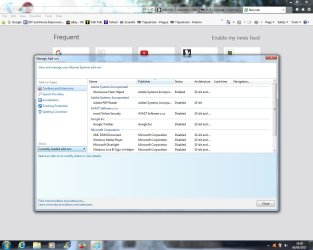
Well, it's been about 5 days since disabling my add ons, and IE has only closed once in that time. As I use IE quite a lot, I reckon my problem is solved.

Only one small thing that occurred was when I wanted to watch catch-up TV on the website of a UK TV station. Nothing would play, and there was a message on the screen saying 'make sure that you have Adobe Flash Player installed'. So, I went back to the list of add ons and re-enabled Adobe Flash Object (top of list). When I tried to watch the programme again, it worked. So it seems like the Flash add on is an essential one.

Thanks again ThrashZone for your time and help. May be back again to you if I get any more problems that I can't solve myself. Next project is to sort out the long standing problem with my Windows Live Mail.

Ian
 

Attachments

  • Add Ons 9.jpg
    Add Ons 9.jpg
    100.4 KB · Views: 3

My Computer My Computer

At a glance

Windows 7 Home Premium 64 bit SP1Intel i3 5403GB DDR3SD
Computer type
PC/Desktop
Computer Manufacturer/Model Number
Acer Aspire Desktop M3910
OS
Windows 7 Home Premium 64 bit SP1
CPU
Intel i3 540
Memory
3GB DDR3SD
Monitor(s) Displays
LG Flatron L1960TR
Screen Resolution
1280x1024
Keyboard
Acer
Mouse
Genius
Antivirus
Avast (Free)
Browser
I E 11
Hi,
Yep some websites insist on people using shockwave object and some like youtube don't care if you have it or not anymore :)
One thing I would do with shockwave object is disable some items it does by default using your computer for some darned trash can
Click the Start button and Control panel listing
On the top right next to the question mark symbol/ Help button and switch to small or large icons
You'll see a flash player listing
Open it and on the top left Storage check the box "Block all sites from storing information on this computer"
Additionally on the Camera and mic & Playback sections too.

Then go to the Advanced section and click on the Delete all button and confirm deletion.

Your video site will still play just fine.
 

My Computer My Computer

At a glance

Win-7-Pro64bit 7-H-Prem-64biti7-5930K 2nd i9-9940x both water blocked VRM'...Trident-z 3200C14 2nd Trident-z 3600C16EVGA 1080ti ftw3 2nd Titan Xp both water blocked
Computer type
PC/Desktop
Computer Manufacturer/Model Number
Custom assembled by me :}
OS
Win-7-Pro64bit 7-H-Prem-64bit
CPU
i7-5930K 2nd i9-9940x both water blocked VRM's too
Motherboard
ASUS SABERTOOTH X99 2nd ASUS x299 Apex
Memory
Trident-z 3200C14 2nd Trident-z 3600C16
Graphics Card(s)
EVGA 1080ti ftw3 2nd Titan Xp both water blocked
Sound Card
Built-in Realtek
Monitor(s) Displays
1-AOC G2460PG 24"G-Sync 144Hz/ 2nd 1-ASUS VG248QE 24" 144Hz
Screen Resolution
1920 x 1080 144Hz
Hard Drives
2-Samsung M.2 Evo & Evo Plus
2-Samsung 850 EVO 500GB SSD's/ 3-2.5 W.D. Black 1tb-&3-1tb/3-3.5 WD Black 1tb hdd's
PSU
EVGA SuperNOVA 1000-P2 2nd 1200-P2
Case
2-Corsair Obsidian Series 450D Black ATX Mid Tower
Cooling
Custom water loops
Keyboard
Logitech G710+/ 2nd Logitech G910
Mouse
2-RedDragon M901 Perdition 16400 dpi Gaming mouse = wired
Internet Speed
Comcast Ping 19ms 89.31mbps download speed 6.12mbps upload
Antivirus
Malwarebytes Pro/ Superantispyware Pro
Browser
FireFox & Pale moon
Other Info
2nd ASUS X299 Apex/Intel i9-9940x with Custom water loop/7H-Prem-x64/Corsair 450D case/Ram Trident-z 3600C16 4x8gb / Samsung970Evo plus 500gb SSD/Dual ssd EZ swap evo/PSU EVGA SuperNova 1200w-P2 80+Platinum/GPU Titan Xp /8-ML-140 on push-pull on 2-280GTX rads

My Computer My Computer

At a glance

Windows 10 Pro. 64/ version 1709 Windows 7 Pr...Intel i7-6800K @ 4.3Corsair Platinum 16 gig @2400EVGA GTX 1070 OC
Computer type
PC/Desktop
Computer Manufacturer/Model Number
Home made Desktop
OS
Windows 10 Pro. 64/ version 1709 Windows 7 Pro/64
CPU
Intel i7-6800K @ 4.3
Motherboard
ASUS X-99 Deluxe II
Memory
Corsair Platinum 16 gig @2400
Graphics Card(s)
EVGA GTX 1070 OC
Monitor(s) Displays
Asus 27" LED LCD/VE278Q
Screen Resolution
1920-1080 or 1280-720 HDMI
Hard Drives
INTEL SSD 730-240 Gb Sata 3.0/
PSU
EVGA Platium 1200W
Case
Phanteks Luxe Tempered Glass 8 fans/ one radiator
Cooling
XSPC/ Water Cooled CPU
Keyboard
Das 4 Professional
Mouse
Logitech M705/MX Anywhere 2-S
Internet Speed
100 mbits
Antivirus
Microsoft Security Essentials/ Malwarebytes Premium 3.0/ SAS
Browser
I.E. 11 default/Firefox/ ISP Time Warner Cable/Spectrum
Other Info
LG BluRay Burner/
Sound system-KLipsch-THX/
Icy Dock ssd Hot Swap bays.
Thanks Layback. I have their anti-malware already, but haven't tried their cleaner. Will give it a go.

ThrashZone>>>>>>>>> IE is still running like a dream, so will put this down as solved. Thanks again for your help and expertise.

Ian
 

My Computer My Computer

At a glance

Windows 7 Home Premium 64 bit SP1Intel i3 5403GB DDR3SD
Computer type
PC/Desktop
Computer Manufacturer/Model Number
Acer Aspire Desktop M3910
OS
Windows 7 Home Premium 64 bit SP1
CPU
Intel i3 540
Memory
3GB DDR3SD
Monitor(s) Displays
LG Flatron L1960TR
Screen Resolution
1280x1024
Keyboard
Acer
Mouse
Genius
Antivirus
Avast (Free)
Browser
I E 11
Back
Top