Solved What are "image file execution options" ?

Callender

New member
Guru
Gold Member
VIP
Local time
5:39 AM
Messages
4,776
Location
United Kingdom
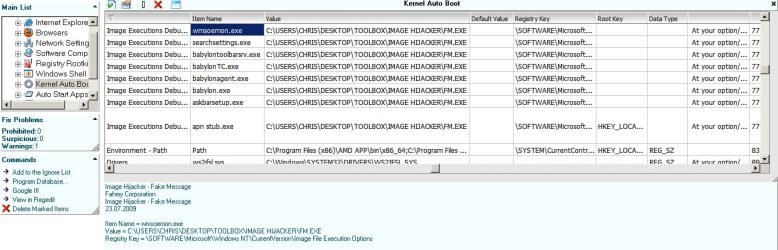
I have software installed that prevents certain executable files from running if the file names are manually added to the block list. I'm actually struggling to understand how this works. I've done some digging about and I see entries listed as shown in the screenshot:

What are "Image Executions Debugger" and "Kernel Autoboot" ?

The software has no running process and doesn't appear in Task Manager so I'm trying to understand how it works. How does it block processes when it doesn't appear to have it's own running process?

Example usage:

I often install free software and then either keep it if I find it of use or remove it otherwise. It seems that a few times per year I'll end up installing some unwanted toolbar or PUP that has been bundled with a program's installer. So I've tried a few methods to block installation of unwanted toolbars when installing such software.

An example might be Photofiltre - it installs Ask Toolbar with no chance to opt out of the installation (last time I checked anyway) but using the software that I'm trying out results in the program installing cleanly without the toolbar.
 

Attachments
  • IFEO.jpg
    IFEO.jpg
    109 KB · Views: 7

My Computer

Computer type
Laptop
Computer Manufacturer/Model Number
ASUS
OS
Microsoft Windows 7 Home Premium 64-bit 7601 Multiprocessor Free Service Pack 1
CPU
AMD C-60 APU with Radeon(tm) HD Graphics
Motherboard
ASUSTeK COMPUTER INC. X501U
Memory
4.00 GB
Graphics Card(s)
AMD Radeon HD 6290 Graphics
Sound Card
(1) AMD High Definition Audio Device (2) Realtek High Defi
Screen Resolution
1366 x 768 x 32 bits (4294967296 colors) @ 60 Hz
Hard Drives
Hitachi HTS545050A7E380 SATA Disk Device
Antivirus
Comodo CIS & FW, SecureAplus App Whitelisting, Threatfire
Browser
Cyberfox 64bit, Opera 64bit, Airfox
Other Info
Spy-The-Spy, HitmanPro.Alert, Norton Connect Safe, MJRegWatcher, BitDefender TrafficLight, Voodoo Shield, Zemana AntiMalware
I have software installed that prevents certain executable files from running if the file names are manually added to the block list. I'm actually struggling to understand how this works. I've done some digging about and I see entries listed as shown in the screenshot:

What are "Image Executions Debugger" and "Kernel Autoboot" ?

The software has no running process and doesn't appear in Task Manager so I'm trying to understand how it works. How does it block processes when it doesn't appear to have it's own running process?

Example usage:

I often install free software and then either keep it if I find it of use or remove it otherwise. It seems that a few times per year I'll end up installing some unwanted toolbar or PUP that has been bundled with a program's installer. So I've tried a few methods to block installation of unwanted toolbars when installing such software.

An example might be Photofiltre - it installs Ask Toolbar with no chance to opt out of the installation (last time I checked anyway) but using the software that I'm trying out results in the program installing cleanly without the toolbar.

Most likely the program is being run in "Services" and can be stopped there. See the following link for more information regarding "Mwsoemon.exe";

How to Deal With Mwsoemon.Exe (Spyware): 5 Steps (with Pictures))

HTH
 
Last edited:

My Computer

Computer type
PC/Desktop
Computer Manufacturer/Model Number
Custom Built
OS
Windows 7 Professional x64
CPU
Intel i5 quad processor
Motherboard
DP67BG
Memory
16 GB
Graphics Card(s)
Radeon HD 5770
Sound Card
Realtek High Definition Audio
Monitor(s) Displays
Samsung SyncMaster
Screen Resolution
1920X1080
Hard Drives
WD 2TB (SATA Internal)
WD 1TB (USB External)
PSU
Corsair GS800
Case
Tower (Generic)
Cooling
3 Internal Fans
Keyboard
MS Wireless
Mouse
MS Optical Wired
Internet Speed
54 mbps
Antivirus
Emsisoft
Browser
IE-Version 9, Palemoon-Version 24.2.0
When you look at the process list, did you elevate task manager and checked "show all processes"? It may be the case that if it's elevated, it doesn't shows it.

Another possibility, judging by the "kernel auto boot" thing, is that it uses precisely a kernel-mode driver to monitor every program launched and block it in case you configure that. Since kernel drivers have access to EVERYTHING in the system and are far more powerful than any regular process, it can get the chance to block programs ran by any user (regardless of permissions) before they even start doing anything. All that don't requires a process to happen, since kernel-mode drivers run in the core of the OS itself.

Antiviruses often implement something similar. They hook filesystem and registry access though filters, so that they can read and analyze the data being read/written and then optionally block it altogether if malware is found.

Have a look here: How does a Windows antivirus hook into the file access process? - Stack Overflow. Maybe it's of some help, I'm not sure how relevant is regarding your particular program, but the techniques discussed may be as well used for your purpose.
 

My Computer

Computer type
Laptop
Computer Manufacturer/Model Number
Toshiba Sattelite A665-S6092
OS
Windows 7 Ultimate x64
CPU
Intel Core i7-740QM
Memory
8 GB DDR3
Graphics Card(s)
NVIDIA GeForce 330GT
Screen Resolution
1366x768
Hard Drives
Samsung 840 SSD 500GB
1TB USB3 external HD
Cooling
Coolermaster Notepal U3 notebook cooling pad
Internet Speed
3mbps ASDL
Antivirus
ClamWin 0.98.7
Browser
Opera 12.17 x86 (main), Firefox 38 (sec), IE11 (last resort)
I have software installed that prevents certain executable files from running if the file names are manually added to the block list. I'm actually struggling to understand how this works. I've done some digging about and I see entries listed as shown in the screenshot:

What are "Image Executions Debugger" and "Kernel Autoboot" ?

The software has no running process and doesn't appear in Task Manager so I'm trying to understand how it works. How does it block processes when it doesn't appear to have it's own running process?

Example usage:

I often install free software and then either keep it if I find it of use or remove it otherwise. It seems that a few times per year I'll end up installing some unwanted toolbar or PUP that has been bundled with a program's installer. So I've tried a few methods to block installation of unwanted toolbars when installing such software.

An example might be Photofiltre - it installs Ask Toolbar with no chance to opt out of the installation (last time I checked anyway) but using the software that I'm trying out results in the program installing cleanly without the toolbar.

What software (program) are you using for this?
 

My Computer

Computer type
PC/Desktop
Computer Manufacturer/Model Number
home built
OS
Multi-Boot W7_Pro_x64 W8.1_Pro_x64 W10_Pro_x64 +Linux_VMs +Chromium_VM
CPU
AMD Athlon II x4 620
Motherboard
Gigabyte GA-MA785G-UD3H
Memory
6GB GSkill DDR2 800
Graphics Card(s)
AMD 4670 GPU + AMD 4200 IGP
Sound Card
on board Realtek ALC889A
Monitor(s) Displays
RCA 40" LCD TV, Insignia 32" LCD TV, HP 15" LCD monitor
Screen Resolution
1680 x 1050
Hard Drives
OCZ Vertex 3 120GB,
Samsung F3 1TB (3),
Several others - WD, Seagate, Hitachi, ...
PSU
Corsair 500 W
Case
Rosewill mid tower
Cooling
CM 90mm rifle
Keyboard
Gyration wireless, Logitech wireless, Dell USB wired
Mouse
Gyration wireless, Logitech wireless, V7 USB wired
Internet Speed
Spectrum - 100Mbps D / 10Mbps U
Antivirus
Avast, MBAM3, EMET, WinPatrol
Browser
Pale Moon, Firefox, IE
Other Info
2 multi-boot PC's
Mainly HTPC/Office/Gen purpose (no gaming).
Trendnet USB KVM.
LG DVD burner/Blue Ray Player.
Tray system for removable SATA backup drives.

Not currently OCd, under-volted.
I use Hybrid sleep, rarely re-boot or shutdown.

Hauppauge HD-PVR, Avermedia PCIe TV Tuner, Hauppauge PCI TV Tuner.
Most likely the program is being run in "Services" and can be stopped there.

It's another possibility, sure, but services do appear on task manager when it's elevated.
 

My Computer

Computer type
Laptop
Computer Manufacturer/Model Number
Toshiba Sattelite A665-S6092
OS
Windows 7 Ultimate x64
CPU
Intel Core i7-740QM
Memory
8 GB DDR3
Graphics Card(s)
NVIDIA GeForce 330GT
Screen Resolution
1366x768
Hard Drives
Samsung 840 SSD 500GB
1TB USB3 external HD
Cooling
Coolermaster Notepal U3 notebook cooling pad
Internet Speed
3mbps ASDL
Antivirus
ClamWin 0.98.7
Browser
Opera 12.17 x86 (main), Firefox 38 (sec), IE11 (last resort)
I have software installed that prevents certain executable files from running if the file names are manually added to the block list. I'm actually struggling to understand how this works. I've done some digging about and I see entries listed as shown in the screenshot:

What are "Image Executions Debugger" and "Kernel Autoboot" ?

The software has no running process and doesn't appear in Task Manager so I'm trying to understand how it works. How does it block processes when it doesn't appear to have it's own running process?

Example usage:

I often install free software and then either keep it if I find it of use or remove it otherwise. It seems that a few times per year I'll end up installing some unwanted toolbar or PUP that has been bundled with a program's installer. So I've tried a few methods to block installation of unwanted toolbars when installing such software.

An example might be Photofiltre - it installs Ask Toolbar with no chance to opt out of the installation (last time I checked anyway) but using the software that I'm trying out results in the program installing cleanly without the toolbar.

What software (program) are you using for this?

I am obviously not the OP, but my guess is s/he is referring to "Unchecky" and you can check it out at;

How to Deal With Mwsoemon.Exe (Spyware): 5 Steps (with Pictures))

HTH
 

My Computer

Computer type
PC/Desktop
Computer Manufacturer/Model Number
Custom Built
OS
Windows 7 Professional x64
CPU
Intel i5 quad processor
Motherboard
DP67BG
Memory
16 GB
Graphics Card(s)
Radeon HD 5770
Sound Card
Realtek High Definition Audio
Monitor(s) Displays
Samsung SyncMaster
Screen Resolution
1920X1080
Hard Drives
WD 2TB (SATA Internal)
WD 1TB (USB External)
PSU
Corsair GS800
Case
Tower (Generic)
Cooling
3 Internal Fans
Keyboard
MS Wireless
Mouse
MS Optical Wired
Internet Speed
54 mbps
Antivirus
Emsisoft
Browser
IE-Version 9, Palemoon-Version 24.2.0
Thanks Sir George but it's not a problem.

Thanks for your input. The file name mswoemon.exe is just one that I'd added to the list of executables to block. I'm just wondering if anyone has an idea of how the software works to block specified executable files when there is no trace of it running anywhere. I understand things like using Group Policy Editor to block programs but that's not what's happening here.
 

My Computer

Computer type
Laptop
Computer Manufacturer/Model Number
ASUS
OS
Microsoft Windows 7 Home Premium 64-bit 7601 Multiprocessor Free Service Pack 1
CPU
AMD C-60 APU with Radeon(tm) HD Graphics
Motherboard
ASUSTeK COMPUTER INC. X501U
Memory
4.00 GB
Graphics Card(s)
AMD Radeon HD 6290 Graphics
Sound Card
(1) AMD High Definition Audio Device (2) Realtek High Defi
Screen Resolution
1366 x 768 x 32 bits (4294967296 colors) @ 60 Hz
Hard Drives
Hitachi HTS545050A7E380 SATA Disk Device
Antivirus
Comodo CIS & FW, SecureAplus App Whitelisting, Threatfire
Browser
Cyberfox 64bit, Opera 64bit, Airfox
Other Info
Spy-The-Spy, HitmanPro.Alert, Norton Connect Safe, MJRegWatcher, BitDefender TrafficLight, Voodoo Shield, Zemana AntiMalware
Thanks for the tips.

When you look at the process list, did you elevate task manager and checked "show all processes"? It may be the case that if it's elevated, it doesn't shows it.

Another possibility, judging by the "kernel auto boot" thing, is that it uses precisely a kernel-mode driver to monitor every program launched and block it in case you configure that. Since kernel drivers have access to EVERYTHING in the system and are far more powerful than any regular process, it can get the chance to block programs ran by any user (regardless of permissions) before they even start doing anything. All that don't requires a process to happen, since kernel-mode drivers run in the core of the OS itself.

Antiviruses often implement something similar. They hook filesystem and registry access though filters, so that they can read and analyze the data being read/written and then optionally block it altogether if malware is found.

Have a look here: How does a Windows antivirus hook into the file access process? - Stack Overflow. Maybe it's of some help, I'm not sure how relevant is regarding your particular program, but the techniques discussed may be as well used for your purpose.

Elevated Task Manager doesn't show anything. Your kernel mode driver explanation makes more sense and I'll do some investigating!
 

My Computer

Computer type
Laptop
Computer Manufacturer/Model Number
ASUS
OS
Microsoft Windows 7 Home Premium 64-bit 7601 Multiprocessor Free Service Pack 1
CPU
AMD C-60 APU with Radeon(tm) HD Graphics
Motherboard
ASUSTeK COMPUTER INC. X501U
Memory
4.00 GB
Graphics Card(s)
AMD Radeon HD 6290 Graphics
Sound Card
(1) AMD High Definition Audio Device (2) Realtek High Defi
Screen Resolution
1366 x 768 x 32 bits (4294967296 colors) @ 60 Hz
Hard Drives
Hitachi HTS545050A7E380 SATA Disk Device
Antivirus
Comodo CIS & FW, SecureAplus App Whitelisting, Threatfire
Browser
Cyberfox 64bit, Opera 64bit, Airfox
Other Info
Spy-The-Spy, HitmanPro.Alert, Norton Connect Safe, MJRegWatcher, BitDefender TrafficLight, Voodoo Shield, Zemana AntiMalware
Thanks for your input. The file name mswoemon.exe is just one that I'd added to the list of executables to block. I'm just wondering if anyone has an idea of how the software works to block specified executable files when there is no trace of it running anywhere. I understand things like using Group Policy Editor to block programs but that's not what's happening here.

So, we have elevated this to a higher level.:) Here's another possibility; the registry is sometimes used by software to cloak its location. One example of that is "CryptoPrevent" which will not appear in any other location, but is preventing certain activity.
HTH
 

My Computer

Computer type
PC/Desktop
Computer Manufacturer/Model Number
Custom Built
OS
Windows 7 Professional x64
CPU
Intel i5 quad processor
Motherboard
DP67BG
Memory
16 GB
Graphics Card(s)
Radeon HD 5770
Sound Card
Realtek High Definition Audio
Monitor(s) Displays
Samsung SyncMaster
Screen Resolution
1920X1080
Hard Drives
WD 2TB (SATA Internal)
WD 1TB (USB External)
PSU
Corsair GS800
Case
Tower (Generic)
Cooling
3 Internal Fans
Keyboard
MS Wireless
Mouse
MS Optical Wired
Internet Speed
54 mbps
Antivirus
Emsisoft
Browser
IE-Version 9, Palemoon-Version 24.2.0
Software used

I have software installed that prevents certain executable files from running if the file names are manually added to the block list. I'm actually struggling to understand how this works. I've done some digging about and I see entries listed as shown in the screenshot:

What are "Image Executions Debugger" and "Kernel Autoboot" ?

The software has no running process and doesn't appear in Task Manager so I'm trying to understand how it works. How does it block processes when it doesn't appear to have it's own running process?

Example usage:

I often install free software and then either keep it if I find it of use or remove it otherwise. It seems that a few times per year I'll end up installing some unwanted toolbar or PUP that has been bundled with a program's installer. So I've tried a few methods to block installation of unwanted toolbars when installing such software.

An example might be Photofiltre - it installs Ask Toolbar with no chance to opt out of the installation (last time I checked anyway) but using the software that I'm trying out results in the program installing cleanly without the toolbar.

What software (program) are you using for this?

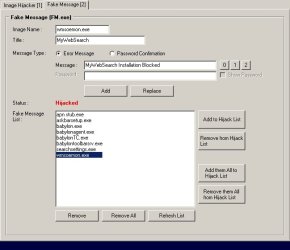
I'm using Image Hijacker but I don't really recommend other users to download it as a lot of the published download links are dodgy

I use it to block toolbar installation and the like and display a message on screen when installation is blocked.
 

Attachments

  • 2013-12-07.jpg
    2013-12-07.jpg
    33.4 KB · Views: 12

My Computer

Computer type
Laptop
Computer Manufacturer/Model Number
ASUS
OS
Microsoft Windows 7 Home Premium 64-bit 7601 Multiprocessor Free Service Pack 1
CPU
AMD C-60 APU with Radeon(tm) HD Graphics
Motherboard
ASUSTeK COMPUTER INC. X501U
Memory
4.00 GB
Graphics Card(s)
AMD Radeon HD 6290 Graphics
Sound Card
(1) AMD High Definition Audio Device (2) Realtek High Defi
Screen Resolution
1366 x 768 x 32 bits (4294967296 colors) @ 60 Hz
Hard Drives
Hitachi HTS545050A7E380 SATA Disk Device
Antivirus
Comodo CIS & FW, SecureAplus App Whitelisting, Threatfire
Browser
Cyberfox 64bit, Opera 64bit, Airfox
Other Info
Spy-The-Spy, HitmanPro.Alert, Norton Connect Safe, MJRegWatcher, BitDefender TrafficLight, Voodoo Shield, Zemana AntiMalware
There's no service

Most likely the program is being run in "Services" and can be stopped there.

It's another possibility, sure, but services do appear on task manager when it's elevated.

Thanks, I checked Services using Elevated Task Manager and also Advanced Win Service Manager (elevated) and found nothing.
 

My Computer

Computer type
Laptop
Computer Manufacturer/Model Number
ASUS
OS
Microsoft Windows 7 Home Premium 64-bit 7601 Multiprocessor Free Service Pack 1
CPU
AMD C-60 APU with Radeon(tm) HD Graphics
Motherboard
ASUSTeK COMPUTER INC. X501U
Memory
4.00 GB
Graphics Card(s)
AMD Radeon HD 6290 Graphics
Sound Card
(1) AMD High Definition Audio Device (2) Realtek High Defi
Screen Resolution
1366 x 768 x 32 bits (4294967296 colors) @ 60 Hz
Hard Drives
Hitachi HTS545050A7E380 SATA Disk Device
Antivirus
Comodo CIS & FW, SecureAplus App Whitelisting, Threatfire
Browser
Cyberfox 64bit, Opera 64bit, Airfox
Other Info
Spy-The-Spy, HitmanPro.Alert, Norton Connect Safe, MJRegWatcher, BitDefender TrafficLight, Voodoo Shield, Zemana AntiMalware
I have software installed that prevents certain executable files from running if the file names are manually added to the block list. I'm actually struggling to understand how this works. I've done some digging about and I see entries listed as shown in the screenshot:

What are "Image Executions Debugger" and "Kernel Autoboot" ?

The software has no running process and doesn't appear in Task Manager so I'm trying to understand how it works. How does it block processes when it doesn't appear to have it's own running process?

Example usage:

I often install free software and then either keep it if I find it of use or remove it otherwise. It seems that a few times per year I'll end up installing some unwanted toolbar or PUP that has been bundled with a program's installer. So I've tried a few methods to block installation of unwanted toolbars when installing such software.

An example might be Photofiltre - it installs Ask Toolbar with no chance to opt out of the installation (last time I checked anyway) but using the software that I'm trying out results in the program installing cleanly without the toolbar.

What software (program) are you using for this?

I'm using Image Hijacker but I don't really recommend other users to download it as a lot of the published download links are dodgy

I use it to block toolbar installation and the like and display a message on screen when installation is blocked.

Thanks for the reply and info!
I've never used the Image Hijacker program ...
Maybe someone else that uses it will see see this thread and be able to help.

I'd be concerned with virus/malware ... :eek:
 

My Computer

Computer type
PC/Desktop
Computer Manufacturer/Model Number
home built
OS
Multi-Boot W7_Pro_x64 W8.1_Pro_x64 W10_Pro_x64 +Linux_VMs +Chromium_VM
CPU
AMD Athlon II x4 620
Motherboard
Gigabyte GA-MA785G-UD3H
Memory
6GB GSkill DDR2 800
Graphics Card(s)
AMD 4670 GPU + AMD 4200 IGP
Sound Card
on board Realtek ALC889A
Monitor(s) Displays
RCA 40" LCD TV, Insignia 32" LCD TV, HP 15" LCD monitor
Screen Resolution
1680 x 1050
Hard Drives
OCZ Vertex 3 120GB,
Samsung F3 1TB (3),
Several others - WD, Seagate, Hitachi, ...
PSU
Corsair 500 W
Case
Rosewill mid tower
Cooling
CM 90mm rifle
Keyboard
Gyration wireless, Logitech wireless, Dell USB wired
Mouse
Gyration wireless, Logitech wireless, V7 USB wired
Internet Speed
Spectrum - 100Mbps D / 10Mbps U
Antivirus
Avast, MBAM3, EMET, WinPatrol
Browser
Pale Moon, Firefox, IE
Other Info
2 multi-boot PC's
Mainly HTPC/Office/Gen purpose (no gaming).
Trendnet USB KVM.
LG DVD burner/Blue Ray Player.
Tray system for removable SATA backup drives.

Not currently OCd, under-volted.
I use Hybrid sleep, rarely re-boot or shutdown.

Hauppauge HD-PVR, Avermedia PCIe TV Tuner, Hauppauge PCI TV Tuner.
Can someone explain?

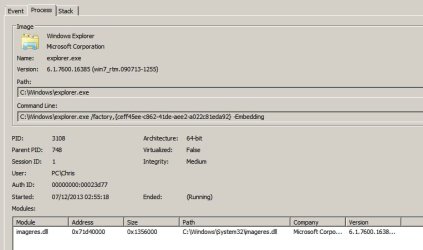
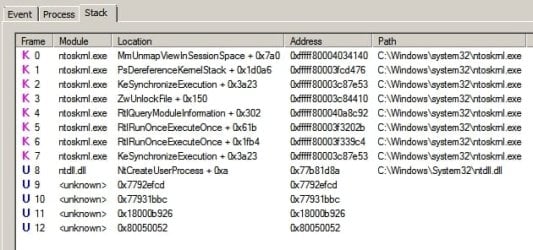
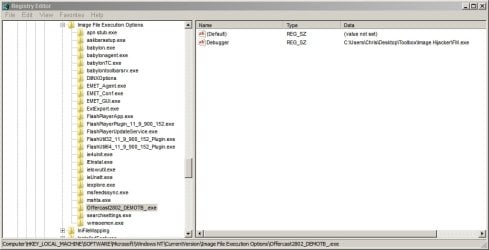
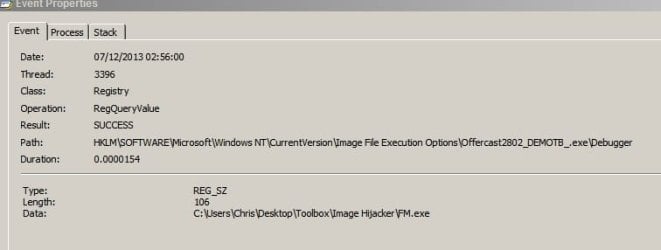
Thanks for the help everyone! I decided to download a version of the Ask Toolbar installer - "Offercast2802_DEMOTB_.exe"and add it to the exclusion list in Image Hijacker before running a capture with ProcMon then trying to run the toolbar installer.

The screenshots are what I think might be important in understanding how this software works but I admit that I don't have a full understanding so if anyone can interpret the screenshots - I'd be grateful.

It seems to me as if registry entries for blocked executables are created in:

HKEY\LOCAL MACHINE\SOFTWARE\Microsoft\Windows NT\Current Version\Image File Execution Options

with the Value Name "Debugger"

and the Value Data "C:\Users\Chris\Desktop\Toolbox\Image Hijacker\FM.exe"

FM.exe as I understand it is the Image Hijacker executable that runs in place of "Offercast2802_DEMOTB_.exe" and displays the user defined message on screen - in this case "Ask Toolbar Installation Blocked"

I still don't really understand what's happening here. It looks like registry entries can be used to block an executable and run another one in it's place but how on earth is the executable detected when it attempts to run?

HELP!
 

Attachments

  • 2013-12-07 03_47_10-Event Properties.jpg
    2013-12-07 03_47_10-Event Properties.jpg
    15.3 KB · Views: 0
  • 2013-12-07 03_48_32-Event Properties.jpg
    2013-12-07 03_48_32-Event Properties.jpg
    29.4 KB · Views: 0
  • 2013-12-07 03_49_23-Event Properties.jpg
    2013-12-07 03_49_23-Event Properties.jpg
    42.7 KB · Views: 10
  • 2013-12-07 03_52_41-Registry Editor.jpg
    2013-12-07 03_52_41-Registry Editor.jpg
    47.6 KB · Views: 1
  • Process Tree.jpg
    Process Tree.jpg
    92.6 KB · Views: 3
Last edited:

My Computer

Computer type
Laptop
Computer Manufacturer/Model Number
ASUS
OS
Microsoft Windows 7 Home Premium 64-bit 7601 Multiprocessor Free Service Pack 1
CPU
AMD C-60 APU with Radeon(tm) HD Graphics
Motherboard
ASUSTeK COMPUTER INC. X501U
Memory
4.00 GB
Graphics Card(s)
AMD Radeon HD 6290 Graphics
Sound Card
(1) AMD High Definition Audio Device (2) Realtek High Defi
Screen Resolution
1366 x 768 x 32 bits (4294967296 colors) @ 60 Hz
Hard Drives
Hitachi HTS545050A7E380 SATA Disk Device
Antivirus
Comodo CIS & FW, SecureAplus App Whitelisting, Threatfire
Browser
Cyberfox 64bit, Opera 64bit, Airfox
Other Info
Spy-The-Spy, HitmanPro.Alert, Norton Connect Safe, MJRegWatcher, BitDefender TrafficLight, Voodoo Shield, Zemana AntiMalware
Got it! Forget everything about the kernel-mode driver I told before, it's probably wrong. That registry keys are the real thing that do the work.

That registry path is a Windows special entry. It's designed to help programmers to run programs under debuggers before they launch, so you can monitor your program in the early phases of its startup. What those keys do is, when the executable pointed there is run, Windows does NOT run it, but instead it runs the thing specified in the "Debugger"" entry, passing the whole original command line to it. The real intention is to put a debugger there that can monitor the target program, but it can really be used for anything, effectively replacing any program with another one. That behavior is built-in in Windows itself, your program has nothing to do with that, just sets those entries and provides a nice "alternative" program to run instead.

Look here:
Launching the Debugger Automatically
registry - set "Image File Execution Options" will always open the named exe file as default - Stack Overflow

A practical usage (discussed in the StackOverflow thread) is replacing Notepad with Notepad2. There is done manually, but as far as I remember, the official Notepad2 installer does exactly the same, effectively running Notepad2 everywhere instead of the real built-in Notepad.

BTW, may I suggest to use a more "innocent" program as a test piggy? Why not try this blocker with the calculator instead of a real virus?
 

My Computer

Computer type
Laptop
Computer Manufacturer/Model Number
Toshiba Sattelite A665-S6092
OS
Windows 7 Ultimate x64
CPU
Intel Core i7-740QM
Memory
8 GB DDR3
Graphics Card(s)
NVIDIA GeForce 330GT
Screen Resolution
1366x768
Hard Drives
Samsung 840 SSD 500GB
1TB USB3 external HD
Cooling
Coolermaster Notepal U3 notebook cooling pad
Internet Speed
3mbps ASDL
Antivirus
ClamWin 0.98.7
Browser
Opera 12.17 x86 (main), Firefox 38 (sec), IE11 (last resort)
Solved

Thanks Alejandro85

You explain very well indeed and with some decent advice. I did originally try substituting my browser with notepad to see if it worked but just couldn't understand how it worked. I chose Ask Toolbar as I knew that I could remove it!
 

My Computer

Computer type
Laptop
Computer Manufacturer/Model Number
ASUS
OS
Microsoft Windows 7 Home Premium 64-bit 7601 Multiprocessor Free Service Pack 1
CPU
AMD C-60 APU with Radeon(tm) HD Graphics
Motherboard
ASUSTeK COMPUTER INC. X501U
Memory
4.00 GB
Graphics Card(s)
AMD Radeon HD 6290 Graphics
Sound Card
(1) AMD High Definition Audio Device (2) Realtek High Defi
Screen Resolution
1366 x 768 x 32 bits (4294967296 colors) @ 60 Hz
Hard Drives
Hitachi HTS545050A7E380 SATA Disk Device
Antivirus
Comodo CIS & FW, SecureAplus App Whitelisting, Threatfire
Browser
Cyberfox 64bit, Opera 64bit, Airfox
Other Info
Spy-The-Spy, HitmanPro.Alert, Norton Connect Safe, MJRegWatcher, BitDefender TrafficLight, Voodoo Shield, Zemana AntiMalware
Back
Top