What are the benefits to a clean install?

bigboi972

New member
Member
VIP
Local time
3:07 AM
Messages
319
i was wondering what are the benefits to a clean install besides getting rid of bloatware. right now im thinking a out doing it my laptops is just to hot even on idle its hot im thinking about just trying a clean install just to see if anything improves although doing a clean install is not a solution to fixing the problem but just to see what happens i may do it. Seeing how as of right now my laptop stays from 60-70 degrees on idle and I just got it about 3 weeks ago. Im also considering buying a cooler for it as some of you have suggested.
 

My Computer My Computer

At a glance

Microsoft Windows 7 Professional 64-bitIntel Xeon E3 @ 3.30GHzIntel(R) Xeon(R) CPU E...16.00GB Single-Channel DDR3 @ 666MHz (9-9-9-24)ATI Radeon HD 7950
Computer type
PC/Desktop
OS
Microsoft Windows 7 Professional 64-bit
CPU
Intel Xeon E3 @ 3.30GHzIntel(R) Xeon(R) CPU E3-1230 v3 @ 3.3
Motherboard
MSI Z97 GAMING 5 (MS-7917)
Memory
16.00GB Single-Channel DDR3 @ 666MHz (9-9-9-24)
Graphics Card(s)
ATI Radeon HD 7950
Sound Card
(1) AMD High Definition Audio Device (2) USB Audio Device
Hard Drives
(1) Samsung SSD 840 EVO 120GB ATA Device
(2) TOSHIBA MK7559GSM ATA Device
Other Info
TRENDnet Wireless AC1200 Dual Band USB 3.0 Adapter, TEW-805UB
Hi,

A clean install will always benefit any machine, I re-install my machine every 3 months ;)

As far as the heat goes you may want to look at blowing out/cleaning the fan exhaust.
   Note
Laptops are, by design, to be on purely flat surfaces. Don't be fooled by the name, you can't keep a laptop on your lap without it oveheating as most of the vents end up covered in some way


OS
 

My Computer My Computer

At a glance

Windows 7 Ultimate x64AMD Sempron Dual Core3GBNVIDIA GeForce 6150SE nForce 430
Computer Manufacturer/Model Number
Compaq Desktop
OS
Windows 7 Ultimate x64
CPU
AMD Sempron Dual Core
Memory
3GB
Graphics Card(s)
NVIDIA GeForce 6150SE nForce 430
Screen Resolution
1024x768
Hard Drives
150GB Sata
Hello and here's some useful information.


After you have copied out or made back-ups of the data you need to save to external media; if you can find an exact Windows version that the PC shipped with you can do a clean install using the activation key on the COA sticker attached to the PC though it may require a robo-call to MS to sort the OEM batch-key.

How to Activate Windows 7 by Phone


If you can't find an exact same version, you could use the info in this tutorial to create an "all versions" installer of any version Windows installer, to install using the same method I posted above.

Windows 7 Universal Installation Disc - Create


After you have made backups of everything you care to save, the best method is to do a complete wipe (secure erase) of the entire Hard Disk Drive first, it over-writes everything, all the old Windows code including all the old drivers/programs, giving you the best possible space to install Windows to.

SSD / HDD : Optimize for Windows Reinstallation


No matter what you do, if you do a clean install you will have to reinstall all the programs/apps that you use as they integrate themselves into the Windows registry and are not moveable from one Windows installation to another so be sure to save the program activation keys where applicable.
 

My Computer My Computer

At a glance

W 7 64-bit UltimateIntel Q9550 Yorkfield8GB Dominator 8500C5DATI : XFX 5870
Computer Manufacturer/Model Number
* BFK Customs *
OS
W 7 64-bit Ultimate
CPU
Intel Q9550 Yorkfield
Motherboard
ASUS P5Q Pro
Memory
8GB Dominator 8500C5D
Graphics Card(s)
ATI : XFX 5870
Sound Card
Realtek HD Audio 7-1
Monitor(s) Displays
1x 47" LCD HDMI & 3x 26" LCD HDMI
Screen Resolution
1920x1080P & 1920x1200
Hard Drives
1x 80GB Intel X25-M G2 SSD : 1x 500GB & 1x 640GB WD Caviar Black(s)
PSU
Corsair 620HX
Case
Cooler Master RC-690
Cooling
Tuniq Tower 120, 2x 140mm and 3x 120mm case fans
Keyboard
Microsoft 500
Mouse
Razer Diamondback 3G
Internet Speed
14 Mb/s
Other Info
1x Koutech 3Gb/s SATA HDD Hot Swap Rack
i was wondering what are the benefits to a clean install besides getting rid of bloatware. right now im thinking a out doing it my laptops is just to hot even on idle its hot im thinking about just trying a clean install just to see if anything improves although doing a clean install is not a solution to fixing the problem but just to see what happens i may do it. Seeing how as of right now my laptop stays from 60-70 degrees on idle and I just got it about 3 weeks ago. Im also considering buying a cooler for it as some of you have suggested.
Its upto you. I've clean installed dozens of times but overheating laptops stayed hot i.e. till I switched to win7 from vista. After that I find I can manage the heat better.

As for general benefits, remnant services/processes/files from uninstalled bloatware that eat resources are wiped out, trialware nags become history and one recovers some disk space. But with faster, bigger, better hardware, these benefits are not such a big deal. If you can uninstall bloat properly, manually stop associated services/processes left behind and not screw up the registry in the process, you'll be fine. It'll save you some time and the need to reinstall everything all over again.

Mind you this goes against standard wisdom, but if you're a reasonably experienced PC user, you can choose either option.
 

My Computer My Computer

At a glance

Windows 7 x64 pro/ Windows 7 x86 Pro/ XP SP3 x86
Computer Manufacturer/Model Number
Too many to describe...
OS
Windows 7 x64 pro/ Windows 7 x86 Pro/ XP SP3 x86
Mind you this goes against standard wisdom, but if you're a reasonably experienced PC user, you can choose either option.
Yep.

Although I'd check your current running processes to see if there is any particular one that is utilizing the CPU when 'idle'. The high temps may be because it's not actually idle.

A clean install won't be a magic bullet if it's not a bloat process running the CPU at any sort of constant load. All you'll have is a bloat free installation with the same high temps.

You can spend equal amounts of time doing a clean install + app installation or tracking down every last bloat app and manually removing all traces.
 

My Computer My Computer

At a glance

8 Pro x64i7 3770K 4.6GHz16GB G.Skill Trident X 2666mhzx2 EVGA 780 Ti Superclocked SLI
Computer type
PC/Desktop
Computer Manufacturer/Model Number
Systems by SmartEyeball
OS
8 Pro x64
CPU
i7 3770K 4.6GHz
Motherboard
ASUS P8Z77 WS
Memory
16GB G.Skill Trident X 2666mhz
Graphics Card(s)
x2 EVGA 780 Ti Superclocked SLI
Sound Card
SB X-FI Surround 5.1 PRO USB / ATH-AD900 Headphones
Monitor(s) Displays
x3 Dell U2410 / 58" Samsung
Screen Resolution
5760*1200/ 1920*1200
Hard Drives
2x Intel 520 240GB (RAID 0) * 2x WD Caviar Blacks 2TB (RAID 0) * 2TB WD Caviar Black * Sony Optirac DVD
PSU
Silverstone Strider Evolution 1200W
Case
Thermaltake Level 10 GT Snow Edition
Cooling
Noctua NH-D14
Keyboard
Topre Realforce // Ducky Shine MX Black // Filco Ninja TKL
Mouse
Thermaltake Theron (Highly Recommended) + Razer Imperator
Antivirus
MSE
Browser
IE, FF, WaterFox
Other Info
GT Extreme V2 Sim Racing Cockpit + 40" LCD and K/B Mouse stand ▼
Fanatec CSR Elite Wheel + Clubsport V1 Pedals + CSR shifter/7G-H ▼Saitek X52 Pro ▼ TrackIR 5 Pro
Buttkicker v2 Seat Rumbler with Dedicated 5.1 and Sub Woofer attached to frame ▼
=
Bloody Big Grin
bigboi972,
You need a cooling pad,asap! As rightly pointed out in the above posts, the hot air vents are placed either on the undersurface of the lappy or the lateral sides of the laptop!

The Toshiba lappy i have has exhaust vents on the lateral side, so i needed to buy a cooling pad with fans blowing in cool air from the bottom ! For lappys with exhausts at the bottom surface, you have toget a cooling pad which appears curved at the sides and that's where the cooling fans are to pump in cool air and cool your 60-70 degrees laptop! Mamma mia!Belkin have both types of cooling pads!
(very sorry for the bold type, it was purely meant for emphasis).

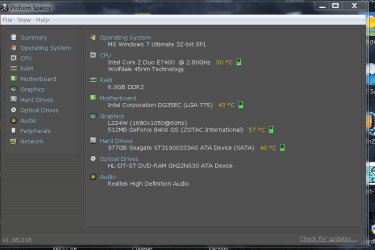
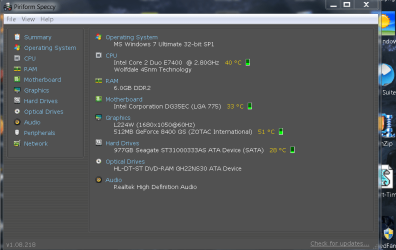
Kindly view the snaps below which were taken yesterday when i was working without the A/C on for straight Three hours( first snap) and the second after keeping the PC in an air-conditioned environment for 45 minutes! So in tropical climes like in India and in states like Texas,Oklahama and Florida in the USA, the external temperatures play their role as well!

Regards,
Sreedhav:cool:
 

Attachments

  • SPECCY-1.png
    SPECCY-1.png
    34.9 KB · Views: 46
  • speccy-2.png
    speccy-2.png
    40.4 KB · Views: 37

My Computer My Computer

At a glance

MS Windows 7 Home Premium 64-bit SP1IntelCore [email protected]; Sandy Bridge 32nm Tech.4096Mb RAM; Single ChannelDDR3@665MHz; DRAM F...AMD Radeon HD 6630M; GPU:Whistler;BIOS Core&m...
Computer Manufacturer/Model Number
Sony Vaio C series VPCCB35FN laptop
OS
MS Windows 7 Home Premium 64-bit SP1
CPU
IntelCore [email protected]; Sandy Bridge 32nm Tech.
Motherboard
Sony Vaio Version:C609NJYJ
Memory
4096Mb RAM; Single ChannelDDR3@665MHz; DRAM Freq:662MHz
Graphics Card(s)
AMD Radeon HD 6630M; GPU:Whistler;BIOS Core&mem Clock:123.36
Sound Card
REALTEK High Definition Audio Device; INTEL Display Card
Monitor(s) Displays
Generic PnP Intel HD;Resolution:1920*1040 Pixels; BPP:32bits
Screen Resolution
Current Resolution:1920*1080 Pixels; Monitor Frequency:60Hz
Hard Drives
Internal HD:TOSHIBA MK5061GSY; Real Size:488 GB;NTFS; 3 Partitions; SATA; HEADS:16

External HDD: WD Elements 1023 PORTABLE; Estimated Size: 1TB; NTFS; 3 Partitions
Cooling
Lateral Exhaust with a Cooling Pad Placed Beneath.
Keyboard
Logitech Bluetooth+ Generic Integrated K-B
Mouse
Logitech Bluetooth
Internet Speed
2MBPS
Other Info
1)Trend Micro Titanium Maximum Security Suite Version:3
2)SAS-PRO

3)MBAM--PRO


4)WATERFOX+IE9 +WOT+LINKEXTEND+ DRWEBCUREIT LINK CHECKER

5)SPYWAREBLASTER

6) WINPATROL PLUS

7) SANDBOXIE and
8) A BIT OF COMMON SENSE.
Dear bigboi972,
As regards your original question, the only way (some even question that and add a erasure) rootkit infections are cleaned is ONLY by a 3-pass erasing any data left behind which may harbor rootkits and a clean install! Kindly read this very nice article on why would suspect Rootkits in the first place and what to do once your pc is infected! The first two replies are very interesting and i lean towards the reply by Sean.L. Link : What would make you suspect your computer was infected with a rootkit? | LinkedIn Answers | LinkedIn

regards,
Sreedhav

PS: I suggest you download speccy (Free), a versatile instrument which will tell you (and if you choose to,us too), the temperatures of CPU,MOBO,HDD and GPU! Link : http://www.piriform.com/speccy
 

My Computer My Computer

At a glance

MS Windows 7 Home Premium 64-bit SP1IntelCore [email protected]; Sandy Bridge 32nm Tech.4096Mb RAM; Single ChannelDDR3@665MHz; DRAM F...AMD Radeon HD 6630M; GPU:Whistler;BIOS Core&m...
Computer Manufacturer/Model Number
Sony Vaio C series VPCCB35FN laptop
OS
MS Windows 7 Home Premium 64-bit SP1
CPU
IntelCore [email protected]; Sandy Bridge 32nm Tech.
Motherboard
Sony Vaio Version:C609NJYJ
Memory
4096Mb RAM; Single ChannelDDR3@665MHz; DRAM Freq:662MHz
Graphics Card(s)
AMD Radeon HD 6630M; GPU:Whistler;BIOS Core&mem Clock:123.36
Sound Card
REALTEK High Definition Audio Device; INTEL Display Card
Monitor(s) Displays
Generic PnP Intel HD;Resolution:1920*1040 Pixels; BPP:32bits
Screen Resolution
Current Resolution:1920*1080 Pixels; Monitor Frequency:60Hz
Hard Drives
Internal HD:TOSHIBA MK5061GSY; Real Size:488 GB;NTFS; 3 Partitions; SATA; HEADS:16

External HDD: WD Elements 1023 PORTABLE; Estimated Size: 1TB; NTFS; 3 Partitions
Cooling
Lateral Exhaust with a Cooling Pad Placed Beneath.
Keyboard
Logitech Bluetooth+ Generic Integrated K-B
Mouse
Logitech Bluetooth
Internet Speed
2MBPS
Other Info
1)Trend Micro Titanium Maximum Security Suite Version:3
2)SAS-PRO

3)MBAM--PRO


4)WATERFOX+IE9 +WOT+LINKEXTEND+ DRWEBCUREIT LINK CHECKER

5)SPYWAREBLASTER

6) WINPATROL PLUS

7) SANDBOXIE and
8) A BIT OF COMMON SENSE.
Here is a definition of clean install from the The Free Dictionary : "A completely new installation of an operating system or application.To clean install an OS, the hard disk is formatted and completely erased . To clean install an application, the older version is uninstalled first. Installing the OS on a new computer or installing an application for the first time is automatically a clean install". The emphasis is mine. source : clean install definition of clean install in the Free Online Encyclopedia.
 

My Computer My Computer

At a glance

MS Windows 7 Home Premium 64-bit SP1IntelCore [email protected]; Sandy Bridge 32nm Tech.4096Mb RAM; Single ChannelDDR3@665MHz; DRAM F...AMD Radeon HD 6630M; GPU:Whistler;BIOS Core&m...
Computer Manufacturer/Model Number
Sony Vaio C series VPCCB35FN laptop
OS
MS Windows 7 Home Premium 64-bit SP1
CPU
IntelCore [email protected]; Sandy Bridge 32nm Tech.
Motherboard
Sony Vaio Version:C609NJYJ
Memory
4096Mb RAM; Single ChannelDDR3@665MHz; DRAM Freq:662MHz
Graphics Card(s)
AMD Radeon HD 6630M; GPU:Whistler;BIOS Core&mem Clock:123.36
Sound Card
REALTEK High Definition Audio Device; INTEL Display Card
Monitor(s) Displays
Generic PnP Intel HD;Resolution:1920*1040 Pixels; BPP:32bits
Screen Resolution
Current Resolution:1920*1080 Pixels; Monitor Frequency:60Hz
Hard Drives
Internal HD:TOSHIBA MK5061GSY; Real Size:488 GB;NTFS; 3 Partitions; SATA; HEADS:16

External HDD: WD Elements 1023 PORTABLE; Estimated Size: 1TB; NTFS; 3 Partitions
Cooling
Lateral Exhaust with a Cooling Pad Placed Beneath.
Keyboard
Logitech Bluetooth+ Generic Integrated K-B
Mouse
Logitech Bluetooth
Internet Speed
2MBPS
Other Info
1)Trend Micro Titanium Maximum Security Suite Version:3
2)SAS-PRO

3)MBAM--PRO


4)WATERFOX+IE9 +WOT+LINKEXTEND+ DRWEBCUREIT LINK CHECKER

5)SPYWAREBLASTER

6) WINPATROL PLUS

7) SANDBOXIE and
8) A BIT OF COMMON SENSE.
Extend your laptop's life! Clean the dust out of its heat sink.
Cleaning Your Laptop Cooling System

Until you get the cooling pad, place a small block of wood or other thin long object under the back of the laptop to elevate the rear by about an inch to increase air circulation. Examine the vents to see where they are and make sure they are kept clear, clean and elevated to maximize air circulation. This sometimes is enough.

Never use the laptop on a bed or sofa or laptop (!) where irregular surface will block the air vents. This is death to a laptop in short order.
 
My dear gregrocker,
Quote" Until you get the cooling pad, place a small block of wood or other thin long object under the back of the laptop to elevate the rear by about an inch to increase air circulation" Unquote! IT IS AGEM OF A POINT! l You rock!

Regards,
Sreedhav
 

My Computer My Computer

At a glance

MS Windows 7 Home Premium 64-bit SP1IntelCore [email protected]; Sandy Bridge 32nm Tech.4096Mb RAM; Single ChannelDDR3@665MHz; DRAM F...AMD Radeon HD 6630M; GPU:Whistler;BIOS Core&m...
Computer Manufacturer/Model Number
Sony Vaio C series VPCCB35FN laptop
OS
MS Windows 7 Home Premium 64-bit SP1
CPU
IntelCore [email protected]; Sandy Bridge 32nm Tech.
Motherboard
Sony Vaio Version:C609NJYJ
Memory
4096Mb RAM; Single ChannelDDR3@665MHz; DRAM Freq:662MHz
Graphics Card(s)
AMD Radeon HD 6630M; GPU:Whistler;BIOS Core&mem Clock:123.36
Sound Card
REALTEK High Definition Audio Device; INTEL Display Card
Monitor(s) Displays
Generic PnP Intel HD;Resolution:1920*1040 Pixels; BPP:32bits
Screen Resolution
Current Resolution:1920*1080 Pixels; Monitor Frequency:60Hz
Hard Drives
Internal HD:TOSHIBA MK5061GSY; Real Size:488 GB;NTFS; 3 Partitions; SATA; HEADS:16

External HDD: WD Elements 1023 PORTABLE; Estimated Size: 1TB; NTFS; 3 Partitions
Cooling
Lateral Exhaust with a Cooling Pad Placed Beneath.
Keyboard
Logitech Bluetooth+ Generic Integrated K-B
Mouse
Logitech Bluetooth
Internet Speed
2MBPS
Other Info
1)Trend Micro Titanium Maximum Security Suite Version:3
2)SAS-PRO

3)MBAM--PRO


4)WATERFOX+IE9 +WOT+LINKEXTEND+ DRWEBCUREIT LINK CHECKER

5)SPYWAREBLASTER

6) WINPATROL PLUS

7) SANDBOXIE and
8) A BIT OF COMMON SENSE.
i was wondering what are the benefits to a clean install besides getting rid of bloatware. right now im thinking a out doing it my laptops is just to hot even on idle its hot im thinking about just trying a clean install just to see if anything improves although doing a clean install is not a solution to fixing the problem but just to see what happens i may do it. Seeing how as of right now my laptop stays from 60-70 degrees on idle and I just got it about 3 weeks ago. Im also considering buying a cooler for it as some of you have suggested.
Its upto you. I've clean installed dozens of times but overheating laptops stayed hot i.e. till I switched to win7 from vista. After that I find I can manage the heat better.

As for general benefits, remnant services/processes/files from uninstalled bloatware that eat resources are wiped out, trialware nags become history and one recovers some disk space. But with faster, bigger, better hardware, these benefits are not such a big deal. If you can uninstall bloat properly, manually stop associated services/processes left behind and not screw up the registry in the process, you'll be fine. It'll save you some time and the need to reinstall everything all over again.

Mind you this goes against standard wisdom, but if you're a reasonably experienced PC user, you can choose either option.
you said your manage your heat better with windows 7 what methods or features have you discovered that have helped you in the process.
 

My Computer My Computer

At a glance

Microsoft Windows 7 Professional 64-bitIntel Xeon E3 @ 3.30GHzIntel(R) Xeon(R) CPU E...16.00GB Single-Channel DDR3 @ 666MHz (9-9-9-24)ATI Radeon HD 7950
Computer type
PC/Desktop
OS
Microsoft Windows 7 Professional 64-bit
CPU
Intel Xeon E3 @ 3.30GHzIntel(R) Xeon(R) CPU E3-1230 v3 @ 3.3
Motherboard
MSI Z97 GAMING 5 (MS-7917)
Memory
16.00GB Single-Channel DDR3 @ 666MHz (9-9-9-24)
Graphics Card(s)
ATI Radeon HD 7950
Sound Card
(1) AMD High Definition Audio Device (2) USB Audio Device
Hard Drives
(1) Samsung SSD 840 EVO 120GB ATA Device
(2) TOSHIBA MK7559GSM ATA Device
Other Info
TRENDnet Wireless AC1200 Dual Band USB 3.0 Adapter, TEW-805UB
well the laptop i have comes with a battery that elevates the pc a few inches off the wooden surface
 

My Computer My Computer

At a glance

Microsoft Windows 7 Professional 64-bitIntel Xeon E3 @ 3.30GHzIntel(R) Xeon(R) CPU E...16.00GB Single-Channel DDR3 @ 666MHz (9-9-9-24)ATI Radeon HD 7950
Computer type
PC/Desktop
OS
Microsoft Windows 7 Professional 64-bit
CPU
Intel Xeon E3 @ 3.30GHzIntel(R) Xeon(R) CPU E3-1230 v3 @ 3.3
Motherboard
MSI Z97 GAMING 5 (MS-7917)
Memory
16.00GB Single-Channel DDR3 @ 666MHz (9-9-9-24)
Graphics Card(s)
ATI Radeon HD 7950
Sound Card
(1) AMD High Definition Audio Device (2) USB Audio Device
Hard Drives
(1) Samsung SSD 840 EVO 120GB ATA Device
(2) TOSHIBA MK7559GSM ATA Device
Other Info
TRENDnet Wireless AC1200 Dual Band USB 3.0 Adapter, TEW-805UB
Back
Top