
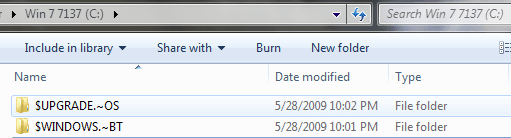
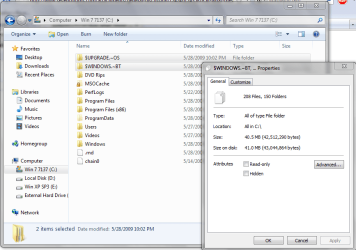
What are these folders/can I delete them?

andythecurefan

New member
Power User
VIP
Local time
6:00 PM
Messages
221
Location
Los Angeles, CA
thx
 

Attachments

  • Capture.PNG
    Capture.PNG
    8.3 KB · Views: 20
  • Capture2.PNG
    Capture2.PNG
    46.2 KB · Views: 48

My Computer My Computer

At a glance

7 Pro Build 7600.16385x64 [2.0 WEI]Intel(R) Celeron(R) D CPU 3.33GHz2.00 GB RAM (1.87 GB usable)ATI Radeon™ X300 based integrated graphics
Computer Manufacturer/Model Number
eMachines W3503
OS
7 Pro Build 7600.16385x64 [2.0 WEI]
CPU
Intel(R) Celeron(R) D CPU 3.33GHz
Memory
2.00 GB RAM (1.87 GB usable)
Graphics Card(s)
ATI Radeon™ X300 based integrated graphics
Sound Card
6-channel (5.1) ATI High Definition Audio
Monitor(s) Displays
eMachines® 17" LCD Flat Panel Monitor (17F3)
Screen Resolution
1024 x 768 @ 85Hz
Hard Drives
160GB HDD (7200rpm, 2MB cache)
The $UPGRADE.~OS Folder contains the temp. installation files when you upgraded from your previous OS. Do NOT delete them manually. Perform a disk clean up, (Check the tick box where it says 'Temporary OS upgrade files (it might differ)' or something) and the folder will disappear. I'm not sure about that second folder, can u post a screen shot once your inside the folder?

Hope this helps,
C.Guy
 
Last edited:

My Computer My Computer

At a glance

Windows 8 x64Intel Core i7 3630QMSamsung 8 GB DDR3 800 MhzATI Radeon HD Graphics 7670M + Intel HD Graph...
Computer type
Laptop
Computer Manufacturer/Model Number
Samsung
OS
Windows 8 x64
CPU
Intel Core i7 3630QM
Motherboard
Intel HM76
Memory
Samsung 8 GB DDR3 800 Mhz
Graphics Card(s)
ATI Radeon HD Graphics 7670M + Intel HD Graphics 4000
Screen Resolution
1366x768
Hard Drives
SAMSUNG Spinpoint M8 1TB
Internet Speed
4 Mb/sDownload Speed, 2 Mb/s Upload Speed
Antivirus
avast!
just found out what they were, you're right, they were temporary files from a Win 7 install. I ran the "setup" while within the OS, then canceled it and those files were left over.

+1 rep to you.
 

My Computer My Computer

At a glance

7 Pro Build 7600.16385x64 [2.0 WEI]Intel(R) Celeron(R) D CPU 3.33GHz2.00 GB RAM (1.87 GB usable)ATI Radeon™ X300 based integrated graphics
Computer Manufacturer/Model Number
eMachines W3503
OS
7 Pro Build 7600.16385x64 [2.0 WEI]
CPU
Intel(R) Celeron(R) D CPU 3.33GHz
Memory
2.00 GB RAM (1.87 GB usable)
Graphics Card(s)
ATI Radeon™ X300 based integrated graphics
Sound Card
6-channel (5.1) ATI High Definition Audio
Monitor(s) Displays
eMachines® 17" LCD Flat Panel Monitor (17F3)
Screen Resolution
1024 x 768 @ 85Hz
Hard Drives
160GB HDD (7200rpm, 2MB cache)
Thanks a lot, Andy.
 

My Computer My Computer

At a glance

Windows 8 x64Intel Core i7 3630QMSamsung 8 GB DDR3 800 MhzATI Radeon HD Graphics 7670M + Intel HD Graph...
Computer type
Laptop
Computer Manufacturer/Model Number
Samsung
OS
Windows 8 x64
CPU
Intel Core i7 3630QM
Motherboard
Intel HM76
Memory
Samsung 8 GB DDR3 800 Mhz
Graphics Card(s)
ATI Radeon HD Graphics 7670M + Intel HD Graphics 4000
Screen Resolution
1366x768
Hard Drives
SAMSUNG Spinpoint M8 1TB
Internet Speed
4 Mb/sDownload Speed, 2 Mb/s Upload Speed
Antivirus
avast!
Back
Top