What are these letters in Boot drive list?

AlanRR

New member
Member
Local time
7:06 AM
Messages
57
Location
Kings Lynn, Norfolk, UK
When viewing boot drive list most detail are obvious - connection, manufacturer and size etc - except for these mystery 2 alpha digits.

I am trying to match drives I know exist in my pc against what the boot mechanism knows them as and these two letters all seem to be unique yet I cannot match them back to any data I can see in W7.

Thoughts?
 

Attachments

  • whatarethese.jpg
    whatarethese.jpg
    58.9 KB · Views: 1

My Computer My Computer

At a glance

Windows 7 - 32bitIntel Core2Duo E84002GBAsus NVIDIA GT640
Computer type
PC/Desktop
Computer Manufacturer/Model Number
self build
OS
Windows 7 - 32bit
CPU
Intel Core2Duo E8400
Motherboard
ASUS P5Q SE
Memory
2GB
Graphics Card(s)
Asus NVIDIA GT640
Sound Card
Realtek on mobo
Monitor(s) Displays
2 identical IIyama 19"
Screen Resolution
1280 x 1024
Hard Drives
4 HDD + 1 SSD all SATA
PSU
520W Corsair HX series modular.
Case
Gigabyte - Triton
Cooling
Fans
Keyboard
Logitech
Mouse
Logitech wireless
Internet Speed
2.8M on a good day
Browser
IE11
Other Info
Wacom Bamboo Tablet CTH-470
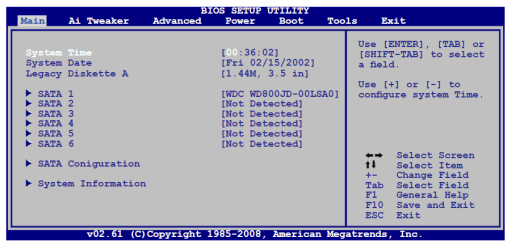
That is just how your bios designates what drive will boot first it will not show in windows. Windows uses its own management scheme to number drives. Those can be reordered on that list as it shows what boots first in your pc. Per your manual for that board if you want to know how the disks are plugged in then it's on the main page as shown.
 

Attachments

  • bios.PNG
    bios.PNG
    20.2 KB · Views: 2

My Computer My Computer

At a glance

10 Pro x64Ryzen 9 3900X64GB(4x16GB) DDR4EVGA 1080ti FTW3
Computer type
PC/Desktop
Computer Manufacturer/Model Number
Custom
OS
10 Pro x64
CPU
Ryzen 9 3900X
Motherboard
Asrock x370 Tachi
Memory
64GB(4x16GB) DDR4
Graphics Card(s)
EVGA 1080ti FTW3
Sound Card
ASUS Xonar Essence STX (V4 Bursons), ODAC rev B, NFB-11, O2
Monitor(s) Displays
3xASUS PB278Q/R, Optoma HD142X
Screen Resolution
3x1440p, 1080p
Hard Drives
512GB 850 EVO(OS, Programs)
4TB (Movies)
3TB (Downloads)
3TB (Programs)
1TB HDD (Games)
2x6TB R1 (videos)
PSU
AX760
Case
Fractal Define R5
Cooling
NH-D15S
Keyboard
Massdrop Ctrl with Box Navy's
Mouse
G903, Alioth XXL Mat
Internet Speed
280/40
Antivirus
MBAM, ESET
Browser
Canary 64 Bit
Other Info
I also own a Thinkpad P50 Xeon 4K, X220T, X1C5
After more research I am getting the impression these are more historic in that pre SATA ie PATA had the concept of Master/Slave Primary/Secondary and 3rd/4th whatever that is - so the letter combination above mean in order 3rd Master, Primary Master, Primary Slave, Secondary Slave, 4th Master. I recall in PATA days you had links to set on the drive to set the drive as Master/Slave Primary/Secondary and probably 3rd/4th.

I further assume that in these SATA days where there is only one physical drive per cable - there is now no longer any need to differentiate.

If anybody knows different then I'm interested - otherwise I'll sleep well with the above explanation.
 

My Computer My Computer

At a glance

Windows 7 - 32bitIntel Core2Duo E84002GBAsus NVIDIA GT640
Computer type
PC/Desktop
Computer Manufacturer/Model Number
self build
OS
Windows 7 - 32bit
CPU
Intel Core2Duo E8400
Motherboard
ASUS P5Q SE
Memory
2GB
Graphics Card(s)
Asus NVIDIA GT640
Sound Card
Realtek on mobo
Monitor(s) Displays
2 identical IIyama 19"
Screen Resolution
1280 x 1024
Hard Drives
4 HDD + 1 SSD all SATA
PSU
520W Corsair HX series modular.
Case
Gigabyte - Triton
Cooling
Fans
Keyboard
Logitech
Mouse
Logitech wireless
Internet Speed
2.8M on a good day
Browser
IE11
Other Info
Wacom Bamboo Tablet CTH-470
After more research I am getting the impression these are more historic in that pre SATA ie PATA had the concept of Master/Slave Primary/Secondary and 3rd/4th whatever that is - so the letter combination above mean in order 3rd Master, Primary Master, Primary Slave, Secondary Slave, 4th Master. I recall in PATA days you had links to set on the drive to set the drive as Master/Slave Primary/Secondary and probably 3rd/4th.

I further assume that in these SATA days where there is only one physical drive per cable - there is now no longer any need to differentiate.

If anybody knows different then I'm interested - otherwise I'll sleep well with the above explanation.

Yes that is correct and that scheme is so the bios knows what to boot from first it keeps your drives in a table of the order you set like that. It boots the same as old they just have their own channel for communication.
 

My Computer My Computer

At a glance

10 Pro x64Ryzen 9 3900X64GB(4x16GB) DDR4EVGA 1080ti FTW3
Computer type
PC/Desktop
Computer Manufacturer/Model Number
Custom
OS
10 Pro x64
CPU
Ryzen 9 3900X
Motherboard
Asrock x370 Tachi
Memory
64GB(4x16GB) DDR4
Graphics Card(s)
EVGA 1080ti FTW3
Sound Card
ASUS Xonar Essence STX (V4 Bursons), ODAC rev B, NFB-11, O2
Monitor(s) Displays
3xASUS PB278Q/R, Optoma HD142X
Screen Resolution
3x1440p, 1080p
Hard Drives
512GB 850 EVO(OS, Programs)
4TB (Movies)
3TB (Downloads)
3TB (Programs)
1TB HDD (Games)
2x6TB R1 (videos)
PSU
AX760
Case
Fractal Define R5
Cooling
NH-D15S
Keyboard
Massdrop Ctrl with Box Navy's
Mouse
G903, Alioth XXL Mat
Internet Speed
280/40
Antivirus
MBAM, ESET
Browser
Canary 64 Bit
Other Info
I also own a Thinkpad P50 Xeon 4K, X220T, X1C5
Back
Top