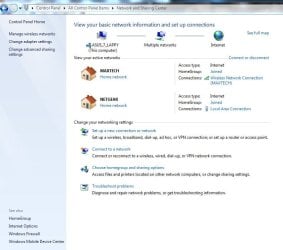
What can you do with both ethernet and wireless??

mw2

New member
Local time
3:06 PM
Messages
56
Hi everyone

I dont really know whether this is really relevent, but I was just wondering. If I have both ethernet cable and wireless on one computer as 2 networks. Can I join up both of them to increase my internet speed or somthing. I tested both of them seperately and the ethernet cable was much faster than the wireless. My router is next to my computer. Can I have some tips. I will be putting some screenshots later.

Thanks in advance
 

My Computer My Computer

At a glance

Windows 7 Professional2gb1gb
Computer Manufacturer/Model Number
Fujitsu Siemens
OS
Windows 7 Professional
Memory
2gb
Graphics Card(s)
1gb
Sound Card
265
Monitor(s) Displays
1080p
Hard Drives
1 external 1tb
Cooling
fan
I tested both of them seperately and the ethernet cable was much faster than the wireless.
Surprise, surprise...:D
 

My Computer My Computer

At a glance

Windows 7 Home Premium 32bit
OS
Windows 7 Home Premium 32bit
Unfortunately, you cannot do both. Once hooked up to an Ethernet cable, a computer will disconnect itself from a wireless network.
 

My Computer My Computer

At a glance

Windows 7 Ultimate x86Intel Core i3 M350 @ 2.27 GHz3.00 GBIntel 1GB HDMI Graphics Card
Computer Manufacturer/Model Number
HP Pavilion dv4i-2100
OS
Windows 7 Ultimate x86
CPU
Intel Core i3 M350 @ 2.27 GHz
Motherboard
Stock
Memory
3.00 GB
Graphics Card(s)
Intel 1GB HDMI Graphics Card
Sound Card
Stock
Monitor(s) Displays
14.6" HD
Screen Resolution
1200x800 current setting.
Hard Drives
320GB samsung internal
500GB ADATA portable
PSU
Stock
Case
Stock
Cooling
Targus twin-fan chill mat.
Internet Speed
At home, 300kb/sec downloads. At work, 1028kb/sec downloads.
Other Info
Purchased through HP direct, custom build. I highly recommend HP to anyone.
Nope...you won't get more speed out of your Internet by connecting more computers to the router.
Whatever your modem (no matter if cable or dsl) delivers is the MAx and will be shared with whatever you connect to your router. Naturally direct connections (via cable) are faster than wireless. But (depending on your router) they can be throttled down in order to assure enough bandwidth for any wireless client.

-DG
 

My Computer My Computer

At a glance

Windows 7 Ultimate x86DualCore AMD Athlon 64 X2, 2600 MHz 5200+Samsung 2GB DDR2Onboard NVIDIA GeForce 6150SE nForce 430
Computer Manufacturer/Model Number
HP m8000n
OS
Windows 7 Ultimate x86
CPU
DualCore AMD Athlon 64 X2, 2600 MHz 5200+
Motherboard
Asus M2N68-LA (Narra)
Memory
Samsung 2GB DDR2
Graphics Card(s)
Onboard NVIDIA GeForce 6150SE nForce 430
Sound Card
Onboard nVIDIA nForce 6100-430 (MCP61P)
Monitor(s) Displays
Westinghouse 19" LED
Screen Resolution
1280x1024
Hard Drives
SATA II Seagate Barracuda 500GB
USB II WD Elements 500GB
USB II WD My Book 1TB
USB II WD My Book 2TB
PSU
Stock (HP)
Case
Stock (HP)
Cooling
Stock
Keyboard
Logitech Classic KB 200
Mouse
Standard HP opticle USB mouse
Once hooked up to an Ethernet cable, a computer will disconnect itself from a wireless network.
May be it will, may be it won't. Mine remains happily connected to both.
But as SledgeDG wrote, the speed will remain the same.
 

My Computer My Computer

At a glance

Windows 7 Home Premium 32bit
OS
Windows 7 Home Premium 32bit
I tested both of them seperately and the ethernet cable was much faster than the wireless.
You really spent time testing this? That's like going through the process of testing which is faster, a motorcycle or a bicycle.
Unfortunately, you cannot do both. Once hooked up to an Ethernet cable, a computer will disconnect itself from a wireless network.
Only if you have specific management software configured to do so, and that would be very rare, so I'm not sure why you'd post something misldeading to the OP.

To answer the question, there is such a thing called "teaming" but that is done with multiple connections using the same interface, such as a server with multiple NIC cards. The NIC cards need to support the feature through drivers and management apps. In your case, just use the wired connection for your normal, everyday setup, and then switch to wireless if you want to roam around.
 

My Computer My Computer

At a glance

Windows 7 Ultimate x64 SP1Intel Core i7-260012 GB Patriot Extreme DDR3-1333Nvidia GTX 470
OS
Windows 7 Ultimate x64 SP1
CPU
Intel Core i7-2600
Motherboard
Gigabyte GA-P67A-UD3P-B3
Memory
12 GB Patriot Extreme DDR3-1333
Graphics Card(s)
Nvidia GTX 470
Monitor(s) Displays
Dell UltraSharp 2209WA
Hard Drives
OCZ Agility3 240 GB, WD5001AALS, WD7501AALS
PSU
OCZ ModStream 700W
Case
CoolerMaster HAF 912 Advanced
Cooling
CoolerMaster Hyper 212 Plus
I tested both of them seperately and the ethernet cable was much faster than the wireless.
You really spent time testing this? That's like going through the process of testing which is faster, a motorcycle or a bicycle.
Unfortunately, you cannot do both. Once hooked up to an Ethernet cable, a computer will disconnect itself from a wireless network.

I guess you never had to test anything in your life and just always knew the answer without having to. Some people don't, though, so you should take that into consideration. This forum would actually benefit from more people like this who actually test things themselves before just tasking the question out to others.

Speaking of misleading, it is not "very rare" to have your machine automatically switch to wired ethernet when it's connected and disable the wireless. In fact, I'd say the exact opposite in I don't see many computers which don't automatically switch back and forth so I'm not sure where that information is coming from. "Specific management software" is playing that up a little bit too much for what the majority of computers already come with these days.
 

My Computer My Computer

At a glance

XP / Win7 x64 ProIntel Quad-Core Q9450 @ 3.2GHz2x2GB GSkill DDR2NVIDIA GeForce 8600 GTS (EVGA)
OS
XP / Win7 x64 Pro
CPU
Intel Quad-Core Q9450 @ 3.2GHz
Motherboard
Asus P5-E
Memory
2x2GB GSkill DDR2
Graphics Card(s)
NVIDIA GeForce 8600 GTS (EVGA)
Monitor(s) Displays
Dell 2408WFP
Screen Resolution
1920x1200
I guess you never had to test anything in your life and just always knew the answer without having to. Some people don't, though, so you should take that into consideration. This forum would actually benefit from more people like this who actually test things themselves before just tasking the question out to others.
For the most part, I'd agree with what you are saying...if it was a topic with unknowns. Wi-Fi speeds compared to wired network speeds aren't a new inknown topic on a computing enthusiasts forum board.
Speaking of misleading, it is not "very rare" to have your machine automatically switch to wired ethernet when it's connected and disable the wireless. In fact, I'd say the exact opposite in I don't see many computers which don't automatically switch back and forth so I'm not sure where that information is coming from. "Specific management software" is playing that up a little bit too much for what the majority of computers already come with these days.
The majority of computers don't come with this software. I'm not going to pull out my eWang and get into a pissing contest, because I can't stand them, but in configuring over 20 laptops for friends and family in the last few years, along with working as a corproate IT manager for the last decade, buying from Dell and HP exclusively, I have yet to see an out of the box system that swapped connections automatically. I've seen ethernet ports disabled for alleged power savings when running on battery, but that's about it. Would it be a cool feature set to have? Yeah, I guess so for some people, but I've always found a hardware switch to be just as effective, such as the ones found on the Latitude D and E series laptops.
 

My Computer My Computer

At a glance

Windows 7 Ultimate x64 SP1Intel Core i7-260012 GB Patriot Extreme DDR3-1333Nvidia GTX 470
OS
Windows 7 Ultimate x64 SP1
CPU
Intel Core i7-2600
Motherboard
Gigabyte GA-P67A-UD3P-B3
Memory
12 GB Patriot Extreme DDR3-1333
Graphics Card(s)
Nvidia GTX 470
Monitor(s) Displays
Dell UltraSharp 2209WA
Hard Drives
OCZ Agility3 240 GB, WD5001AALS, WD7501AALS
PSU
OCZ ModStream 700W
Case
CoolerMaster HAF 912 Advanced
Cooling
CoolerMaster Hyper 212 Plus
I'm not sure why an eWang has to figure into this but I don't think it has a place here. My old Dell 600m automatically swaps connections and did so out of the box 6 years ago. My Toshiba Satellite from 7 years ago did the same, as well as my 2 year old HP laptop, and a 2 month old EEE pc. While I don't understand how we can have such polar opposite experiences with the same line of machines, I guess we'll just have to differ on that. At the least, there should be no statements that machines definitely do or don't come out of the box configured to swap connections because obviously there are real-world examples of both configurations.
 

My Computer My Computer

At a glance

XP / Win7 x64 ProIntel Quad-Core Q9450 @ 3.2GHz2x2GB GSkill DDR2NVIDIA GeForce 8600 GTS (EVGA)
OS
XP / Win7 x64 Pro
CPU
Intel Quad-Core Q9450 @ 3.2GHz
Motherboard
Asus P5-E
Memory
2x2GB GSkill DDR2
Graphics Card(s)
NVIDIA GeForce 8600 GTS (EVGA)
Monitor(s) Displays
Dell 2408WFP
Screen Resolution
1920x1200
I guess you aren't familiar with forum boards and how one person posts their supposed experience levels, assuming that makes them automatically correct on the subject. It's known as an eWang contest...my experience trumps yours because I said so...that kind of thing. Drives me up a wall.

As for the only differing point, I don't ever leave a system configured as is from the box. For business, I use the corporate image, and for home users, I wipe it out and do a clean install, each and everytime a new purchase is made. However, I do go to Dell/HP's websites for all utilities and drivers...and that swapping functionality is not offered through their websites. I've even contacted Dell about such software to disable a wireless connection when a laptop is either docked or connected by wire, and have never been given a solution, aside from instructing my users to use their hardware switches. I was getting tired of seeing my in-office users be connected twice, tying up two IP addresses per computer.
 

My Computer My Computer

At a glance

Windows 7 Ultimate x64 SP1Intel Core i7-260012 GB Patriot Extreme DDR3-1333Nvidia GTX 470
OS
Windows 7 Ultimate x64 SP1
CPU
Intel Core i7-2600
Motherboard
Gigabyte GA-P67A-UD3P-B3
Memory
12 GB Patriot Extreme DDR3-1333
Graphics Card(s)
Nvidia GTX 470
Monitor(s) Displays
Dell UltraSharp 2209WA
Hard Drives
OCZ Agility3 240 GB, WD5001AALS, WD7501AALS
PSU
OCZ ModStream 700W
Case
CoolerMaster HAF 912 Advanced
Cooling
CoolerMaster Hyper 212 Plus
It's just weird that you've had those experiences when I can't recall more than maybe one experience like that of my own, even having reformatted all of my personal machines upon receiving them and reloading my own image. I have seen it before on occasion, but it's never been the point where I've considered it a common or default action.

Anyway, I like the OP's thinking of how to maximize two separate connections (I would imagine this is how the person who created Wireless-N began the project), but unfortunately I can't think of much to be done other than being able to act as an access point with internet connection sharing but that's useless if there's already a wireless router. It does provide the ability to monitor wi-fi traffic while not losing an internet connection, though, if that's worth anything. That's probably all I'd use it for.
 

My Computer My Computer

At a glance

XP / Win7 x64 ProIntel Quad-Core Q9450 @ 3.2GHz2x2GB GSkill DDR2NVIDIA GeForce 8600 GTS (EVGA)
OS
XP / Win7 x64 Pro
CPU
Intel Quad-Core Q9450 @ 3.2GHz
Motherboard
Asus P5-E
Memory
2x2GB GSkill DDR2
Graphics Card(s)
NVIDIA GeForce 8600 GTS (EVGA)
Monitor(s) Displays
Dell 2408WFP
Screen Resolution
1920x1200
Unfortunately, you cannot do both. Once hooked up to an Ethernet cable, a computer will disconnect itself from a wireless network.

no, you still get to choose which connection you want. it's just in most case the wired will be faster, unless you have a really slow connection.
 

My Computer My Computer

At a glance

Win 7 X32e84003.5 gigs ddr2geforce 9500 gtx
Computer Manufacturer/Model Number
self built
OS
Win 7 X32
CPU
e8400
Motherboard
asus rampage formula rev. 1
Memory
3.5 gigs ddr2
Graphics Card(s)
geforce 9500 gtx
Monitor(s) Displays
26"
Screen Resolution
1680 x 1050
Once hooked up to an Ethernet cable, a computer will disconnect itself from a wireless network.
Maybe it will, maybe it won't. Mine remains happily connected to both.
But as SledgeDG wrote, the speed will remain the same.

Ahh, mine disconnects. Of course, there's something weird with my LAN driver anyway... lol... (Dream Edition is a tad bit screwy at times)
 

My Computer My Computer

At a glance

Windows 7 Ultimate x86Intel Core i3 M350 @ 2.27 GHz3.00 GBIntel 1GB HDMI Graphics Card
Computer Manufacturer/Model Number
HP Pavilion dv4i-2100
OS
Windows 7 Ultimate x86
CPU
Intel Core i3 M350 @ 2.27 GHz
Motherboard
Stock
Memory
3.00 GB
Graphics Card(s)
Intel 1GB HDMI Graphics Card
Sound Card
Stock
Monitor(s) Displays
14.6" HD
Screen Resolution
1200x800 current setting.
Hard Drives
320GB samsung internal
500GB ADATA portable
PSU
Stock
Case
Stock
Cooling
Targus twin-fan chill mat.
Internet Speed
At home, 300kb/sec downloads. At work, 1028kb/sec downloads.
Other Info
Purchased through HP direct, custom build. I highly recommend HP to anyone.
Hopefully I'm not the only one that thinks the original question/statement wasn't as silly as it was perhaps made out to be. Not everyone in every country has super-fast cable connections available, a fact that is highlighted to me whenever I go to a clients house and they're still running 256k adsl, or worse still, dial up.
With Next G 3G running at approx 7.2Mbps, and Wireless N at up to 300Mbps, it's entirely plausible that the OP's wireless connection (which wasn't specified) might have been faster than his wired connection.

Using Windows 7 Home Premium 64 bit on an Asus F3JR notebook, without any specialised networking software or bundled bloatware installed, I plugged in the a blue cable and took these snips for you:
Capture.JPG

Capture1.JPG

Which one am I connecting to the internet via? Well, the led lights on the front of my router are hidden by a surround sound speaker, and quite honestly, answering that question isn't motivation enough to wrench myself off the bean bag that I'm lying on. As I'm sure any bean bag owner will tell you, sometimes it just takes too long to shape just right, and an ewang/ipeen fight aint gonna do it.
 

My Computer My Computer

At a glance

XP Pro/Vista Ultimate (64)/Windows 7 Ultimate...Core 2 Duo E8500 @ stock8Gb (4 X 2Gb) Corsair Dominator 1066Mhz DDR2XFX ATI Radeon 4870 1Gb
OS
XP Pro/Vista Ultimate (64)/Windows 7 Ultimate Signature Edition(64)
CPU
Core 2 Duo E8500 @ stock
Motherboard
Gigabyte EP45-UD3R
Memory
8Gb (4 X 2Gb) Corsair Dominator 1066Mhz DDR2
Graphics Card(s)
XFX ATI Radeon 4870 1Gb
Sound Card
Onboard 7.1
Monitor(s) Displays
BenQ E2200Hd, Asus VW161D, HP L1506
Screen Resolution
1920 X 1080
Hard Drives
Seagate 7200.12 500Gb
2 X Hitachi 1Tb
PSU
CoolerMaster 650 EPD
Case
Thermaltake
Cooling
2 X Noctua 120mm's, Stock Intel
Keyboard
Logitech
Mouse
Logitech
There's a couple things to point out, Orpheous. First, both wired and wireless connections are faster than what comes to the typical house, so the week point in the chain is going to be the actual internet connection. I have a decent to high-end speed of 25 Mbps through Comcast at home, and that still can't come close to the bandwidth a wired 100/1000 MB connection or a wireless G or N connection can offer. So, using the internet as your testing point is not a good idea, especially when you factor in other variables, such as server load, traffic, etc.

If you really must still test the difference between wired and wireless, you'll have to do it all internally, using the same router. For example, I have a Windows Home Server. I could copy a DVD image file, roughly 4 GB in size, to the server using either wired or wireless connections, and record the time it took to fully copy the file up to the server. If I did so, I'd see a big difference in the wired and wireless speeds. For further testing, I could repeat the copy process several times, and each time move farther and farther from the router, such as moving one room away, then two, then another floor, etc. You'll see how those times vary greatly.

The reason I suggested that it wasn't worth testing is because a wired connection was available...and will always provide a better, more consistent connection than wireless. The general rule in networking is that wireless is only used when wired isn't available or practical, but it is never a replacement for wired.
 

My Computer My Computer

At a glance

Windows 7 Ultimate x64 SP1Intel Core i7-260012 GB Patriot Extreme DDR3-1333Nvidia GTX 470
OS
Windows 7 Ultimate x64 SP1
CPU
Intel Core i7-2600
Motherboard
Gigabyte GA-P67A-UD3P-B3
Memory
12 GB Patriot Extreme DDR3-1333
Graphics Card(s)
Nvidia GTX 470
Monitor(s) Displays
Dell UltraSharp 2209WA
Hard Drives
OCZ Agility3 240 GB, WD5001AALS, WD7501AALS
PSU
OCZ ModStream 700W
Case
CoolerMaster HAF 912 Advanced
Cooling
CoolerMaster Hyper 212 Plus
Back
Top