What do you use? Best combination of security software?

compwiz02

New member
Local time
11:33 PM
Messages
30
So....I regretfully downloaded some files which I thought would help me out but did the exact opposite. Put some weird spyware and adware I think on my laptop. My laptop works ok now after running a few scans but I have now installed several programs just to be safe. What do you guys recommend for 1) programs used to scan for spyware, adware, and any malware, and 2) programs used as a shield? most software will have the option of acting as a shield for you but which ones are the best?

I have Malwarebytes Free, IOLO Anti-Malware Free, Emsisoft Anti-Malware Free (the shield has been pretty good), SUPERAntiSpyware Free, HitmanPro trial, AdAware SE personal Free, SpyBot Search & Destroy Free, Ads-killer free, as well as Avast Internet Security (which has a good shield) and Panda Antivirus Free. There are a few shields that do a pretty good job which include Winpatrol, Emsisoft, and Avast. But I'm not sure if I am using too many programs or not. What is recommended?

Oh yea, I also use Spyhunter 4 free (which I just recently installed due to some recommendations from some article postings online). I swear....I blame Spyhunter for the reason why I decided to install so many programs. I WAS relying on Malwarebytes for the past few years until Spyhunter caught over 600 adware and spyware (or what seemed to be some weird stuff) and since it has such a high rating and positive reviews on a few sites, I became kinda insecure. Trying to decide whether or not I want to pay for it. I only pay for things if they have great reviews and will only delete crap once paid for.

When you see one program catching way more stuff than others and that specific program has some good reviews, you become kinda curious....
 

My Computer My Computer

At a glance

Windows 7
Computer type
PC/Desktop
OS
Windows 7
~~~
When you see one program catching way more stuff than others and that specific program has some good reviews, you become kinda curious....

Curious can get you infected. Suspicious is better.

Do you personally know the people who wrote those good reviews? People get paid to tell lies online.


Let's say that you run program A and it flags 50 bad things. Don't let program A fix anything.

Now run program B. It flags 10 bad things.

Is program A is better?

What if 40 of those 50 "bad things" that program A found were lies?


That said, I understand the question that you are asking. This long running thread covers more than just anti-virus apps: http://www.sevenforums.com/system-security/72070-whats-best-anti-virus.html
 

My Computer My Computer

At a glance

W7 Pro SP1 64biti78GBIntel HD Graphics
Computer type
Laptop
Computer Manufacturer/Model Number
Employer provided Dell Latitude
OS
W7 Pro SP1 64bit
CPU
i7
Memory
8GB
Graphics Card(s)
Intel HD Graphics
Hard Drives
crappy SSD
Antivirus
Employer mandated Symantec Endpoint Protection
Browser
Pale Moon 64bit, IE11 64bit & Chrome 64bit
Yes, I do realize a lot of people post good reviews because they might be paid to do it but I also realize there are some people who are ignorant and stupid and post up bad reviews.

Spyhunter: Voted As Best Antivirus And Anti Malware That Offers Complete Protection Offering Spyhunter Download and Free Scan - Yahoo Finance
How Safe Is Spyhunter 4? - We Hate Malware
SpyHunter 4

I actually researched some of the stuff SpyHunter had found on my laptop and some of it seemed to be legit bad stuff with TONS of traces and breadcrumbs.
 

My Computer My Computer

At a glance

Windows 7
Computer type
PC/Desktop
OS
Windows 7
I opened a virtual machine to download SpyHunter and OpenDNS blocked the download. I switched to Google DNS and completed the download/install and test. I do not think that you will be pleased with SpyHunter. If you are determined to throw your money away, then uninstall SpyHunter and you should be offered a purchase price of $10 instead of the $39.99.
 

My Computer My Computer

At a glance

W7 Pro SP1 64biti78GBIntel HD Graphics
Computer type
Laptop
Computer Manufacturer/Model Number
Employer provided Dell Latitude
OS
W7 Pro SP1 64bit
CPU
i7
Memory
8GB
Graphics Card(s)
Intel HD Graphics
Hard Drives
crappy SSD
Antivirus
Employer mandated Symantec Endpoint Protection
Browser
Pale Moon 64bit, IE11 64bit & Chrome 64bit
Is there a valid test that gives results on what are the top 10 malware/spyware/adware softwares? I can literally give you guys a screenshot later on on what SpyHunter was able to get. If you guys can give me a free solution on what SpyHunter caught, that would be great. As for OpenDNS, I'm not against using that service but sometimes a program can be blocked from being downloaded for weird reasons even if that program is deemed safe. Not vouching for SpyHunter....I'm jus sayin....it can happen.

if you look up reviews, Malwarebytes is at the top. But is it the best for browser hijacks and stuff?

The Best Anti-Malware Software of 2015 | Top Ten Reviews <-- this site doesn't even show any anti-malware software.
 

My Computer My Computer

At a glance

Windows 7
Computer type
PC/Desktop
OS
Windows 7
If software uses a "free scan - pay to fix" business model, then I would avoid it.

See this thread for more info:
spyhunter vs malwarebytes vs iobit - Anti-Virus and Anti-Malware Software

On positive note, SpyHunter found no problems inside my clean Virtual Machine.


Let those that volunteer in this security forum walk you thru cleaning your computer.

There can be harmless things that are left over from an infection. There are plenty of things that Malwarebytes (and other scanners) will ignore because they do no harm.
 

My Computer My Computer

At a glance

W7 Pro SP1 64biti78GBIntel HD Graphics
Computer type
Laptop
Computer Manufacturer/Model Number
Employer provided Dell Latitude
OS
W7 Pro SP1 64bit
CPU
i7
Memory
8GB
Graphics Card(s)
Intel HD Graphics
Hard Drives
crappy SSD
Antivirus
Employer mandated Symantec Endpoint Protection
Browser
Pale Moon 64bit, IE11 64bit & Chrome 64bit
Is there a valid test that gives results on what are the top 10 malware/spyware/adware softwares? ...
There are entire companies dedicated to testing stuff like this and there are long threads debating the testing methods and the results of those tests.

There are no simple answers - just tons of opinions.
 

My Computer My Computer

At a glance

W7 Pro SP1 64biti78GBIntel HD Graphics
Computer type
Laptop
Computer Manufacturer/Model Number
Employer provided Dell Latitude
OS
W7 Pro SP1 64bit
CPU
i7
Memory
8GB
Graphics Card(s)
Intel HD Graphics
Hard Drives
crappy SSD
Antivirus
Employer mandated Symantec Endpoint Protection
Browser
Pale Moon 64bit, IE11 64bit & Chrome 64bit
SpywareHunter - one to avoid in my opinion. Try typing the follwing search term into google search and check out the top results and have a read. Words like Scam, Bad, Don't Trust.

spyhunter site:malwaretips.com

Best combination is - what works for you. Just plug the gaps in security.
 

My Computer My Computer

At a glance

Microsoft Windows 7 Home Premium 64-bit 7601 ...AMD C-60 APU with Radeon(tm) HD Graphics4.00 GBAMD Radeon HD 6290 Graphics
Computer type
Laptop
Computer Manufacturer/Model Number
ASUS
OS
Microsoft Windows 7 Home Premium 64-bit 7601 Multiprocessor Free Service Pack 1
CPU
AMD C-60 APU with Radeon(tm) HD Graphics
Motherboard
ASUSTeK COMPUTER INC. X501U
Memory
4.00 GB
Graphics Card(s)
AMD Radeon HD 6290 Graphics
Sound Card
(1) AMD High Definition Audio Device (2) Realtek High Defi
Screen Resolution
1366 x 768 x 32 bits (4294967296 colors) @ 60 Hz
Hard Drives
Hitachi HTS545050A7E380 SATA Disk Device
Antivirus
Comodo CIS & FW, SecureAplus App Whitelisting, Threatfire
Browser
Cyberfox 64bit, Opera 64bit, Airfox
Other Info
Spy-The-Spy, HitmanPro.Alert, Norton Connect Safe, MJRegWatcher, BitDefender TrafficLight, Voodoo Shield, Zemana AntiMalware
Fair enough.

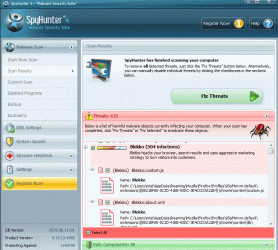
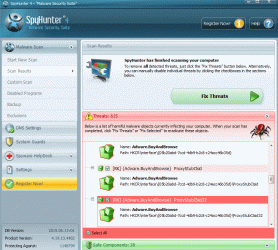
Someone tell me what's the best way to fix the following things that SpyHunter apparently found:

SpyHunter found around 600 infections

Adware.BuyAndBrowse (32 infections)
PUP.SupTab
Adware Helpers
Adware.Multiplug
Adware.YTDownloader (26 infections)
Yontoo Layers
Rogue.Spy Protector
Blekko (504 infections)
Conduit Search/Toolbar
Iminent Toolbar
MyWebSearch
OurSurfing.com
2o7
Adware.Sense
Atlast DMT
PUP.CrossRider
PUP.InstallCore
PUP.SupTab
PUP.YoutubeAdblocker (26 infections)

Spybot was the only program that actually found stuff but was unable to detect what SpyHunter found (except Yontoo):

Delta Toolbar
Yontoo.Pagerage
And it found 447 cookies in firefox, but after I cleaned it up, SpyHunter still detected the same stuff it detected before.

Every other program I used to scan my laptop found nothing. Only bad thing I don't like about SpyHunter was that it takes way too long (I didn't let it finish) and it takes a lot of CPU.
 

My Computer My Computer

At a glance

Windows 7
Computer type
PC/Desktop
OS
Windows 7
~~~
SpyHunter found around 600 infections
~~~
Let's reword that to: "SpyHunter found around 600 traces of infections that reputable security scanners think are harmless."

I should have worded my program A/program B illustration better so that it is clear the what program A finds might indeed have been caused by an infection, but program A is telling you a lie when it says that you should pay to get rid of these minor, harmless traces.

I have watched long time members in this security forum use scanning tools that remove some harmless stuff (items that other scanning tools just leave). I suppose that getting rid of every trace helps prevent people from getting tricked by scams like SpyHunter. But getting rid of every trace means that those maintaining these scanners have to put a lot of effort/research/time into making sure that the detect everything and properly remove it without harming the computer. Such efforts take them away from the core goal: stopping the infection.

For example: there are ways to try and hide how various registry entries start an infection. There can be entries that point to other entries that in turn point to other entries - eventually starting the infected file. If a scanning tool has removed the infected file, then all of those obfuscated registry entries are most likely harmless. They won't slow the computer down. Just leave them be.


Does SpyHunter tell you exactly what it found? Pick one item that it found and see if it says exactly what & where the problem is. Please post back with one example.
 

My Computer My Computer

At a glance

W7 Pro SP1 64biti78GBIntel HD Graphics
Computer type
Laptop
Computer Manufacturer/Model Number
Employer provided Dell Latitude
OS
W7 Pro SP1 64bit
CPU
i7
Memory
8GB
Graphics Card(s)
Intel HD Graphics
Hard Drives
crappy SSD
Antivirus
Employer mandated Symantec Endpoint Protection
Browser
Pale Moon 64bit, IE11 64bit & Chrome 64bit
Does SpyHunter tell you exactly what it found? Pick one item that it found and see if it says exactly what & where the problem is. Please post back with one example.

Did you even read my post or did you just want to post up 3 paragraphs on how some programs detect harmless things? I posted up a list that SpyHunter found in my post above...
 

My Computer My Computer

At a glance

Windows 7
Computer type
PC/Desktop
OS
Windows 7
Someone tell me what's the best way to fix the following things that SpyHunter apparently found:

Are you unwilling to use the paid version of SpyHunter?

Can you live with not removing these 600 items, considering the anxiety that causes?
 

My Computer My Computer

At a glance

Windows 7 Home Premium SP1, 64-bitIntel Skylake i5-6600K, not overclocked8 GB HyperX DDR4-2666 (2 x 4 GB)none; graphics are integrated on CPU
Computer type
PC/Desktop
Computer Manufacturer/Model Number
Ignatz Special; 4 speed manual gearbox; factory air conditioning; one of one
OS
Windows 7 Home Premium SP1, 64-bit
CPU
Intel Skylake i5-6600K, not overclocked
Motherboard
AsRock Z170M Extreme 4, micro ATX
Memory
8 GB HyperX DDR4-2666 (2 x 4 GB)
Graphics Card(s)
none; graphics are integrated on CPU
Sound Card
onboard: Realtek ALC1150; external: USB Behringer UF0-202
Monitor(s) Displays
Dell S2340M 23 inch IPS
Screen Resolution
1600 x 900
Hard Drives
System: Crucial MX100 series SSD, 128 GB;
Data: Samsung Spinpoint 103SJ, 1 TB;
Backup: WD Caviar Green WD30EZRX-00D8PB0, 3 TB
PSU
Rosewill SilentNight 500 watt fanless, semi-modular
Case
Antec Solo II
Cooling
Noctua NH-U12S; Noctua F12 intake, Noctua S12A exhaust
Keyboard
Microsoft 200 6JH-00001 USB
Mouse
Dell or Microsoft optical wired; USB
Antivirus
Microsoft Security Essentials and Malwarebytes Premium
Browser
Pale Moon
Other Info
All fans PWM; speeds at idle: CPU circa 500 rpm; intake circa 600 rpm; exhaust circa 600 rpm; CPU temps 27 idle and 47 C load in a warm room (27 C/81 F) when running Intel Extreme Tuning Utility stress test.
Does SpyHunter tell you exactly what it found? Pick one item that it found and see if it says exactly what & where the problem is. Please post back with one example.
Did you even read my post or did you just want to post up 3 paragraphs on how some programs detect harmless things? I posted up a list that SpyHunter found in my post above...
Yes, I read every word of all of your posts in this thread - sometimes, I read your words more than once. Sorry that I was not clear in my request for more info from you. I see that my method of communicating and discussing things is not a good fit for you. I'll let other forum members help you from here on out.


Just to clarify what I was asking for:
Your list of what SpyHunter found has no details. Below is an example of the details provided by a different scamware/scareware product that scans for free, but makes you pay to "fix" harmless stuff:

scamware.PNG

Those scan (scam) results are from a Windows 7 virtual machine that has never been on the Internet and has not had any 3rd party software installed or uninstalled.


Again, I'll let other forum members help you from here on out. Sorry to have wasted your time.
 

My Computer My Computer

At a glance

W7 Pro SP1 64biti78GBIntel HD Graphics
Computer type
Laptop
Computer Manufacturer/Model Number
Employer provided Dell Latitude
OS
W7 Pro SP1 64bit
CPU
i7
Memory
8GB
Graphics Card(s)
Intel HD Graphics
Hard Drives
crappy SSD
Antivirus
Employer mandated Symantec Endpoint Protection
Browser
Pale Moon 64bit, IE11 64bit & Chrome 64bit
How many security programs do you have on your computer at this time? Please no smart mouth. I also have read the complete thread.

I would not use IOLO Anti-Malware for one reason. I have never heard of it.

What I use active and it works for me.
Microsoft Security Essentials
Malwarebytes Anti Malware Premium.
Windows 7 built in firewall.

I also gave up on all those reviews years ago. In my opinion they are just bought and paid for B/S.
 

My Computer My Computer

At a glance

Windows 10 Pro. 64/ version 1709 Windows 7 Pr...Intel i7-6800K @ 4.3Corsair Platinum 16 gig @2400EVGA GTX 1070 OC
Computer type
PC/Desktop
Computer Manufacturer/Model Number
Home made Desktop
OS
Windows 10 Pro. 64/ version 1709 Windows 7 Pro/64
CPU
Intel i7-6800K @ 4.3
Motherboard
ASUS X-99 Deluxe II
Memory
Corsair Platinum 16 gig @2400
Graphics Card(s)
EVGA GTX 1070 OC
Monitor(s) Displays
Asus 27" LED LCD/VE278Q
Screen Resolution
1920-1080 or 1280-720 HDMI
Hard Drives
INTEL SSD 730-240 Gb Sata 3.0/
PSU
EVGA Platium 1200W
Case
Phanteks Luxe Tempered Glass 8 fans/ one radiator
Cooling
XSPC/ Water Cooled CPU
Keyboard
Das 4 Professional
Mouse
Logitech M705/MX Anywhere 2-S
Internet Speed
100 mbits
Antivirus
Microsoft Security Essentials/ Malwarebytes Premium 3.0/ SAS
Browser
I.E. 11 default/Firefox/ ISP Time Warner Cable/Spectrum
Other Info
LG BluRay Burner/
Sound system-KLipsch-THX/
Icy Dock ssd Hot Swap bays.
Fair enough.

I've decided that I will uninstall a few programs.

Anyways, here are two screenshots I took.
 

Attachments

  • spyhunter4_pic1.gif
    spyhunter4_pic1.gif
    114.2 KB · Views: 0
  • spyhunter_pic2.gif
    spyhunter_pic2.gif
    110.3 KB · Views: 1

My Computer My Computer

At a glance

Windows 7
Computer type
PC/Desktop
OS
Windows 7
Please answer this question from my post #14

How many security programs do you have on your computer at this time?
 

My Computer My Computer

At a glance

Windows 10 Pro. 64/ version 1709 Windows 7 Pr...Intel i7-6800K @ 4.3Corsair Platinum 16 gig @2400EVGA GTX 1070 OC
Computer type
PC/Desktop
Computer Manufacturer/Model Number
Home made Desktop
OS
Windows 10 Pro. 64/ version 1709 Windows 7 Pro/64
CPU
Intel i7-6800K @ 4.3
Motherboard
ASUS X-99 Deluxe II
Memory
Corsair Platinum 16 gig @2400
Graphics Card(s)
EVGA GTX 1070 OC
Monitor(s) Displays
Asus 27" LED LCD/VE278Q
Screen Resolution
1920-1080 or 1280-720 HDMI
Hard Drives
INTEL SSD 730-240 Gb Sata 3.0/
PSU
EVGA Platium 1200W
Case
Phanteks Luxe Tempered Glass 8 fans/ one radiator
Cooling
XSPC/ Water Cooled CPU
Keyboard
Das 4 Professional
Mouse
Logitech M705/MX Anywhere 2-S
Internet Speed
100 mbits
Antivirus
Microsoft Security Essentials/ Malwarebytes Premium 3.0/ SAS
Browser
I.E. 11 default/Firefox/ ISP Time Warner Cable/Spectrum
Other Info
LG BluRay Burner/
Sound system-KLipsch-THX/
Icy Dock ssd Hot Swap bays.
Programs installed? Not counting the tools that run as portable executable files (eg: tdsskiller.exe):

Avast Internet Security
WinPatrol (Scotty)
Glary Utilities
RAM Rush
SUPERAntiSpyware
Panda Free Antivirus
Emsisoft Anti-Malware
SpyHunter 4
Spybot S&D
IOBit Malware Fighter
Ad-Aware Antivirus (with Web Companion)
 

My Computer My Computer

At a glance

Windows 7
Computer type
PC/Desktop
OS
Windows 7
I'd stay away from any AV or scanner that goes overboard on red color to emphasize a problem. It looks too much like the popular scam software. On top of that, the bugs and other coloring make it look like it was written in a junior high school PC class. There's no need for that as "real" software just gets down to business and produces a log file that can be shared for review.

Some of those you listed, I never heard of in recent time. If you have all that software installed and get over 600 entries from another scanner, that's a sure fire warning that it's a scam. Either that or your PC is virus test bed. I feel like I need to go wash my hands now. :)

Added:
Forgot to ask; Did you actually check the registry for some of the listed keys?
 
Last edited:

My Computer My Computer

At a glance

Windows 7 Pro-x64i7-2600 3.4GHz - 3.8GHz Turbo8Gb - 2x4GB, Muskin 991770 PC3-1333Integrated Intel HD 2000
Computer type
PC/Desktop
Computer Manufacturer/Model Number
Built 2/11/2011
OS
Windows 7 Pro-x64
CPU
i7-2600 3.4GHz - 3.8GHz Turbo
Motherboard
Intel DH67BL-B3
Memory
8Gb - 2x4GB, Muskin 991770 PC3-1333
Graphics Card(s)
Integrated Intel HD 2000
Sound Card
Integrated Intel 10.1 HD, RealTek ALC892
Monitor(s) Displays
Asus LCD VH222H, Haier HL24XSL2a
Screen Resolution
1920x1080, 1920x1080
Hard Drives
Crucial SSD C300-128Gb,
Western Digital WD5002AALX - 500Gb,
Western Digital WD7501AALS - 750Gb
PSU
Seasonic 650W 80+ Gold Modular
Case
Rosewill Defender
Cooling
Stock CPU, Four 120mm case fans, PCH fan added
Keyboard
Logitech EX100 Y-RBH94 Wireless
Mouse
Logitech EX100 M-RCE95 Wireless
Internet Speed
3.0/1.5 Mbs
Antivirus
Microsoft Security Essentials
Browser
Microsoft Internet Explorer 11
Other Info
Antec Veris Premier-Multimedia IR Station,
Cyber Accoustics-3602 Speakers,
AFT XM-5U Card Reader,
Hauppauge TV-HVR-2250,
Sony LX300 USB Turntable
That many active security programs on one computer at the same time is your first problem.

The big problem is IOBit Malware Fighter. Once you install any program by IOBit I would suggest reading the forum tutorials on Clean Install you will probable need to.
 

My Computer My Computer

At a glance

Windows 10 Pro. 64/ version 1709 Windows 7 Pr...Intel i7-6800K @ 4.3Corsair Platinum 16 gig @2400EVGA GTX 1070 OC
Computer type
PC/Desktop
Computer Manufacturer/Model Number
Home made Desktop
OS
Windows 10 Pro. 64/ version 1709 Windows 7 Pro/64
CPU
Intel i7-6800K @ 4.3
Motherboard
ASUS X-99 Deluxe II
Memory
Corsair Platinum 16 gig @2400
Graphics Card(s)
EVGA GTX 1070 OC
Monitor(s) Displays
Asus 27" LED LCD/VE278Q
Screen Resolution
1920-1080 or 1280-720 HDMI
Hard Drives
INTEL SSD 730-240 Gb Sata 3.0/
PSU
EVGA Platium 1200W
Case
Phanteks Luxe Tempered Glass 8 fans/ one radiator
Cooling
XSPC/ Water Cooled CPU
Keyboard
Das 4 Professional
Mouse
Logitech M705/MX Anywhere 2-S
Internet Speed
100 mbits
Antivirus
Microsoft Security Essentials/ Malwarebytes Premium 3.0/ SAS
Browser
I.E. 11 default/Firefox/ ISP Time Warner Cable/Spectrum
Other Info
LG BluRay Burner/
Sound system-KLipsch-THX/
Icy Dock ssd Hot Swap bays.
Well I'm gonna go with what you guys say since I would rather trust the authoritative reviews over a bunch of blogs with mixed reviews. Only reason why I became insecure is because oursurfing came into my browsers and I think it was Spybot or the small portable files (adwcleaner or tdsskiller ) that got rid of oursurfing cuz when I restarted my browser, it was gone. I did a scan using all of the programs and they didn't find anything. So I don't feel like wasting any more time validating any of the things SpyHunter caught. The fact that the Quick Scan on an Anti-Malware takes so long to run a scan and it kinda takes up a lot of CPU bugs me a bit. I also admit I hate paying software to remove stuff.

So I'll just remove a few of the programs I installed. Maybe leave Spybot and Ad-Aware....want to give them a chance.

Thanks guys for your help. If you guys have any more tips for me, go ahead and post them :) I always like hearing opinions and reviews about security programs.

By the way, virus bulletin recently published a report saying Avira has a higher percantage in the RAP category compared to other antiviruses like Kaspersky and Panda.
 

My Computer My Computer

At a glance

Windows 7
Computer type
PC/Desktop
OS
Windows 7
Back
Top