What does this error code mean: 0x805800d?

flycaster

New member
Member
VIP
Local time
6:46 PM
Messages
472
Location
Boynton Beach, FL
Ran Windows Defender several times over the past few days and kept getting the following error message:

"Some history items could not be displayed. Please wait a few minutes and try again. That doesn't work, clear the history and then try again. (Error Code 0x805800d)"
 

My Computer

Computer Manufacturer/Model Number
Gateway DX4720-03/HP Pavilion dv6
OS
Windows 7 HP 64-bit
Memory
4GB/4GB
Antivirus
Avast Pro
Browser
Firefox, the latest
Did you try clearing the history?
 

My Computer

Computer type
Laptop
Computer Manufacturer/Model Number
HP Pavillion dv6 (dv6-6165dx)
OS
Windows 7 Home Premium x64
CPU
AMD Vision A8-3500M 4 Core
Motherboard
AMD
Memory
8Gb
Graphics Card(s)
AMD Radeon HD 6620G
Screen Resolution
1366x768
Hard Drives
Hitachi Travelstar 500Gb
Internet Speed
Realtek RTL8188CE 802.11b/g/n
Ran Windows Defender several times over the past few days and kept getting the following error message:

"Some history items could not be displayed. Please wait a few minutes and try again. That doesn't work, clear the history and then try again. (Error Code 0x805800d)"

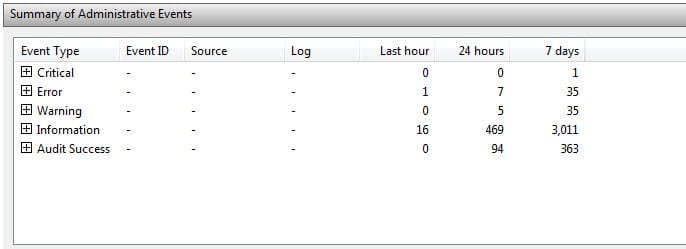
Look in Event Viewer and see if you can find an entry related to the problem;

1. Left click the "Start" orb (Windows Flag in lower left corner)
2. Type "Event Viewer" in the caption box without the quotes
3. Wait until the screen populates
4. Click the "+" sign in the Summary of Administrative Events categories.

Event Viewer.jpg

HTH
 

My Computer

Computer type
PC/Desktop
Computer Manufacturer/Model Number
Custom Built
OS
Windows 7 Professional x64
CPU
Intel i5 quad processor
Motherboard
DP67BG
Memory
16 GB
Graphics Card(s)
Radeon HD 5770
Sound Card
Realtek High Definition Audio
Monitor(s) Displays
Samsung SyncMaster
Screen Resolution
1920X1080
Hard Drives
WD 2TB (SATA Internal)
WD 1TB (USB External)
PSU
Corsair GS800
Case
Tower (Generic)
Cooling
3 Internal Fans
Keyboard
MS Wireless
Mouse
MS Optical Wired
Internet Speed
54 mbps
Antivirus
Emsisoft
Browser
IE-Version 9, Palemoon-Version 24.2.0
Do you have another Anti Virus program installed? that will cause the 0x805800d error.
 

My Computer

Computer type
PC/Desktop
Computer Manufacturer/Model Number
Home Built Desktop By DataTech
OS
Windows 7 Ultimate X64 SP1
CPU
Intel i5-2550K, Differing ~4.4-4.8GHz No built in GPU
Motherboard
ASUS P8Z68-V PRO/GEN3
Memory
16GB G.Skill Sniper 1866MHz @ 2133MHz 2x8GB
Graphics Card(s)
ASUS GTX650TIB-DC2OC-2GD5, (650TI Boost)
Sound Card
Onboard Realtek 5-1
Monitor(s) Displays
Samsung P2570HD
Screen Resolution
1920x1080
Hard Drives
Samsung 840 Pro 256GB SSD for OS, 500GB Seagate Constellation (Enterprise drive) for Data
PSU
Corsair HX650W
Case
Inwin Dragon Rider
Cooling
Hyper 212 EVO w/two Noctua fans, push-pull, @1300 RPM
Keyboard
E-Z Eyes, bright yellow keys with large characters
Mouse
steelseries SENSEI Laser Pro Gaming
Internet Speed
48-51Mbs Mbs down, 11 Mbs up Xfinity Cable
Antivirus
Norton Internet Security 2013
Browser
IE 10, Opera, Pale Moon if needed
Other Info
4 case fans, LG BluRay-RE, ASUS DVD-RW, Mr. Fusion power supply, 1.21 gigawatts.
History cleared, made no difference, still got error. Norton 360 is my antivirus. N360 has been on the computer since I got it and Defender always worked up until now.
 

My Computer

Computer Manufacturer/Model Number
Gateway DX4720-03/HP Pavilion dv6
OS
Windows 7 HP 64-bit
Memory
4GB/4GB
Antivirus
Avast Pro
Browser
Firefox, the latest
History cleared, made no difference, still got error. Norton 360 is my antivirus. N360 has been on the computer since I got it and Defender always worked up until now.
Do you by chance have any Wildfire games installed?
 

My Computer

Computer type
PC/Desktop
OS
Microsoft Windows 7 Home Premium 64-bit 7601 Multiprocessor Free Service Pack 1
CPU
Intel(R) Core(TM) i7-3770 CPU @ 3.40GHz
Motherboard
ASUSTeK COMPUTER INC. P8H77-M
Memory
8.00 GB
Graphics Card(s)
Intel(R) HD Graphics 4000
Sound Card
On Board
Monitor(s) Displays
Dell 24"
Screen Resolution
1920 x 1080
Hard Drives
(1) INTEL SSDSC2CT180A3 ATA Device (2) ST500DM002-1BD142 ATA Device (3) WDC WD3200AAKS-75L9A0 ATA Device (4) Generic- Compact Flash USB Device (5) Generic- MS/MS-Pro USB Device (6) Generic- SD/MMC USB Device (7) Generic- SM/xD-Picture USB
PSU
500w Corsair
Case
Cooler Master
Cooling
3 Fans
Keyboard
Logitech MK300
Mouse
Logitech WOM
Internet Speed
75Mb
Antivirus
Norton 360
Browser
Firefox, Opera, IE
Try disabling Windows Defender. Sometimes it takes time for two AVs to cause a conflict. I advise against using any of the Norton 360 "tweaking" tools, firewall and AV only.
 

My Computer

Computer type
PC/Desktop
Computer Manufacturer/Model Number
Home Built Desktop By DataTech
OS
Windows 7 Ultimate X64 SP1
CPU
Intel i5-2550K, Differing ~4.4-4.8GHz No built in GPU
Motherboard
ASUS P8Z68-V PRO/GEN3
Memory
16GB G.Skill Sniper 1866MHz @ 2133MHz 2x8GB
Graphics Card(s)
ASUS GTX650TIB-DC2OC-2GD5, (650TI Boost)
Sound Card
Onboard Realtek 5-1
Monitor(s) Displays
Samsung P2570HD
Screen Resolution
1920x1080
Hard Drives
Samsung 840 Pro 256GB SSD for OS, 500GB Seagate Constellation (Enterprise drive) for Data
PSU
Corsair HX650W
Case
Inwin Dragon Rider
Cooling
Hyper 212 EVO w/two Noctua fans, push-pull, @1300 RPM
Keyboard
E-Z Eyes, bright yellow keys with large characters
Mouse
steelseries SENSEI Laser Pro Gaming
Internet Speed
48-51Mbs Mbs down, 11 Mbs up Xfinity Cable
Antivirus
Norton Internet Security 2013
Browser
IE 10, Opera, Pale Moon if needed
Other Info
4 case fans, LG BluRay-RE, ASUS DVD-RW, Mr. Fusion power supply, 1.21 gigawatts.
Ran Windows Defender several times over the past few days and kept getting the following error message:

"Some history items could not be displayed. Please wait a few minutes and try again. That doesn't work, clear the history and then try again. (Error Code 0x805800d)"

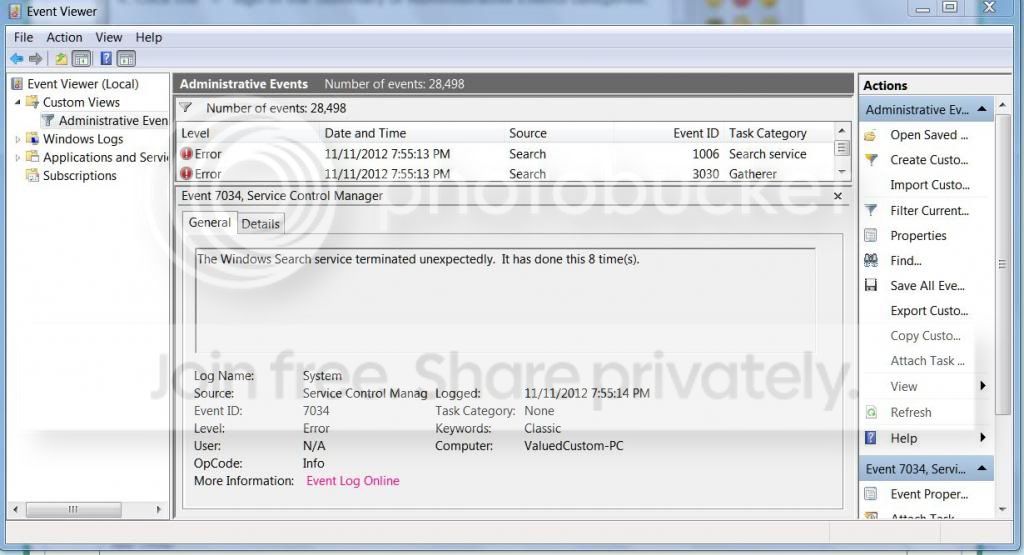
Look in Event Viewer and see if you can find an entry related to the problem;

1. Left click the "Start" orb (Windows Flag in lower left corner)
2. Type "Event Viewer" in the caption box without the quotes
3. Wait until the screen populates
4. Click the "+" sign in the Summary of Administrative Events categories.

View attachment 241038

HTH

Got to Event Viewer, but the screen didn't look like yours. And, where do I go from here?

EventViewer.jpg
 

My Computer

Computer Manufacturer/Model Number
Gateway DX4720-03/HP Pavilion dv6
OS
Windows 7 HP 64-bit
Memory
4GB/4GB
Antivirus
Avast Pro
Browser
Firefox, the latest
I have tried everything - cleared history, disabled Norton - but still get the same error message....
 

My Computer

Computer Manufacturer/Model Number
Gateway DX4720-03/HP Pavilion dv6
OS
Windows 7 HP 64-bit
Memory
4GB/4GB
Antivirus
Avast Pro
Browser
Firefox, the latest
I would, get rid of Norton. Install Microsoft Security Essentials. You should never have this problem again.

Do you have CCleaner installed ? It usually clears everything.

http://www.piriform.com/ccleaner
 

My Computer

Computer type
PC/Desktop
Computer Manufacturer/Model Number
Skylake Special #666
OS
Windows 10 Pro x64
CPU
Intel Core i7 6700K
Motherboard
Asus Sabertooth Z170 Mark 1
Memory
GSkill TridentZ RGB 16GB 3600 16-16-16-36
Graphics Card(s)
EVGA GTX 980 Ti SC x2
Sound Card
Realtek High Definition
Monitor(s) Displays
AOC G2460PG
Screen Resolution
1920 x 1080 144Hz
Hard Drives
Samsung 860 Pro 256GB, Seagate Barracuda 4TB x2
PSU
EVGA 1000 P2, EVGA White Custom Braided Cables
Case
Corsair Vengeance C70 Gunmetal Black
Cooling
Corsair H100i v2, Corsair ML120 x2, Thermal Grizzly Kryonaut
Keyboard
Logitech G910 Orion Spectrum
Mouse
Logitech G700s
Internet Speed
Verizon Fios Quantum Gateway 75/75
Antivirus
Windows Defender, Malwarebytes Free 3.8.3
Browser
Chrome
Other Info
Corsair SP120 x4, LG Blu-ray Drive, Durabrand HT-395 100 Watt Dolby Digital Amp, Corsair H2100 Wireless 7.1 Headset
Norton AV and Firewall are fine, used both for 8 years.
 

My Computer

Computer type
PC/Desktop
Computer Manufacturer/Model Number
Home Built Desktop By DataTech
OS
Windows 7 Ultimate X64 SP1
CPU
Intel i5-2550K, Differing ~4.4-4.8GHz No built in GPU
Motherboard
ASUS P8Z68-V PRO/GEN3
Memory
16GB G.Skill Sniper 1866MHz @ 2133MHz 2x8GB
Graphics Card(s)
ASUS GTX650TIB-DC2OC-2GD5, (650TI Boost)
Sound Card
Onboard Realtek 5-1
Monitor(s) Displays
Samsung P2570HD
Screen Resolution
1920x1080
Hard Drives
Samsung 840 Pro 256GB SSD for OS, 500GB Seagate Constellation (Enterprise drive) for Data
PSU
Corsair HX650W
Case
Inwin Dragon Rider
Cooling
Hyper 212 EVO w/two Noctua fans, push-pull, @1300 RPM
Keyboard
E-Z Eyes, bright yellow keys with large characters
Mouse
steelseries SENSEI Laser Pro Gaming
Internet Speed
48-51Mbs Mbs down, 11 Mbs up Xfinity Cable
Antivirus
Norton Internet Security 2013
Browser
IE 10, Opera, Pale Moon if needed
Other Info
4 case fans, LG BluRay-RE, ASUS DVD-RW, Mr. Fusion power supply, 1.21 gigawatts.
I have tried everything - cleared history, disabled Norton - but still get the same error message....
Over a week ago I asked:
"Do you by chance have any Wildfire games installed?"
Do You?
 

My Computer

Computer type
PC/Desktop
OS
Microsoft Windows 7 Home Premium 64-bit 7601 Multiprocessor Free Service Pack 1
CPU
Intel(R) Core(TM) i7-3770 CPU @ 3.40GHz
Motherboard
ASUSTeK COMPUTER INC. P8H77-M
Memory
8.00 GB
Graphics Card(s)
Intel(R) HD Graphics 4000
Sound Card
On Board
Monitor(s) Displays
Dell 24"
Screen Resolution
1920 x 1080
Hard Drives
(1) INTEL SSDSC2CT180A3 ATA Device (2) ST500DM002-1BD142 ATA Device (3) WDC WD3200AAKS-75L9A0 ATA Device (4) Generic- Compact Flash USB Device (5) Generic- MS/MS-Pro USB Device (6) Generic- SD/MMC USB Device (7) Generic- SM/xD-Picture USB
PSU
500w Corsair
Case
Cooler Master
Cooling
3 Fans
Keyboard
Logitech MK300
Mouse
Logitech WOM
Internet Speed
75Mb
Antivirus
Norton 360
Browser
Firefox, Opera, IE
I have tried everything - cleared history, disabled Norton - but still get the same error message....
Over a week ago I asked:
"Do you by chance have any Wildfire games installed?"
Do You?

Sorry, thought I did. No Wildfire games on my computer.

And, BTW, although my laptop computer is a different brand, it is just about a mirror image of this one in terms of having the same programs and OS; and yet no problems with the laptop.
 

My Computer

Computer Manufacturer/Model Number
Gateway DX4720-03/HP Pavilion dv6
OS
Windows 7 HP 64-bit
Memory
4GB/4GB
Antivirus
Avast Pro
Browser
Firefox, the latest

My Computer

Computer type
PC/Desktop
OS
Microsoft Windows 7 Home Premium 64-bit 7601 Multiprocessor Free Service Pack 1
CPU
Intel(R) Core(TM) i7-3770 CPU @ 3.40GHz
Motherboard
ASUSTeK COMPUTER INC. P8H77-M
Memory
8.00 GB
Graphics Card(s)
Intel(R) HD Graphics 4000
Sound Card
On Board
Monitor(s) Displays
Dell 24"
Screen Resolution
1920 x 1080
Hard Drives
(1) INTEL SSDSC2CT180A3 ATA Device (2) ST500DM002-1BD142 ATA Device (3) WDC WD3200AAKS-75L9A0 ATA Device (4) Generic- Compact Flash USB Device (5) Generic- MS/MS-Pro USB Device (6) Generic- SD/MMC USB Device (7) Generic- SM/xD-Picture USB
PSU
500w Corsair
Case
Cooler Master
Cooling
3 Fans
Keyboard
Logitech MK300
Mouse
Logitech WOM
Internet Speed
75Mb
Antivirus
Norton 360
Browser
Firefox, Opera, IE
I would try this:
* Disable your internet access, then turn off your anti-virus
* Run Windows Defender again.

If that doesn't help, maybe there's an issue with your Defender configuration. Did you try updating it? You might want to consider downloading it from Microsoft and installing it again.
 

My Computer

Computer type
Laptop
Computer Manufacturer/Model Number
HP Pavillion dv6 (dv6-6165dx)
OS
Windows 7 Home Premium x64
CPU
AMD Vision A8-3500M 4 Core
Motherboard
AMD
Memory
8Gb
Graphics Card(s)
AMD Radeon HD 6620G
Screen Resolution
1366x768
Hard Drives
Hitachi Travelstar 500Gb
Internet Speed
Realtek RTL8188CE 802.11b/g/n
I would try this:
* Disable your internet access, then turn off your anti-virus
* Run Windows Defender again.

If that doesn't help, maybe there's an issue with your Defender configuration. Did you try updating it? You might want to consider downloading it from Microsoft and installing it again.

I'm now at the point where I would like to re-install Windows Defender. Will a new install overwrite the present WD, or do I need to delete WD before installing WD again?
 

My Computer

Computer Manufacturer/Model Number
Gateway DX4720-03/HP Pavilion dv6
OS
Windows 7 HP 64-bit
Memory
4GB/4GB
Antivirus
Avast Pro
Browser
Firefox, the latest

My Computer

Computer type
PC/Desktop
OS
Microsoft Windows 7 Home Premium 64-bit 7601 Multiprocessor Free Service Pack 1
CPU
Intel(R) Core(TM) i7-3770 CPU @ 3.40GHz
Motherboard
ASUSTeK COMPUTER INC. P8H77-M
Memory
8.00 GB
Graphics Card(s)
Intel(R) HD Graphics 4000
Sound Card
On Board
Monitor(s) Displays
Dell 24"
Screen Resolution
1920 x 1080
Hard Drives
(1) INTEL SSDSC2CT180A3 ATA Device (2) ST500DM002-1BD142 ATA Device (3) WDC WD3200AAKS-75L9A0 ATA Device (4) Generic- Compact Flash USB Device (5) Generic- MS/MS-Pro USB Device (6) Generic- SD/MMC USB Device (7) Generic- SM/xD-Picture USB
PSU
500w Corsair
Case
Cooler Master
Cooling
3 Fans
Keyboard
Logitech MK300
Mouse
Logitech WOM
Internet Speed
75Mb
Antivirus
Norton 360
Browser
Firefox, Opera, IE

My Computer

Computer type
Laptop
Computer Manufacturer/Model Number
MSI GE72VR Apache Pro-416
OS
Windows 10x64 Build 1709
CPU
Intel i7 7700HQ Kaby Lake
Motherboard
Micro-Star Intl. MS-179B (U3C1)
Memory
16 GB DDR4 @2400
Graphics Card(s)
Nvidia Geforce GTX 1060
Screen Resolution
1920x1080 120Hz
Hard Drives
256 GB Nvme M.2 SSD

1TB HDD@7200
Cooling
Cooler Blast 4
Keyboard
Steel Series
Antivirus
Bit Defender Free
Browser
Edge

My Computer

Computer Manufacturer/Model Number
Gateway DX4720-03/HP Pavilion dv6
OS
Windows 7 HP 64-bit
Memory
4GB/4GB
Antivirus
Avast Pro
Browser
Firefox, the latest
Back
Top