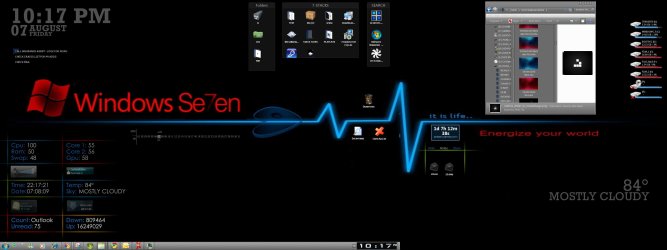
Solved What gadget is this??

weaselciuy

New member
Hey,

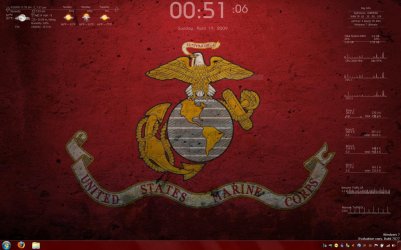
found a post of a user on this forum, unfortunatly he has`nt logged in for a while (Last Activity: 1 Week Ago ), he posted a screenshot of his desktop, what i like about it is his gadgets, must be an allIN1 pack , clock, weather, all transparent no background, perfectly integrated with a well selected wallpaper.

Anyone know what gadget he is using?
Its in the Custom Theme Thread last quote i made.

Or something similar ... :o
 

Attachments

  • 01_20090419.jpg
    01_20090419.jpg
    203.1 KB · Views: 1,940

My Computer

Computer Manufacturer/Model Number
Custom Built
OS
Windows 7 Ultimate SP1 build 7601
CPU
AMD Athlon II x2 240 3.35Ghz
Motherboard
Gigabyte MA785G-UD3H
Memory
4x1Gb XMS2 Corsair 786Mhz Oc
Graphics Card(s)
HIS Ati Radeon 4850 IceQ4 512 Ddr3
Sound Card
Integrated HD Realtek Audio Device
Monitor(s) Displays
iiYama ProLite E1900S 2ms
Screen Resolution
1280*1024 32bit
Hard Drives
Samsung 500Gb SP F3
WD 240GB 16 mb
PSU
ThermalTake 420W
Case
noname :(
Cooling
Standard
Keyboard
Microsoft 600
Mouse
Razer Imperator
Internet Speed
100+ MB/s
Other Info
N-ai Treaba !!!
yeah what is that? :)
 

My Computer

Computer Manufacturer/Model Number
Intel
OS
Windows 7 Ultimate
CPU
Intel(R) Core(TM)2 CPU E7400 @ 2.80GHz (2 CPUs), ~2.8GHz
Motherboard
DG31PR
Memory
4G Kingston
Graphics Card(s)
HIS Radeon HD 4670 1GB
Sound Card
Realtek High Definition Audio
Monitor(s) Displays
ViewSonic VA1716w
Screen Resolution
1440 x 900 (32 bit) (60Hz)
Hard Drives
MAXTOR STM3160215AS ATA Device
Internet Speed
SLT ADSL 512Kbps
Got it !!!

OK,

I found it with the help of someone from this forum i found on a member here on seven (i`ll ty when i find you:D ) :Transparent gadget like this ...

The program is called rainmeter, its a bitch to configure so i`ll make a small guide for it .

1.First off its NOT a sidebar gadget, its an alternative.
2.Download the software from Downloads - rainmeter - Google Code .
3.Download the skin : Rainmeter Skins - HUD.Vision v2.0 by mepu - Customize.org .
4. Install rainmeter. Use compatibility Vista SP1, i got a error at first start (explorer crashed) but it worked fine after...
5. Install the skin ... after go to where you installed rainmeter and DELETE the other skin ( NOT HUD.Vision ). I forgot what name it had. I Didnt find where to change skins yet lol.
6. Now comes the OMG hard part... u have to activate each component trough a labirinth of drop-menus.
Go to bottom right near your clock and right click raindrop, go to Configs->HUD.Vision->White text OR Black text and choose what component you want to display ( I dont know the whats the difference between normal .ini and line.ini ).

Notes:
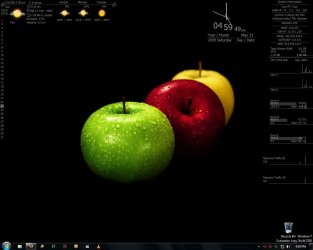
- Added a wallpaper for you in case you dont have, for white text.
- I couldnt attach the setup+ patch files, dunno why it didnt work. Download from links .
- Weather is easy, go to that webpage and get the code from the upper link. Type your city. Note that when you restart PC weather bar takes like 1-2 min to load, untill then it will be blank. My code was ROXX0020 so look it up for yours.
- When you change the wallpaper weather component resets, so wait 30 sec for it to refresh.
- There are other skins to choose from on the link from where to download the HUD skin. Choose whatever you like .
- Resourse related it takes me 25-40 Ram so its no biggy, didnt feel any difference in games or stuff like that. NOT a resourse hog :) .
- Some components didnt work for me like the CPU Temp, it shown me 0C`.
- Choose a good wallpaper to go with rainmeter :D .
- NOTE There is rainmeter version 2, its called Rainlendar but you have to buy PREMIUM membership (There is Lite vers to) for that one + i didnt find HUD.Vision skin for it. Do whatever you want.
- I didnt use the wallpaper comp or the winamp one, i dont need.
- Post here any issues. I`ll keep mingling with this one ...


Other Tutorial:
(not mine, i followed this one)

1. only for installation to !!! Windows Vista !!!
I bring up the Properties window for a folder,
uncheck read-only and apply it to the folder "Rainmeter" and all sub-items.
Now you can use HUD.Vision as well as in Windows XP. (i did this)

2.) change weather dest.
Now go to www.weather.com and search the name of city you want the weather of. Once the page loads,
look at the link up in your browser's address bar. For example, one of the cities I used was Brno, and
after searching on weather.com, the resulting page's
link was: weather.com/outlook/travel/businesstraveler/local/EZXX0002?from=recentsearch code for Brno EZXX0002 (i did this)

3.) only for "Picture Browser & Changing Wallpapers"
download NCONVERT Orange and install to to Windows directory.
edit all ini files in directory "Picture.Browser+Wallpapers and
settings Monitor Resolution, example 1280x800 defined "-resize 1280 0"
and defined image path in variables "ImagePath".

4.) only for Foobar2000 "WinAmp+Foobar interface"
download http://chron.visiondesigns.de/foobar2000/foo_winamp_spam_v0.96.zip
must install the special Winamp API file foo_winamp_spam.dll
into the folder: C:\Program Files\foobar2000\Components\

 

Attachments

  • black-and-white-HD-wallpapers-1.jpg
    black-and-white-HD-wallpapers-1.jpg
    183.1 KB · Views: 11,374

My Computer

Computer Manufacturer/Model Number
Custom Built
OS
Windows 7 Ultimate SP1 build 7601
CPU
AMD Athlon II x2 240 3.35Ghz
Motherboard
Gigabyte MA785G-UD3H
Memory
4x1Gb XMS2 Corsair 786Mhz Oc
Graphics Card(s)
HIS Ati Radeon 4850 IceQ4 512 Ddr3
Sound Card
Integrated HD Realtek Audio Device
Monitor(s) Displays
iiYama ProLite E1900S 2ms
Screen Resolution
1280*1024 32bit
Hard Drives
Samsung 500Gb SP F3
WD 240GB 16 mb
PSU
ThermalTake 420W
Case
noname :(
Cooling
Standard
Keyboard
Microsoft 600
Mouse
Razer Imperator
Internet Speed
100+ MB/s
Other Info
N-ai Treaba !!!
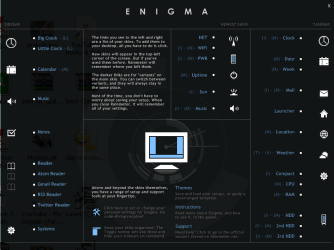
Says i`m using win Vista :)) on top right . Clearly this soft has some compatibility problems with win 7 so carefull.

Damn weather component seems to refresh almost whenver i change something in windows like mouse cursor or wallpaper, sound scheme.

OMG btw i forgot, dragging the components on the desktop is a brainsquisher, u liteerally have to click on 1 of the pixels to get it otherswise it dosnt work, keep click-dragging untill u get it, so annoying.
 

Attachments

  • Untitled.jpg
    Untitled.jpg
    166.5 KB · Views: 848

My Computer

Computer Manufacturer/Model Number
Custom Built
OS
Windows 7 Ultimate SP1 build 7601
CPU
AMD Athlon II x2 240 3.35Ghz
Motherboard
Gigabyte MA785G-UD3H
Memory
4x1Gb XMS2 Corsair 786Mhz Oc
Graphics Card(s)
HIS Ati Radeon 4850 IceQ4 512 Ddr3
Sound Card
Integrated HD Realtek Audio Device
Monitor(s) Displays
iiYama ProLite E1900S 2ms
Screen Resolution
1280*1024 32bit
Hard Drives
Samsung 500Gb SP F3
WD 240GB 16 mb
PSU
ThermalTake 420W
Case
noname :(
Cooling
Standard
Keyboard
Microsoft 600
Mouse
Razer Imperator
Internet Speed
100+ MB/s
Other Info
N-ai Treaba !!!

My Computer

Computer Manufacturer/Model Number
Dell Vostro 1000
OS
Windows 7 Ultimate x86
CPU
AMD Sempron 3600+
Graphics Card(s)
ATI Radeon Xpress 1150
Monitor(s) Displays
Generic PnP Monitor
Screen Resolution
1200 x 800
Hard Drives
WD Scorpio Blue 500 GB (WD5000BEVT)
Mouse
Logitech V320 Cordless Optical Mouse

My Computer

Computer Manufacturer/Model Number
Custom Built
OS
Windows 7 Ultimate SP1 build 7601
CPU
AMD Athlon II x2 240 3.35Ghz
Motherboard
Gigabyte MA785G-UD3H
Memory
4x1Gb XMS2 Corsair 786Mhz Oc
Graphics Card(s)
HIS Ati Radeon 4850 IceQ4 512 Ddr3
Sound Card
Integrated HD Realtek Audio Device
Monitor(s) Displays
iiYama ProLite E1900S 2ms
Screen Resolution
1280*1024 32bit
Hard Drives
Samsung 500Gb SP F3
WD 240GB 16 mb
PSU
ThermalTake 420W
Case
noname :(
Cooling
Standard
Keyboard
Microsoft 600
Mouse
Razer Imperator
Internet Speed
100+ MB/s
Other Info
N-ai Treaba !!!
Very cool but OMG what a pain in the ass to set it up!
Has anyone got the email to work? If so HOW DID YOU DO IT?
 

My Computer

Computer Manufacturer/Model Number
Custom Built Rig BY ME "My Baby"
OS
7 Ultimate x64
CPU
AMD Athlon 64X2 4600+ 2.51Ghz
Motherboard
ASUS M2N-E SLI
Memory
6GB DDR2 900 Kingston
Graphics Card(s)
2x BFG Nvidia 9600 GT-OC
Sound Card
SoundBlaster XF-I
Monitor(s) Displays
19"acer, 22"acer, 19"acer, 48" HITACHI HDTV
Screen Resolution
1400x900, 1680x1050, 1400x900, 1920x1080
Hard Drives
Seagate 500GB Sata
Seagate 500GB Sata
Seagate 500GB Sata
Seagate 500GB Sata
Seagate 320 Sata (Primary)
Western Digital 500GB IDE
Western Digital 300GB IDE
Maxter 720 Sata (USB)
PSU
BFG 800 Watt SLI Power Supply
Case
Game Master
Cooling
Thermotake
Keyboard
Logitech (Bluetooth)
Mouse
Logitech (Bluetooth)
Internet Speed
Turbo Cable
Other Info
ATI 650HD TV Tuner X2,
Samsung (Light scribe) DVD-R,
Sony (Dual Layer) DVD-R
Normal means that on line graphs they are filled

Line means you see just a line
 

My Computer

Computer Manufacturer/Model Number
Custom by me.
OS
Windows 7 64bit RTM
CPU
Intel Core i7 920 Nehalem Over clocked to 3.5 Ghz
Motherboard
EVGA 132-BL-E758-A1 LGA 1366 Intel X58
Memory
CORSAIR DOMINATOR 6GB (3 x 2GB) 240-Pin DDR3 SDRAM DDR3 1600
Graphics Card(s)
EVGA 01G-P3-1280-AR GeForce GTX 280 1GB
Sound Card
Soundblaster X-Fi Fatal1ty
Monitor(s) Displays
2 x 20in Dell Flatpanels 3200x1200
Screen Resolution
3200x1200
Hard Drives
150GB WD Velociraptor(C:), WD 750GB (D:Games), WD 1TB Black (E:Data1), WD 1TB Green (F:Data2)
PSU
CORSAIR HX1000 1000 watt
Case
Desktop
Cooling
Air
Keyboard
Logitech G15
Mouse
Logitech Revolution MX
Internet Speed
25 MB/s
mine%20sofar.jpg
 

My Computer

Computer Manufacturer/Model Number
Custom Built Rig BY ME "My Baby"
OS
7 Ultimate x64
CPU
AMD Athlon 64X2 4600+ 2.51Ghz
Motherboard
ASUS M2N-E SLI
Memory
6GB DDR2 900 Kingston
Graphics Card(s)
2x BFG Nvidia 9600 GT-OC
Sound Card
SoundBlaster XF-I
Monitor(s) Displays
19"acer, 22"acer, 19"acer, 48" HITACHI HDTV
Screen Resolution
1400x900, 1680x1050, 1400x900, 1920x1080
Hard Drives
Seagate 500GB Sata
Seagate 500GB Sata
Seagate 500GB Sata
Seagate 500GB Sata
Seagate 320 Sata (Primary)
Western Digital 500GB IDE
Western Digital 300GB IDE
Maxter 720 Sata (USB)
PSU
BFG 800 Watt SLI Power Supply
Case
Game Master
Cooling
Thermotake
Keyboard
Logitech (Bluetooth)
Mouse
Logitech (Bluetooth)
Internet Speed
Turbo Cable
Other Info
ATI 650HD TV Tuner X2,
Samsung (Light scribe) DVD-R,
Sony (Dual Layer) DVD-R
Sorry for bringing this old topic back from the death, but did someone get the cpu-temperature to work? I'm trying now, but it gives me errors about a plug in not found.
 

My Computer

OS
Windows 7 x64
CPU
E8200 @ 4Ghz
Motherboard
Asus P5k DLX
Memory
G.Skill F2-8000CL5D-4GBPQ, total of 8GB
Graphics Card(s)
Nvidea 7600GT
Monitor(s) Displays
Lacie Electron22blueIV (oldschool CRT)
Screen Resolution
1600*1200
Cooling
Custom Watercooled
that's because you need to download the plug-in - it doesn't come with the skin.

i've just spent 15 mins googling for the plugin, but no joy...you'll have to find it yourself, sorry ;)
 

My Computer

Computer Manufacturer/Model Number
mickey megabyte 1234
OS
ultimate 64 sp1
CPU
i5 2500K [email protected]
Motherboard
MSI P67A-GD53
Memory
8 gigs GSkill Ripjaws 1600
Graphics Card(s)
amd hd6950
Sound Card
creative x-fi gamer
Monitor(s) Displays
samsung 24"
Screen Resolution
1920x1080
Hard Drives
ocz vertex 2e 60 gig, samsung f3 1tb, buffalo 2tb ext
PSU
antec 550
Case
antec three hundred
Cooling
i'm a cooling fan
Keyboard
saitek eclipse ii
Mouse
logitech g3
Internet Speed
about 4 Mbps
Other Info
i love win7
Last edited:

My Computer

Computer Manufacturer/Model Number
mickey megabyte 1234
OS
ultimate 64 sp1
CPU
i5 2500K [email protected]
Motherboard
MSI P67A-GD53
Memory
8 gigs GSkill Ripjaws 1600
Graphics Card(s)
amd hd6950
Sound Card
creative x-fi gamer
Monitor(s) Displays
samsung 24"
Screen Resolution
1920x1080
Hard Drives
ocz vertex 2e 60 gig, samsung f3 1tb, buffalo 2tb ext
PSU
antec 550
Case
antec three hundred
Cooling
i'm a cooling fan
Keyboard
saitek eclipse ii
Mouse
logitech g3
Internet Speed
about 4 Mbps
Other Info
i love win7
it's this skin I want to use:
taboo_Vision Rainmeter skin by ~jamien-price on deviantART

the plugin is in a seperate folder in the zip file, and it uses the coretemp.dll which is in the folder. When I enable the cpu temp ini, it says that it can't find the plugin, while I put the plugin in every folder in the installed location, just to make sure it can find the plugin.

Coretemp as a standalone runs just fine, but why it won't work with rainmeter is beyond me.

So, if anyone got it to work, I would love to hear how you did it.

Many thanks for the help so far guys!

[edit]

additional information

I just opened the .ini file and this was in it:


[mCPU1]
Measure=Plugin
Plugin=Plugins\CoreTempPlugin.dll
CPUId=1

[CPU1Graph1]
Meter=Line
MeasureName=mCPU1
X=0
Y=4
H=43
W=180
LineCount=1
LineColor=#graph.line1#
AntiAlias=1


I made sure that "CoreTempPlugin.dll" was everywhere where it should and shouldn't be, but to no avail...

I also found this (http://www.rainmeter.net/forum/viewtopic.php?f=5&t=699&p=5552&hilit=rainmeter+plugin+not+found#p5552)

saying something about compiling for certain OS-es but Win7, but I don't get that part entirely, it is a bit to technical for me.

So, am I hitting a dead end here? :(

 
Last edited:

My Computer

OS
Windows 7 x64
CPU
E8200 @ 4Ghz
Motherboard
Asus P5k DLX
Memory
G.Skill F2-8000CL5D-4GBPQ, total of 8GB
Graphics Card(s)
Nvidea 7600GT
Monitor(s) Displays
Lacie Electron22blueIV (oldschool CRT)
Screen Resolution
1600*1200
Cooling
Custom Watercooled

My Computer

Computer Manufacturer/Model Number
mickey megabyte 1234
OS
ultimate 64 sp1
CPU
i5 2500K [email protected]
Motherboard
MSI P67A-GD53
Memory
8 gigs GSkill Ripjaws 1600
Graphics Card(s)
amd hd6950
Sound Card
creative x-fi gamer
Monitor(s) Displays
samsung 24"
Screen Resolution
1920x1080
Hard Drives
ocz vertex 2e 60 gig, samsung f3 1tb, buffalo 2tb ext
PSU
antec 550
Case
antec three hundred
Cooling
i'm a cooling fan
Keyboard
saitek eclipse ii
Mouse
logitech g3
Internet Speed
about 4 Mbps
Other Info
i love win7
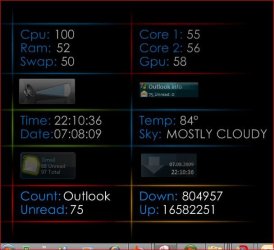
cpu temp workd for me as long as i have speedfan running in the background - here is a link to all my rainmeter skins - here
 

Attachments

  • 66.JPG
    66.JPG
    55.4 KB · Views: 63
  • 65.JPG
    65.JPG
    262.1 KB · Views: 373

My Computer

Computer Manufacturer/Model Number
dell optiplex - 2003
OS
windows7 7600 x86
CPU
itel pentium 4
Memory
3.00 GB
Graphics Card(s)
diamond radion x1050
Sound Card
SoundMax
Monitor(s) Displays
dell 2408wfp dell e172fp
Screen Resolution
1920 x 1200 1280 x 1024
Hard Drives
2 - 80 GB internals WD
1 - 01 TB ext
2 - 750 GB ext
1- 500 GB ext
all running on system no problems
Keyboard
old logitech cordless
Mouse
logitech wireless
Internet Speed
16 / 4
Other Info
networked into my sbs2003 server running sp1 still
it's a wonder I could even get windows 7 to connect to it
many thanks mate! I'll have a look at it!
 

My Computer

OS
Windows 7 x64
CPU
E8200 @ 4Ghz
Motherboard
Asus P5k DLX
Memory
G.Skill F2-8000CL5D-4GBPQ, total of 8GB
Graphics Card(s)
Nvidea 7600GT
Monitor(s) Displays
Lacie Electron22blueIV (oldschool CRT)
Screen Resolution
1600*1200
Cooling
Custom Watercooled
Back
Top