I have religiously created system restore points before any event, one as recently as yesterday and many within the last few weeks.
Today, I tried to create a restore point as always and it kept failing, giving an error number and something about "timeout for shadow copy has expired"
I thought maybe a restart might set things to rights; was I ever wrong.
The machine refuses to start.
I put in the system repair disc and attempted to boot from that.
After several fails at that, I decided to restore to a restore point.
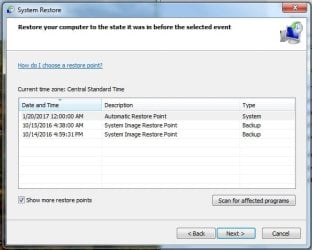
When it gave me a list to chose from, there are only two choices, both in October 2016; the machine was new to us in early October with a clean install of W7.
Why do I not have the choice of any of my more recent restore points ?
Another thing that puzzles me is that it is not giving me the option to use the revert to when new whatever it is called; I know it is there because I used it a couple days after we got it when something went haywire.
Not to confuse the issue, but one more question: when it finally gets to a box that offers me two choices, the bottom one being "restore to a system image" and the top choice "use recovery tools", there is nothing showing where it should show the OS; when I click the button "load drivers", it opens an explorer window showing tons of files that I have no idea what I am looking at.
I canceled out of that and clicked "next" at which point it provides the choices "use repair disc", "restore point" etc.
Could the reason that it will not boot from the system repair disk be the absence of anything in that window where it has the load drivers button ?
Please don't assume that I know all the lingo and such and walk me through this.
I would really like to avoid the hassle of reinstalling all those many many programs and drivers.Thanks so much for reading.
Today, I tried to create a restore point as always and it kept failing, giving an error number and something about "timeout for shadow copy has expired"
I thought maybe a restart might set things to rights; was I ever wrong.
The machine refuses to start.
I put in the system repair disc and attempted to boot from that.
After several fails at that, I decided to restore to a restore point.
When it gave me a list to chose from, there are only two choices, both in October 2016; the machine was new to us in early October with a clean install of W7.
Why do I not have the choice of any of my more recent restore points ?
Another thing that puzzles me is that it is not giving me the option to use the revert to when new whatever it is called; I know it is there because I used it a couple days after we got it when something went haywire.
Not to confuse the issue, but one more question: when it finally gets to a box that offers me two choices, the bottom one being "restore to a system image" and the top choice "use recovery tools", there is nothing showing where it should show the OS; when I click the button "load drivers", it opens an explorer window showing tons of files that I have no idea what I am looking at.
I canceled out of that and clicked "next" at which point it provides the choices "use repair disc", "restore point" etc.
Could the reason that it will not boot from the system repair disk be the absence of anything in that window where it has the load drivers button ?
Please don't assume that I know all the lingo and such and walk me through this.
I would really like to avoid the hassle of reinstalling all those many many programs and drivers.Thanks so much for reading.
My Computer
At a glance
Windows 7 Pro x64Intel Core Two Duo E8600 3.33 ghz8GBGigabyte Radeon R7 240
- Computer type
- PC/Desktop
- Computer Manufacturer/Model Number
- Dell Optiplex 780m "mini-tower"
- OS
- Windows 7 Pro x64
- CPU
- Intel Core Two Duo E8600 3.33 ghz
- Motherboard
- Whatever DELL put in it
- Memory
- 8GB
- Graphics Card(s)
- Gigabyte Radeon R7 240
- Monitor(s) Displays
- HP 2159m
- PSU
- 750 Watt Corsair CX750
- Keyboard
- Logitech Wireless
- Mouse
- Logitech Wireless
- Browser
- Chrome, Firefox, IE